
Introduction
This manual provides essential instructions for the installation and proper handling of the SRJTEK LCD Display Touch Screen Digitizer Assembly Replacement for the Oppo Realme C11 2021 (Model RMX3231). Please read these instructions carefully before proceeding with the installation to ensure optimal performance and prevent damage.
Product Overview
The SRJTEK replacement screen is designed for the Oppo Realme C11 2021 (RMX3231) model. It features a high-quality LCD display and touch screen digitizer assembly, engineered to restore your device's visual and touch functionality. Each unit undergoes strict quality control testing to ensure it is free from scratches, dead pixels, or lines, offering high color saturation, resolution, and a smooth touch experience.

Image: The SRJTEK replacement screen for Oppo Realme C11 2021, shown alongside the included installation tools.
Key Features:
- High Sensitivity Touch: Ensures smooth screen interaction.
- Enhanced Display Quality: Offers adjustable brightness, higher definition, and improved viewing angles compared to standard screens.
- Durability: Features 9H hardness, making it resistant to scratches.
- Precision Engineering: Includes a new internal and external screen, 3D Arc edge, and a high-level material flex cable.

Image: A visual comparison illustrating the superior display quality of the SRJTEK screen ("Ours") compared to a generic alternative ("Others").

Image: A demonstration of the display effect comparison, highlighting adjustable brightness, higher definition, and clear viewing from various angles (e.g., Side 45° Normal, Positive 90° Normal).

Image: A close-up view of the screen in use, emphasizing its smooth and responsive touch functionality, similar to the original screen.

Image: An infographic detailing the "Brand New Upgrade" features of the screen, including smooth feel, 3D Arc edge, scratchproof surface, HD effect, and waterproof properties.
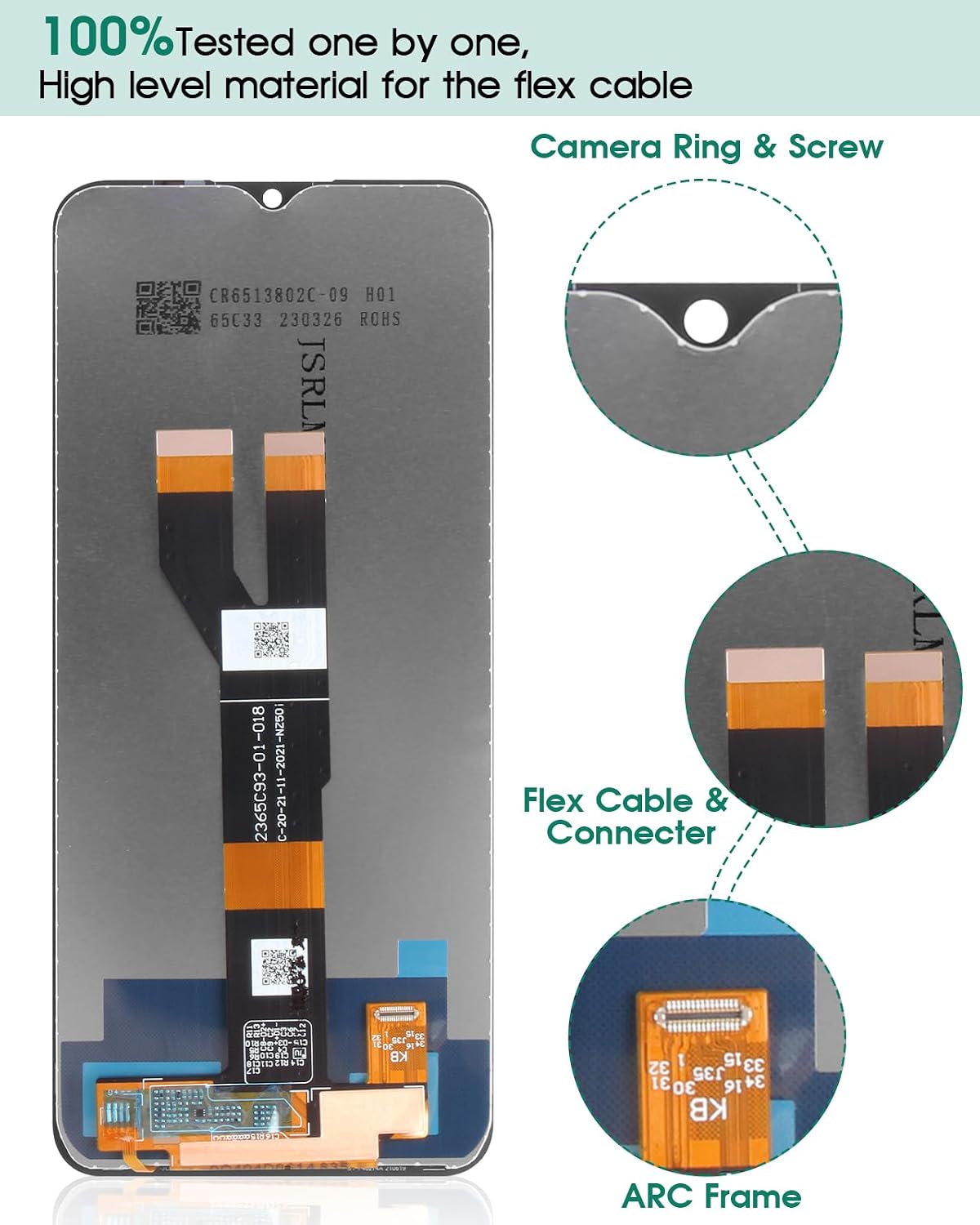
Image: A detailed breakdown of the screen's components, highlighting the flex cable and connector, camera ring and screw, and the ARC frame, indicating 100% testing and high-level materials.
Package Contents
Upon opening your package, please verify that all the following items are included:
- 1x LCD Touch Screen Assembly Replacement for Oppo Realme C11 2021 (RMX3231)
- 1x Free Double-sided Adhesive Tape
- 1x Set of Basic Installation Tools (Note: These are universal tools; professional repair may require additional specialized tools.)
Setup and Pre-Installation Steps
- Inspect the Product: Before beginning any installation, carefully check the new screen for any visible damage, such as cracks or scratches.
- Test the Screen: It is crucial to test the screen's functionality before full installation. Connect the new screen's flex cable to your phone's motherboard without fully mounting it. Power on the device and check for display issues, touch responsiveness, and color accuracy. Do not remove any protective films or labels during this testing phase.
- Power Off Device: Ensure your phone is completely powered off and disconnected from any power source before proceeding with disassembly.
- Static Discharge: Be mindful of static electricity. Consider using an anti-static wrist strap or working on an anti-static mat to prevent damage to sensitive electronic components.
Installation Precautions
- The screen is made of glass and is very fragile. Handle with extreme care.
- Do not bend the flex cable excessively. Bending the LCD cable at an angle greater than 90 degrees can result in a black screen or other display malfunctions.
- Avoid applying excessive force during installation, especially around the edges of the screen and the connector areas.
- The screen assembly does not include the frame, power buttons, volume buttons, or other small components. These must be carefully removed from your old screen and re-installed onto the new assembly.
Installation Guide
Replacing a phone screen requires technical skill and precision. If you are not experienced in repairing electronic equipment, it is highly recommended to seek professional assistance from a repair shop. Attempting installation without proper knowledge or tools may lead to damage to your device or the new screen.
For those who wish to proceed with self-installation, we strongly advise watching relevant installation video tutorials on platforms like YouTube. Search for "Oppo Realme C11 2021 RMX3231 screen replacement" to find detailed step-by-step guides. Follow these instructions carefully.
General Steps (Refer to video tutorials for detailed instructions):
- Heat the edges of the old screen to loosen the adhesive.
- Carefully pry open the old screen using appropriate tools.
- Disconnect the battery to prevent short circuits.
- Disconnect the flex cables of the old screen from the motherboard.
- Remove the old screen.
- Clean any remaining adhesive from the phone frame.
- Transfer any necessary components (e.g., earpiece speaker, front camera, home button if applicable) from the old screen to the new one.
- Connect the new screen's flex cables to the motherboard.
- Reconnect the battery.
- Perform a final test of the new screen before fully sealing the device.
- Apply new adhesive tape around the frame and carefully press the new screen into place.
- Secure the screen and allow the adhesive to cure.
Troubleshooting
- Black Screen During Installation: If your phone displays a black screen after connecting the new display, press and hold the power key and volume key simultaneously. If the phone vibrates, it indicates that the main flex cable might not be properly installed. Power off the device and carefully reinstall the product, ensuring all connections are secure.
- Unresponsive Touch or Display Issues: Double-check all flex cable connections. Ensure they are fully seated and not bent or damaged. Re-test the screen.
- Screen Not Fitting Properly: Ensure all old adhesive residue has been removed from the phone frame. Verify that no small components are obstructing the screen's seating.
Specifications
| Model | RMX3231 (for Oppo Realme C11 2021) |
| Screen Size | 6.52 inches |
| Resolution | 720 x 1600 pixels |
| Color | Black |
| Item Weight | 0.32 ounces |
| Manufacturer | SRJTEK |
Warranty and Support
SRJTEK products undergo strict quality control. If you encounter any issues or require assistance with your screen replacement, please contact SRJTEK customer support. We aim to respond to inquiries within 24 hours.
Note: Damage caused by improper installation or mishandling is not covered under warranty. Always test the screen before final installation.