
1. Introduction
Thank you for choosing the Havit PA304 Projector Ceiling and Wall Mount. This mount is designed to securely hold your projector, offering flexible positioning with 360-degree rotation and adjustable height. Please read this manual carefully before installation and use to ensure proper setup and safe operation.
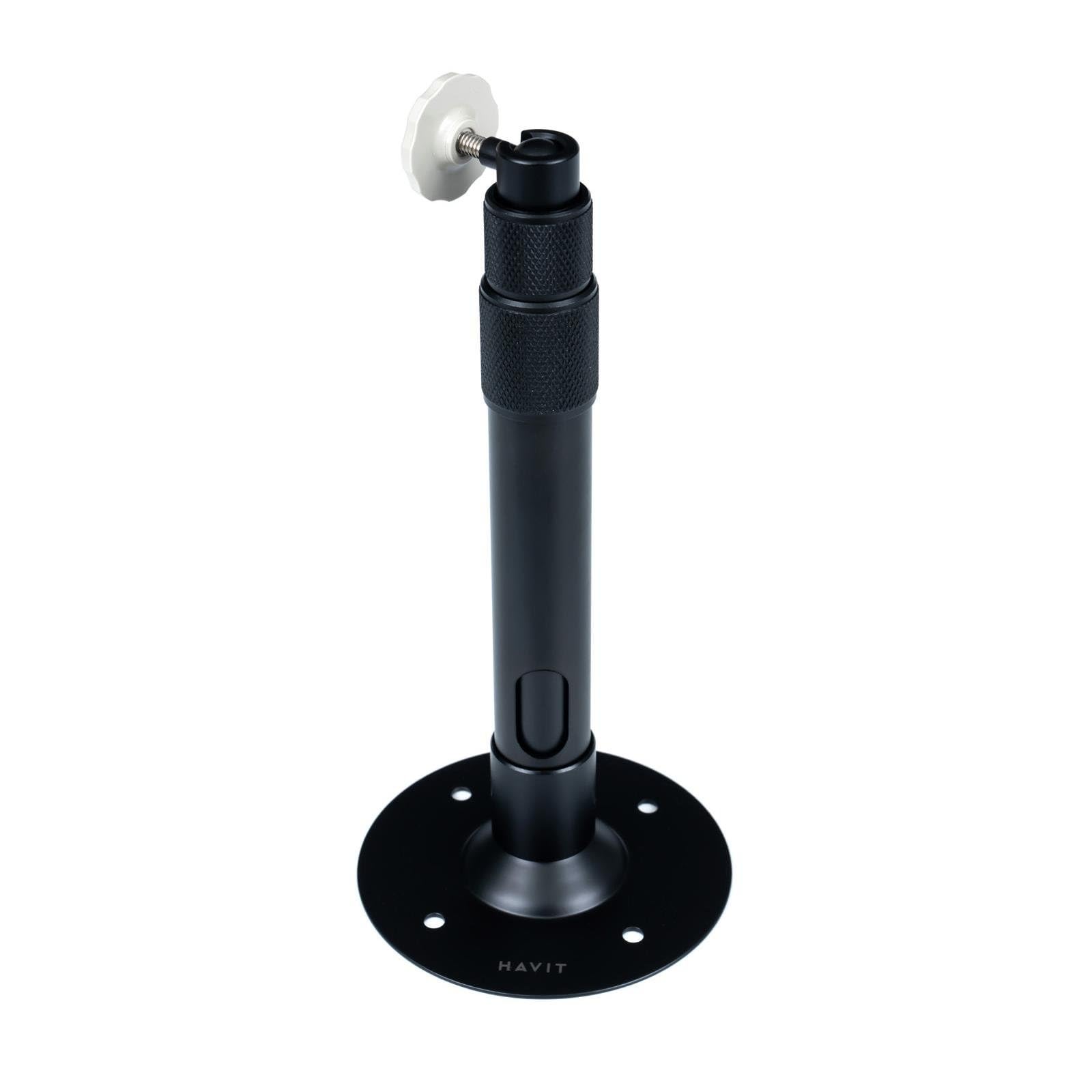
Figure 1: Havit PA304 Projector Mount. This image displays the main components of the Havit PA304 mount, including the mounting plate, adjustable arm, and projector attachment head.
2. Safety Information
- Ensure the mounting surface (ceiling or wall) can support the combined weight of the mount and your projector. The maximum load capacity for this mount is 3 kg.
- Do not exceed the maximum weight capacity of 3 kg.
- Use appropriate tools and follow all installation steps carefully to prevent injury or damage to the product or property.
- If you are unsure about any part of the installation process, consult a qualified professional.
- Keep small parts and packaging materials away from children.
- Regularly check all screws and connections to ensure they remain secure.
3. Package Contents
Please verify that all components are present before beginning installation.
- Havit PA304 Projector Mount Assembly
- Screw Mounting Kit (includes screws and wall anchors)
Note: Projector and installation tools (drill, screwdriver, pencil, measuring tape) are not included.
4. Installation Instructions
The Havit PA304 mount can be installed on either a ceiling or a wall. Follow the steps below for your desired mounting location.
4.1. Tools Required (Not Included)
- Drill
- Screwdriver (Phillips head recommended)
- Pencil
- Measuring Tape
4.2. Mounting the Bracket to the Ceiling or Wall
- Select Location: Choose a suitable location on your ceiling or wall that is structurally sound and can support the weight. Ensure there are no electrical wires or pipes behind the drilling area.
- Mark Drill Holes: Hold the mounting plate of the Havit PA304 mount against the desired surface. Use a pencil to mark the positions for the drill holes.
- Drill Holes: Using an appropriate drill bit for your wall/ceiling material, drill pilot holes at the marked positions. Insert the wall anchors (if required for your surface type) into the drilled holes.
- Secure Mounting Plate: Align the mounting plate with the drilled holes and secure it firmly using the provided screws and a screwdriver. Ensure the plate is level and tightly fastened.
Image for this step (e.g., "PA304_MountingPlate_Installation.jpg") is not available in the provided data.
4.3. Attaching the Projector to the Mount
- Identify Projector Mounting Point: Locate the universal mounting screw hole on the bottom of your projector.
- Attach Projector: Carefully align the projector's mounting hole with the screw on the projector attachment head of the Havit PA304 mount. Screw the projector onto the mount until it is secure. Do not overtighten.
- Check Stability: Gently test the projector's stability on the mount. It should feel firm and not wobble.
Image for this step (e.g., "PA304_Projector_Attachment.jpg") is not available in the provided data.
5. Operation and Adjustment
The Havit PA304 mount offers flexibility for optimal projector positioning.
- 360-Degree Rotation: The projector attachment head can rotate 360 degrees. Loosen the adjustment knob/screw on the head, position your projector to the desired angle, and then tighten the knob/screw to secure it.
- Height Adjustment: The mount allows for height adjustment between 27.5 cm and 39 cm. Loosen the height adjustment mechanism (usually a collar or screw on the main pole), extend or retract the pole to the desired height, and then firmly tighten the mechanism to lock it in place.
- Angle Adjustment: Some projectors may require slight tilting. The mount's head allows for minor tilt adjustments. Loosen the relevant screw, adjust the projector's vertical angle, and then retighten.
Image illustrating adjustment points (e.g., "PA304_Adjustment_Points.jpg") is not available in the provided data.
6. Maintenance
- Cleaning: Wipe the mount with a soft, dry cloth. Do not use abrasive cleaners or solvents, as they may damage the finish.
- Regular Checks: Periodically inspect all screws and connections to ensure they are tight and secure. Over time, vibrations or adjustments can cause screws to loosen.
- Weight Limit: Always ensure that the total weight of your projector does not exceed the 3 kg maximum load capacity.
7. Troubleshooting
| Problem | Possible Cause | Solution |
|---|---|---|
| Mount feels unstable or wobbly. | Screws are loose; mounting surface is not strong enough; projector weight exceeds limit. | Tighten all mounting screws. Ensure the mounting surface is solid. Verify projector weight is within 3 kg. |
| Cannot adjust height or rotation. | Adjustment mechanisms are too tight. | Loosen the relevant adjustment knob/screw before attempting to adjust. Retighten after positioning. |
| Projector does not fit the mount. | Projector lacks a universal mounting screw hole or has an unusual design. | Ensure your projector has a standard 1/4-inch screw hole for mounting. This mount is designed for projectors with a single mounting point. |
8. Specifications
| Model Name | Havit PA304 |
| Model Number | PA304 |
| Brand | havit |
| Material | Metal |
| Mount Type | Ceiling Mount, Wall Mount |
| Maximum Weight Capacity | 3 kg (6.6 lbs) |
| Adjustable Height Range | 27.5 cm - 39 cm (10.8 in - 15.3 in) |
| Rotation | 360 Degrees |
| Included Components | Mount assembly, screw mounting kit |
9. Warranty and Support
The Havit PA304 Projector Mount comes with a 2-year warranty from the date of purchase. This warranty covers manufacturing defects under normal use. It does not cover damage caused by improper installation, misuse, accidents, or unauthorized modifications.
For technical support, warranty claims, or further inquiries, please contact your local Havit dealer or visit the official Havit website for contact information. Please retain your proof of purchase for warranty service.


