
NALsa M400S
NALsa Android 12 Car Stereo User Manual
Model: M400S (Compatible with Toyota Alphard H30 2015-2020)
1. Product Overview
This NALsa Android Car Stereo is an advanced multimedia and navigation system designed specifically for Toyota Alphard H30 models from 2015 to 2020. It offers a comprehensive upgrade to your vehicle's infotainment system, providing modern features such as Android 12 operating system, high-resolution touch screen, integrated GPS, wireless connectivity, and support for various multimedia formats.
Please ensure your vehicle's original center console does not have a screen for proper compatibility. If unsure, consult with a professional or contact customer support with a picture of your dashboard.
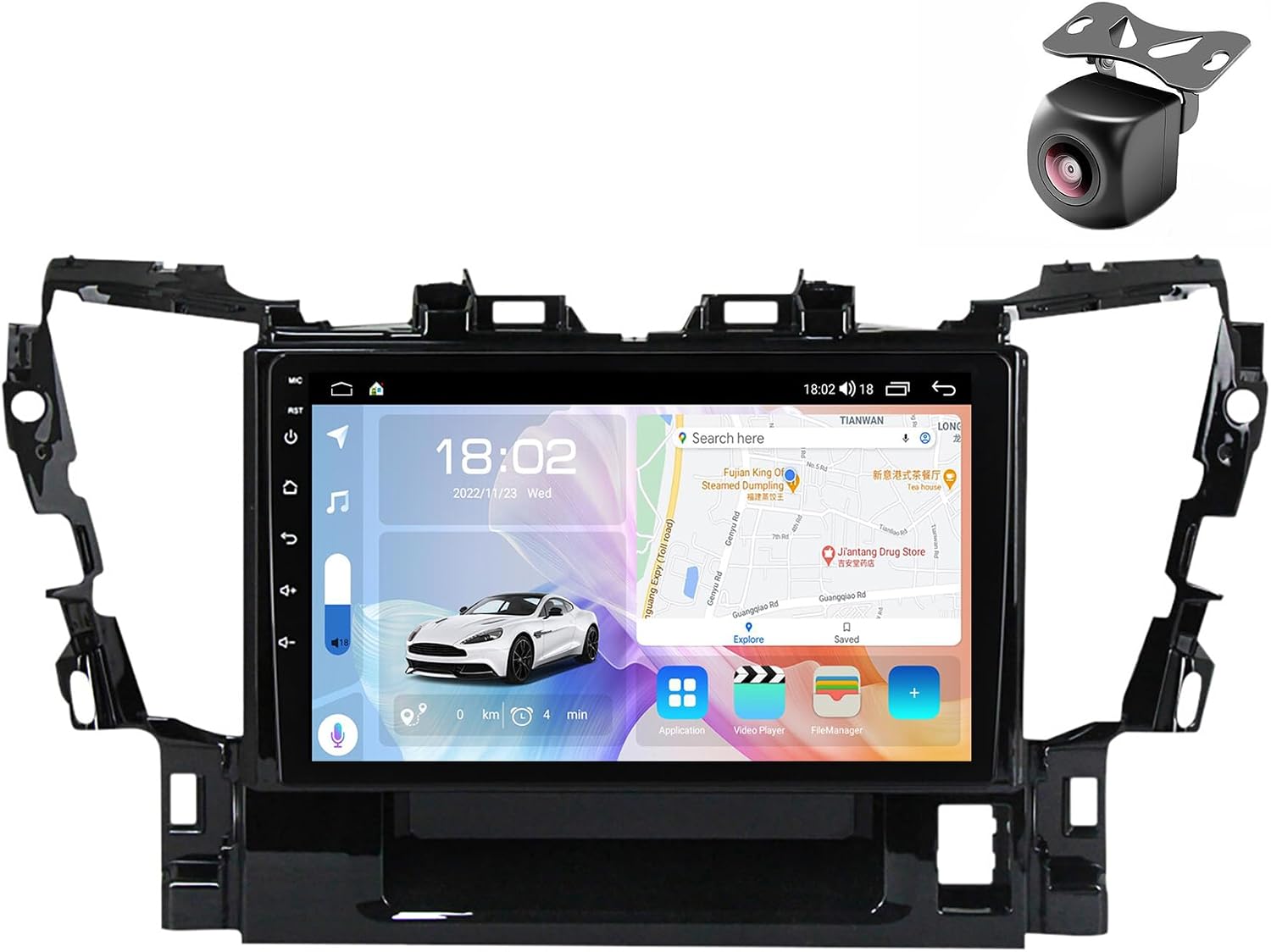
Figure 1.1: NALsa Android 12 Car Stereo unit and complimentary rearview camera.
2. Package Contents
Upon opening the package, verify that all the following components are included:
- Android host (screen unit)
- Power cord and cable adapters
- Microphone (gift)
- GPS antenna
- AHD 720P reversing camera (gift)
- RCA cables
- Reversing camera cable
- USB cables (x2)
- Audio out cable
- 4G Antenna (for M200S-700S models)
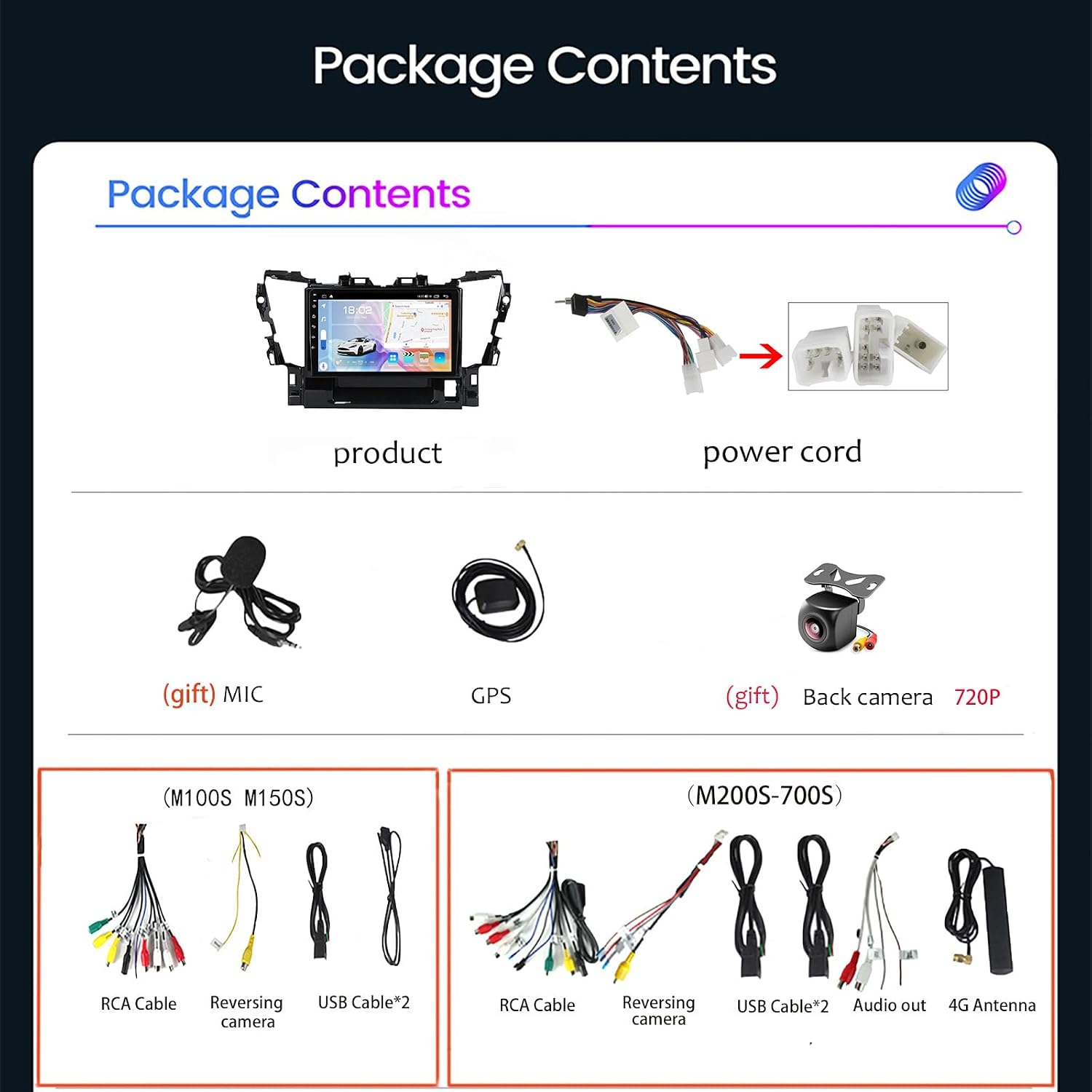
Figure 2.1: Detailed view of package contents for M100S/M150S and M200S-700S models.
3. Setup and Installation
Installation of this Android radio requires specialized skills or expertise in car audio systems. It is highly recommended to seek professional installation at a certified auto repair store to ensure correct wiring and functionality. Our customer service technology team can provide ongoing technical support.
3.1 Pre-Installation Check
- Confirm your Toyota Alphard H30 model year (2015-2020) and ensure the original car dashboard does not have a built-in screen.
- Disconnect the vehicle's battery before beginning any electrical work.
- Familiarize yourself with your vehicle's dashboard disassembly process.
3.2 Installation Steps (General Guidance)
- Carefully remove the original car stereo or dashboard panel.
- Connect the provided power cord and cable adapters to the new Android unit and the vehicle's wiring harness. Ensure all connections are secure.
- Install the GPS antenna in a location with clear sky view (e.g., dashboard, A-pillar).
- Route and connect the rearview camera cable to the appropriate input on the head unit and install the camera at the rear of the vehicle.
- Connect any additional accessories such as USB cables, external microphone, or 4G antenna.
- Carefully mount the new Android unit into the dashboard opening.
- Reconnect the vehicle's battery and test all functions before fully reassembling the dashboard.

Figure 3.1: Visual comparison of the Toyota Alphard dashboard before and after the NALsa car stereo installation.
4. Operating Instructions
4.1 Basic Operation
- Power On/Off: Press and hold the power button on the unit or use the vehicle's ignition.
- Touch Screen: Navigate the interface using the high-resolution capacitive multi-touch screen.
- Volume Control: Adjust volume using the on-screen controls or steering wheel controls (if configured).
- Home Screen Customization: Customize the main interface icon position and add shortcuts for frequently used applications.

Figure 4.1: Customizable user interface and display features.
4.2 Connectivity
- Bluetooth (BT): Connect your smartphone for hands-free calling and audio streaming. Supports phonebook sync, call history, and music playback.
- Wi-Fi: Connect to a Wi-Fi hotspot (e.g., from your phone) for internet access, app downloads, and online navigation. Supports 5GHz Wi-Fi for faster speeds.
- 4G LTE: (For M200S-700S models) Insert a 4G SIM card for direct internet access, enabling online music, video streaming, and navigation without a separate hotspot.
- USB: Connect USB drives for multimedia playback (music, videos, photos) or to charge devices.

Figure 4.2: Connectivity options including Bluetooth, 4G LTE, and 5GHz WiFi.
4.3 Navigation and Multimedia
- GPS Navigation: Utilize the built-in GPS module for online and offline navigation. Supports various map applications.
- CarPlay & Android Auto: (For 8-core models M200S-700S) Supports both wired and wireless Apple CarPlay and Android Auto for seamless smartphone integration.
- Multimedia Playback: Play various digital media formats including MP3, MP4, MP5, WMA, and JPEG. Supports 1080P and 4K video playback.
- Radio Tuner: Access FM radio stations with RDS support.
- DSP (Digital Sound Processor): (For M200S-700S models) Built-in DSP allows for advanced audio adjustments, including surround sound, bass enhancement, and treble filtering.

Figure 4.3: Advanced features like DSP audio processing and high-definition video playback.
4.4 Additional Features
- Steering Wheel Control (SWC): Integrate with your vehicle's steering wheel controls for safe and convenient operation.
- Rearview Camera Input: Supports AHD 720P rearview camera for parking assistance.
- Front Camera Input: Supports front camera input for enhanced driving visibility.
- Picture-in-Picture Split Screen: Allows for multitasking by displaying two applications simultaneously.
- Button Light Customization: Change the color of the unit's physical buttons to match your vehicle's interior lighting.
- Cooling Fan: (For M200S-700S models) Features an aluminum heat sink and powerful cooling fan to prevent overheating during prolonged use.
5. Specifications
The NALsa Android Car Stereo comes in various configurations. The M400S model, as specified, features 4GB RAM and 64GB ROM.
| Feature | M100S | M150S | M200S | M300S | M400S | M500S | M600S | M700S |
|---|---|---|---|---|---|---|---|---|
| Operating System | Android 11 | Android 11 | Android 12 | Android 12 | Android 12 | Android 12 | Android 12 | Android 12 |
| CPU Core | 4-Core | 4-Core | 8-Core | 8-Core | 8-Core | 8-Core | 8-Core | 8-Core |
| RAM/ROM | 1GB+16GB | 2GB+32GB | 2GB+32GB | 3GB+32GB | 4GB+64GB | 4GB+64GB | 6GB+128GB | 8GB+128GB |
| Carplay/Android Auto | Optional | Optional | Wireless + Wired | Wireless + Wired | Wireless + Wired | Wireless + Wired | Wireless + Wired | Wireless + Wired |
| BT Module | 4.0 | 4.0 | 5.0 | 5.0 | 5.0 | 5.0 | 5.0 | 5.0 |
| Resolution | 1024*600 | 1024*600 | 1280*720 | 1280*720 | 1280*720 | 1280*720 | 1280*720 | 1280*720 |
| Screen Type | HD Screen | HD Screen | IPS Screen | IPS Screen | IPS Screen | IPS Screen | IPS Screen | IPS Screen |
| Cooling Fan | No | No | Yes | Yes | Yes | Yes | Yes | Yes |
| DSP | No | No | Yes | Yes | Yes | Yes | Yes | Yes |
| RDS | No | No | Yes | Yes | Yes | Yes | Yes | Yes |

Figure 5.1: Comprehensive parameter comparison across NALsa car multimedia player models.
General Specifications:
- Screen: 9 or 10 inch 2.5D IPS high-resolution capacitive multi-touch screen
- Digital Media Formats: MP3 / MP4 / MP5 / WMA / JPEG
- Special Features: Built-in Bluetooth, GPS, FM transmitter, MP5 player, Radio tuner, Touch screen, TV (optional), Built-in speaker/microphone, WiFi function, Steering wheel operation support, 3G/4G network support (M200S-700S)
- Amplifier IC: Toshiba 7851/7850/7838 (M300S, M500S, M600S, M700S), TDA7388 (M200S, M400S)
- Receiver IC: 7708 (M200S-700S)
- Optional Accessories Support: DAB, DVR, TPMS, OBD2, CARPLAY, Dash cam
- Language: Supports most languages worldwide
6. Maintenance
To ensure the longevity and optimal performance of your NALsa Android Car Stereo, follow these maintenance guidelines:
- Cleaning: Use a soft, dry, lint-free cloth to clean the screen and exterior. For stubborn smudges, slightly dampen the cloth with water or a screen-safe cleaner. Avoid abrasive materials or harsh chemicals.
- Temperature: Avoid exposing the unit to extreme temperatures, both hot and cold, for extended periods.
- Moisture: Keep the unit dry. Do not expose it to water or excessive humidity.
- Software Updates: Periodically check for and install software updates to ensure the system runs efficiently and securely.
7. Troubleshooting
If you encounter issues with your NALsa Android Car Stereo, consider the following general troubleshooting steps:
- No Power: Check all power connections and vehicle fuses. Ensure the unit is properly seated in its harness.
- No Sound: Verify speaker connections, volume levels, and audio source selection. Check if the mute function is active.
- Touch Screen Unresponsive: Try restarting the unit. If the issue persists, a factory reset might be necessary (consult support before performing).
- GPS Signal Issues: Ensure the GPS antenna is installed in a clear line of sight to the sky and is securely connected.
- Bluetooth Pairing Issues: Ensure Bluetooth is enabled on both the stereo and your device. Delete previous pairings and try reconnecting.
- System Lag/Freezing: Close unnecessary background applications. Consider clearing cache or performing a system restart.
For complex issues or if troubleshooting steps do not resolve the problem, please contact our technical support team. Provide detailed information about the issue and any steps you have already taken.
8. Warranty and Support
NALsa is committed to providing professional pre and post-sales service. While specific warranty terms are not detailed here, we offer comprehensive technical support for our products.
- Technical Support: Our online technical service and professional installation technical support are available to assist you.
- Contact Us: If you have any questions regarding installation, operation, or compatibility, please do not hesitate to contact us via chat or Amazon mail. We encourage sending a photo of your car's model, year of manufacture, and dashboard center console for accurate identification and support.
Ask a question about this manual
Ask about setup, troubleshooting, compatibility, parts, safety, or missing instructions. Manuals+ will review the question and use this page’s manual context to help answer it.