
Soehnle Professional 6731
SOEHNLE PROFESSIONAL 6731 Personal Scale with Tripod and Length Measurement
Instruction Manual
1. Introduction
Thank you for choosing the SOEHNLE PROFESSIONAL 6731 Personal Scale. This professional-grade medical device is designed for accurate measurement of body weight, height, and calculation of Body Mass Index (BMI). Its robust construction, integrated length measurement, and user-friendly interface make it ideal for medical practices, hospitals, and fitness centers. Please read this manual carefully before initial use to ensure proper operation, safety, and longevity of your device.
2. Safety Instructions
- Always place the scale on a firm, level, and stable surface to ensure accurate measurements and prevent tipping.
- Do not exceed the maximum weight capacity of the scale.
- Keep the device away from water and excessive moisture, despite its waterproof feature, to prevent damage to electronic components.
- Do not attempt to disassemble or repair the scale yourself. Refer all servicing to qualified personnel.
- Ensure children do not play with the device.
- Use only the specified power supply unit or batteries.
- Clean the scale regularly as described in the Maintenance section.
3. Package Contents
Please check the package contents upon unpacking. Ensure all components are present and undamaged:
- SOEHNLE PROFESSIONAL 6731 Personal Scale with integrated platform
- Tripod/Stand assembly
- Length measurement rod
- Display unit
- Power supply unit
- Instruction Manual (this document)
- Batteries (if included)
4. Setup
Follow these steps to set up your SOEHNLE PROFESSIONAL 6731 scale:
- Unpacking: Carefully remove all components from the packaging. Retain packaging for future transport or storage.
- Assembly:
- Attach the tripod/stand assembly to the scale platform according to the diagrams in the quick start guide (if provided). Ensure all connections are secure.
- Mount the display unit onto the stand.
- Carefully slide the length measurement rod into its designated slot on the stand.
- Power Supply:
- Battery Operation: Open the battery compartment (usually located on the underside of the platform or display unit) and insert the required batteries, observing polarity (+/-).
- Mains Operation: Connect the power supply unit to the designated port on the scale and plug it into a suitable electrical outlet.
- Placement: Place the assembled scale on a hard, flat, and stable surface. Avoid carpets or uneven floors, as this can affect accuracy.
- Initial Calibration/Zeroing: Once powered on, the scale will typically perform a self-test and zero itself. Wait for the display to show "0.0" before use.

Figure 4.1: Fully assembled SOEHNLE PROFESSIONAL 6731 Personal Scale, ready for use.
5. Operating Instructions
This section details how to use your SOEHNLE PROFESSIONAL 6731 scale for accurate measurements.
5.1. Taking a Weight Measurement
- Ensure the scale is on a stable surface and the display shows "0.0". If not, press the ON/OFF button to turn it on or re-zero it.
- Step onto the center of the large platform barefoot and stand still.
- Your weight will be displayed on the LC display. Wait for the reading to stabilize.
- Step off the scale. The reading may hold for a few seconds or return to zero.
5.2. Using the Length Measurement
The integrated length gauge allows for simultaneous height measurement.
- Have the person stand on the scale platform, facing forward, with their back against the stand.
- Gently lower the headpiece of the length measurement rod until it rests lightly on the top of the person's head.
- Read the height measurement directly from the scale on the display, or from the markings on the rod itself, depending on the model's specific integration.

Figure 5.1: Detail of the display and length measurement mechanism.
5.3. BMI Calculation and Display
The scale can calculate and display the Body Mass Index (BMI) based on the measured weight and height.
- First, take a weight measurement as described in section 5.1.
- Then, take a height measurement as described in section 5.2.
- The scale will automatically calculate the BMI. Look for a dedicated BMI button or a mode selection on the display unit to switch to BMI view. Refer to the display unit's specific button layout.
- The BMI value will be shown on the LC display.
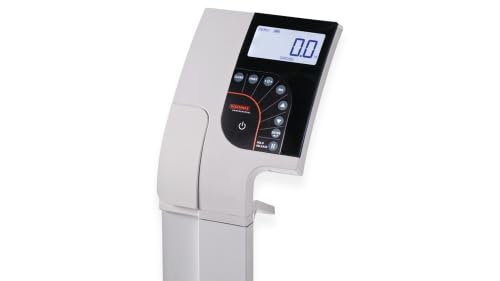
Figure 5.2: Control panel and LC display for weight, height, and BMI readings.
6. Maintenance and Care
Proper maintenance ensures the longevity and accuracy of your SOEHNLE PROFESSIONAL 6731 scale.
- Cleaning: The scale features an easy-to-clean surface. Wipe the platform and display unit with a soft, damp cloth. Use a mild, non-abrasive cleaning agent if necessary. Do not use harsh chemicals or abrasive pads. Ensure no liquid enters the display or battery compartments.
- Battery Replacement: If the display shows a low battery indicator or fails to turn on, replace the batteries. Refer to the Setup section for battery compartment location and type. Dispose of old batteries responsibly.
- Storage: When not in use for extended periods, store the scale in a dry, cool place, away from direct sunlight and extreme temperatures.
- Calibration: While the scale is factory-calibrated, professional medical scales may require periodic re-calibration by certified technicians to maintain accuracy standards. Consult your local service provider for details.
7. Troubleshooting
If you encounter issues with your scale, refer to the following common problems and solutions:
| Problem | Possible Cause | Solution |
|---|---|---|
| Scale does not turn on. | No power, dead batteries, or power adapter issue. | Check battery installation/replace batteries. Ensure power adapter is securely connected and outlet is functional. |
| Inaccurate readings. | Scale on uneven surface, not zeroed, or overloaded. | Place scale on a hard, flat surface. Ensure display shows "0.0" before use. Do not exceed maximum capacity. |
| "Err" or other error message on display. | Overload, unstable reading, or internal error. | Step off the scale, wait for it to reset, then try again. Ensure stable posture during measurement. If persistent, contact support. |
| Length measurement not working. | Rod not properly extended or stuck. | Gently check for obstructions. Ensure the rod moves freely. |
If the problem persists after attempting these solutions, please contact SOEHNLE PROFESSIONAL customer support.
8. Technical Specifications
| Feature | Specification |
|---|---|
| Brand | Soehnle Professional |
| Model | 6731 |
| Special Feature | Waterproof (Note: Refers to specific components or splash resistance) |
| Display Type | LC Display |
| Form Factor | Floor Scale with Stand |
| Reading Accuracy | ±100g |
| Scale Type | Medical/Personal Scale |
| Measurement Type | Kilograms (kg) |
| Platform Dimensions | 374 x 374 mm |
| Power Source | Batteries and Power Supply Unit |
| Manufacturer | Soehnle Industrial Solutions GmbH |
9. Warranty and Support
SOEHNLE PROFESSIONAL products are manufactured to high-quality standards and come with a manufacturer's warranty. For specific warranty terms and conditions, please refer to the warranty card included with your product or visit the official Soehnle Professional website. For technical support, spare parts, or service inquiries, please contact Soehnle Industrial Solutions GmbH directly or your authorized dealer.
Contact Information:
- Website: www.soehnle-professional.com (Example link, verify official site)
- Customer Service: Refer to your purchase documentation or the website for regional contact details.
Related documents6731


Ask a question about this manual
Ask about setup, troubleshooting, compatibility, parts, safety, or missing instructions. Manuals+ will review the question and use this page’s manual context to help answer it.