
WIN STELLAR 60'' x 80-80.75'' Opening 1 Panel (ASIN: B0CF264HTB)
WIN STELLAR Bifold Pantry/Closet Doors
Model: 60'' x 80-80.75'' Opening 1 Panel (ASIN: B0CF264HTB)
Manufacturer: WIN STELLAR
1. Product Overview
The WIN STELLAR Bifold Pantry/Closet Doors are designed to provide a functional and aesthetically pleasing solution for various interior spaces. Crafted with solid core panels, these heavy-duty folding doors are engineered for smooth, effortless gliding without rattling. The package includes all necessary hardware and a complementary knob for each panel, ensuring a complete and ready-to-install system. A matching fascia is also provided to conceal the bifold door hardware, contributing to a clean and finished look.
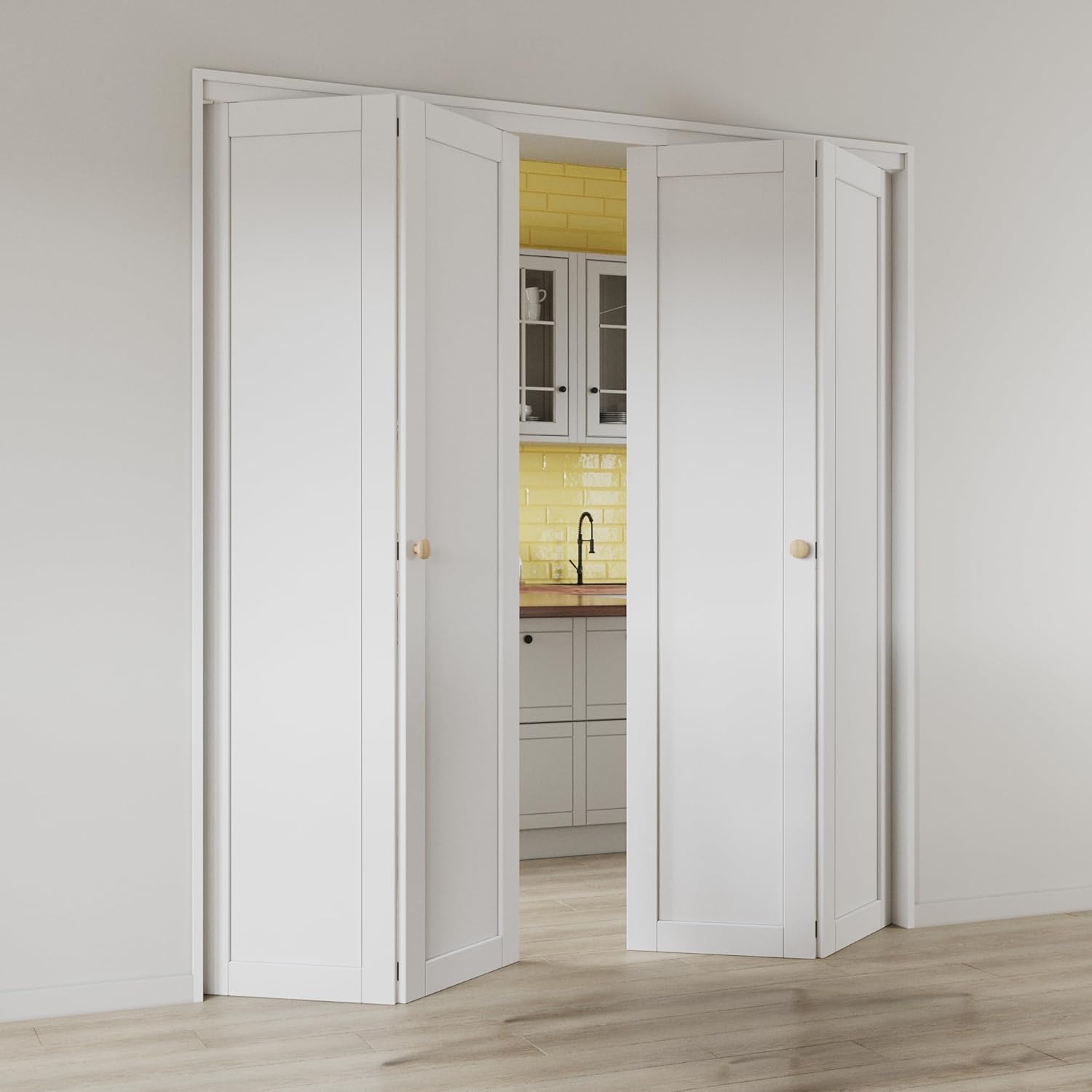
Image: Bifold doors in an open configuration, showcasing their space-saving design and integration into a room.

Image: Bifold doors in a closed configuration, demonstrating their ability to neatly conceal a space.
These doors are highly versatile and can be used in various home interior settings such as closets, storage rooms, pantries, bathrooms, and bookcases. Their bi-fold design maximizes valuable space, making them ideal for areas where traditional swinging doors are impractical. The panels feature a paintable and water-resistant surface, allowing for customization to match your interior decor.
2. Setup and Installation
The WIN STELLAR Bifold Doors are designed for quick and straightforward installation, typically achievable within 30 minutes. The door panels come pre-assembled, and all necessary hardware is included, eliminating the need for additional purchases.
2.1. Package Contents
Before beginning installation, verify that all components are present:

Image: A comprehensive list of all hardware components provided in the installation kit.
- Door Panels (2)
- Track and Pivot Hardware
- Hinges
- Knobs
- Screws and Fasteners
- Fascia (to conceal hardware)
- Detailed Instruction Manual (this document)
2.2. Opening Size and Fit
It is crucial to measure your door opening accurately before installation. The product is available in various sizes to accommodate different opening widths. For optimal fit, refer to the size chart below. For openings around 80.5 inches, the roller can be adjusted to increase the door height.
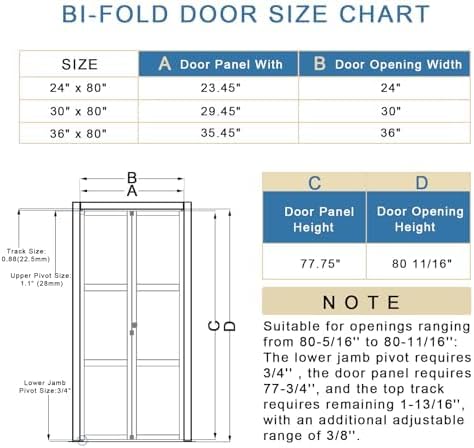
Image: Detailed size chart and diagram illustrating door and opening dimensions for proper fit.
2.3. Installation Steps
Follow the detailed instructions provided in the physical manual included with your package for step-by-step installation. Ensure all hardware is securely fastened for safe and proper operation.
3. Operation
The bifold doors operate by folding inward or outward along a track, allowing them to open and close smoothly. This design maximizes usable space compared to traditional swinging doors.
3.1. Opening and Closing
- To open the doors, gently pull the knob on the leading panel. The panels will fold and slide along the top track.
- To close the doors, push the leading panel until all sections are fully extended and meet in the center.

Image: Illustration demonstrating the space-saving capability of bifold doors, folding up to 90% of their width.
4. Maintenance
Proper maintenance ensures the longevity and smooth operation of your bifold doors.
4.1. Cleaning
- Wipe the door panels with a soft, damp cloth to remove dust and dirt.
- For stubborn marks, use a mild, non-abrasive cleaner. Avoid harsh chemicals that may damage the surface.
- Regularly clean the top track to prevent debris buildup, which can hinder smooth operation.
4.2. Material Properties
The doors are constructed with durable MDF (Medium-Density Fiberboard) panels, offering a smooth and sleek surface. They are designed to be water-resistant and scratch-resistant, providing enhanced durability for everyday use.

Image: Features of the durable MDF surface, including scratch and water resistance.

Image: Visual representation of the door's scratch-resistant properties.
4.3. Customization
The door panels are paintable, allowing you to customize their appearance to match your interior design. Additionally, decorative panels are included that can be adhered to the door to create various designs.

Image: Examples of how to customize the door design using included adhesive panels.

Image: Examples of custom-painted doors, highlighting the paintable surface for personalized style.
5. Troubleshooting
This section addresses common issues you might encounter with your bifold doors.
5.1. Door Not Fitting Correctly
- If the door is too short for an 80.5-inch opening, adjust the roller mechanism to increase the door's height. Refer to the installation manual for specific instructions on roller adjustment.
- Ensure the top track is level and securely mounted. An uneven track can cause the doors to bind or not close properly.
5.2. Doors Sticking or Not Gliding Smoothly
- Check the top track for any obstructions or debris. Clean the track thoroughly.
- Inspect the rollers and pivots for damage or wear. Replace any worn components if necessary.
- Ensure all hardware is properly lubricated. A silicone-based lubricant can be applied to the track and rollers.
5.3. Rattling Noise
- Verify that all screws and fasteners are tight. Loose hardware can cause rattling.
- Check the alignment of the door panels. Misaligned panels may rub against each other or the frame.
6. Specifications
| Feature | Specification |
|---|---|
| Brand | WIN STELLAR |
| Model | 60'' x 80-80.75'' Opening 1 Panel |
| ASIN | B0CF264HTB |
| Color | 1 Panel (White) |
| Material | Engineered Wood (MDF) |
| Style | Classic |
| Assembly Required | No (panels pre-assembled) |
| Item Weight | 66 pounds |
| Product Dimensions | 0.83 x 60 x 80 inches |
| Mounting Type | Floor Mount |
| Date First Available | August 7, 2023 |
7. Warranty and Support
WIN STELLAR is committed to providing quality products and customer satisfaction.
7.1. Returns and Replacements
The product is eligible for 30-day easy returns. If you experience any damage or discover missing parts upon arrival, please contact WIN STELLAR customer service promptly for a replacement.
7.2. Customer Support
For any inquiries, assistance, or to report issues, you can contact WIN STELLAR customer support directly. Refer to your order details on the platform where you purchased the product to find contact options for the seller.
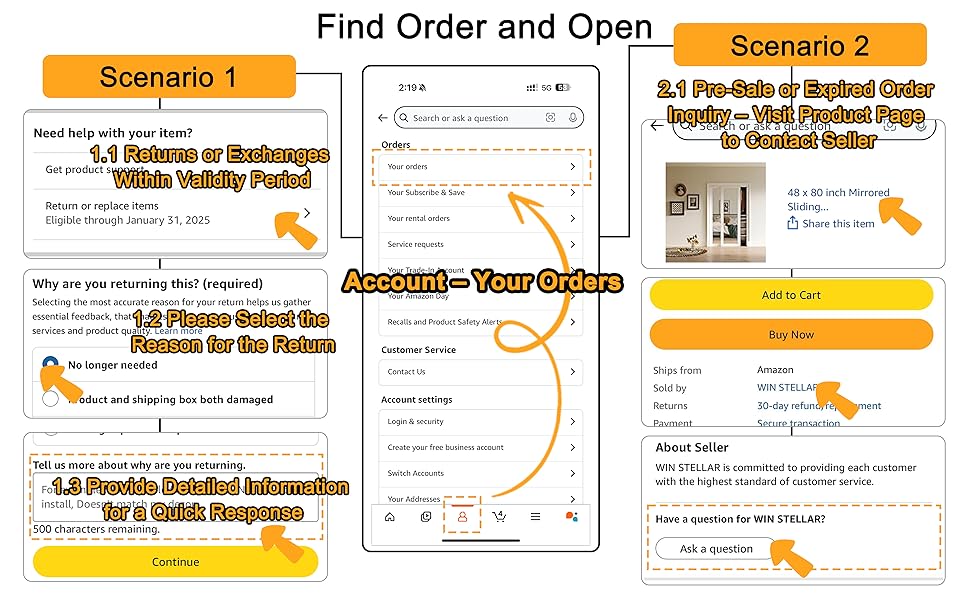
Image: Guide on how to access customer support through your order history for assistance.
Ask a question about this manual
Ask about setup, troubleshooting, compatibility, parts, safety, or missing instructions. Manuals+ will review the question and use this page’s manual context to help answer it.