
1. Introduction
Thank you for choosing the BOGASING M6 Portable Bluetooth Speaker. This manual provides essential information for setting up, operating, and maintaining your speaker. Please read it carefully before use and retain it for future reference.
The BOGASING M6 is designed to deliver powerful sound with deep bass, featuring IPX6 waterproofing, Bluetooth 5.3 connectivity, and multiple sound effects for an enhanced listening experience. Its portable design makes it ideal for various environments, from outdoor adventures to home use.
2. Package Contents
Please check the box for the following items:
- 1 x BOGASING M6 Bluetooth Speaker
- 1 x USB Type-C Charging Cable (Adapter Not Included)
- 1 x 3.5mm Audio Cable
- 1 x Lanyard
- 1 x User Manual (This Document)
3. Product Overview and Controls
Familiarize yourself with the buttons and ports on your BOGASING M6 speaker:
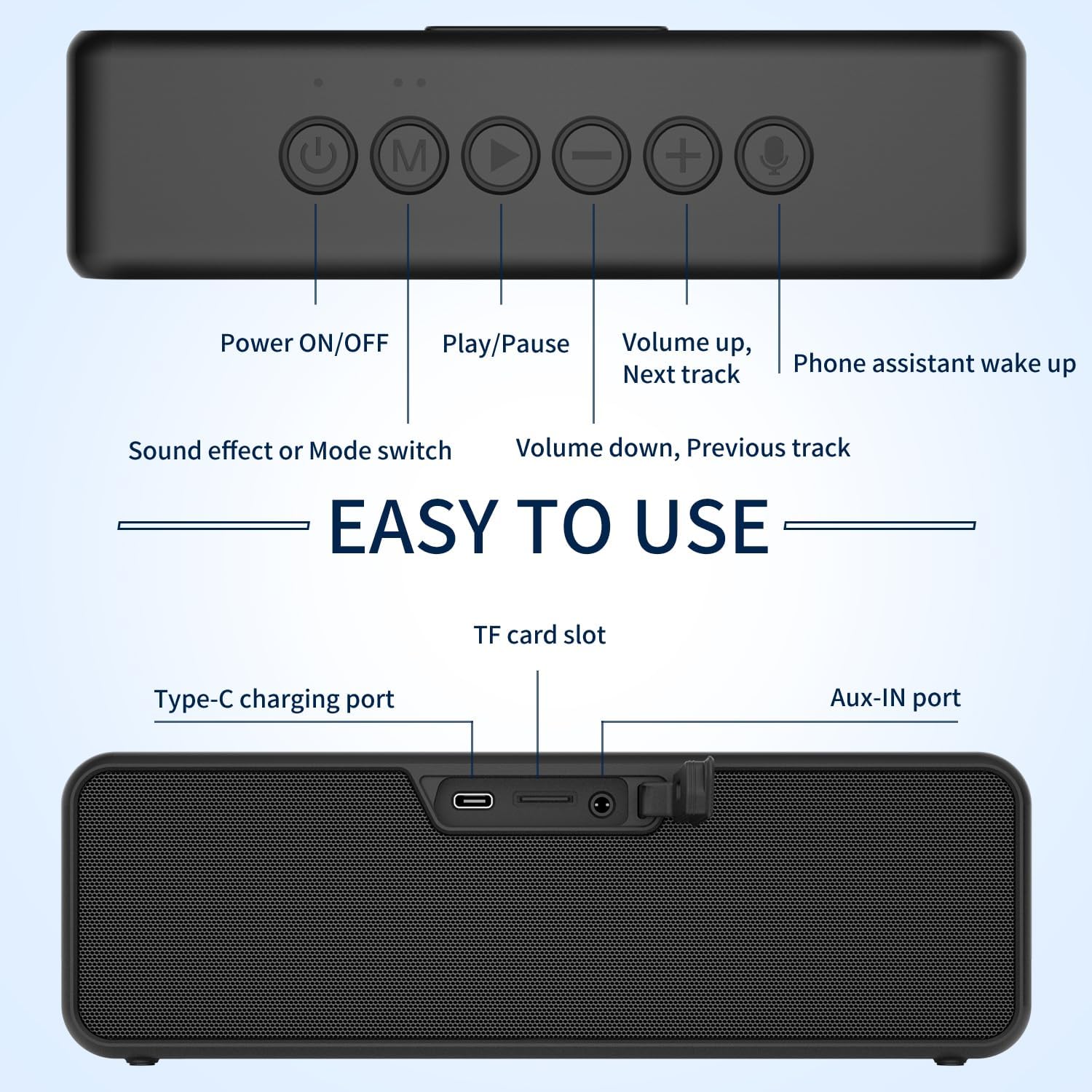
Image: Top and rear view of the BOGASING M6 speaker, highlighting the function of each button and port.
Top Panel Controls:
- Power ON/OFF Button: Press and hold to power the speaker on or off.
- 'M' (Mode) Button: Short press to switch between Bluetooth, TF Card, and AUX modes.
- Play/Pause Button: Short press to play or pause music. In Bluetooth mode, press and hold to disconnect the current device.
- '-' (Volume Down / Previous Track) Button: Short press to decrease volume. Long press to go to the previous track.
- '+' (Volume Up / Next Track) Button: Short press to increase volume. Long press to go to the next track.
- Microphone Button: Short press to activate your device's voice assistant (e.g., Siri, Google Assistant).
Rear Panel Ports:
- Type-C Charging Port: For charging the speaker's internal battery.
- TF Card Slot: Insert a TF (MicroSD) card for direct music playback.
- AUX-IN Port: Connect external audio devices using the included 3.5mm audio cable.
4. Setup and Operation
4.1 Charging the Speaker
- Connect the provided USB Type-C charging cable to the speaker's Type-C port.
- Connect the other end of the cable to a USB power adapter (5V/2A recommended, not included) or a computer's USB port.
- The LED indicator will show charging status. It will turn off or change color when fully charged.
4.2 Bluetooth Pairing
- Power on the BOGASING M6 speaker by pressing and holding the Power ON/OFF button. The speaker will enter Bluetooth pairing mode, indicated by a flashing blue LED.
- On your mobile device (smartphone, tablet, etc.), enable Bluetooth and search for available devices.
- Select "BOGASING M6" from the list of devices.
- Once connected, the LED indicator will turn solid blue, and you will hear an audible confirmation.
4.3 True Wireless Stereo (TWS) Pairing
The TWS function allows you to pair two BOGASING M6 speakers for a stereo sound experience.

Image: Two BOGASING M6 speakers connected wirelessly to a smartphone, illustrating the True Wireless Stereo feature.
- Ensure both BOGASING M6 speakers are powered on and not connected to any Bluetooth device.
- On one speaker (this will be the primary speaker), press and hold the Play/Pause button for 2-3 seconds until you hear a prompt indicating TWS pairing mode.
- The two speakers will automatically search for and connect to each other. Once connected, you will hear a confirmation sound, and the LED indicators on both speakers will change.
- Now, connect your mobile device to the primary speaker via Bluetooth as described in section 4.2.
4.4 Sound Modes (EQ)
The BOGASING M6 offers three distinct sound effect modes:

Image: Visual representation of the three sound effect modes: Enhanced Bass, 3D Stereo, and Vocals.
- Enhanced Bass: For music genres that benefit from deeper low frequencies.
- 3D Stereo: Creates a wider, more immersive soundstage.
- Vocals: Optimizes clarity for spoken word or vocal-heavy music.
To switch between these modes, short press the 'M' (Mode) button.
4.5 TF Card & AUX Input
- TF Card: Insert a TF (MicroSD) card with MP3/WAV/FLAC audio files into the TF card slot. The speaker will automatically switch to TF card mode and begin playback.
- AUX Input: Connect an external audio device (e.g., MP3 player, computer) to the AUX-IN port using the 3.5mm audio cable. The speaker will automatically switch to AUX mode.
5. Key Features
5.1 Powerful Sound with Deep Bass

Image: An exploded view of the BOGASING M6 speaker, illustrating its dual high-performance drivers and passive radiators for powerful sound and deep bass.
The BOGASING M6 is equipped with high-performance drivers and passive radiators, combined with an advanced DSP chip, to deliver 30W of impressive sound and deep, punchy bass.
5.2 IPX6 Waterproof Rating

Image: The BOGASING M6 speaker submerged in water, showcasing its IPX6 waterproof capability.
With an IPX6 waterproof rating, the M6 speaker is protected against powerful water jets, making it suitable for use in various outdoor conditions, including poolside, beach, or camping, without fear of heavy rain or splashes.
Video: Demonstration of the BOGASING M6 speaker's IPX6 waterproof feature in various outdoor settings, including being splashed by water and submerged in shallow water.
5.3 Advanced Bluetooth 5.3 Technology
The latest Bluetooth 5.3 technology ensures optimized transmission, faster connection speeds, and stable connectivity with a wide range of devices, including smartphones, MP3 players, TVs, and PCs.
6. Maintenance
- Cleaning: Wipe the speaker with a soft, damp cloth. Do not use harsh chemicals or abrasive cleaners.
- Storage: Store the speaker in a cool, dry place away from extreme temperatures and direct sunlight.
- Battery Care: To prolong battery life, fully charge the speaker before first use and at least once every three months if not used regularly. Avoid fully discharging the battery frequently.
- Water Exposure: After exposure to water, ensure the charging port and other openings are dry before charging or connecting cables.
7. Troubleshooting
| Problem | Possible Cause | Solution |
|---|---|---|
| Speaker does not power on. | Low battery. | Charge the speaker for at least 30 minutes. |
| Cannot pair via Bluetooth. | Speaker is not in pairing mode or already connected to another device. | Ensure the speaker is in pairing mode (flashing blue LED). Disconnect from other devices by long pressing the Play/Pause button. Restart both speaker and device. |
| No sound or low volume. | Volume too low on speaker or connected device. Incorrect input mode. | Increase volume on both speaker and device. Press 'M' button to cycle through input modes (Bluetooth, TF, AUX). |
| TWS pairing fails. | Speakers are too far apart or already connected to other devices. | Ensure both speakers are within 10 meters of each other and not connected to any other Bluetooth devices. Repeat TWS pairing steps. |
8. Specifications
| Feature | Specification |
|---|---|
| Model Name | M6 |
| Speaker Type | Subwoofer |
| Output Power | 30W (Single Speaker), 60W (TWS) |
| Bluetooth Version | 5.3 |
| Waterproof Rating | IPX6 |
| Connectivity Technology | Bluetooth, Aux-in, TF-Card |
| Audio Output Mode | Stereo |
| Power Source | Battery Powered (1 Lithium Ion battery included) |
| Product Dimensions | 27D x 5.3W x 7.3H Centimetres |
| Item Weight | 0.9 Grams |
9. Warranty and Support
BOGASING products come with a standard manufacturer's warranty. For detailed warranty information, product support, or technical assistance, please refer to the warranty card included in your package or visit the official BOGASING website. You may also contact our customer service team through the retailer where you purchased the product.
Please keep your purchase receipt as proof of purchase for warranty claims.


