
JAUYXIAN U60
JAUYXIAN U60 Wireless Microphones User Manual
Dual UHF Microphone System with Rechargeable Receiver
1. Introduction
Thank you for choosing the JAUYXIAN U60 Wireless Microphone System. This dual UHF microphone system is designed to provide high-quality audio transmission for various applications, including singing, public speaking, parties, and events. With its advanced features and robust construction, the U60 system ensures clear sound and reliable performance over a wide range.
Please read this manual thoroughly before operating the device to ensure proper use and to maximize its lifespan. Keep this manual for future reference.
2. Package Contents
Carefully unpack the box and ensure all items listed below are present and in good condition:
- 2 x JAUYXIAN U60 Wireless Microphones (one Champagne Gold, one Grey)
- 1 x Rechargeable UHF Receiver
- 1 x 6.35mm to 3.5mm Audio Adapter
- 1 x USB Charging Cable (Type-C)
- 2 x Anti-roll Rings (sets of various colors)
- 1 x User Manual
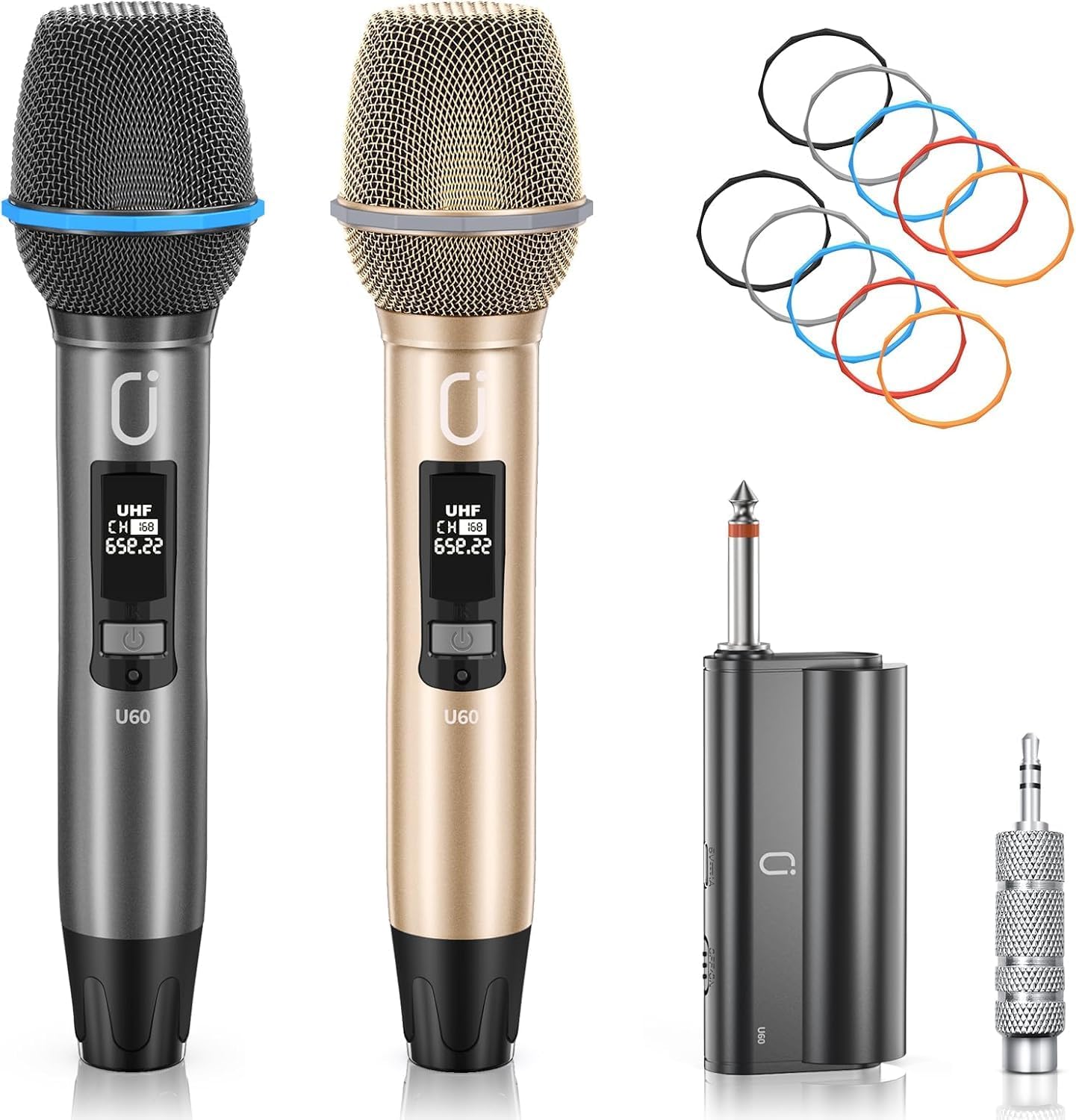
Figure 2.1: JAUYXIAN U60 Wireless Microphone System, showing two microphones, a receiver, a 6.35mm adapter, and colored anti-roll rings.
3. Product Features
- Unrivaled Range: Offers a remarkable 200 ft (approximately 60 meters) wireless operating range, ensuring extensive coverage for various venues.
- Clear Sound & Frequency Adjustment: Equipped with an upgraded cordless dynamic mic system featuring adjustable frequencies to minimize interference and optimize audio clarity.
- Unyielding Durability: Features a robust bumper strip and all-iron construction for enhanced protection against impacts and long-term reliability.
- Rechargeable Batteries: Both microphones and the receiver are equipped with rechargeable batteries, providing 4-6 hours of continuous working time on a single charge. Microphones feature 3500mAh capacity for 10-12 hours of use.
- DSP Noise Cancellation: Integrated DSP noise cancellation chip ensures high-frequency, anti-interference, and clear sound quality.
- Plug and Play: Simple setup for immediate use.
- Wide Compatibility: Compatible with various PA equipment including karaoke speakers, professional music mixers, karaoke machines, and home theater systems with 6.35mm or 3.5mm jack inputs.

Figure 3.1: Diagram illustrating the advanced DSP noise cancellation chip within the microphone, highlighting improved sound quality reproduction.

Figure 3.2: Close-up image of the microphone head, showing the built-in high-density sponge for sound receiving and a decorative bumper strip.

Figure 3.3: Diagram depicting the ultra-wide wireless signal range of the U60 microphone system, showing effective distances from the receiver.

Figure 3.4: Cross-section view of the microphone handle, illustrating the rechargeable 3500mAh battery and its charging port, with details on charging and working times.

Figure 3.5: Detailed view of the microphone highlighting its durable features: bumper strip, drop-proof metal head, LED indicator, and metallic matte texture.
4. Setup Guide
4.1 Charging the Devices
- Connect the provided USB charging cable to the Type-C port on both microphones and the receiver.
- Plug the other end of the USB cable into a standard USB power adapter (not included) or a computer USB port.
- The LED indicator on the devices will show charging status. Charge until the indicator shows a full charge (typically 2-3 hours for microphones, 4-6 hours for receiver).
4.2 Connecting the Receiver
- Identify the audio input jack on your amplifier, mixer, karaoke machine, or home theater system. This is typically a 6.35mm (1/4 inch) jack.
- Insert the 6.35mm plug of the UHF receiver directly into the audio input jack.
- If your device has a 3.5mm (1/8 inch) input, attach the included 6.35mm to 3.5mm audio adapter to the receiver before plugging it into your audio system.

Figure 4.1: Image illustrating various PA equipment compatible with the U60 microphones, such as Karaoke Speaker DVD, Professional Music Mixer, Karaoke Machine, and Home Theater Speaker.
5. Operating Instructions
5.1 Powering On/Off
- Receiver: Press and hold the power button on the receiver for a few seconds until the indicator light turns on.
- Microphones: Press and hold the power button on each microphone until the display screen illuminates.
- To power off, press and hold the power button on each device until the indicator light/screen turns off.
5.2 Pairing and Frequency Adjustment
The microphones and receiver are pre-paired at the factory. If re-pairing is needed or if you experience interference, follow these steps:
- Ensure both the receiver and the microphone are powered on.
- On the microphone, short press the power button to cycle through available UHF frequencies. The display will show the current channel and frequency.
- The receiver will automatically sync with the selected microphone frequency. Look for a stable connection indicator on the receiver.
- If using both microphones, ensure they are set to different frequencies to avoid interference.

Figure 5.1: Comparison image showing the JAUYXIAN U60 UHF microphones providing stable signal without interference, contrasted with typical VHF mics experiencing poor sound quality and signal interference.

Figure 5.2: Image comparing the JAUYXIAN U60's DSP Noise Cancellation Chip for high frequency and anti-interference with other microphones that may have low frequency and poor sound quality.
5.3 Using the Microphones
- Hold the microphone approximately 2-6 inches from your mouth for optimal sound capture.
- Avoid covering the microphone grille with your hand, as this can affect sound quality and signal.
- The 360° voice capture design allows for clear pickup from various angles.
- Attach the colored anti-roll rings to the base of the microphone to prevent it from rolling on flat surfaces.

Figure 5.3: Diagram showing various components of the microphone including 360° voice capture, blowout-prevention cotton, bumper strip, shatterproof metal mesh cover, and metal frosted shell.
6. Maintenance
- Cleaning: Use a soft, dry cloth to clean the exterior of the microphones and receiver. Do not use liquid cleaners or abrasive materials.
- Storage: Store the system in a cool, dry place away from direct sunlight and extreme temperatures when not in use.
- Battery Care: For optimal battery life, fully charge the devices before long periods of storage and recharge them every 3-6 months if not in regular use.
- Handling: While durable, avoid dropping the microphones or subjecting them to strong impacts to prevent damage to internal components.
7. Troubleshooting
| Problem | Possible Cause | Solution |
|---|---|---|
| No sound from microphone | Microphone or receiver not powered on Low battery Microphone not paired with receiver Receiver not connected to audio system Audio system volume too low | Ensure both devices are powered on Charge batteries fully Re-pair microphone and receiver (see Section 5.2) Check receiver connection to amplifier/mixer Increase volume on audio system |
| Sound cutting in/out or static | Interference from other wireless devices Too far from receiver Obstructions between microphone and receiver Low battery | Change microphone frequency (see Section 5.2) Move closer to the receiver Ensure clear line of sight Charge batteries fully |
| Microphone not charging | Faulty USB cable or power adapter Charging port dirty or damaged | Try a different USB cable and power adapter Gently clean the charging port Contact customer support if issue persists |
| One microphone not working in dual setup | Both microphones on same frequency Microphone not powered on or paired | Ensure each microphone is on a unique frequency Check power and pairing for the non-working microphone |
8. Specifications
| Feature | Specification |
|---|---|
| Model Number | U60 |
| Brand | JAUYXIAN |
| Connectivity Technology | Wireless (UHF) |
| Wireless Range | Up to 200 ft (60 meters) |
| Microphone Form Factor | Handheld |
| Polar Pattern | Unidirectional |
| Power Source | Battery Powered (Lithium Ion) |
| Microphone Battery Capacity | 3500mAh |
| Microphone Working Time | 10-12 hours |
| Receiver Working Time | 4-6 hours |
| Charging Time | 2-3 hours (microphones) |
| Signal-to-Noise Ratio | 120 dB |
| Noise Level | 51 dB |
| Connector Type | 6.35 mm Jack (with 3.5mm adapter) |
| Item Weight | 1.7 pounds (total package) |
| Package Dimensions | 10.43 x 4.45 x 2.87 inches |
9. Warranty and Support
JAUYXIAN products are manufactured to high-quality standards. For warranty information, technical support, or any questions regarding your U60 Wireless Microphone System, please contact the manufacturer directly through their official channels or the retailer from whom you purchased the product. Please retain your proof of purchase for warranty claims.
Related documentsU60

Ask a question about this manual
Ask about setup, troubleshooting, compatibility, parts, safety, or missing instructions. Manuals+ will review the question and use this page’s manual context to help answer it.