
1. Introduction
This manual provides detailed instructions for the safe and effective use of your Kisonli LP-5S Mini Bluetooth Speaker. Please read this manual thoroughly before operating the device and retain it for future reference.

Image 1.1: Kisonli LP-5S Mini Bluetooth Speaker. This image displays the compact, cylindrical design of the speaker with its transparent upper casing and dark base, featuring a speaker grille on top.
2. Product Overview
2.1 Key Features
- Portable Wireless Bluetooth Speaker
- 360-Degree Stereo Sound (3W output)
- 6 Modes RGB Light Effect
- Multiple Playback Options: AUX Audio Input, TF Card, USB Playback
- True Wireless Stereo (TWS) Functionality
- Built-in 800mAh Rechargeable Battery (3-5 hours playback)
- Hands-free Calling Support
2.2 Components and Controls
The Kisonli LP-5S speaker features a compact design with various input ports and control buttons. Refer to the images below for visual identification.
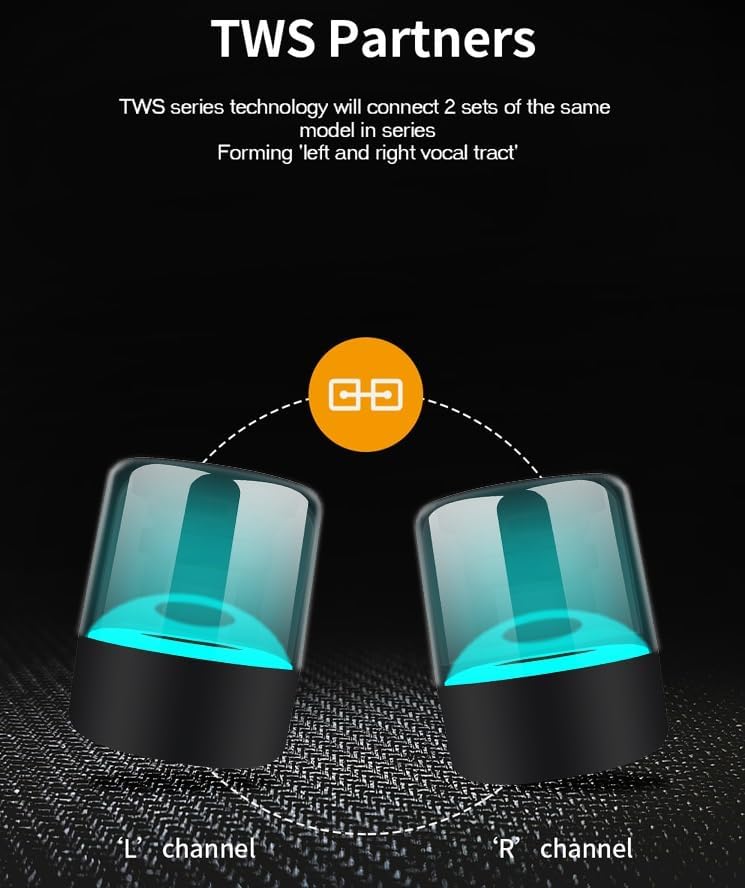
Image 2.1: Kisonli LP-5S Features Overview. This image highlights key features such as the 800mAh high-capacity battery, 3D cinema sound, intelligent wireless connection, hands-free HD call, multi-mode RGB light, and TF card playback.

Image 2.2: Kisonli LP-5S Input Ports. This image illustrates the available input ports on the speaker: a Type-C charging port, an AUX audio input, and a TF card slot, along with a USB port for playback.
3. Setup
3.1 Charging the Speaker
- Connect the provided Type-C USB cable to the charging port on the speaker.
- Connect the other end of the cable to a DC-5V power source (e.g., USB wall adapter, computer USB port).
- The charging indicator light will illuminate. Once fully charged, the light may change color or turn off.
- A full charge provides approximately 3-5 hours of playback time.
3.2 Powering On/Off
- To power on, press and hold the power button for a few seconds until you hear an audible prompt or see the indicator light illuminate.
- To power off, press and hold the power button again for a few seconds until the indicator light turns off.
3.3 Bluetooth Pairing
- Ensure the speaker is powered on and within Bluetooth range of your device (e.g., smartphone, tablet, laptop).
- The speaker will automatically enter Bluetooth pairing mode, indicated by a flashing LED light.
- On your device, navigate to the Bluetooth settings and search for available devices.
- Select "LP-5S" from the list of found devices to initiate pairing.
- Once successfully paired, you will hear a confirmation sound, and the LED indicator will stop flashing.

Image 3.1: Kisonli LP-5S Bluetooth Connection. This image shows the speaker connected wirelessly to a smartphone, illustrating its multiple compatibility for Bluetooth audio playback.
4. Operating Instructions
4.1 Bluetooth Playback
- After successful Bluetooth pairing, audio from your connected device will play through the speaker.
- Use the controls on your connected device to manage playback (play/pause, skip tracks, adjust volume).
4.2 AUX Audio Input
- Connect one end of a 3.5mm audio cable (not included) to the AUX port on the speaker.
- Connect the other end to the audio output jack of your external device (e.g., MP3 player, computer).
- The speaker will automatically switch to AUX mode, or you may need to press the mode button (if available) to select AUX.
4.3 TF Card Playback
- Insert a TF (MicroSD) card with pre-loaded audio files into the TF card slot on the speaker.
- The speaker will automatically detect the card and begin playing audio files.
- Use the speaker's controls (if available) or the connected device to manage playback.
4.4 USB Playback
- Insert a USB flash drive with pre-loaded audio files into the USB port on the speaker.
- The speaker will automatically detect the USB drive and begin playing audio files.
- Use the speaker's controls (if available) or the connected device to manage playback.
4.5 True Wireless Stereo (TWS) Function
The TWS function allows you to pair two Kisonli LP-5S speakers together for a synchronized stereo audio experience.
- Ensure both LP-5S speakers are powered on and not connected to any other Bluetooth device.
- On one speaker (this will be the primary speaker), press and hold the TWS pairing button (refer to speaker diagram if available, otherwise assume a dedicated button or a long press on a multi-function button).
- The primary speaker will search for the secondary speaker. Once connected, you will hear a confirmation sound.
- Now, connect your device to the primary speaker via Bluetooth as described in Section 3.3. Audio will play in stereo across both speakers.

Image 4.1: Kisonli LP-5S TWS Pairing. This image visually represents two LP-5S speakers wirelessly connected to form a left and right stereo channel, enhancing the audio experience.
4.6 RGB Light Effects
The speaker features 6 distinct RGB light modes that can enhance your listening experience.
- To cycle through the light modes, press the dedicated light mode button (or a multi-function button, if applicable).
- The light effects are designed to move with the rhythm of the music.

Image 4.2: Kisonli LP-5S RGB Light Modes. This image showcases the speaker displaying various RGB light colors, including youth blue, cinnabar red, coral red, grass-green, deep blue, and yellow, demonstrating the 6 available light effects.

Image 4.3: Kisonli LP-5S 360 Degree Stereo Sound with RGB. This image highlights the speaker's 360-degree surround stereo sound capability, featuring high/midrange speakers and a subwoofer for omnidirectional audio, complemented by dynamic RGB lighting.
4.7 Hands-free Calling
- When connected via Bluetooth to a smartphone, the speaker can be used for hands-free calls.
- Answering and ending calls typically involves a short press of the multi-function button (e.g., Play/Pause button).
- The speaker provides HD call quality.
5. Maintenance
- Cleaning: Use a soft, dry cloth to clean the speaker's exterior. Do not use abrasive cleaners or solvents.
- Storage: Store the speaker in a cool, dry place away from direct sunlight and extreme temperatures.
- Battery Care: To prolong battery life, avoid fully discharging the battery frequently. Charge the speaker regularly, even if not in use for extended periods.
- Water Resistance: This speaker is not waterproof. Avoid exposure to water or excessive moisture.
6. Troubleshooting
- No Power:
- Ensure the speaker is charged. Connect it to a power source using the Type-C cable.
- Press and hold the power button for a few seconds to ensure it is properly turned on.
- No Sound:
- Check the volume levels on both the speaker and the connected device.
- Ensure the correct input mode (Bluetooth, AUX, TF card, USB) is selected.
- If using Bluetooth, ensure the speaker is properly paired and connected to your device.
- Bluetooth Disconnection/Cannot Pair:
- Ensure the speaker is within the effective Bluetooth range (typically 10 meters) and there are no significant obstructions.
- Turn off Bluetooth on your device and the speaker, then restart both and attempt pairing again.
- Forget the speaker from your device's Bluetooth list and re-pair.
- Ensure no other devices are actively connected to the speaker.
- RGB Lights Not Working:
- Ensure the speaker is powered on.
- Press the light mode button to cycle through the available effects.
7. Specifications
| Feature | Specification |
|---|---|
| Model Name | LP-5S |
| Speaker Maximum Output Power | 3 Watts |
| Connectivity Technology | Auxiliary, Bluetooth, USB |
| Audio Output Mode | Stereo |
| Mounting Type | Tabletop |
| Material | Plastic or Metal |
| Special Features | Bluetooth, Portable, Wireless, RGB Light |
| Recommended Uses | For Smartphones, Tablets, and Laptops |
| Battery Capacity | 800mAh |
| Charging Input | DC-5V (Type-C) |
| Product Dimensions | 5 x 10 x 5 cm |
| Product Weight | 250 g |
8. Warranty and Support
For warranty information and technical support, please refer to the documentation provided at the point of purchase or contact your retailer. Keep your proof of purchase for any warranty claims.