
Introduction
The REUMAR AH 9066 WiFi HaLow Wireless Bridge is designed to extend the range of your wireless network. It functions as a relay for your existing wireless router, boosting the signal and transmitting it to areas with weaker coverage. This device is commonly used for extending network access to IP cameras and other remote devices.
Key features include:
- Extends wireless network range, acting as a relay for existing routers to boost signal in areas with weaker coverage, commonly used for IP cameras.
- Supports 2.4GHz frequency for reliable connections, featuring built-in antennas for enhanced signal strength and stability.
- Easy setup: Connect the USB power adapter and network cable to the router for automatic connection to your existing wireless network.
- Long-distance transmission with a built-in omni-directional antenna, offering a visual range of up to 1000 meters and wall penetration capability.
- Operates at 902-928MHz with an 8MHz bandwidth, supporting a maximum transmission rate of 16Mbps. Actual speed may vary due to interference, distance, and other wireless signals. Supports up to 8 connected devices.
What's in the Box
Upon unpacking your REUMAR AH 9066 WiFi HaLow Wireless Bridge, please ensure all items are present:
- 1 x Transmitter Unit
- 1 x Receiver Unit
- 2 x 2dBi High-Gain Antennas
- 2 x Network Cables
- 2 x Power Adapters
- Installation Network Package (mounting hardware)
- User Manual
Setup Instructions
Follow these steps to set up your REUMAR AH 9066 Wireless Bridge for point-to-point connection:
- Attach Antennas: Connect the provided antennas to the SMA interfaces on both the transmitter (TX) and receiver (RX) units. Ensure they are securely fastened.
- Connect Transmitter to Network: Connect one end of a network cable to the network port socket of the transmitter unit. Connect the other end to your existing router's LAN port or directly to a device like an IP camera.
- Power On Transmitter: Plug the transmitter's power adapter into a power outlet and connect it to the transmitter unit. The power supply indicator will flash for 3 seconds and then remain on after a self-test.
- Connect Receiver to Device: Connect one end of the second network cable to the network port socket of the receiver unit. Connect the other end to the device you wish to provide network access to, such as a computer, NVR, or another router's WAN port.
- Power On Receiver: Plug the receiver's power adapter into a power outlet and connect it to the receiver unit. The power indicator and RX indicator will flash for 3 seconds and then remain on after a self-test.
- Verify Connection: Once both units are powered on and indicators are stable, the wireless bridge should establish a connection automatically. For IP camera monitoring, open a PC browser and input the IP address of the camera to log in and view the video feed. For WiFi expansion, connect your mobile device to the router connected to the receiver.

Image: Step-by-step connection guide for the wireless bridge units.
Video: A detailed demonstration of how to set up and use the REUMAR AH 9066 Wireless Bridge for various applications, including connecting to an IP camera and a router for WiFi expansion.
Operating Instructions
The REUMAR AH 9066 Wireless Bridge operates on a plug-and-play principle, requiring minimal configuration once set up. The units automatically establish a connection to extend your network.
- Point-to-Point Connection: The primary mode of operation involves a transmitter (TX) unit and a receiver (RX) unit creating a direct wireless link. This is ideal for extending network access to a single remote location or device.
- Point-to-Multi-Point Connection: While the core setup is point-to-point, the system can support multiple receiver units connecting to a single transmitter, allowing for network extension to several remote points.
- Network Expansion: When the receiver unit is connected to a WiFi router, it can provide expanded wireless coverage to multiple mobile devices, computers, and tablets within its range.
- Device Compatibility: The bridge is compatible with various network-enabled devices such as computers, smart TVs, IP cameras, switches, game consoles, printers, laptops, and routers.

Image: Illustrates different ways to connect the wireless bridge for video monitoring and network expansion.

Image: Shows the versatility of the RX unit in connecting to various devices for network access.
Maintenance
To ensure optimal performance and longevity of your REUMAR AH 9066 Wireless Bridge, consider the following maintenance guidelines:
- Regular Cleaning: Keep the units free from dust and debris. Use a soft, dry cloth for cleaning. Avoid liquid cleaners.
- Environmental Protection: While designed for outdoor use, ensure the units are installed in locations that minimize direct exposure to extreme weather conditions where possible. Regularly check for any signs of wear or damage to the casing or cable connections.
- Cable Integrity: Periodically inspect all connected cables (network and power) for any cuts, fraying, or loose connections. Replace damaged cables immediately.
- Firmware Updates: Check the manufacturer's website periodically for any available firmware updates. Keeping the firmware updated can improve performance and security.
- Power Cycle: If you experience intermittent connectivity issues, try power cycling both the transmitter and receiver units by unplugging them from power for 10 seconds and then plugging them back in.
Troubleshooting
If you encounter issues with your REUMAR AH 9066 Wireless Bridge, refer to the following troubleshooting tips:
- No Power Indicator: Ensure the power adapter is securely connected to both the unit and a working power outlet. Try a different outlet or power adapter if available.
- No Link/RX Indicator: Verify that both the transmitter and receiver units are powered on and within range. Check that network cables are properly connected to both units and the connected devices (router, camera, computer). Ensure there are no significant obstructions between the units.
- Slow Connection Speed: The maximum transmission rate is 16Mbps. Actual speeds can be affected by interference, distance, and other wireless signals. Try repositioning the units to minimize interference and ensure a clear line of sight if possible. Reduce the number of connected devices if exceeding 8.
- Intermittent Connectivity: Check for sources of interference (e.g., other wireless devices, large metal objects). Ensure the units are securely mounted and not subject to movement. Power cycle both units and connected network equipment.
- Cannot Access IP Camera/NVR: Confirm the IP address of the camera/NVR is correct. Ensure your computer is on the same network segment or properly configured to access the device through the bridge.
Specifications
| Feature | Detail |
|---|---|
| Model Number | AH 9066 |
| Product Dimensions | 3.3 x 5 x 10.6 inches |
| Item Weight | 1.01 pounds |
| Wireless Communication Standard | 900 MHz Radio Frequency (802.11ah) |
| Data Transfer Rate | Up to 16 Megabytes Per Second |
| Frequency Band Class | Single-Band (902-928MHz) |
| Special Feature | Access Point Mode, Point-to-Point, Point-to-Multi-Point |
| Outdoor Transmission Distance | Up to 2600 feet (approx. 800 meters visual range) |
| Wall Penetration | Easily penetrate through three walls (approx. 350 meters with walls) |
| Max Connected Devices | 8 devices |
Additional Product Information

Image: Demonstrates the point-to-point wireless connection capability between two locations.

Image: Visual representation of the long-distance wireless transmission equipment in an urban setting.

Image: Illustrates a wireless connection setup for an IP camera, emphasizing no messy cabling.

Image: Shows diverse applications of the wireless bridge in different environments.

Image: Highlights the waterproof design and weather resistance of the device.
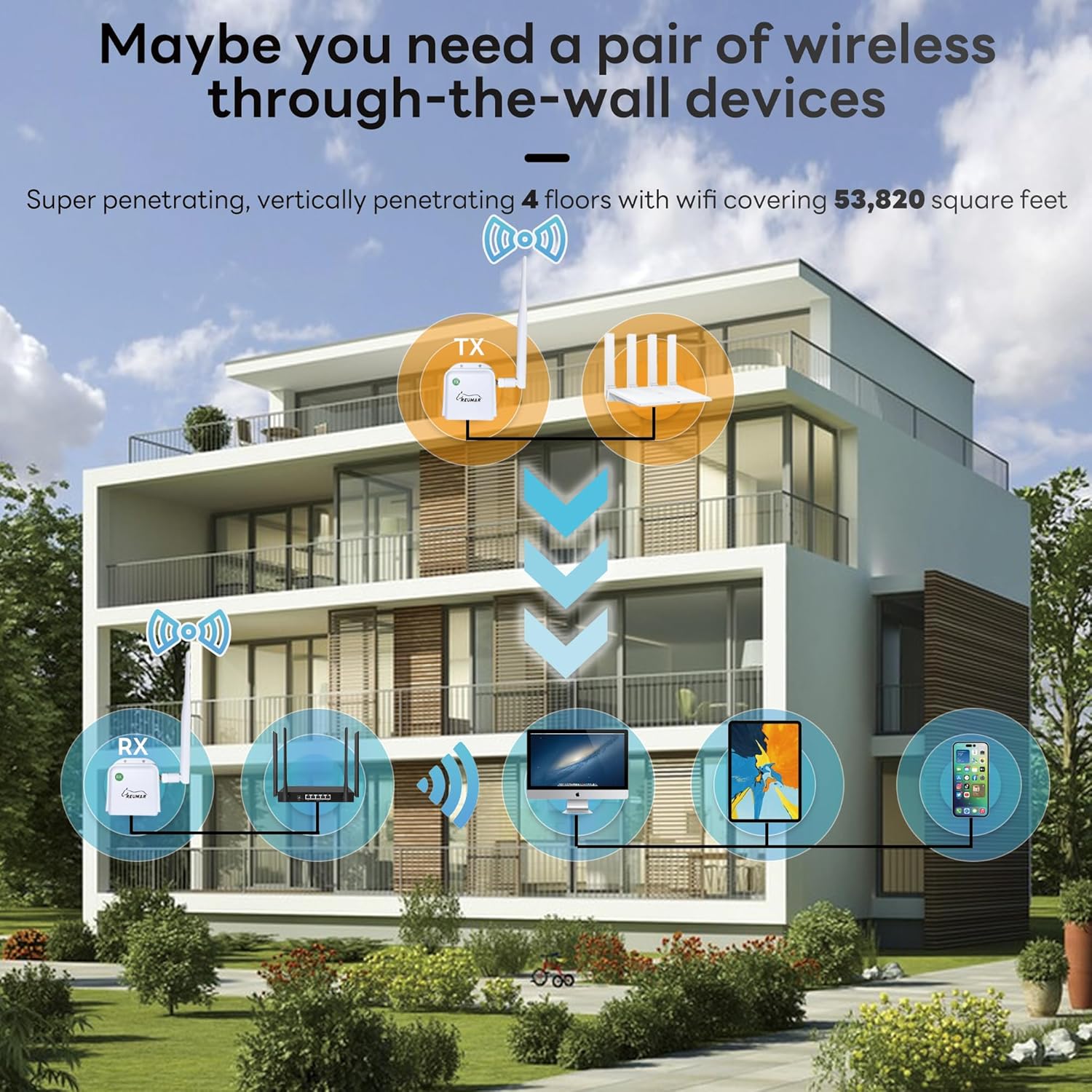
Image: Demonstrates the through-the-wall penetration capability for multi-floor coverage.
Video: An animated overview of the AH Ethernet Wireless long-distance extender, showcasing its features like point-to-point transmission, WiFi signal expansion, and outdoor rainproof design.
Warranty and Support
For warranty information and technical support, please refer to the documentation included with your product or visit the official REUMAR website. Protection plans may be available for extended coverage.
