
Introduction
This manual provides detailed instructions for the safe and efficient use of your Blow Portable Bluetooth Speaker, Model 30-391. Please read this manual thoroughly before operating the device and retain it for future reference.
The Blow 30-391 is a versatile portable Bluetooth speaker designed for universal use with smartphones, tablets, computers, and other audio devices. It features Bluetooth 5.0 connectivity, AUX input, Micro USB port, and an integrated microphone for various audio applications.
Package Contents
Verify that all items listed below are present in your package:
- Blow Portable Bluetooth Speaker (Model 30-391)
- USB Charging Cable
- Microphone Cable
- User Manual (this document)
- Remote Control

Image: Front view of the Blow Portable Bluetooth Speaker 30-391, showcasing its RGB lighting, included remote control, and wired microphone.

Image: The USB charging cable and the microphone cable that come with the speaker.
Product Features
- Connectivity: Bluetooth 5.0, AUX-in (3.5mm), Micro USB, USB port, MicroSD card slot.
- Audio Output: 10 Watts maximum speaker output.
- Battery: Integrated 4500 mAh rechargeable battery.
- Special Features: Integrated microphone, RGB lighting effects, voice control capability.
- Portability: Compact design with a handle for easy transport.
- Compatibility: Universal compatibility with desktop computers, laptops, smartphones, and tablets.
Setup
1. Charging the Speaker
Before first use, fully charge the speaker. Connect the supplied USB charging cable to the Micro USB port on the speaker and the other end to a standard USB power adapter (not included) or a computer's USB port. The charging indicator light will illuminate during charging and turn off when fully charged.
2. Powering On/Off
Locate the power switch on the top panel of the speaker. Slide the switch to the "ON" position to power on the speaker. Slide it to the "OFF" position to power off the speaker.

Image: Close-up of the speaker's top control panel, showing the power switch, volume knob, and various input ports.
3. Bluetooth Pairing
- Power on the speaker. It will automatically enter Bluetooth pairing mode, indicated by a flashing LED light.
- On your mobile device (smartphone, tablet, etc.), enable Bluetooth and search for available devices.
- Select "Blow 30-391" from the list of devices.
- Once paired, the speaker will emit an audible confirmation, and the LED light will stop flashing.
- The speaker will automatically reconnect to the last paired device when powered on, if the device is within range and Bluetooth is enabled.
4. AUX Connection
To connect an external audio device via AUX, use a 3.5mm audio cable (not included). Plug one end into the AUX-in port on the speaker and the other end into the headphone jack or audio output of your device. The speaker will automatically switch to AUX mode.
5. USB/MicroSD Playback
Insert a USB flash drive or a MicroSD card (up to 32GB) containing MP3 audio files into the respective port on the speaker. The speaker will automatically detect the storage device and begin playing music. Use the control buttons to navigate tracks.
Operating Instructions
1. Controls Overview
The speaker features a control panel on the top for easy operation. Refer to the image in the "Setup" section for button layout.
- Power Switch: ON/OFF.
- Volume Knob: Rotate to adjust master volume.
- Mode Button: Press to switch between Bluetooth, AUX, USB, and MicroSD modes.
- Play/Pause Button: Press to play or pause audio.
- Previous/Next Track Buttons: Press to skip to the previous or next track.
- EQ Button: Press to cycle through equalizer presets.
- Light Mode Button: Press to change RGB lighting effects.
- Microphone Input: Connect the wired microphone here.
2. Using the Microphone
Connect the supplied wired microphone to the microphone input port on the speaker. Adjust the microphone volume using the dedicated control (if available) or the main volume knob. The integrated microphone allows for voice control and hands-free calling when connected via Bluetooth.
3. RGB Lighting Effects
The speaker features dynamic RGB lighting. Press the "Light Mode" button on the control panel or remote control to cycle through different lighting patterns or to turn the lights off.
Maintenance
- Cleaning: Use a soft, dry cloth to clean the speaker's exterior. Do not use abrasive cleaners or solvents.
- Battery Care: To prolong battery life, avoid fully discharging the battery frequently. Charge the speaker regularly, even if not in use for extended periods.
- Storage: Store the speaker in a cool, dry place away from direct sunlight and extreme temperatures.
- Water Resistance: This speaker is NOT waterproof. Avoid exposure to water or excessive moisture.
Troubleshooting
| Problem | Possible Solution |
|---|---|
| Speaker does not power on. | Ensure the battery is charged. Connect the speaker to a power source using the USB cable. Check the power switch position. |
| Cannot pair via Bluetooth. | Ensure the speaker is in pairing mode (flashing LED). Make sure your device's Bluetooth is enabled and within range (up to 10 meters). Forget previous pairings on your device and try again. |
| No sound. | Check the volume level on both the speaker and your connected device. Ensure the correct input mode (Bluetooth, AUX, USB, MicroSD) is selected. Check cable connections for AUX mode. |
| Poor sound quality. | Ensure the speaker is not too far from the Bluetooth device. Avoid obstacles between the speaker and the device. Try a different audio source or file. |
| Microphone not working. | Ensure the microphone is securely connected to the input port. Check microphone volume settings. |
Specifications
| Model Number | 30-391 |
| Brand | Blow |
| Connectivity Technology | Bluetooth 5.0, Auxiliary (3.5mm), Micro USB, USB |
| Audio Output Mode | AUX, Bluetooth |
| Maximum Speaker Output Power | 10 Watts |
| Battery Capacity | 4500 mAh |
| Max Memory Card Size | 32 GB (MicroSD) |
| Special Features | Integrated Microphone, RGB Lighting, Voice Control |
| Power Source | Battery Powered |
| Product Dimensions (L x W x H) | 26 x 46 x 24 cm (approximately) |
| Product Weight | 3.67 kg (approximately) |
| Color | Black (with multicolor RGB lighting) |

Image: Side view of the Blow Portable Bluetooth Speaker 30-391, showing its vertical orientation.
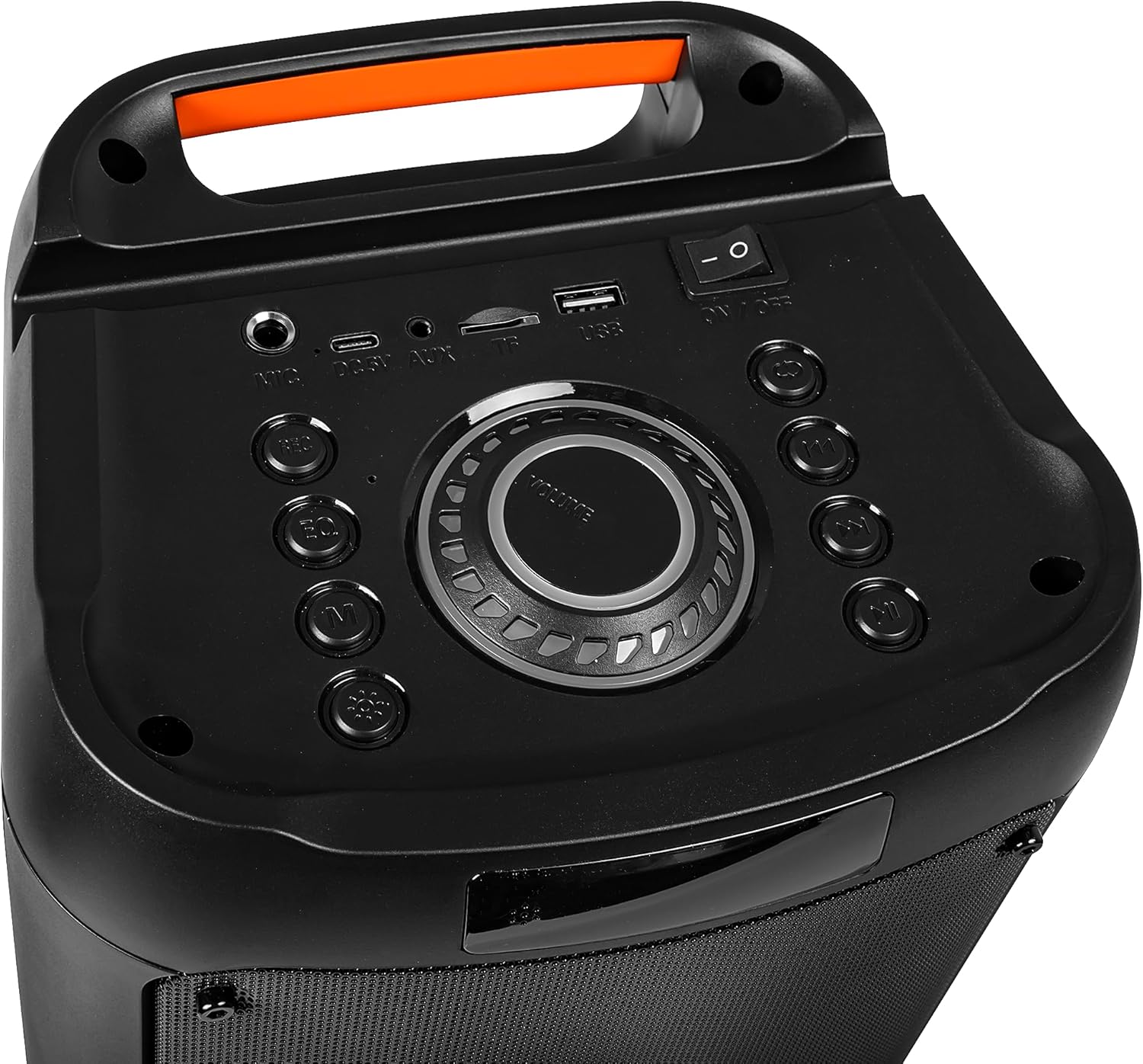
Image: Back view of the Blow Portable Bluetooth Speaker 30-391, highlighting the integrated carrying handle.
Image: Detailed view of the top control panel, including the power switch, volume knob, and various input ports.

Image: The retail packaging for the Blow Portable Bluetooth Speaker 30-391, showing product features and accessories.
Warranty and Support
The Blow Portable Bluetooth Speaker 30-391 comes with a limited warranty. Please refer to the warranty card included in your package for specific terms and conditions. For technical support, troubleshooting assistance, or warranty claims, please contact your retailer or the manufacturer directly. Contact information can typically be found on the product packaging or the manufacturer's official website.
Manufacturer: Blow
ASIN: B0CDXQRT9Q


