
Introduction
This manual provides detailed instructions for the installation, operation, and maintenance of your EMLIVIAR 22 Inch Farmhouse Solar Lamp Post Light. Please read this manual thoroughly before use and retain it for future reference.
The EMLIVIAR solar lamp post light features four efficient solar panels and a 3600mAh/3.7V Li-ion rechargeable battery, providing up to 13 hours of illumination after an 8-10 hour charge. It includes a remote control for convenient operation, allowing for brightness adjustments and timer settings. Constructed from durable die-cast aluminum with clear glass, this IP43-rated weather-resistant light is designed for outdoor use.
Safety Information
- Ensure the solar panel is exposed to direct sunlight for optimal charging.
- Do not attempt to modify or disassemble the product, as this may void the warranty and pose safety risks.
- Keep the product away from open flames or extreme heat sources.
- Dispose of batteries according to local regulations.
- This product is designed for outdoor use and is rated IP43 for water resistance. However, avoid submerging it in water.
Package Contents
Please verify that all components are present before beginning installation.
- 1 x EMLIVIAR Solar Lamp Post Light
- 1 x Remote Control
- 1 x LED Light Bulb (Max 4W, 2700K)
- Mounting Hardware (integrated pier mount adapter)

Image showing the main components of the EMLIVIAR Solar Lamp Post Light, including the LED bulb, aluminum frame, clear glass panels, and the location of the switch button.
Specifications
| Feature | Detail |
|---|---|
| Model Number | 500181M-SL BK |
| Dimensions (L x W x H) | 8.1" x 8.1" x 22.2" (20.6L x 20.6W x 56.4H Centimetres) |
| Material | Die-Cast Aluminum, Clear Glass |
| Finish | Black |
| Power Source | Solar Powered |
| Battery | 1 x 3600mAh/3.7V Li-ion rechargeable battery (included) |
| Charging Time | 8-10 hours (direct sunlight) |
| Illumination Time | Up to 13 hours (after full charge) |
| Light Source | LED (1 x Max 4W, E26 base, 2700K warm white) |
| Brightness | 50 Lumens (Dimmable 10%-100%) |
| Control Method | Remote Control, Dusk-to-Dawn Sensor |
| Timer Settings | 3, 5, or 8 hours |
| Water Resistance Rating | IP43 |
| Mounting Type | Pier Mount (Non-removable) |
| Assembly Required | Yes |
Setup and Installation
Unpacking
Carefully remove all components from the packaging. Inspect for any damage. Retain packaging materials for future transport or storage.
Initial Activation
Before first use, ensure the light bulb is securely installed and the main power switch (located near the bulb socket) is turned ON. The light will not charge or operate if this switch is OFF.
Image showing the main components of the EMLIVIAR Solar Lamp Post Light, including the LED bulb, aluminum frame, clear glass panels, and the location of the switch button for initial activation.
Placement
Select a location where the solar panel on top of the lamp receives at least 8-10 hours of direct sunlight daily. Avoid shaded areas, as this will reduce charging efficiency and illumination time.

This image illustrates the solar charging capability of the lamp, showing its four solar panels. It also demonstrates the dusk-to-dawn functionality, with the light charging in daylight and providing illumination for up to 13 hours after dark.
Mounting
The lamp features an integrated, non-removable pier mount adapter. Secure the base of the lamp to a flat surface, such as a post or pier, using appropriate mounting hardware (included). Ensure the light is stable and level.

This diagram provides the exact measurements of the lamp (8.1" x 8.1" x 22.2") and clarifies that it comes with an integrated, non-removable pier mount for installation.
Video demonstrating the features and installation process of the EMLIVIAR Solar Post Light. It shows the light being placed on a pier mount and highlights its design.
Operating Instructions
Automatic Operation (Dusk-to-Dawn)
Once the main switch is ON and the battery is charged, the light will automatically turn on at dusk and turn off at dawn. The integrated solar sensor detects ambient light levels.
Remote Control Functions
The included remote control provides additional functionality:
- ON/OFF: Press the "ON" button to turn the light on, and "OFF" to turn it off manually.
- Brightness Adjustment: Use the "+" and "-" buttons to adjust brightness from 10% to 100%. Pre-set options for 30%, 50%, and 80% brightness are also available.
- Timer Settings: Press the "3H", "5H", or "8H" buttons to set the light to automatically turn off after 3, 5, or 8 hours, respectively.
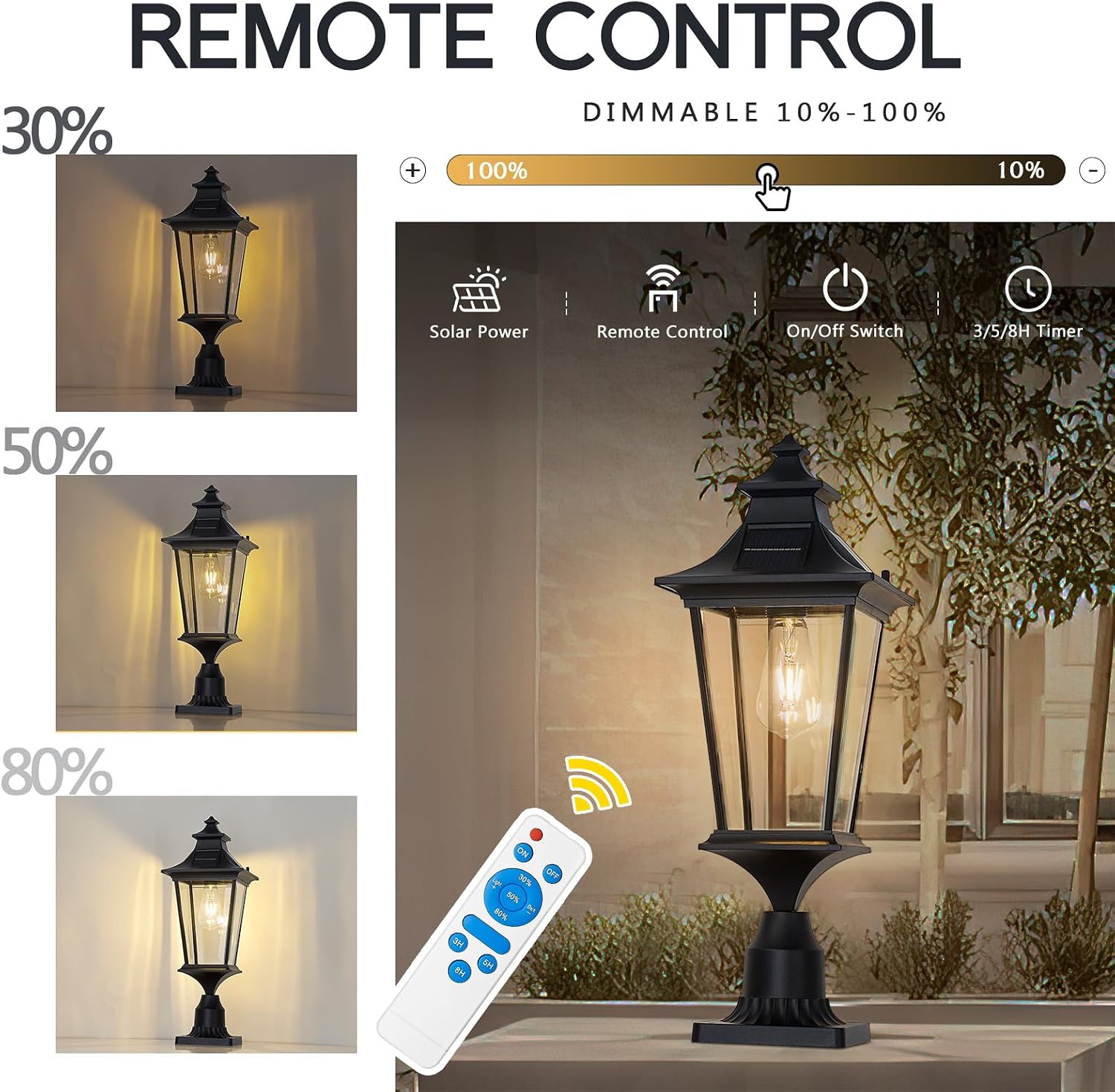
Image displaying the remote control for the EMLIVIAR Solar Lamp Post Light, with callouts for brightness adjustment (10%-100%) and timer settings (3/5/8 hours).
Video illustrating the remote control functions of the solar post light, including dimmable brightness settings and timer options for 3, 5, or 8 hours.
Maintenance
Cleaning
Regularly clean the solar panel and glass panels with a soft, damp cloth to remove dust, dirt, or debris. A clean solar panel ensures efficient charging. Avoid abrasive cleaners or harsh chemicals.
Battery Care
The integrated Li-ion battery is designed for long-term use. If the light's performance significantly decreases over time, ensure the solar panel is clean and receiving adequate sunlight. Battery replacement should only be performed by qualified personnel if necessary.
Seasonal Considerations
During winter months or periods of prolonged cloudy weather, charging efficiency may be reduced, leading to shorter illumination times. Ensure the solar panel is free of snow or ice.
Troubleshooting
| Problem | Possible Cause | Solution |
|---|---|---|
| Light does not turn on at night. | 1. Main switch is OFF. 2. Insufficient sunlight for charging. 3. Solar panel is dirty or obstructed. 4. Battery charge is low. | 1. Ensure the main switch is ON. 2. Relocate the light to an area with direct sunlight. 3. Clean the solar panel. 4. Allow 8-10 hours of direct sunlight for a full charge. |
| Light is dim or illumination time is short. | 1. Insufficient charging. 2. Solar panel is dirty. 3. Remote control brightness setting is low. | 1. Ensure adequate direct sunlight exposure. 2. Clean the solar panel. 3. Adjust brightness using the remote control. |
| Remote control is not working. | 1. Remote battery is dead. 2. Obstruction between remote and light sensor. | 1. Replace the remote control battery. 2. Ensure a clear line of sight to the light's sensor. |
Warranty and Support
Warranty Information
This EMLIVIAR product comes with a one-year warranty from the date of purchase. The warranty covers defects in materials and workmanship under normal use.
Customer Support
For any questions, concerns, or issues regarding your product, including broken glass shades, light bulb concerns, or installation problems, please contact EMLIVIAR customer service. Refer to your purchase documentation for specific contact details.