
1. Product Overview
The HiLetgo PD/QC/AFC Decoy Board USB C Boost Module is designed to trigger specific voltage outputs from fast charging power sources. It supports various fast charging protocols, including PD3.0/2.0, PPS/QC4+, QC3.0/2.0, FCP, and AFC. This module allows users to convert a fast charging power bank or charger into a DC power supply, providing fixed voltages like 9V, 12V, 15V, or 20V for compatible devices.
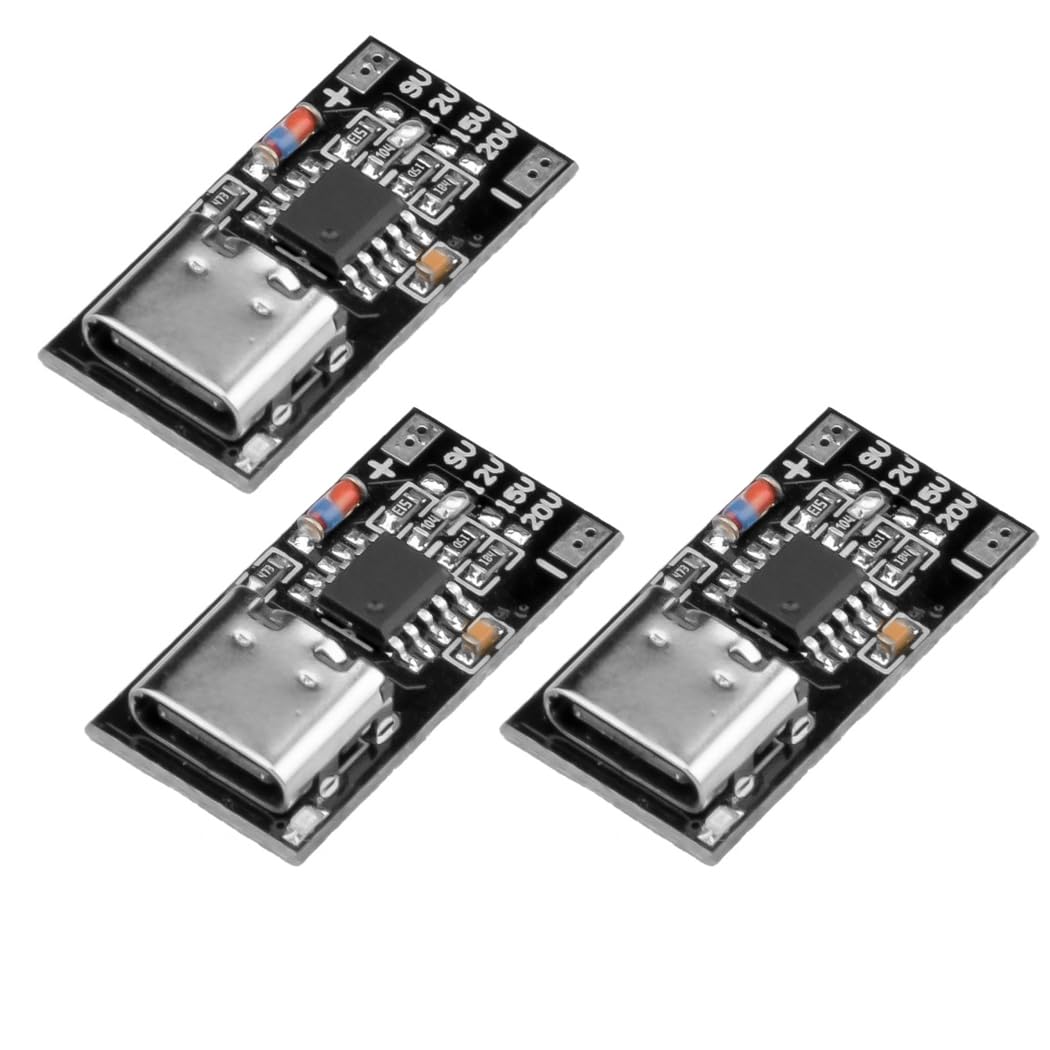
Figure 1: Top view of the HiLetgo PD/QC/AFC Decoy Board USB C Boost Module.
2. Key Features
- Supports multiple fast charging protocols: PD3.0/2.0, PPS/QC4+, QC3.0/2.0, FCP, AFC.
- Allows selection of fixed output voltages: 9V, 12V, 15V, 20V.
- Maximum current support: 5A.
- Compact design for various applications.
3. Setup Instructions
To set up the HiLetgo Decoy Board, follow these steps:
- Identify Voltage Pads: Locate the four voltage selection pads labeled 9V, 12V, 15V, and 20V on the module.
- Select Desired Voltage: To set the desired output voltage, you must short-circuit the corresponding pads. For example, to obtain 12V, short the pads marked '12V'. Ensure only one voltage is selected at a time.
- Connect Power Source: Plug a compatible USB Type-C fast charger or power bank into the Type-C input port of the module. The power source must support the fast charging protocol (PD/QC/AFC) and the desired voltage.
- Connect Load: Connect your device requiring DC power to the output voltage pads (+ and -) on the module.

Figure 2: Labeled diagram of the module, highlighting the Type-C input and voltage selection pads.
Important Note:
- The fast charging power source (charger/power bank) must support the fast charging protocol (e.g., PD/QC) to enable voltage deception.
- If the selected voltage (e.g., 20V) is higher than what your charger can provide (e.g., max 9V), the module will automatically negotiate down to the highest supported voltage (e.g., 9V).
4. Operating Instructions
Once the desired voltage is set and the power source is connected, the module will output the negotiated voltage through the output pads. Ensure your connected device is compatible with the selected voltage and current. The actual output current and power are determined by your fast charging charger and the load connected.

Figure 3: Detailed view of the module's components.
5. Specifications
| Feature | Detail |
|---|---|
| Supported Protocols | PD3.0/2.0, PPS/QC4+, QC3.0/2.0, FCP, AFC |
| Selectable Output Voltages | 9V, 12V, 15V, 20V (via shorting pads) |
| Maximum Current Support | 5A |
| Input Port | USB Type-C |
| Package Dimensions | 3.5 x 2.2 x 0.01 inches (approximate) |
| Item Weight | 0.176 ounces (approximate) |

Figure 4: Module dimensions.

Figure 5: Bottom view indicating supported protocols.
6. Troubleshooting
- No Output Voltage: Ensure the Type-C power source is connected and active. Verify that the power source supports fast charging protocols (PD/QC/AFC). Check if the correct voltage pads are shorted.
- Incorrect Output Voltage: Confirm that the power source can deliver the desired voltage. If the source's maximum voltage is lower than the selected voltage, the module will output the highest voltage the source can provide. Re-check the shorting of the voltage pads.
- Device Not Powering On: Ensure your device's voltage and current requirements are met by the module's output and the power source's capacity. Check for proper connection to the output pads.
7. Maintenance
The HiLetgo Decoy Board requires minimal maintenance. To ensure longevity and proper function:
- Keep the module dry and away from moisture.
- Avoid exposing the module to extreme temperatures.
- Handle with care to prevent physical damage to components or solder joints.
- Clean gently with a dry, soft cloth if necessary. Do not use liquids or solvents.
8. Warranty Information
Specific warranty details for this product are not provided in the available documentation. For information regarding warranty terms and conditions, please contact HiLetgo customer support directly.
9. Customer Support
For technical support, inquiries, or any issues you may encounter with your HiLetgo product, please contact us:
- Website: www.hiletgo.com
- Email: support@hiletgo.com

Figure 6: HiLetgo packaging with support information.