
1. Introduction
This manual provides detailed instructions for the safe and effective use of your SHAHE Dual Axis Digital Protractor Inclinometer, Model 5346. This high-precision digital angle gauge is designed for accurate angle measurements in various applications, including interior decoration, construction, plumbing, flooring, and woodworking. It features both uniaxial and biaxial measurement capabilities, multiple unit displays, a magnetic base, and a rechargeable battery.
2. Product Overview
2.1 Components and Display
The SHAHE Digital Protractor Inclinometer is equipped with a clear LED display and intuitive controls. Key components include:
- LED Display: Shows angle readings, battery status, and measurement modes.
- Horizontal Bubble Level: For quick visual leveling.
- ON/OFF/REF Button: Powers the device on/off and sets relative zero.
- HOLD Button: Freezes the current measurement on the display.
- Unit Conversion Key (MM/M, %, °): Switches between different measurement units.
- Magnetic Base: Allows for secure attachment to metallic surfaces.
- Type-C Charging Port: For recharging the internal lithium battery.
- Reserved Fixed Inclination Box Mounting Holes: Diameter 4mm.

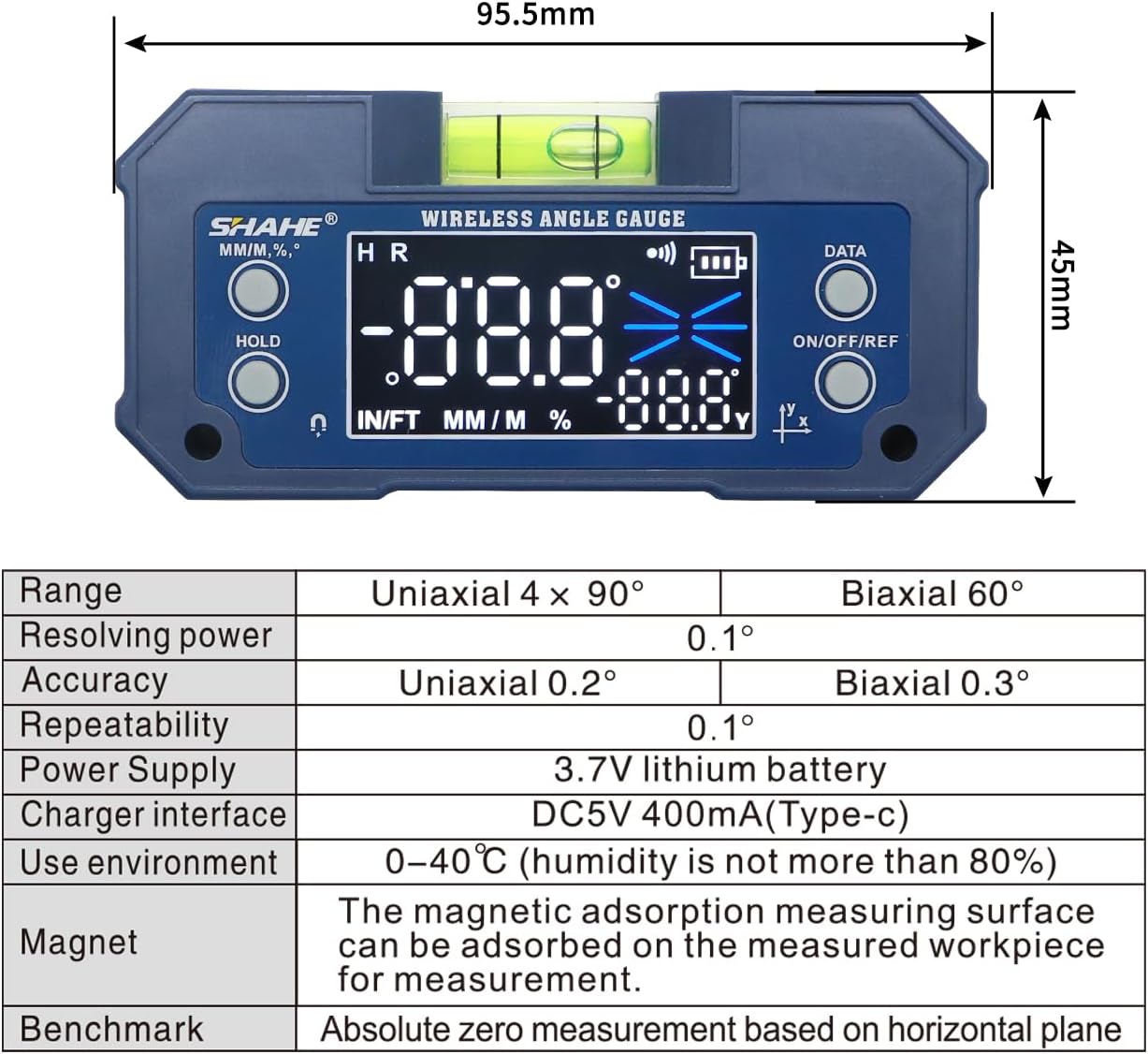
2.2 Unboxing the Product
Upon opening the package, you will find the digital protractor, a Type-C charging cable, and this instruction manual. Please inspect all items for any damage.
3. Specifications
Refer to the table below for detailed technical specifications of the SHAHE Digital Protractor Inclinometer Model 5346.
| Feature | Description |
|---|---|
| Range (Uniaxial) | 4 x 90° |
| Range (Biaxial) | ±60° |
| Resolving Power | 0.1° |
| Accuracy (Uniaxial) | ±0.2° |
| Accuracy (Biaxial) | ±0.3° |
| Repeatability | 0.1° |
| Power Supply | 3.7V Lithium Ion Battery |
| Charger Interface | DC5V 400mA (Type-C) |
| Operating Environment | 0-40°C (Humidity ≤ 80%) |
| Magnet | Magnetic adsorption measuring surface |
| Benchmark | Absolute zero measurement based on horizontal plane |
| Item Weight | 118 g |
| Parcel Dimensions | 15.49 x 10.31 x 4.29 cm |
4. Setup
4.1 Initial Charging
Before first use, ensure the device is fully charged. Connect the provided Type-C charging cable to the charging port on the side of the inclinometer and to a standard USB power source (e.g., computer USB port, wall adapter). The battery indicator on the display will show charging status.

4.2 Powering On/Off
Press the ON/OFF/REF button to turn the device on. Press and hold the ON/OFF/REF button for a few seconds to turn it off. The device will automatically power off after 3 minutes of inactivity to conserve battery life.
5. Operating Instructions
5.1 Absolute and Relative Measurement Modes
The inclinometer supports two measurement modes: Absolute and Relative.
- Absolute Mode (ABS): Measures the angle relative to a true horizontal plane (absolute zero).
- Relative Mode (REF): Allows you to set any surface as a temporary zero reference, measuring subsequent angles relative to that reference.
To switch between Absolute and Relative modes, briefly press the ON/OFF/REF button while the device is on. The display will indicate the current mode (ABS or REF).
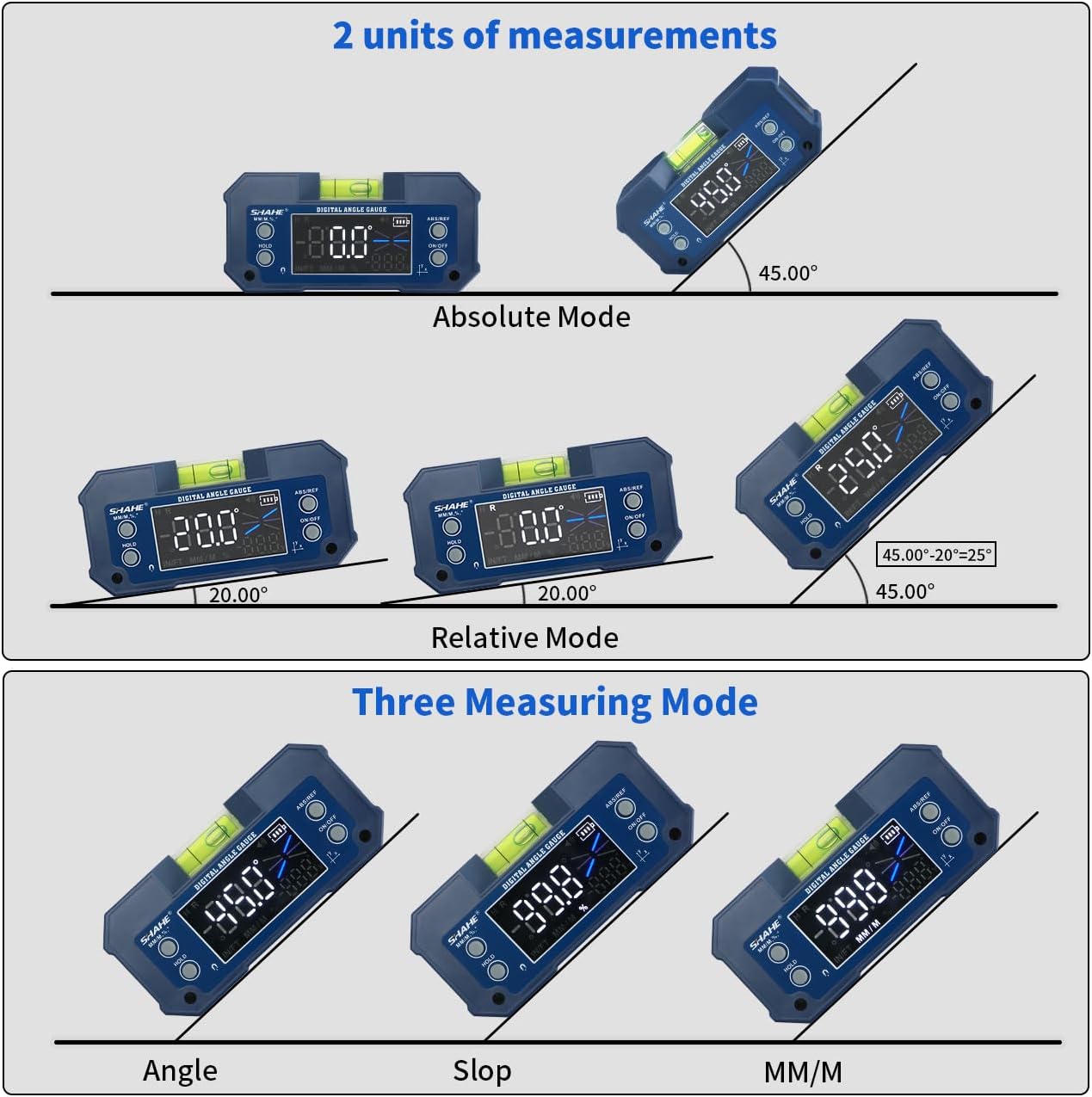
5.2 Unit Conversion
The device can display measurements in three units: degrees (°), percentage (%), and millimeters per meter (mm/m).
To change the unit, press the MM/M, %, ° button (often labeled IN/FT MM/M %) repeatedly until your desired unit is displayed.
5.3 Hold Function
To freeze the current measurement on the display, press the HOLD button. This is useful for reading measurements in difficult-to-view positions. Press the HOLD button again to release the measurement and return to live readings.
5.4 Backlight
The device features a white backlight for improved readability in low-light conditions. The backlight typically activates automatically when the device is turned on or a button is pressed. Refer to Figure 4.1 for an example of the backlight in use.
5.5 Magnetic Base Usage
The strong built-in magnetic base allows the inclinometer to be securely attached to ferrous metal surfaces, such as miter saws, band saws, or table saw blades, for hands-free operation and precise angle setting.
6. Applications
The SHAHE Digital Protractor Inclinometer is a versatile tool suitable for a wide range of applications, including but not limited to:
- Interior decoration projects.
- Construction site measurements.
- Plumbing installations and pipe alignment.
- Leveling floors and stairs.
- Woodworking tasks, such as setting saw blade angles.
- General machinery setup and alignment.
7. Maintenance
- Cleaning: Wipe the device with a soft, dry cloth. Do not use abrasive cleaners or solvents.
- Storage: Store the inclinometer in a dry, dust-free environment at room temperature when not in use.
- Battery Care: Recharge the battery regularly, even if the device is not frequently used, to maintain battery health. Avoid fully discharging the battery for extended periods.
- Avoid Impact: While durable, avoid dropping the device or subjecting it to strong impacts, as this can affect its accuracy.
8. Troubleshooting
| Problem | Possible Cause | Solution |
|---|---|---|
| Device does not turn on. | Low battery. | Charge the device using the provided Type-C cable. |
| Inaccurate readings. | Device not properly calibrated (in Absolute mode). | Ensure the surface used for absolute zero is truly level. If persistent, contact support. |
| Display is dim or flickering. | Low battery. | Recharge the device. |
| Readings do not update smoothly. | This behavior can occur with very small, gradual angle changes due to internal filtering. | This is a characteristic of the device's design to filter noise. For precise adjustments, make slight movements and observe the display for updates. |
9. Warranty and Support
For warranty information, technical support, or service inquiries, please refer to the warranty card included with your product or visit the official SHAHE Measuring Tools website. You may also contact your retailer for assistance.
Manufacturer: Wenzhou Sanhe Measuring Instrument Co.,LTD


