
CAMMHD Z3
CAMMHD Z3 1440P Body Mounted Camera User Manual
Model: Z3
Introduction
This manual provides detailed instructions for the operation and maintenance of your CAMMHD Z3 Body Mounted Camera. Please read this manual thoroughly before using the device to ensure proper function and to maximize its lifespan. The CAMMHD Z3 is designed for security and personal recording, featuring high-definition video, audio recording, and night vision capabilities.
Package Contents
- CAMMHD Z3 Body Mounted Camera
- USB Data Cable
- Shoulder Clip
- Back Clip
- User Manual (this document)
- Built-in 3000mAh Battery (pre-installed)
Setup
1. Initial Charging
Before first use, fully charge the camera. Connect the camera to a power source using the provided USB data cable. The charging indicator will show the charging status and turn off or change color when fully charged. A full charge provides approximately 8-10 hours of continuous recording (with infrared off at 1080p resolution).
2. Attaching the Camera
Select either the shoulder clip or the back clip based on your preference. Attach the chosen clip to the camera and then secure it to your clothing or gear. The camera is lightweight, weighing only 0.2 pounds, ensuring comfortable wear.
3. Memory Storage
The CAMMHD Z3 comes with built-in memory (available in 32GB, 64GB, or 128GB options). No external SD card is required for operation. Ensure sufficient storage is available for your recording needs.
Operating Instructions
1. Power On/Off
- To power on: Press and hold the Power button until the screen illuminates.
- To power off: Press and hold the Power button until the device shuts down.
2. Video Recording
- From the main screen, press the Record button to start video recording. The recording indicator will activate.
- Press the Record button again to stop recording.
- The camera supports 1440P resolution for high-definition video capture and a 130° wide-angle view.
3. Audio Recording
The camera records audio simultaneously with video. There may be an option in the settings to record audio only; refer to the on-screen menu for specific audio-only recording functions.
4. Night Vision
- The camera features built-in infrared lights for night vision.
- Night vision can be switched manually or set to automatic mode. In automatic mode, the camera senses light levels and adjusts accordingly.
- Effective night vision range is up to 50 feet.
5. Local Playback and File Management

Image: File Viewing, Transmission, and Storage options for the CAMMHD Z3 Body Camera. This includes local playback on the device, connecting to a PC, connecting via OTG to a phone, and the internal memory card.
- The 2.0-inch display screen allows for one-key operation to playback and view recorded files directly on the device.
- Navigate through files using the camera's control buttons.
6. Connecting to a Computer
- Connect the camera to a computer (Windows or macOS) using the provided USB data cable.
- The camera will appear as a removable storage device, allowing you to view, transfer, and manage recorded files.
7. Advanced Features
- Motion Detection: Activates recording when motion is detected. This feature can be enabled/disabled in the camera settings.
- Loop Recording: When memory is full, the camera will automatically overwrite the oldest files. This ensures continuous recording without manual deletion.
- Independent Volume Adjustment: Adjust audio recording levels through the camera's menu.
- Extended Recording: The camera supports extended recording sessions, ideal for long shifts or continuous monitoring.
Maintenance
- Cleaning: Use a soft, dry cloth to clean the camera body. For the lens, use a specialized lens cleaning cloth and solution. Avoid abrasive materials or harsh chemicals.
- Storage: Store the camera in a cool, dry place away from direct sunlight and extreme temperatures.
- Battery Care: To prolong battery life, avoid fully discharging the battery frequently. Charge the camera regularly, even if not in use for extended periods.
- Water Resistance: The camera is waterproof; however, avoid submerging it beyond its rated depth or for prolonged periods. Ensure all ports are securely closed before exposure to water.
Troubleshooting
- Camera not powering on:
- Ensure the battery is fully charged. Connect to a power source and try again.
- Press and hold the Power button for at least 5 seconds.
- Recording issues (e.g., not recording, poor quality):
- Check available memory. If full, loop recording should overwrite old files, but ensure it's enabled.
- Ensure the lens is clean and free from obstructions.
- Verify recording settings (resolution, night vision mode).
- Cannot connect to computer:
- Ensure the USB cable is securely connected to both the camera and the computer.
- Try a different USB port or cable.
- Restart both the camera and the computer.
- Ensure the camera is powered on when connected.
- Short battery life:
- Ensure the camera is fully charged before use.
- Continuous recording at higher resolutions or with infrared night vision enabled will consume more power.
- Check battery health; if significantly degraded, contact support.
Specifications
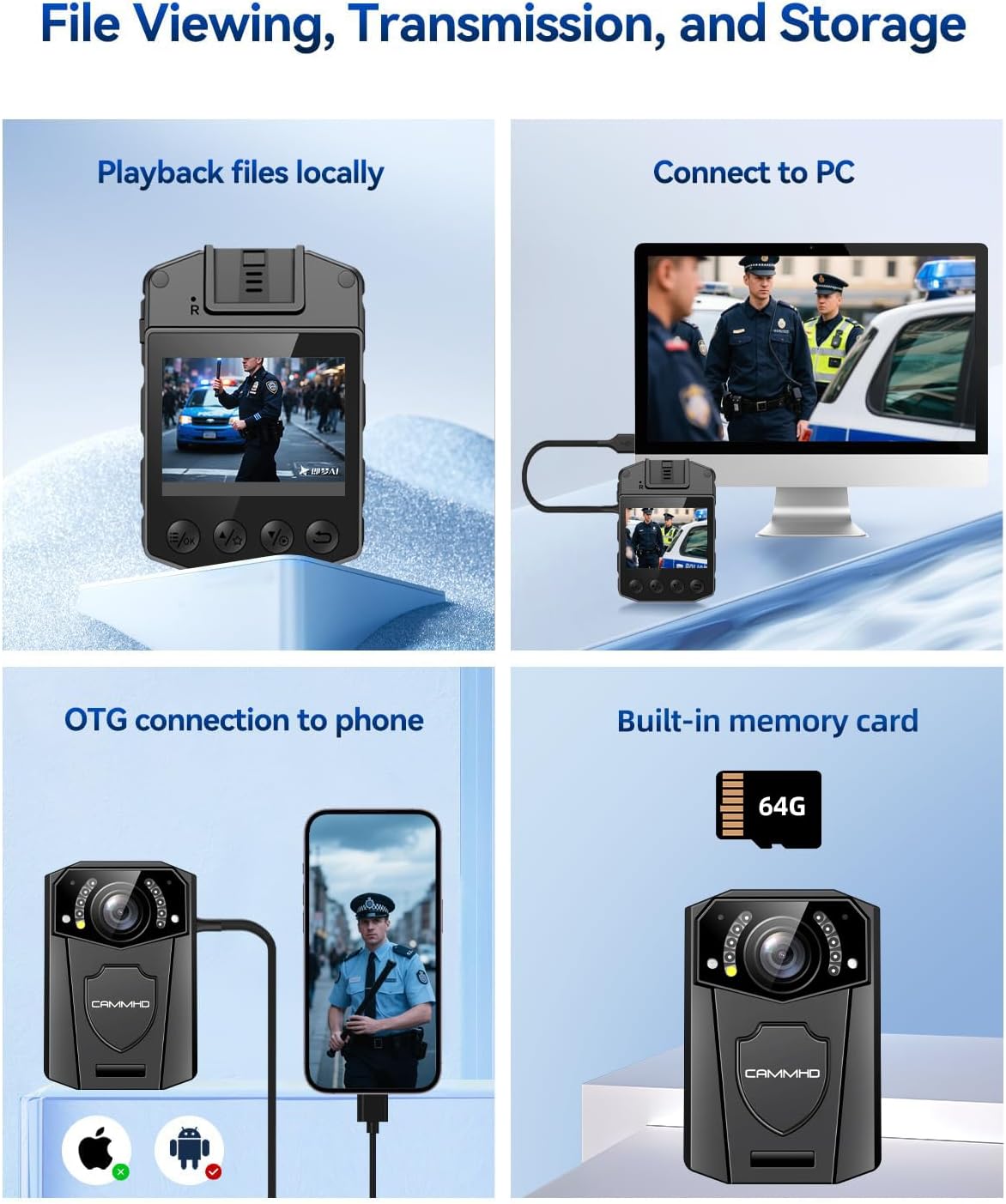
Image: The CAMMHD Z3 Body Camera demonstrating its versatile applications, including law enforcement, personal security, and recreational recording.
| Feature | Detail |
|---|---|
| Model Number | Z3 |
| Video Resolution | 1440P (Effective), 1080p (Capture) |
| Still Image Resolution | 48 MP |
| Lens Type | 130° Wide-Angle |
| Display Screen | 2.0 Inches |
| Battery Capacity | 3000mAh |
| Continuous Recording Time | 8-10 hours (1080p, IR off) |
| Night Vision Range | Up to 50 feet |
| Connectivity | USB (for PC connection) |
| Memory Type | Built-in (32G, 64G, 128G options) |
| Dimensions | 2.07 x 2.99 x 1.03 inches |
| Weight | 0.2 pounds |
| Operating System Compatibility | Windows, macOS |
| File Format | MP4 |
Warranty and Support
The CAMMHD Z3 Body Mounted Camera comes with a one-year warranty from the date of purchase. Additionally, CAMMHD provides lifetime technical support for this product. If you encounter any issues or have questions regarding your device, please contact CAMMHD customer service for assistance.
For technical support or warranty claims, please refer to the contact information provided on the CAMMHD official website or your purchase documentation.
Related documentsZ3


Ask a question about this manual
Ask about setup, troubleshooting, compatibility, parts, safety, or missing instructions. Manuals+ will review the question and use this page’s manual context to help answer it.