
1. Introduction
This manual provides detailed instructions for the installation, setup, operation, and maintenance of your EUERTE Smart Fingerprint Door Knob, model S08T. Please read this manual thoroughly before installation and use to ensure proper functionality and safety.
2. Product Overview
2.1 Key Features
- 3-in-1 Unlocking Methods: Fingerprint, App Control, and Physical Keys.
- Fast Biometric Access: Advanced 360° fingerprint sensor for 0.15s recognition with low false rejection rate.
- Smart App Control (TT Lock APP): Manage fingerprints, view unlock records, check battery status, set auto-lock, passage mode, and privacy mode.
- Easy Installation: Designed for quick installation, typically under 15 minutes with a screwdriver.
- Durable Design: Premium metallic finish and sturdy Zinc Alloy construction, sweat & weatherproof (IP54 rated).
- Enhanced Security: Stores up to 100 fingerprints locally, 5s auto-locking feature, and privacy mode.
2.2 Package Contents
The package includes the following components:
- Front handle
- Back handle
- Single latch
- Strike plate
- 2 Keys
- Square cotter
- 1 Spiral tube
- Screws
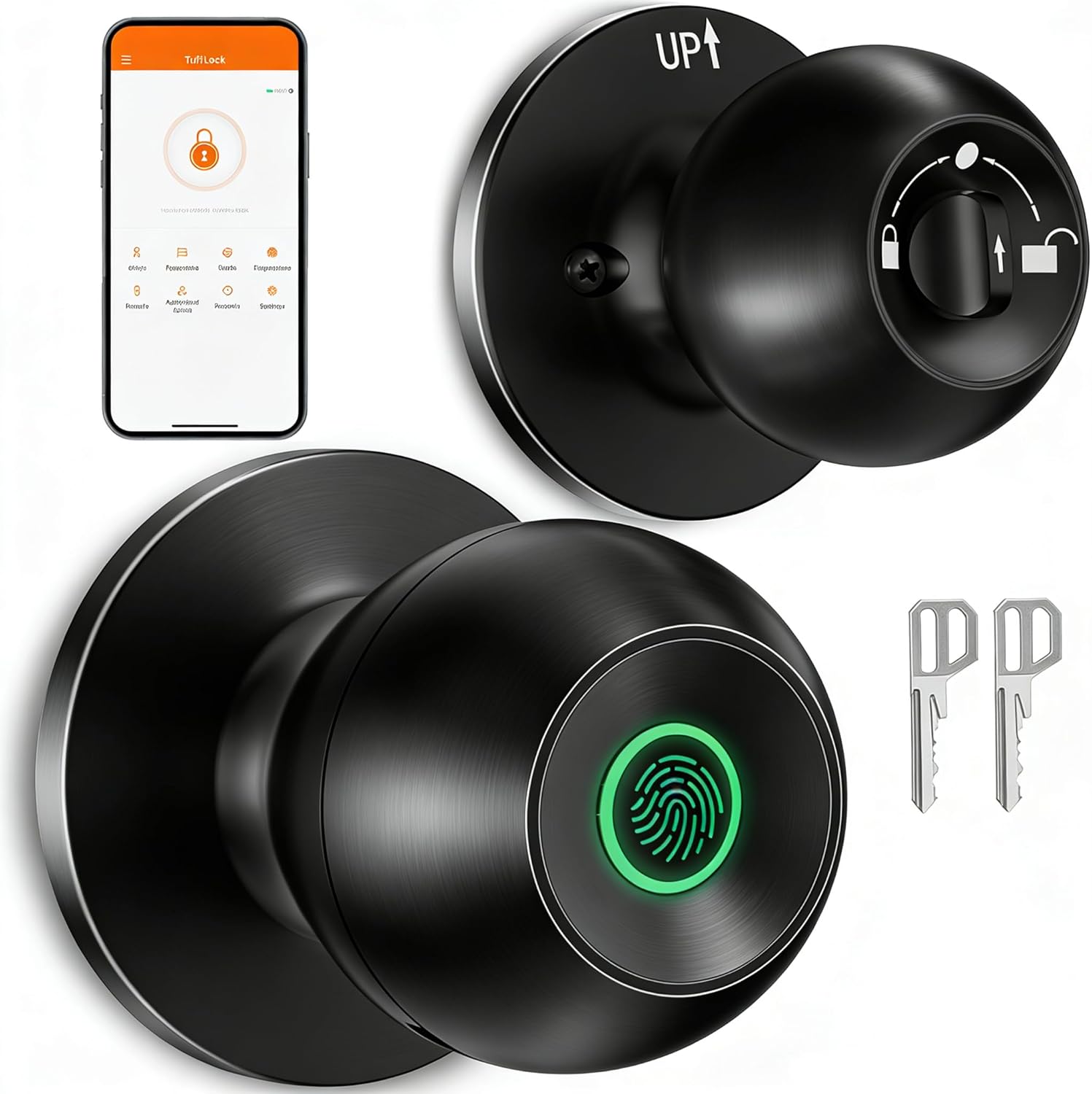
Image: EUERTE Smart Fingerprint Door Knob S08T with physical keys and a smartphone displaying the control app.

Image: Visual representation of the three unlocking methods: fingerprint, app, and traditional key.
3. Setup
3.1 Installation
The EUERTE Smart Fingerprint Door Knob is designed for easy installation on standard doors. It fits door thicknesses between 1-3/8" to 2-1/8" (35mm-55mm) and requires a door hole diameter of 2-1/8" (55mm). The latch length is adjustable between 2-3/8" (60mm) or 2-3/4" (70mm).
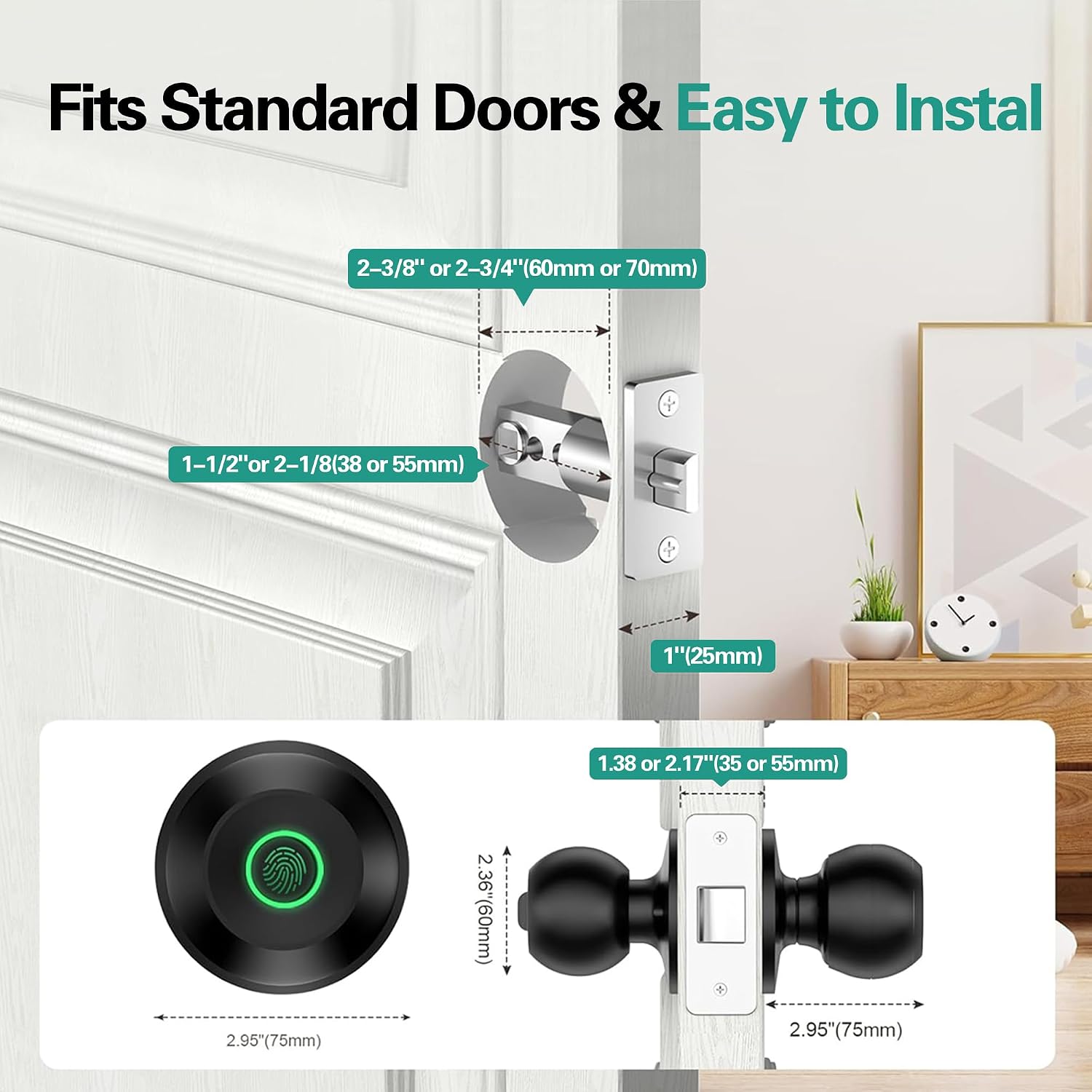
Image: Diagram illustrating standard door dimensions and lock components for installation.
For a visual guide, please refer to the official installation video:
Video: Official installation guide for the S08Y Smart Door Knob, demonstrating step-by-step physical installation.
3.2 App Setup
To utilize the smart features, download the TT Lock App from your device's app store. Follow the in-app instructions to register an account and add your S08T door knob as a device. Ensure Bluetooth is enabled on your smartphone during the pairing process.

Image: Illustration of Bluetooth app connection for controlling the smart door knob within 15 meters.
For a visual guide on app setup, please refer to the official setup video:
Video: Official setup guide for the S08Y Smart Door Knob, detailing app installation and initial device pairing.
3.3 Fingerprint Enrollment
After pairing the device with the app, you can enroll administrator and family member fingerprints. The lock can store up to 100 unique fingerprints. Follow the in-app prompts to place and remove your finger on the sensor multiple times until enrollment is complete.

Image: Depiction of the fast fingerprint unlock feature, highlighting 0.1s identification and 100 local data storage.

Image: Illustrates how to grant access to various individuals like family, friends, roommates, housekeepers, and pet sitters.
4. Operating Instructions
4.1 Unlocking Methods
- Fingerprint Unlock: Place a registered finger on the sensor for instant access.
- App Unlock: Use the TT Lock App on your smartphone to unlock the door remotely (within Bluetooth range or via Wi-Fi gateway, sold separately).
- Physical Key Unlock: In case of battery depletion or emergency, use the provided physical keys.
4.2 Operating Modes
The door knob supports various modes to suit your needs:
- Standard Mode: All registered fingerprint users can access the space at any time.
- Passage Mode: The lock remains unlocked for instant access, useful for high-traffic periods.
- Private Mode: Only the administrator can access, ensuring privacy.

Image: Visual explanation of Standard, Passage, and Private modes for the smart door knob.
4.3 App Features Overview
The TT Lock App provides comprehensive control and monitoring capabilities:
- User Management: Add or remove users and their fingerprints.
- Unlock Records: View a history log of all unlock events.
- Auto-Lock Setting: Configure the door to automatically lock after a set period (e.g., 5 seconds).
- Do Not Disturb Mode: Mute alerts and prevent unauthorized access during specific times.
- Door Lock Alarm: Receive notifications for incorrect fingerprint attempts or forced entry.
- Family Go Home: Set up smart scenes for family members' arrival.
Explore these features in detail with the official features video:
Video: Official video showcasing new features of the S08Y Smart Door Knob, including app functionalities like visitor logs, automatic locking, and alarm settings.
5. Maintenance
5.1 Battery Management
The door knob requires batteries for operation (not included). It features a low battery alarm to notify you when replacement is needed. In case of complete battery depletion, an external battery can be connected via the emergency port, or the physical keys can be used for access.

Image: Information on battery working time, low battery alarm, and emergency USB-C power input.
5.2 Cleaning and Care
The door knob has a sweat & weatherproof design (IP54 rated). To maintain optimal performance, regularly wipe the fingerprint sensor and the knob's surface with a soft, dry cloth. Avoid using abrasive cleaners or solvents that could damage the finish or electronic components.
6. Troubleshooting
- Fingerprint not recognized: Ensure your finger is clean and dry. Try re-enrolling your fingerprint if the issue persists. The sensor may be less effective with wet or wrinkled fingers.
- Lock not responding: Check battery levels. If batteries are low or depleted, replace them or use the emergency power port.
- App connectivity issues: Ensure Bluetooth is enabled on your phone and you are within range. If using a Wi-Fi gateway, verify its connection.
- Fingerprint data loss: Some users have reported that fingerprint recognition can become unreliable when battery levels drop below 80%. If this occurs, re-enroll your fingerprints after charging or replacing batteries.
- Door not locking automatically: Verify that the auto-lock feature is enabled and configured correctly in the TT Lock App.
7. Specifications
| Feature | Detail |
|---|---|
| Model Number | S08T |
| Material | Aluminum, Zinc Alloy |
| Color | Black |
| Product Dimensions | 9.29"L x 3.3"W |
| Lock Type | Biometric |
| Special Features | Fingerprint, App, Keys Unlock, Auto Lock, Privacy/Normal/Passage Mode, Share/Add Members, View History Logs |
| Power Source | Batteries Required (No Batteries Included) |
| Hand Orientation | Universal |
| Indoor/Outdoor Usage | Indoor |
| Item Weight | 1.72 Pounds |
8. Warranty and Support
8.1 Warranty Information
The EUERTE Smart Fingerprint Door Knob S08T comes with a manufacturer warranty for 1 year from the date of purchase. Please retain your proof of purchase for warranty claims.
8.2 Customer Support
If you have any questions or require assistance, please feel free to contact us:
- Email: support@euerte.com
- Technical Team Website: www.euerte.com

Image: QR code for quick access to EUERTE support resources.
