
1. Introduction
The Hunter Wireless Mini-Clik Sensor (WM-CLIK) is designed to prevent unnecessary irrigation during or after rainfall and freezing conditions. This device integrates seamlessly with most automatic irrigation systems, ensuring water conservation and protecting landscapes from oversaturation. The wireless design simplifies installation, offering a reliable solution for efficient water management.
This manual provides comprehensive instructions for the installation, operation, and maintenance of your WM-CLIK sensor, ensuring optimal performance and longevity.
2. Safety Information
Please read and understand all safety instructions before installing or operating the Hunter Wireless Mini-Clik Sensor. Failure to follow these instructions may result in property damage, injury, or improper operation.
- Electrical Safety: Ensure power to the irrigation controller is disconnected before making any wiring connections. All wiring should comply with local electrical codes.
- Mounting: Mount the sensor securely to prevent it from falling, which could cause damage or injury.
- Environmental Conditions: The sensor is designed for outdoor use. Avoid placing it in locations where it may be subject to extreme physical impact or submersion.
- Children and Pets: Keep the device out of reach of children and pets to prevent tampering or accidental damage.
3. Product Overview
The Hunter Wireless Mini-Clik system consists of two main components: the sensor unit and the receiver unit. The sensor unit is installed outdoors to detect rain and freezing temperatures, while the receiver unit connects to your irrigation controller.
Key Features:
- Automatic irrigation shutdown upon detecting rainfall from ⅛" to ¾".
- Freeze sensing capability to prevent irrigation in freezing conditions.
- Wireless communication for simplified installation and flexible placement.
- Quick Response technology for rapid system shutdown.
- Debris-tolerant design ensures reliable operation.
Component Identification:

Figure 1: Hunter Wireless Mini-Clik Sensor Unit. This image shows the main sensor unit, which includes the rain collection cups and the freeze sensing element.

Figure 2: Close-up view of the Hunter Wireless Mini-Clik Sensor. This image highlights the internal components and the 'WM-CLIK' model designation on the casing.

Figure 3: Hunter CLIK RECEIVER Unit. This image displays the receiver unit with its antenna, status indicator lights (Bypass, Status), and a button for rain sensor bypass.
4. Setup
4.1 Sensor Unit Installation
Proper placement of the sensor unit is crucial for accurate rain and freeze detection.
- Location: Choose an outdoor location that is exposed to unobstructed rainfall and direct sunlight (for drying). Avoid areas under eaves, trees, or overhangs that could block rain or cause false readings.
- Mounting: The sensor can be mounted on an eave, gutter, or any flat vertical surface using the included bracket. Ensure the sensor is level.
- Clearance: Ensure there is adequate clearance around the sensor for proper air circulation and to prevent debris accumulation.
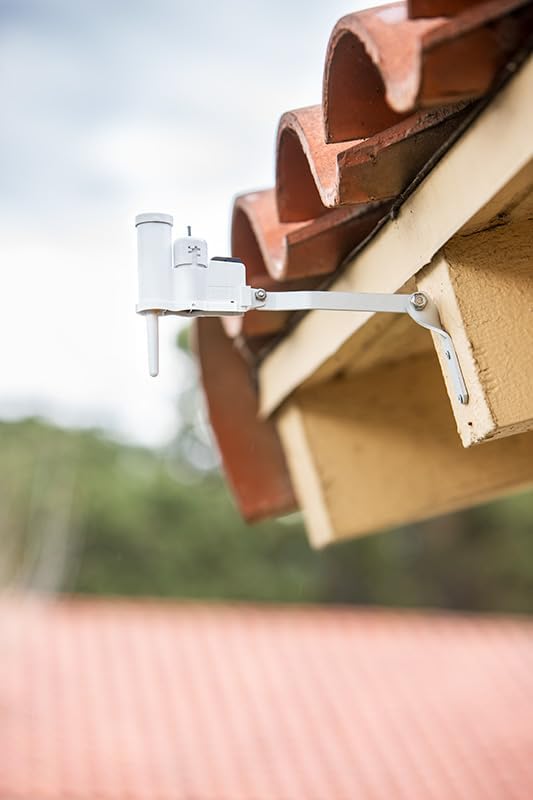
Figure 4: Hunter Wireless Mini-Clik Sensor mounted on an eave. This image demonstrates a typical installation location for the sensor unit, ensuring exposure to rainfall.
4.2 Receiver Unit Installation and Wiring
The receiver unit should be installed near your irrigation controller.
- Power Off: IMPORTANT: Disconnect power to your irrigation controller before proceeding.
- Mounting: Mount the receiver unit indoors, typically next to the irrigation controller, using screws or adhesive.
- Wiring: Connect the receiver's two wires to the sensor terminals on your irrigation controller. These terminals are usually labeled 'SEN', 'SENS', 'RAIN', or 'R'. Consult your controller's manual for specific wiring instructions. The polarity of these wires typically does not matter.
- Power On: Restore power to the irrigation controller.
4.3 Pairing (Automatic)
The Hunter Wireless Mini-Clik Sensor and Receiver are typically pre-paired at the factory. Upon initial power-up, the receiver should automatically establish communication with the sensor. If communication is not established, refer to the troubleshooting section.
5. Operation
5.1 Rain Detection
When the sensor detects a pre-set level of rainfall (adjustable from ⅛" to ¾"), it sends a signal to the receiver. The receiver then interrupts the common wire to the irrigation valves, preventing scheduled irrigation cycles from running. Once the sensor dries out, it signals the receiver to allow normal irrigation to resume.
5.2 Freeze Detection
The WM-CLIK also incorporates freeze sensing. If the ambient temperature drops to a freezing level, the sensor will similarly interrupt irrigation, protecting your system and landscape from potential damage due to freezing water.
5.3 Receiver Status Indicators
The CLIK RECEIVER unit features LED indicators to provide operational status:
- BYPASS (Red LED): Indicates the sensor is currently bypassed.
- STATUS (Green LED): Indicates the sensor is dry and irrigation is enabled.
- STATUS (Yellow LED): Indicates the sensor is wet or frozen, and irrigation is suspended.
5.4 Manual Bypass Function
In situations where you need to override the sensor (e.g., for system testing or specific watering needs), you can use the bypass button on the receiver unit.
- Press the 'Press to bypass' button on the receiver. The red BYPASS LED will illuminate.
- While bypassed, the irrigation controller will operate normally, regardless of rain or freeze conditions.
- To re-enable the sensor, press the button again. The red BYPASS LED will turn off, and the sensor will resume control.
6. Maintenance
Regular maintenance ensures the longevity and accurate operation of your WM-CLIK sensor.
- Annual Inspection: At least once a year, inspect the sensor unit for any debris (leaves, dirt, insects) that may have accumulated in the rain collection cups or around the freeze sensor.
- Cleaning: Gently clean the sensor unit with a soft cloth and water if necessary. Avoid using harsh chemicals or abrasive materials.
- Wiring Check: Periodically check the wiring connections at the receiver unit and irrigation controller for any signs of corrosion or loose connections.
- Battery Replacement: The wireless sensor unit is powered by a long-life battery. While designed for extended use, if the sensor consistently fails to communicate or provides inaccurate readings, the battery may need replacement. Refer to the manufacturer's guidelines for specific battery type and replacement procedures.
7. Troubleshooting
If your Hunter Wireless Mini-Clik Sensor is not functioning as expected, refer to the following common issues and solutions:
| Problem | Possible Cause | Solution |
|---|---|---|
| Irrigation runs during rain. |
|
|
| Irrigation does not run when dry. |
|
|
| No power to receiver. |
|
|
8. Specifications
- Model: WM-CLIK
- Rain Shutoff Settings: ⅛", ¼", ½", ¾" (adjustable)
- Freeze Shutoff: Yes
- Wireless Operating Frequency: 433 MHz
- Wireless Range: 800 feet (line of sight) from sensor to receiver
- Power Source (Sensor): Battery (type and life cycle specified by manufacturer)
- Power Source (Receiver): Powered by irrigation controller (24 VAC)
- Dimensions (Package): 10.43 x 8.27 x 1.65 inches
- Item Weight: 1.02 pounds
- Manufacturer: Hunter Industries

