
Introduction
Thank you for choosing the ASHATA 6-Channel USB 3.7V Lithium Battery Charger Board. This device is designed to efficiently charge up to six 3.7V LiPo 1S or LiHv batteries simultaneously and independently. Its compact design and versatile power input make it an ideal solution for hobbyists and professionals requiring reliable battery charging.
Package Contents
- 1 x ASHATA 6-Channel USB Lithium Battery Charger Board
Safety Information
Please read and understand all safety instructions before using this product. Failure to follow these instructions may result in electric shock, fire, or serious injury.
- Use only with compatible 3.7V LiPo 1S or LiHv batteries. Do not attempt to charge other battery types.
- Ensure the charger is connected to a stable 5V USB power source (e.g., computer USB port, power bank, phone charger).
- Do not leave charging batteries unattended.
- Keep the charger away from water, moisture, and high temperatures.
- Do not short-circuit the charging ports.
- If the charger or battery shows signs of damage, discontinue use immediately.
- Keep out of reach of children.
Product Overview
The ASHATA 6-Channel USB Lithium Battery Charger Board features a compact design with multiple independent charging channels and user-friendly indicators.
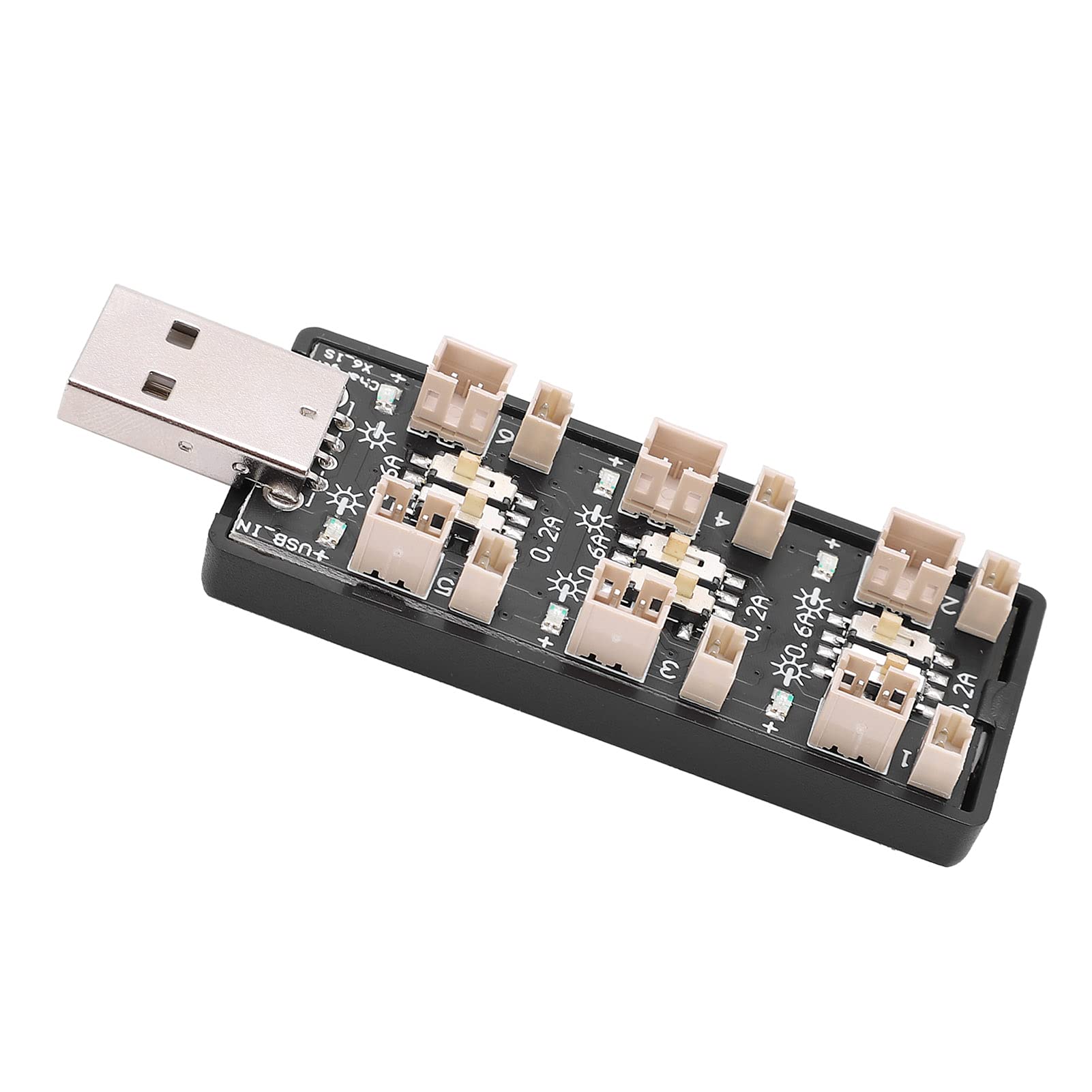
Figure 1: Overall view of the ASHATA 6-Channel USB Lithium Battery Charger Board, showing the integrated USB plug for power input and the six charging ports.
Key Components:
- USB Input Plug: Standard USB-A connector for power input.
- Charging Ports (x6): Independent ports for connecting 3.7V LiPo 1S or LiHv batteries.
- Current Selection Switches (x6): Individual toggle switches for each channel to select charging current (0.2A or 0.6A).
- LED Indicators (x6): Each channel has an LED to indicate charging status.

Figure 2: A close-up view highlighting the individual charging ports and their corresponding current selection toggle switches (0.2A and 0.6A settings) and LED indicators.
Setup
- Connect Power Source: Insert the integrated USB plug of the charger board into a compatible 5V USB power source. This can be a computer USB port, a power bank, or a standard USB wall adapter (e.g., phone charger).
- Prepare Batteries: Ensure your 3.7V LiPo 1S or LiHv batteries are in good condition and compatible with the charger's ports.

Figure 3: Top-down view of the charger board, illustrating the layout of the six independent charging channels and the USB input.
Operating Instructions
- Select Charging Current: For each battery you intend to charge, adjust the corresponding toggle switch to either 0.2A or 0.6A.
- 0.2A: Suitable for smaller capacity batteries or for a slower, more gentle charge.
- 0.6A: Suitable for larger capacity batteries or when a faster charge is desired. Ensure your battery can handle this current.
- Connect Batteries: Carefully plug your 3.7V LiPo 1S or LiHv batteries into the charging ports. Ensure correct polarity.
- Monitor Charging Status: The LED indicator for each channel will behave as follows:
- Blinking LED: Indicates that the battery is currently charging.
- Solid LED: Indicates that the battery is fully charged and the charging process has automatically stopped.
- Disconnect Batteries: Once the LED turns solid, the battery is fully charged. Disconnect the battery from the charging port.
- Disconnect Power: When all charging is complete, disconnect the USB charger board from its power source.

Figure 4: Top and bottom views of the charger board, showing the compact form factor and the USB input.
Maintenance
- Cleaning: Use a dry, soft cloth to clean the charger board. Do not use liquid cleaners or solvents.
- Storage: Store the charger in a cool, dry place away from direct sunlight and extreme temperatures when not in use.
- Inspection: Periodically inspect the charger for any signs of damage to the casing, ports, or USB plug.
Troubleshooting
| Problem | Possible Cause | Solution |
|---|---|---|
| LED does not light up when battery is connected. |
|
|
| Battery charges slowly. |
|
|
| Charger or battery gets excessively hot. |
|
|
Specifications
| Model Number | Rich0CsIrfVFiU |
| Input Voltage Range | USB 5V ± 5% (0.5A ~ 2A) |
| Output Voltage Range | 2.5V ~ 4.20V |
| Output Current Range | 600mA x 6CH (0.6A) / 200mA x 6CH (0.2A) |
| Number of Channels | 6 independent channels |
| Applicable Battery Type | LiPo 1S; LiHv high voltage lithium battery (3.7V nominal) |
| Dimensions (L x W x H) | 8 x 3 x 2 cm |
| Manufacturer | ASHATA |
| Country of Origin | China |
Warranty and Support
For warranty information or technical support, please refer to the retailer's policy or contact ASHATA customer service through their official channels. Please have your model number (Rich0CsIrfVFiU) and purchase details ready when contacting support.