
Introduction
The realme Buds Air 5 Pro are advanced truly wireless in-ear earbuds designed to deliver a high-quality audio experience. They feature 50dB Active Noise Cancellation (ANC), Realboost Dual Coaxial Drivers for rich sound, 360° Spatial Audio Effect, and support for LDAC HD Audio. This manual provides essential information for setting up, operating, maintaining, and troubleshooting your earbuds.
Package Contents:
- realme Buds Air 5 Pro Earbuds (Left and Right)
- Charging Case
- USB Charging Cable
- Eartips (various sizes)
- User Manual

Image: realme Buds Air 5 Pro earbuds and charging case in Astral Black.
Setup
1. Initial Charging
Before first use, fully charge the earbuds and charging case. Connect the provided USB charging cable to the charging port on the case and a power source. The indicator light on the case will show charging status.
2. Pairing with a Device
- Ensure the earbuds are in the charging case and the case lid is open.
- Press and hold the function button on the charging case for 3 seconds until the indicator light flashes white, indicating pairing mode.
- On your device (smartphone, tablet, laptop), enable Bluetooth and search for available devices.
- Select "realme Buds Air 5 Pro" from the list to connect.
- Once connected, the indicator light will turn solid white or off.
3. Wearing the Earbuds
Select the eartips that provide the best seal and comfort for your ears. Insert the earbuds gently into your ear canal and rotate them slightly to ensure a secure and comfortable fit. A proper fit is crucial for optimal sound quality and noise cancellation.
4. realme Link App
Download the realme Link app from your device's app store. This app allows you to customize settings, update firmware, check battery status, and access advanced features like EQ presets, volume enhancements, and sound modes.

Image: realme Link app interface for customizing earbud settings.
Operating Instructions
Touch Controls
The earbuds feature touch-sensitive areas for control. Default controls are:
- Double-tap: Play/Pause music, Answer/End call.
- Triple-tap: Next song.
- Touch and hold (one earbud): Switch between Noise Cancellation and Transparency modes.
- Touch and hold (both earbuds): Enter/Exit Gaming Mode (Low Latency).
Note: These controls can be customized via the realme Link app.
Active Noise Cancellation (ANC)
The realme Buds Air 5 Pro offer up to 50dB of active noise cancellation to reduce ambient sounds. Toggle ANC on/off or switch to Transparency mode using the touch controls or the realme Link app.

Image: Visual representation of 50dB Active Noise Cancellation.
Transparency Mode
Transparency mode allows you to hear your surroundings without removing the earbuds, enhancing awareness in various environments.
360° Spatial Audio Effect
Experience an immersive audio environment with the 360° Spatial Audio Effect. This feature can be enabled through the realme Link app for a theatre-like listening experience.

Image: A user enjoying the 360° Spatial Audio Effect.
Dual Device Connection
The earbuds support simultaneous connection to two devices. This allows for seamless switching between audio sources, such as a laptop and a smartphone, without manual re-pairing.

Image: Illustration of dual-device connection capability.
Low Latency Mode
For gaming, activate the 40ms Super Low Latency mode to minimize audio delay, providing a more synchronized gaming experience.

Image: Earbuds providing 40ms Super Low Latency for gaming.
Maintenance
Cleaning
Regularly clean the earbuds and charging case with a soft, dry, lint-free cloth. Remove eartips and clean any earwax or debris from the earbud nozzles using a small brush or cotton swab. Ensure the charging contacts on both the earbuds and case are clean and dry.
Storage
When not in use, store the earbuds in their charging case to protect them from dust and damage. Store the case in a cool, dry place away from direct sunlight and extreme temperatures.
Water Resistance
The realme Buds Air 5 Pro are IPX5 water resistant, meaning they are protected against low-pressure water jets from any direction. This makes them suitable for workouts and light rain. Do not submerge the earbuds in water or expose them to heavy rain or strong water jets. The charging case is not water resistant.

Image: Earbuds demonstrating IPX5 water resistance.
Troubleshooting
No Sound or Disconnection
- Ensure earbuds are charged.
- Check Bluetooth connection on your device. Try turning Bluetooth off and on again.
- Move closer to your device to avoid interference.
- Try re-pairing the earbuds.
Earbuds Not Charging
- Ensure the charging cable is securely connected to both the case and power source.
- Verify the charging contacts on the earbuds and inside the case are clean and free of debris.
- Try a different charging cable or power adapter.
Poor Sound Quality or ANC Performance
- Ensure the earbuds are properly seated in your ears with a good seal. Try different eartip sizes.
- Clean the earbud nozzles and eartips.
- Check for firmware updates via the realme Link app.
Factory Reset
If issues persist, perform a factory reset:
- Place both earbuds into the charging case.
- Press and hold the function button on the charging case for 10 seconds until the indicator light flashes red and then white.
- The earbuds will reset and enter pairing mode. You will need to re-pair them with your device.
Specifications
| Feature | Detail |
|---|---|
| Brand | realme |
| Model Number | RMA2120 |
| Color | Black |
| Ear Placement | In Ear |
| Form Factor | In Ear |
| Impedance | 32 Ohms |
| Noise Control | Active Noise Cancellation (50dB) |
| Audio Driver Type | Realboost Dual Coaxial Drivers (11mm Bass Driver, 6mm Tweeter) |
| Frequency Range | 20-40KHz |
| Battery Life (Earbuds + Case) | Up to 40 Hours |
| Control Method | Touch |
| Bluetooth Version | 5.3 |
| Bluetooth Range | 10 Metres |
| Water Resistance Level | IPX5 (Earbuds only) |
| Low Latency | 40ms Super Low Latency |
| Weight | 48 Grams (Total) |

Image: Realboost Dual Coaxial Drivers diagram.
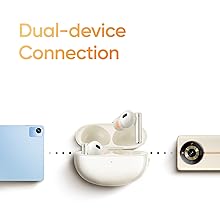
Image: 6-Mic Call Noise Cancellation diagram.

Image: Battery life information for the earbuds and charging case.
Warranty Information
The realme Buds Air 5 Pro comes with a 1-year manufacturer warranty from the date of purchase. This warranty covers manufacturing defects under normal use. Please retain your proof of purchase for warranty claims.
The warranty does not cover damage caused by misuse, accidents, unauthorized repairs, or normal wear and tear. For detailed warranty terms and conditions, please refer to the official realme website or contact customer support.
Customer Support
For further assistance, technical support, or warranty claims, please contact realme customer service through their official website or the realme Link app. Ensure you have your product model number (RMA2120) and proof of purchase ready.
Online Resources:
- Visit the official realme website for FAQs and support articles.
- Utilize the realme Link app for firmware updates and personalized settings.