Introduction
The Dyson Purifier Big+Quiet Formaldehyde is engineered to purify large spaces, projecting air over 32 feet. It features advanced 360 HEPA H13 grade filtration, capturing 99.97% of fine particles, and effectively removes gases, odors, and permanently destroys formaldehyde. This manual provides essential information for setting up, operating, and maintaining your purifier.

Image: The Dyson Purifier Big+Quiet Formaldehyde BP03 unit with its remote control.
Safety Information
Always read and follow all safety instructions before operating the appliance. Keep the appliance out of reach of children. Do not use the appliance near water or in wet environments. Ensure the power cord is not damaged and is properly plugged into a suitable outlet. Unplug the appliance before cleaning or performing any maintenance.
What's in the Box
Your Dyson Purifier Big+Quiet Formaldehyde BP03 package includes the following components:
- BP03 Purifier Unit
- HEPA H13 grade filter
- Activated carbon filter
- Power Cord
- Remote Control

Image: Components included in the Dyson Purifier Big+Quiet Formaldehyde BP03 box, showing the purifier, remote, HEPA filter, and activated carbon filter.
Setup
- **Unpacking:** Carefully remove all components from the packaging.
- **Filter Installation:**
- Ensure the purifier is unplugged.
- Locate the filter compartment, typically at the base of the unit.
- Insert the HEPA H13 grade filter and the activated carbon filter according to the markings.
- Close the filter compartment securely.
- **Placement:** Place the purifier on a stable, level surface, ensuring adequate clearance around the unit for optimal airflow. The unit is designed to project air over 32 feet.
- **Power Connection:** Plug the power cord into a suitable electrical outlet.
- **App Connection (Optional):** Download the MyDyson app to control and monitor your air quality from anywhere. The app requires Wi-Fi or mobile data, Bluetooth 4.0 support, and iOS version 10 or Android version 5 (or above).
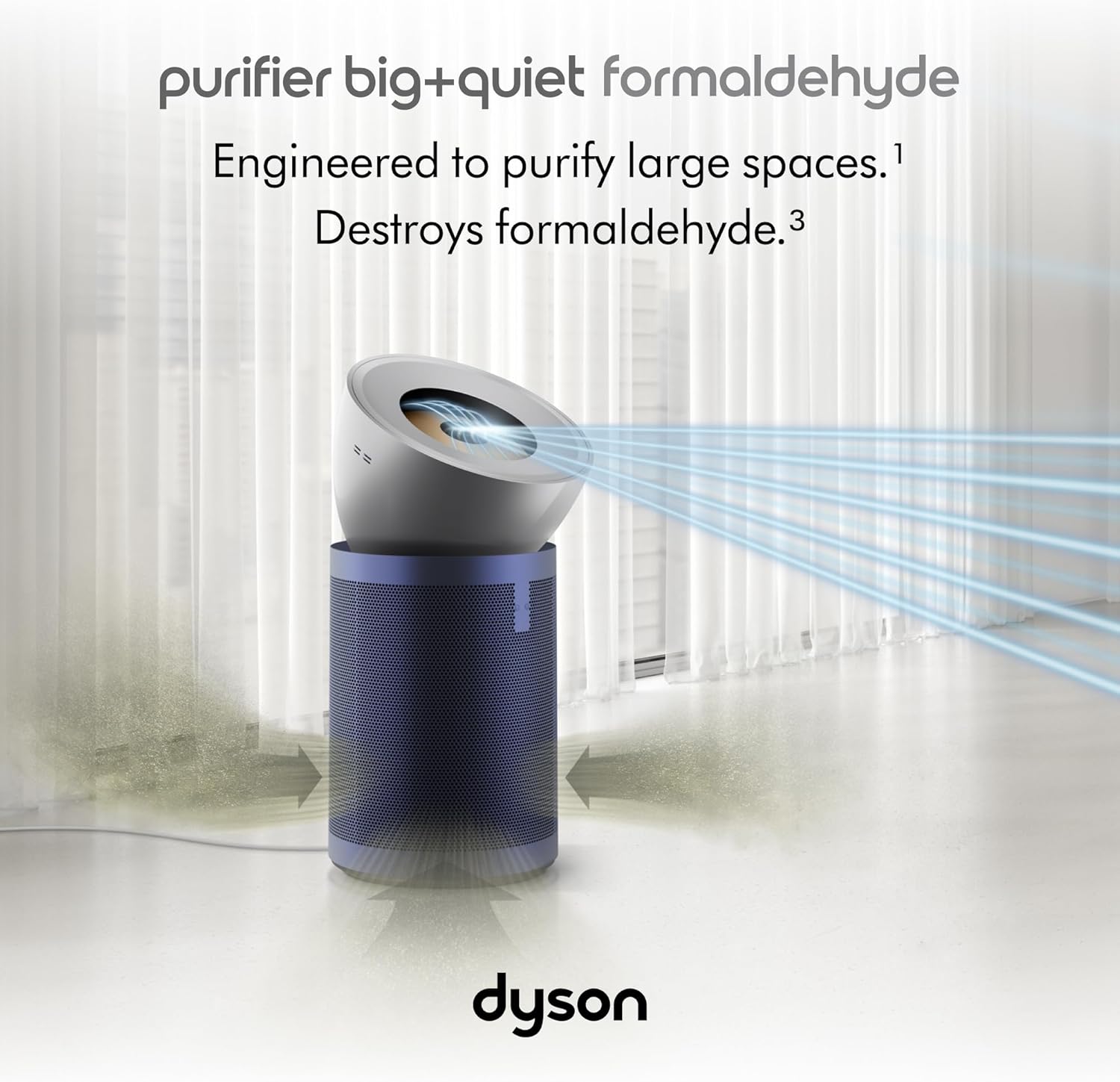
Image: The Dyson Purifier Big+Quiet Formaldehyde BP03 demonstrating its air projection capability in a large room.
Operating Instructions
Your Dyson Purifier Big+Quiet Formaldehyde BP03 can be operated using the included remote control or the MyDyson app.
Remote Control Functions
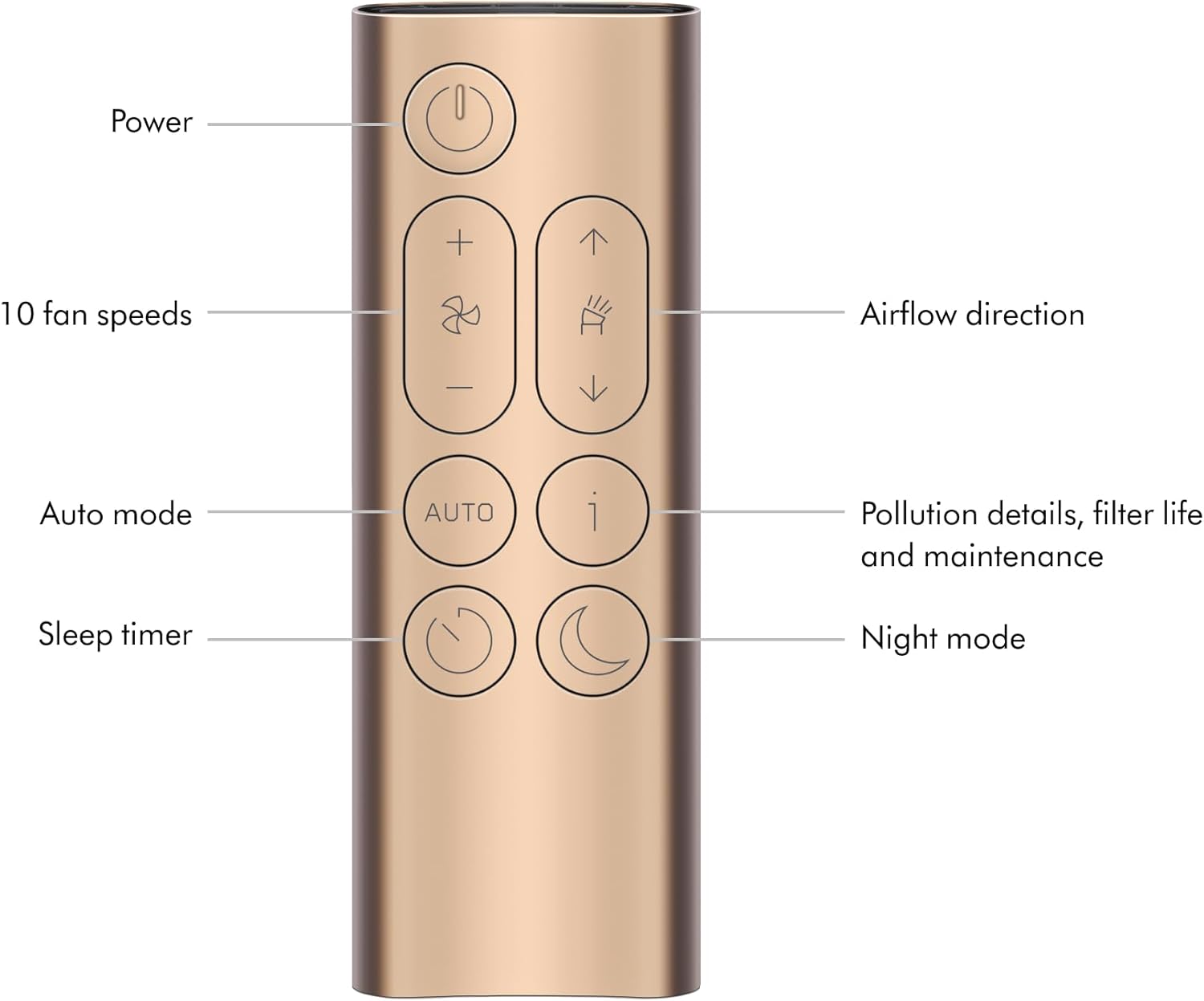
Image: Detailed view of the Dyson Purifier remote control with labeled buttons.
- **Power Button:** Turns the purifier on or off.
- **Fan Speed Control (+/-):** Adjusts the airflow intensity (10 fan speeds available).
- **Airflow Direction (Up/Down Arrows):** Changes the direction of purified air projection.
- **Auto Mode:** Automatically adjusts fan speed based on detected air quality.
- **Information Button (i):** Displays pollution details, filter life, and maintenance alerts on the LCD screen.
- **Sleep Timer:** Programs the machine to turn off after preset intervals (30 minutes to 8 hours).
- **Night Mode:** Monitors and purifies using the quietest settings with a dimmed display.
Automatic Sensing and Reporting
Integrated sensors, including a solid-state formaldehyde sensor, continuously analyze and diagnose airborne pollutants in real time. Results are displayed on the LCD screen of the unit and within the MyDyson app.
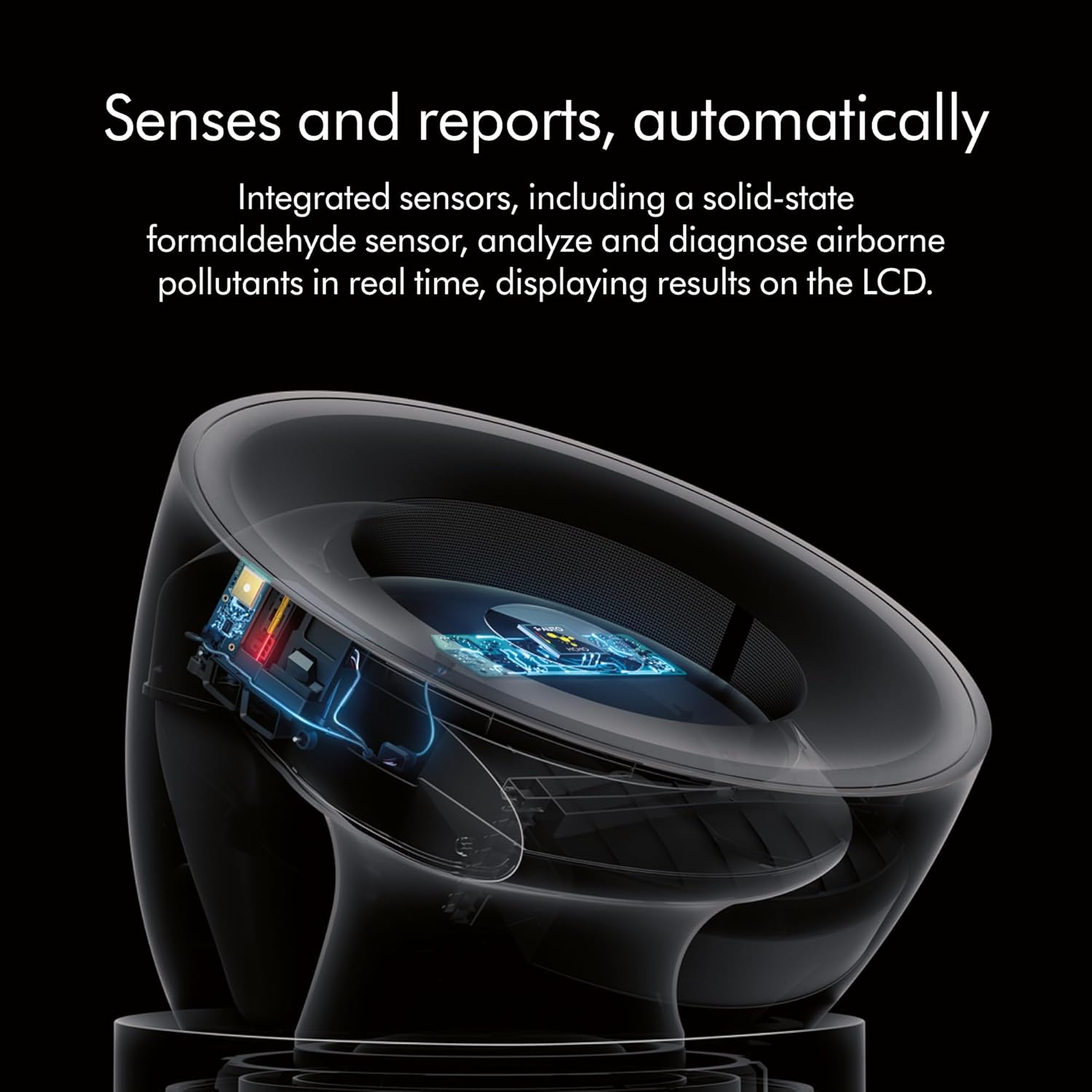
Image: An internal view of the Dyson Purifier highlighting its integrated sensors for real-time air quality analysis.

Image: Infographic detailing the purifier's features: largest room coverage, fully sealed HEPA filtration, automatic sensing and reporting, and connected app functionality.
Breeze Mode
Activate Breeze mode to simulate the feeling of natural, refreshing air indoors.
Quiet Operation
The Dyson Purifier Big+Quiet Formaldehyde is acoustically engineered to operate quietly, even at its highest power setting, ensuring minimal disruption.

Image: The Dyson Purifier operating quietly in a living room setting, demonstrating its low noise level.
Maintenance
Regular maintenance ensures optimal performance and longevity of your Dyson Purifier.
Filter Life and Replacement
The HEPA H13 grade filter is designed to last up to 5 years, and the activated carbon filter lasts up to 2 years, depending on usage and air quality. The unit will notify you when filter replacement is needed. A hygienic replacement mechanism allows for easy disposal.

Image: A person demonstrating the filter replacement process for the Dyson Purifier, showing the base unit and the cylindrical filter.
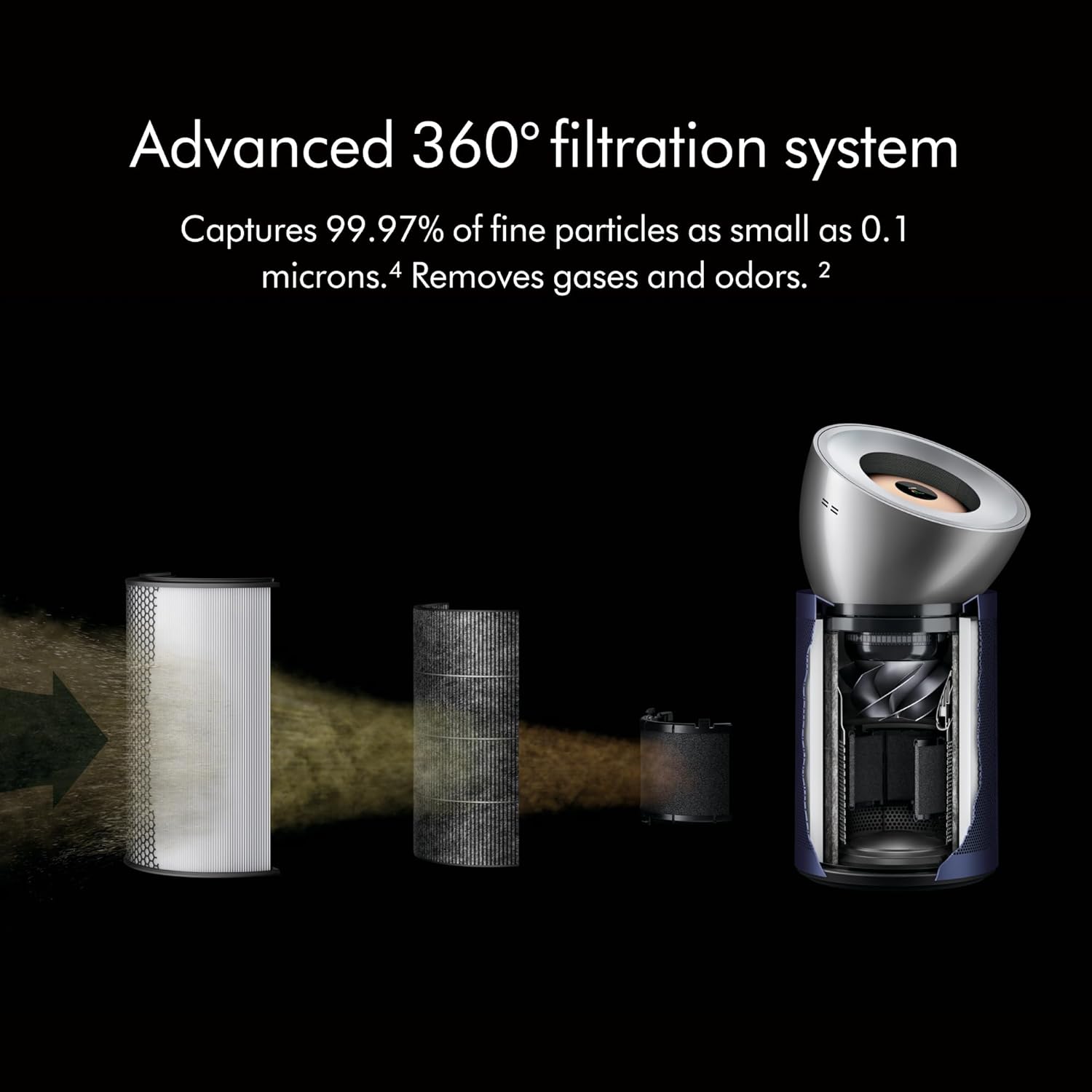
Image: A diagram illustrating the advanced 360-degree filtration system of the Dyson Purifier, showing air entering, passing through filters, and exiting purified.
Cleaning
Wipe the exterior of the purifier with a soft, dry cloth. Do not use cleaning agents or polishes as they may damage the surface. Ensure the unit is unplugged before cleaning.
Troubleshooting
| Problem | Possible Cause | Solution |
|---|---|---|
| Purifier not turning on | No power supply; Power cord not properly connected. | Check power outlet; Ensure power cord is securely plugged in. |
| Poor air purification performance | Filters are dirty or need replacement; Obstruction to airflow. | Check filter life indicator and replace filters if necessary; Ensure air inlets/outlets are clear. |
| Unit is noisy | High fan speed setting; Obstruction in fan area. | Reduce fan speed; Check for and remove any obstructions. |
| MyDyson app not connecting | Wi-Fi issues; Bluetooth not enabled; App version outdated. | Ensure Wi-Fi is stable; Enable Bluetooth on your device; Update MyDyson app to the latest version. |
Specifications
- **Brand:** Dyson
- **Model:** BP03
- **Color:** Blue
- **Product Dimensions:** 16.34"D x 17.09"W x 32.68"H
- **Item Weight:** 26.2 pounds
- **Floor Area Coverage:** 98 Meters (approx. 1055 sq ft)
- **Filtration Type:** HEPA H13 Grade, Activated Carbon
- **Particle Retention Size:** 0.3 Micrometer
- **Controller Type:** Mobile App, Remote Control
- **UPC:** 885609026978
- **Manufacturer:** Dyson
Warranty and Support
For warranty information and product support, please refer to the official Dyson website or contact Dyson customer service. You can also find additional resources and a downloadable user manual (PDF) at Dyson User Manual (PDF).
Protection plans may be available for extended coverage. Please check with your retailer for details.


