
1. Introduction
Welcome to the instruction manual for your new Cooler Master QUBE 500 Flatpack Macaron ATX PC Mid-Tower. This innovative case is designed for enthusiasts and beginners alike, offering a highly customizable and modular building experience. Its unique flatpack design not only simplifies assembly but also contributes to a reduced environmental footprint. This manual provides essential information for setting up, operating, maintaining, and troubleshooting your PC case.
2. Key Features
- DIY For Everyone: Embrace a sustainable flatpack design for a fun and flexible building experience, perfect for both beginners and seasoned builders.
- Highly Customizable: Experience an unparalleled level of customizability to express your creativity.
- Fully Modular: Enjoy modular panels that simplify case prep. Each panel is individually removable, making maintenance a breeze.
- Full-Sized Specs, Pint-Sized Body: Despite its compact 33L size, it accommodates Mini-ITX to E-ATX for easy installation and future expansion.
- Components Clearance: Maximum supports CPU coolers up to 164mm, GPUs up to 365mm, and PSUs up to 332mm.
- Versatile Cooling: Stay ahead with versatile mounting options for a 280mm liquid cooler and up to 9 fans for optimal performance.
- USB 3.2 Gen 2x2 Type C: Integrated in the I/O panel is a USB 3.2 Type-C port.

Figure 2.1: Exploded view of the Cooler Master QUBE 500 components, illustrating its flatpack and DIY assembly nature.

Figure 2.2: The QUBE 500 case shown in four different customizable configurations, including HAF XB (lay down) mode, Test Bench mode, Plug-Atarian Top I/O mode, and South Paw Mirror mode.
3. Setup and Assembly
The Cooler Master QUBE 500 is designed for a straightforward and enjoyable assembly process. The case arrives in a flatpack, allowing you to build it from the ground up. Follow these general steps for initial setup:
3.1 Initial Assembly
- Unpack Components: Carefully unbox all flatpack panels and hardware. Organize them for easy access.
- Frame Assembly: Begin by assembling the main frame of the chassis according to the included visual guide. Ensure all screws are tightened securely.
- Panel Installation: Attach the modular panels. The QUBE 500 features individually removable panels for ease of access and maintenance.
- Feet Installation: Secure the case feet to the bottom of the chassis. These often require Phillips head screws.

Figure 3.1: An assembled Cooler Master QUBE 500 Flatpack Macaron case, showcasing its vibrant pink and teal panels and compact design.
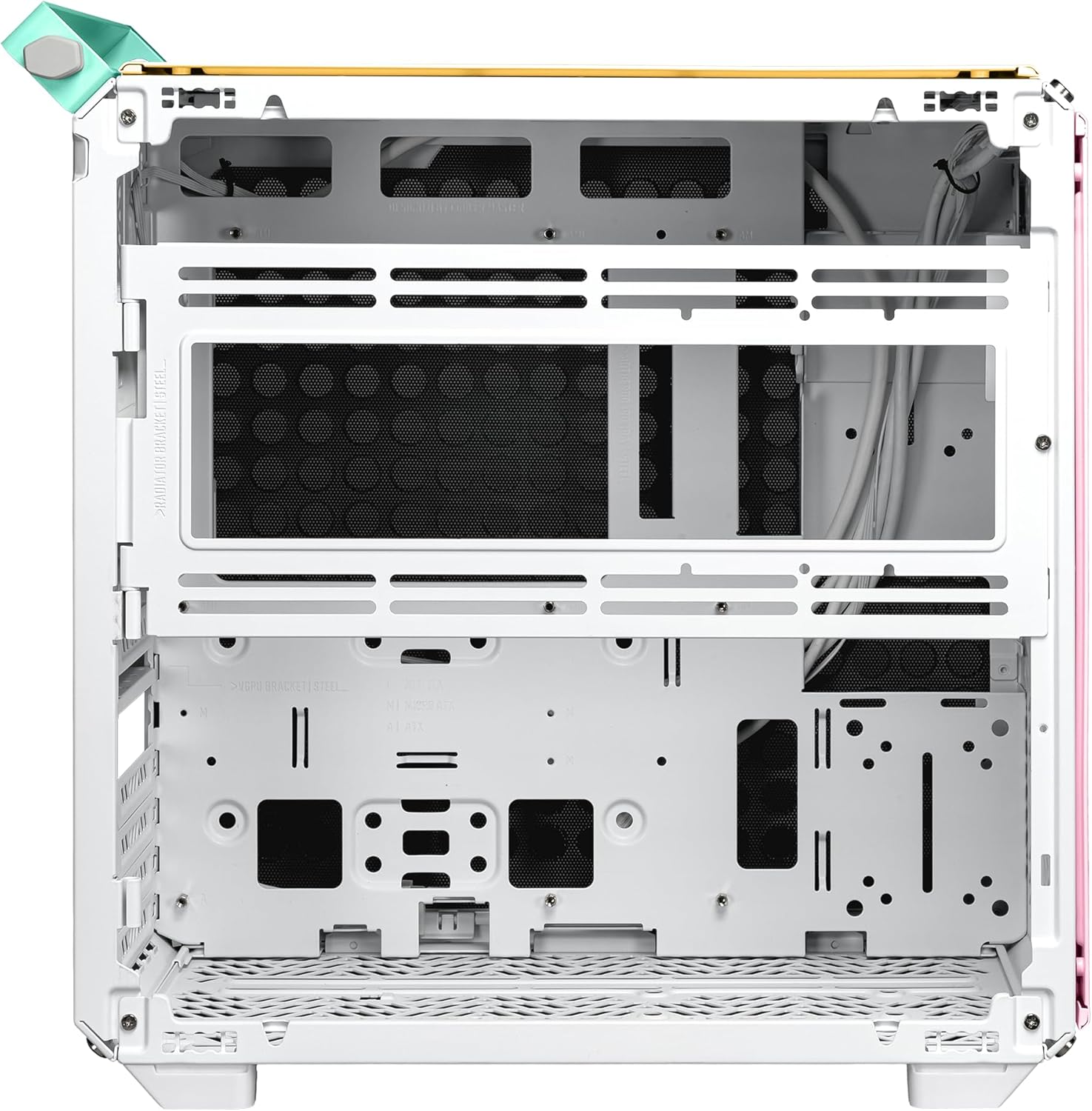
Figure 3.2: The interior of the QUBE 500 Macaron case, highlighting the spacious motherboard tray and various mounting points for components.
3.2 Component Installation
The QUBE 500 offers ample clearance for a wide range of components, from Mini-ITX to E-ATX motherboards.
Motherboard
Install your motherboard onto the pre-installed standoffs. The modular design allows for easy access during this step. Ensure all necessary power and data cables are routed efficiently.
Power Supply (PSU)
The case supports PSUs up to 332mm. Consider a fully modular PSU for better cable management. The PSU can be mounted in various positions to optimize space and airflow.
Graphics Card (GPU)
The QUBE 500 accommodates GPUs up to 365mm in length. Ensure proper clearance, especially if using a large air cooler or front-mounted radiator.
Cooling Solutions
The case supports CPU coolers up to 164mm in height. For liquid cooling, it offers versatile mounting options for a 280mm liquid cooler and up to 9 fans for optimal thermal performance.

Figure 3.3: Visual guide to maximum component clearances: 164mm for CPU coolers, 365mm for GPUs, and 332mm for PSUs.

Figure 3.4: Illustration of the QUBE 500's versatile cooling capabilities, supporting a 280mm liquid cooler and various fan configurations (140mm and 120mm).
4. Operating Instructions
Once your system is fully assembled and connected, operating the Cooler Master QUBE 500 is straightforward.
4.1 Power On/Off
Locate the power button on the top I/O panel. Press it firmly to power on your system. To power off, use your operating system's shutdown function or press and hold the power button for several seconds.
4.2 Front I/O Ports
The top I/O panel provides convenient access to essential ports:
- USB 3.2 Gen 2x2 Type-C: For high-speed data transfer.
- USB 3.0 Ports: Two ports for connecting peripherals.
- Audio Jacks: Separate ports for headphones and microphone.

Figure 4.1: A close-up view of the top I/O panel, featuring a USB 3.2 Gen 2x2 Type-C port, two USB-A ports, and audio jacks for convenient connectivity.
5. Maintenance
Regular maintenance ensures optimal performance and longevity of your Cooler Master QUBE 500 case and its components.
5.1 Dust Filter Cleaning
The QUBE 500 is equipped with dust filters on various panels to prevent dust accumulation inside the case. These filters are designed for easy removal and cleaning. Simply detach the magnetic filters (if applicable) or unclip the panels, gently clean them with compressed air or a soft brush, and reattach.
5.2 Panel Cleaning
The modular panels, including the tempered glass side panel, can be easily removed for thorough cleaning. Use a soft, lint-free cloth and a mild cleaning solution (e.g., glass cleaner for tempered glass) to wipe down surfaces. Avoid abrasive materials that could scratch the panels.
6. Troubleshooting
This section addresses common issues you might encounter during assembly or use of your QUBE 500 case.
- Cable Management: If you experience difficulties with cable management, especially with larger ATX power supplies or long graphics cards, consider using an SFX power supply for more room. Utilize the dedicated cable management channels behind the motherboard tray.
- Component Fit: Ensure all components adhere to the maximum clearance specifications (CPU cooler: 164mm, GPU: 365mm, PSU: 332mm). Double-check component dimensions before installation.
- Side Panel Security: If a side panel feels insecure or does not click into place firmly, re-examine the mounting points. Ensure all screws (if applicable) are properly tightened and that no cables are obstructing the panel's closure.
- Airflow Concerns: If you notice higher than expected component temperatures, verify that all fans are correctly installed and oriented for optimal airflow. Ensure dust filters are clean and not obstructing air intake.
7. Specifications
| Feature | Specification |
|---|---|
| Brand | Cooler Master |
| Series | QUBE 500 Flatpack Macaron |
| Model Number | Q500-DGNN-S00 |
| Item Weight | 22 pounds |
| Product Dimensions (LxWxH) | 18.11 x 9.09 x 16.33 inches |
| Color | Macaron |
| Material | Tempered Glass |
| Motherboard Compatibility | Extended ATX |
| Case Type | Mid Tower |
| Recommended Uses | Business, Gaming |
| Power Supply Mounting Type | Bottom Mount |
| Cooling Method | Air, Water |
| Fan Size | 280 Millimeters (Liquid Cooler), 120mm/140mm (Fans) |
| Number of USB 3.0 Ports | 2 |
| USB 3.2 Gen 2x2 Type-C | 1 (Integrated in I/O panel) |
| Max CPU Cooler Height | 164mm |
| Max GPU Length | 365mm |
| Max PSU Length | 332mm |
8. Warranty and Support
For detailed warranty information and technical support, please refer to the official Cooler Master website or contact their customer service. Keep your proof of purchase for any warranty claims.


