1. Introduction
This manual provides detailed instructions for the safe and effective operation of your JINBEI TR-Q6II 2.4G Wireless Flash Trigger. Please read this manual thoroughly before use and retain it for future reference.
The JINBEI TR-Q6II is a versatile 2.4 GHz wireless flash trigger designed to provide precise control over compatible JINBEI flash units. It offers multiple shooting modes, high-speed synchronization, and broad camera hot shoe compatibility.
2. Product Overview
2.1 Key Features
- 2.4 GHz Wireless System: Stable and reliable wireless communication with 32 channels and GR groups (A/B/C/D/E/F) for independent flash control.
- Dual Shooting Modes: Supports automatic TTL (Through-The-Lens) mode for precise exposure and Manual (M) mode for full power control.
- Broad Camera Compatibility: Designed for use with Canon, Nikon, Fuji, Panasonic, and Olympus cameras via the hot shoe. Note: Not compatible with Sony cameras.
- Advanced Sync Functions: Includes First-Curtain Sync, Second-Curtain Sync, and High-Speed Sync (HSS) up to 1/8000s.
- Bluetooth Connectivity: Allows wireless control of trigger settings via a dedicated smartphone application (Apple and Android compatible).
- Upper Hot Shoe: Can trigger other brands of speedlites in slave mode when mounted on the TR-Q6II's upper hot shoe.
2.2 Components
The JINBEI TR-Q6II Wireless Flash Trigger consists of the main unit with an integrated hot shoe for camera mounting, an LCD display, control buttons, and an upper hot shoe for slave flash triggering.

Figure 1: Front view of the JINBEI TR-Q6II Wireless Flash Trigger, showing the LCD screen and control buttons.
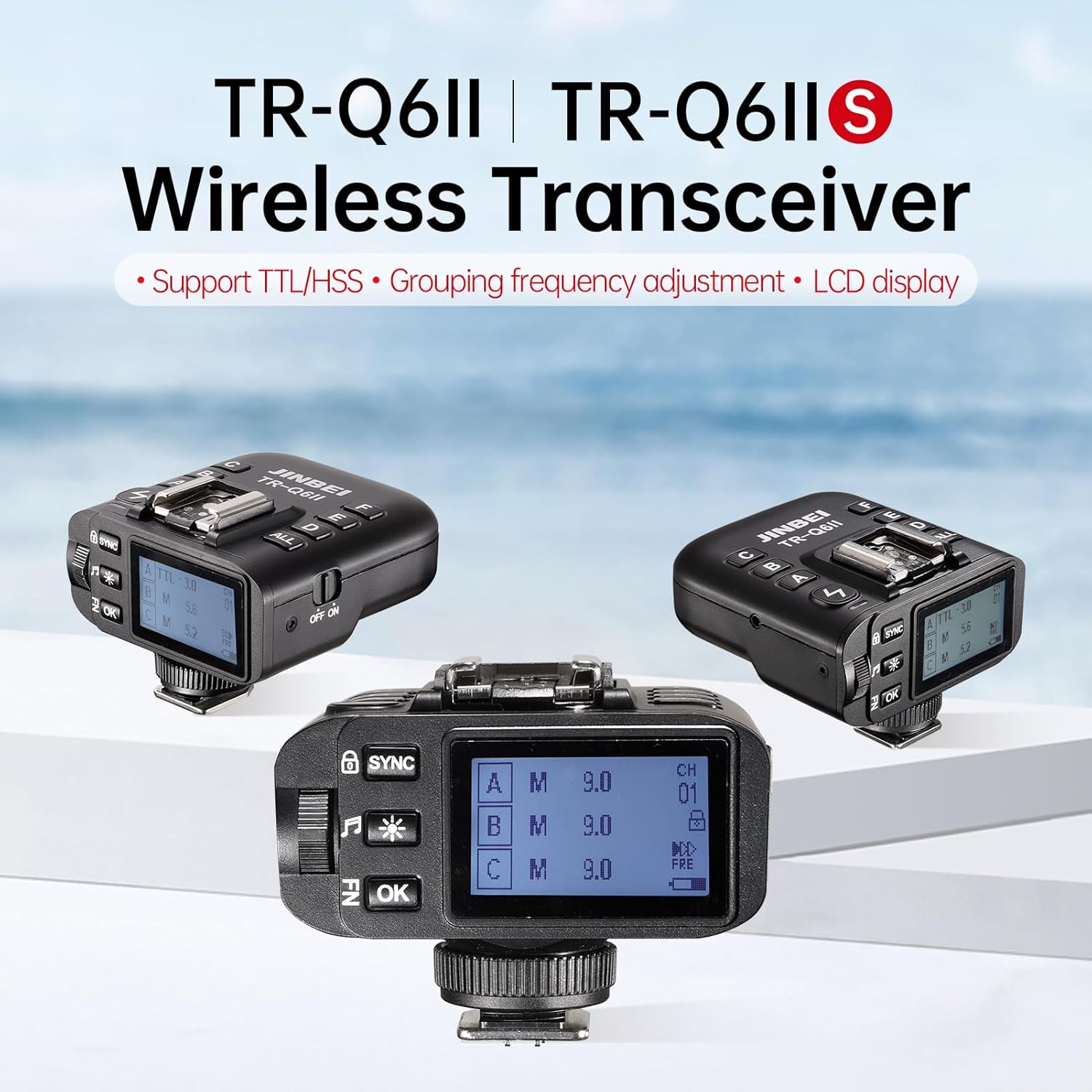
Figure 2: Overview of the TR-Q6II Wireless Transceiver, highlighting its support for TTL/HSS, grouping frequency adjustment, and LCD display.
3. Setup
3.1 Battery Installation
The TR-Q6II requires two AA alkaline batteries for operation. Batteries are not included with the product.
- Locate the battery compartment cover on the trigger.
- Open the cover and insert two AA batteries, ensuring correct polarity (+/-).
- Close the battery compartment cover securely.
3.2 Mounting on Camera
The TR-Q6II features an integrated hot shoe for mounting onto compatible cameras.
- Ensure your camera is powered off.
- Slide the TR-Q6II's hot shoe foot into your camera's hot shoe mount.
- Secure the trigger by tightening the locking wheel or lever (if present) on the trigger or camera hot shoe.

Figure 3: The TR-Q6II mounted on a camera, illustrating its universal hot shoe compatibility with various camera brands (Canon, Nikon, Fuji, Panasonic, Olympus).

Figure 4: The TR-Q6II transmitter integrated onto a camera hot shoe, highlighting features like 1/8000s High Speed Sync and TTL auto flash.
3.3 Power On/Off
To power on the TR-Q6II, slide the ON/OFF switch to the "ON" position. The LCD display will illuminate. To power off, slide the switch to the "OFF" position.
4. Operating Instructions
4.1 Basic Controls and Display
The TR-Q6II features an LCD display that shows current settings such as channel, group, and flash mode. Control buttons allow navigation and adjustment of parameters.
4.2 Wireless Flash Control
The TR-Q6II is designed to wirelessly control compatible JINBEI flash units. It operates on a 2.4 GHz frequency with 32 channels. Ensure your JINBEI flash units are set to the same channel and group as the TR-Q6II for proper communication.
Important Note: While the TR-Q6II is compatible with various camera hot shoes, its wireless control functionality is primarily designed for JINBEI brand flash units. It may not wirelessly control other brands of flashes. However, it can trigger other brands of speedlites in slave mode when those speedlites are mounted directly onto the TR-Q6II's upper hot shoe.
4.3 Shooting Modes (TTL and Manual)
- TTL (Through-The-Lens) Mode: In this automatic mode, the trigger communicates with your camera to determine the optimal flash power for correct exposure. This is ideal for fast-paced shooting where lighting conditions may change.
- Manual (M) Mode: Provides full control over flash power output. You can manually adjust the power level on the trigger, allowing for precise creative control over your lighting.

Figure 5: Demonstrates the TTL Auto Shooting Mode for accurate exposure and High-Speed Sync (HSS) at 1/8000s for capturing fast motion.
4.4 Synchronization Modes
- First-Curtain Sync: The flash fires at the beginning of the exposure.
- Second-Curtain Sync: The flash fires at the end of the exposure, often used for creative effects with moving subjects to show a trail of light behind them.
- High-Speed Sync (HSS): Allows the flash to synchronize with shutter speeds up to 1/8000s, enabling the use of flash in bright ambient light or with wide apertures.
4.5 Group Control
The TR-Q6II supports GR groups A/B/C/D/E/F, allowing you to control multiple flash units independently. This provides flexibility in shaping your lighting setup.

Figure 6: Illustrates independent grouping frequency adjustment and the mobile phone app for full-function wireless remote control via Bluetooth.
4.6 Bluetooth and App Control
The built-in Bluetooth functionality allows you to connect the TR-Q6II to your smartphone (compatible with both Apple and Android devices). Download the dedicated JINBEI app to wirelessly control all flash trigger settings, including power, groups, and modes, directly from your phone.
4.7 Upper Hot Shoe for Slave Triggering
The TR-Q6II features an upper hot shoe that can be used to trigger other brands of speedlites in slave mode. Mount the slave speedlite directly onto the TR-Q6II's upper hot shoe to utilize this function.

Figure 7: The TR-Q6II with its upper hot shoe, demonstrating its ability to synchronously flash with other brand speedlites in slave mode.
5. Maintenance
- Cleaning: Use a soft, dry cloth to clean the exterior of the trigger. Do not use liquid cleaners or solvents.
- Storage: Store the trigger in a cool, dry place away from direct sunlight and extreme temperatures. Remove batteries if the unit will not be used for an extended period to prevent leakage.
- Handling: Avoid dropping the trigger or subjecting it to strong impacts.
6. Troubleshooting
| Problem | Possible Cause | Solution |
|---|---|---|
| Trigger does not power on. | Batteries are dead or incorrectly inserted. | Replace with fresh AA batteries, ensuring correct polarity. |
| Flash units are not firing wirelessly. |
|
|
| High-Speed Sync (HSS) not working. | Camera or flash unit does not support HSS, or HSS is not enabled. | Check camera and flash unit manuals for HSS compatibility and activation. |
| Bluetooth connection issues. | Bluetooth is off on phone/trigger, or app is not installed/updated. | Ensure Bluetooth is active on both devices. Install or update the JINBEI app. |
7. Specifications
| Feature | Detail |
|---|---|
| Model | TR-Q6II |
| Wireless Frequency | 2.4 GHz |
| Channels | 32 |
| Groups | A/B/C/D/E/F |
| Shooting Modes | TTL (Auto), Manual (M) |
| Sync Modes | First-Curtain Sync, Second-Curtain Sync, High-Speed Sync (up to 1/8000s) |
| Camera Compatibility | Canon, Nikon, Fuji, Panasonic, Olympus (Not compatible with Sony) |
| Connectivity | Hot Shoe, Bluetooth |
| Power Source | 2 x AA Alkaline Batteries (not included) |
| Dimensions | 2.8 x 2.7 x 2.1 inches (approx.) |
| Weight | 7 ounces (approx.) |
| Manufacturer | JINBEI |
8. Warranty and Support
For warranty information and technical support, please refer to the documentation included with your product or visit the official JINBEI website. Contact details for customer service are typically available on the manufacturer's website.
Official JINBEI Store: JINBEI Amazon Store


