
SIBRILLE H107607
SIBRILLE Remote Controlled LED Floor Lamp 36W 2500LM User Manual
Model: H107607
Introduction
Thank you for purchasing the SIBRILLE Remote Controlled LED Floor Lamp. This manual provides essential information for the safe and efficient use of your new lamp. Please read it thoroughly before installation and operation, and keep it for future reference.

Image: The SIBRILLE LED Floor Lamp (Model H107607) illuminating a modern living room, showcasing its elegant design and warm light output.
Safety Instructions
- Ensure the power supply voltage matches the lamp's requirements before connecting.
- Do not disassemble or modify the lamp. This may cause damage and void the warranty.
- Keep the lamp away from water and high humidity environments.
- Do not cover the lamp with any materials while it is in operation to prevent overheating.
- Unplug the lamp from the power outlet before cleaning or performing any maintenance.
- This lamp is designed for indoor use only.
Package Contents
Please check the package contents upon opening to ensure all parts are present and undamaged:
- SIBRILLE LED Floor Lamp (Main Body)
- Remote Control
- Power Adapter
- User Manual (this document)
Setup Instructions
Follow these steps to assemble and set up your SIBRILLE LED Floor Lamp:
- Unpack Components: Carefully remove all parts from the packaging.
- Assemble Lamp Pole: Screw the lamp pole sections together clockwise until securely tightened. Ensure no wires are pinched during assembly.
- Attach Base: Connect the assembled lamp pole to the heavy base, twisting clockwise until firm.
- Connect Power: Insert the power adapter into the lamp's power input port, then plug the adapter into a standard wall outlet.
- Remote Control Pairing (Initial Setup):
Upon first use, the remote control may need to be paired with the lamp. Follow these steps:
- Ensure the lamp is plugged in and powered off (unplug and plug back in if unsure).
- Within 5 seconds of plugging in the lamp, press and hold the power button (⏻) on the remote control until the lamp flashes, indicating successful pairing.
- If pairing fails, unplug the lamp, wait 10 seconds, and repeat the process.
Operating Instructions
Your SIBRILLE LED Floor Lamp is controlled by the included remote. Familiarize yourself with the remote's functions:
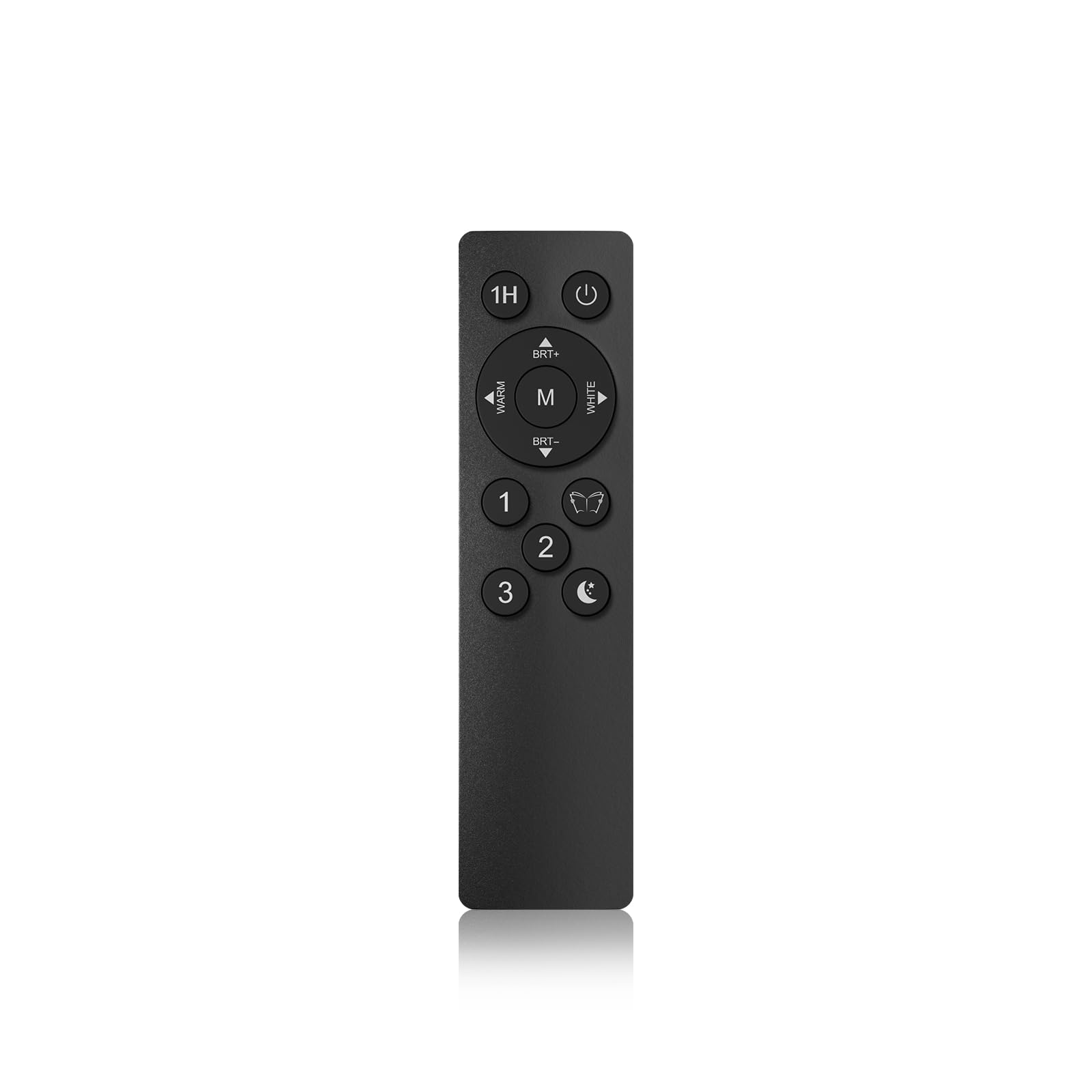
Image: The dedicated remote control for the SIBRILLE LED Floor Lamp, featuring buttons for power, brightness adjustment, color temperature control, and preset scene modes.
| Button | Function |
|---|---|
| ⏻ (Power) | Turns the lamp On or Off. |
| 1H | Activates a 1-hour timer, after which the lamp will automatically turn off. |
| BRT+ / BRT- | Increases / Decreases brightness. |
| WARM / WHITE | Adjusts color temperature between warm white and cool white. |
| M (Mode) | Cycles through preset lighting modes (e.g., reading, relaxation). |
| 1, 2, 3 | Customizable scene buttons. Press and hold to save current settings; short press to recall. |
| 📚 (Reading Mode) | Activates a bright, neutral white light suitable for reading. |
| 🌙 (Night Light Mode) | Activates a very dim, warm light for a soft night ambiance. |
Note: Some remote controls may have pairing instructions printed on a sticker on the back. Refer to these instructions if you encounter difficulties with initial pairing.
Maintenance
Proper maintenance ensures the longevity and optimal performance of your lamp:
- Cleaning: Before cleaning, always unplug the lamp from the power outlet. Use a soft, dry cloth to wipe down the lamp's surface. Do not use abrasive cleaners, solvents, or harsh chemicals, as these can damage the finish.
- Light Source: The LED light source is integrated and not user-replaceable. Do not attempt to replace the LEDs.
- Storage: If storing the lamp for an extended period, unplug it and store it in a cool, dry place, away from direct sunlight and moisture.
Troubleshooting
If you encounter issues with your SIBRILLE LED Floor Lamp, refer to the following common problems and solutions:
| Problem | Possible Cause / Solution |
|---|---|
| Lamp does not turn on. |
|
| Remote control does not work or connect. |
|
| Lamp flickers or brightness is inconsistent. |
|
Specifications
| Feature | Detail |
|---|---|
| Brand | SIBRILLE |
| Model Number | H107607 |
| Power | 36W |
| Luminous Flux | 2500LM |
| Connectivity Technology | High Frequency (RF) |
| Controller Type | Remote Control |
| Maximum Range | 10 Meters |
| Product Dimensions | 3.8 x 1.4 x 15 cm (Remote Control); 40 Grams (Remote Control) |
| Compatible Devices | LED Floor Lamp (specific SIBRILLE models) |
| UPC | 799408477780 |
Warranty and Support
SIBRILLE products are manufactured to high-quality standards. For warranty information or technical support, please refer to the warranty card included with your purchase or visit the official SIBRILLE website. Please have your model number (H107607) and purchase details ready when contacting support.
For further assistance, you may also contact the retailer where you purchased the product.
Ask a question about this manual
Ask about setup, troubleshooting, compatibility, parts, safety, or missing instructions. Manuals+ will review the question and use this page’s manual context to help answer it.