
Looki LKI-Dispenser
Looki Hot Water Dispenser 3.0L - Model LKI-Dispenser
Your comprehensive guide to operating and maintaining your Looki Hot Water Dispenser.
Introduction
The Looki Hot Water Dispenser is designed to provide instant hot water for various beverages and quick meals. Featuring a 3.0-liter capacity, a touch display, and 2600W power, it offers convenience and efficiency for daily use. This manual provides detailed instructions for setup, operation, maintenance, and troubleshooting to ensure optimal performance and longevity of your appliance.
1. Setup
1.1 Unpacking
Carefully remove all packaging materials from the dispenser. Ensure all components are present: the main unit, water reservoir, and drip tray. Retain packaging for future transport or storage if needed.
1.2 Placement
Place the dispenser on a stable, flat, and heat-resistant surface, away from direct sunlight and heat sources. Ensure there is adequate ventilation around the unit. Do not place it near the edge of a countertop where it could be easily knocked over.
1.3 Filling the Water Reservoir
Remove the water reservoir from the back of the unit. Fill it with clean, cold tap water up to the MAX fill line (3.0L). Do not overfill. Reattach the reservoir securely to the main unit.

Image: A hand pouring water into the transparent water reservoir of the Looki Hot Water Dispenser, illustrating the filling process.

Image: The Looki Hot Water Dispenser in use, dispensing hot water into a glass, showcasing its primary function.
1.4 Initial Use
Before first use, it is recommended to run a full cycle of hot water without any beverage to clean the internal components. Plug the power cord into a grounded electrical outlet. Place a large heat-resistant container under the dispenser spout. Select the highest temperature and maximum volume setting, then dispense. Discard this water. Repeat if desired.
2. Operating Instructions
2.1 Powering On/Off
Press the On/Off button on the touch display to power the unit on or off. The LED display will illuminate when the unit is on.
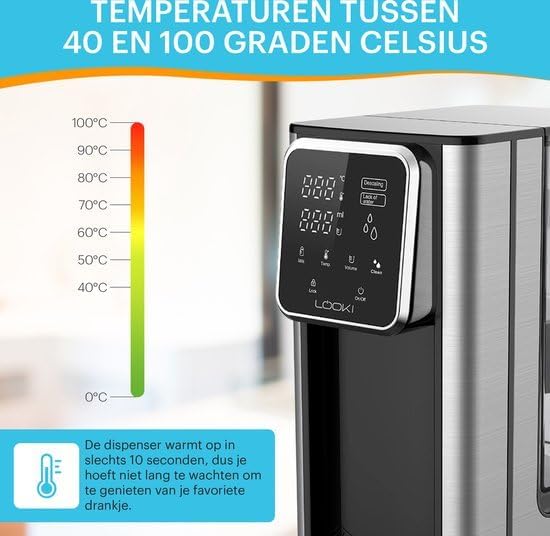
Image: A detailed view of the Looki Hot Water Dispenser's LED touch display, showing various icons for temperature, volume, milk function, and cleaning, with a hand interacting with the screen.
2.2 Adjusting Temperature
Use the Temp icon on the touch display to cycle through available temperature settings (e.g., 40°C to 100°C). Select the desired temperature for your beverage or meal.

Image: The Looki Hot Water Dispenser alongside a temperature scale ranging from 0°C to 100°C, highlighting its ability to dispense water at various temperatures within 10 seconds.
2.3 Adjusting Volume
Press the Volume icon to select the desired water volume to be dispensed. This feature helps in dispensing precise amounts of water.
2.4 Dispensing Hot Water
Place your cup or container under the spout. Once temperature and volume are set, press the Dispense button (often indicated by a water droplet icon or a large central button) to start dispensing. The dispenser will stop automatically once the selected volume is reached.

Image: A split image comparing the traditional method of boiling water with a kettle (top) versus the instant dispensing of hot water from the Looki Hot Water Dispenser (bottom), emphasizing convenience.
2.5 Milk Function (if applicable)
If your model includes a milk function, press the Milk icon to activate settings suitable for milk-based beverages. Refer to the display for specific instructions related to this function.
2.6 Safety Features
The Looki Hot Water Dispenser is equipped with automatic shut-off and overheat protection. The unit will automatically turn off if the water level is too low or if it detects overheating, ensuring safe operation.
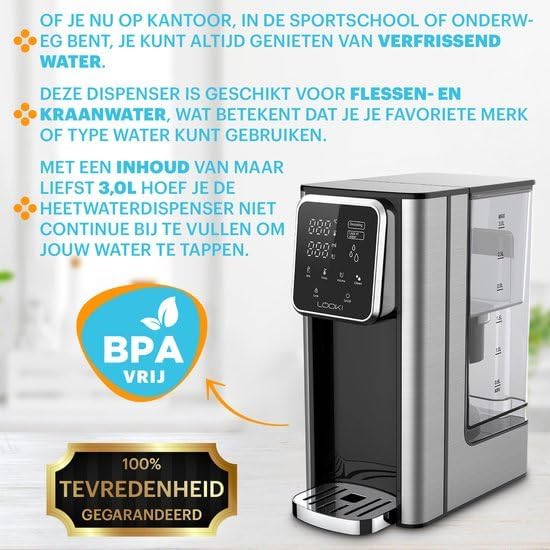
Image: A woman holding a cup of coffee next to the Looki Hot Water Dispenser, with icons below showing various uses like tea, coffee, hot chocolate, and bouillon, demonstrating versatility.
3. Maintenance
3.1 Cleaning
Regular cleaning ensures hygiene and extends the life of your dispenser. Unplug the unit before cleaning. Wipe the exterior with a soft, damp cloth. The drip tray can be removed and washed with warm, soapy water. Rinse thoroughly and dry before reattaching.
3.2 Self-Cleaning Function
The dispenser features an integrated self-cleaning function. Refer to the display for the Clean icon. Follow the on-screen prompts to initiate the cleaning cycle. This function helps to flush out internal components.
3.3 Descaling
Over time, mineral deposits (limescale) can build up, especially in hard water areas. The display may show a "Descaling" or "Calc" indicator. To descale, use a descaling solution specifically designed for hot water appliances, following the product's instructions. Alternatively, a mixture of white vinegar and water can be used (e.g., 1 part vinegar to 2 parts water). Fill the reservoir with the descaling solution, run a full cycle, then rinse by running several cycles with fresh water.
4. Troubleshooting
| Problem | Possible Cause | Solution |
|---|---|---|
| No water dispensed. | Water reservoir empty or not properly seated. | Fill the water reservoir. Ensure it is securely placed. |
| Water not hot enough. | Incorrect temperature setting. Limescale buildup. | Check temperature setting. Perform descaling. |
| "Descaling" or "Calc" indicator on. | Limescale buildup detected. | Perform a descaling cycle as per maintenance instructions. |
| Unit not powering on. | Not plugged in. Power outlet issue. | Ensure power cord is securely plugged in. Test outlet with another appliance. |
If the problem persists after attempting these solutions, please contact customer support.
5. Specifications
- Model Number: LKI-Dispenser
- Brand: Looki
- Capacity: 3.0 Liters
- Wattage: 2600 Watts
- Voltage: 240 Volts
- Color: Black
- Product Dimensions: 26 x 15 x 30 cm
- First Available Date: September 21, 2023
6. Warranty and Support
This Looki Hot Water Dispenser comes with a 24-month warranty from the date of purchase, covering manufacturing defects. Please retain your proof of purchase for warranty claims.
For technical support, troubleshooting assistance, or warranty inquiries, please contact Looki customer service. Refer to the product packaging or the Looki official website for the most up-to-date contact information.
Manufacturer: Looki
Ask a question about this manual
Ask about setup, troubleshooting, compatibility, parts, safety, or missing instructions. Manuals+ will review the question and use this page’s manual context to help answer it.