
1. Introduction
Thank you for choosing the iWALK MAG-X 10000mAh Magnetic Wireless Power Bank. This compact and powerful device is designed to provide convenient and efficient charging for your iPhone and Apple Watch simultaneously. It features strong magnetic alignment for optimal wireless charging and a versatile USB-C port for fast wired charging. Please read this manual carefully to ensure safe and proper use of your new power bank.
2. Product Overview
2.1 Key Features
- Simultaneous Charging: Wirelessly charge your iPhone and Apple Watch at the same time.
- Strong Magnetic Attachment: Ensures perfect alignment for efficient and stable wireless charging.
- Wide Compatibility: Supports Apple Watch SE/Ultra/8/7/6/5/4, iPhone 16/15/14/13/12 series, MagSafe-compatible phone cases, and AirPods.
- 10000mAh High Capacity: Provides multiple charges for your devices (e.g., approximately 2 charges for iPhone 14, up to 22 charges for Apple Watch, 26 charges for AirPods).
- USB-C PD Fast Charging: Offers fast wired charging output for various devices.
- Compact and Lightweight Design: Easy to carry for travel and daily use.
- Built-in Stand: Allows for hands-free viewing while charging your iPhone.
- Intelligent Temperature Control: Protects devices from overheating during charging.
- Airline-Friendly: Designed for safe travel.
2.2 Package Contents
- iWALK MAG-X Wireless Power Bank
- USB-C to USB-C Cable
- Instruction Manual (Welcome Guide)

Image: Package contents of the iWALK MAG-X power bank.
3. Setup
3.1 Initial Charging of the Power Bank
Before first use, fully charge the iWALK MAG-X power bank. Connect the provided USB-C to USB-C cable to the power bank's USB-C port and to a compatible USB-C power adapter (not included). The LED display will show the charging progress.
3.2 Power On/Off and Mode Selection

Image: Explanation of the power bank's switch and LED display.
- Power On: Press the side button once. The LED display will illuminate.
- Power Off: Double-click the side button.
- Low Current Mode: Press and hold the side button for 3 seconds to activate low current discharge mode. This mode is suitable for charging small devices like wireless earphones. Repeat the action to exit low current mode.
4. Operating Instructions
4.1 Charging iPhone (MagSafe Compatible)
Ensure your iPhone is MagSafe compatible (iPhone 12 series or newer) or is using a MagSafe-compatible case. Align the back of your iPhone with the magnetic charging area on the power bank. The strong magnets will snap your iPhone into perfect alignment, and wireless charging will begin automatically. The LED display will show the power bank's remaining charge.

Image: iWALK MAG-X power bank wirelessly charging an iPhone and Apple Watch simultaneously.
4.2 Charging Apple Watch
Place your Apple Watch on the dedicated wireless charging pad located on the top surface of the power bank. Ensure the watch is centered on the pad for optimal charging. Charging will start automatically.

Image: Apple Watch charging on the iWALK MAG-X, highlighting compatibility.
4.3 Simultaneous Charging
The iWALK MAG-X allows you to charge both your iPhone and Apple Watch at the same time. Simply place each device on its respective wireless charging area. You can also use the USB-C port to charge a third device simultaneously.
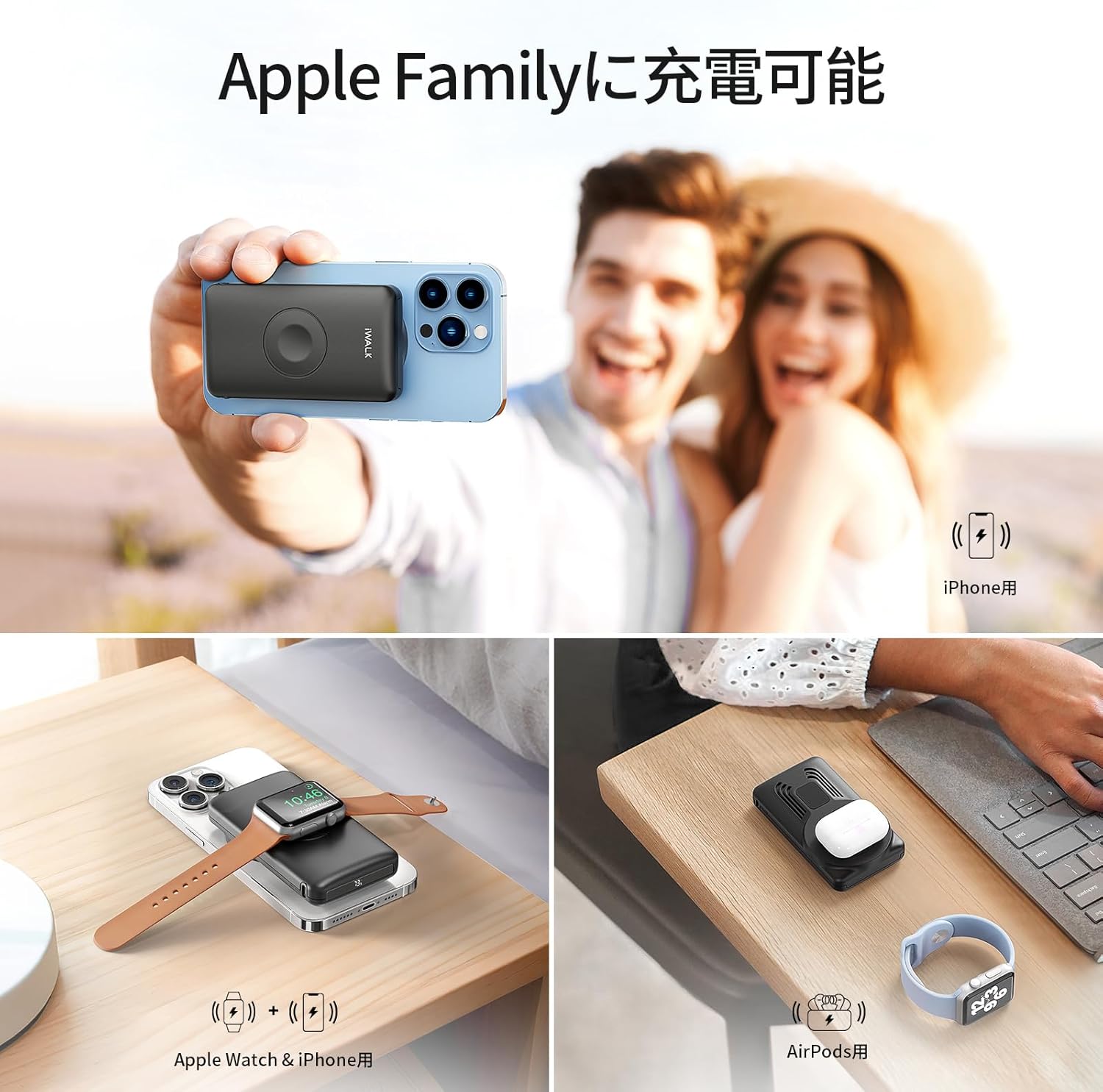
Image: The power bank charging an iPhone, Apple Watch, and AirPods.
4.4 Wired Charging
Connect your device (e.g., iPad, other smartphones) to the USB-C port on the power bank using a compatible USB-C cable. The power bank supports PD fast charging for efficient power delivery.

Image: Multiple devices charging simultaneously via wireless and wired connections.
4.5 Using the Built-in Stand
The iWALK MAG-X features a retractable stand. Extend the stand from the back of the power bank to prop up your iPhone, allowing for hands-free viewing in landscape or portrait mode while it charges.

Image: The power bank with its built-in stand and indication of airline compatibility.
5. Maintenance
- Keep the power bank dry and away from extreme temperatures (both hot and cold).
- Clean the device with a soft, dry cloth. Do not use harsh chemicals or abrasive materials.
- Store the power bank in a cool, dry place when not in use for extended periods.
- Avoid dropping or subjecting the device to strong impacts.
6. Troubleshooting
6.1 Device Not Charging
- Check Power Bank Charge: Ensure the iWALK MAG-X has sufficient charge. Refer to the LED display.
- Power On: Press the side button once to ensure the power bank is turned on.
- Alignment: For wireless charging, verify that your iPhone or Apple Watch is correctly aligned with the charging area.
- Cable Connection: For wired charging, ensure the USB-C cable is securely connected to both the power bank and your device.
- Phone Case: If using a phone case, ensure it is MagSafe compatible and not excessively thick, as this can interfere with wireless charging.
6.2 Slow Charging
- Alignment: Ensure optimal alignment for wireless charging.
- Low Current Mode: Check if low current mode is accidentally activated (indicated by a specific icon on the LED display). Press and hold the side button for 3 seconds to toggle this mode.
- Power Adapter: For charging the power bank itself, use a compatible fast charging adapter.
6.3 Power Bank Getting Hot
Some heat generation during charging is normal. If the power bank becomes excessively hot to the touch, discontinue use immediately and allow it to cool down. If the issue persists, contact customer support.

Image: Intelligent temperature control chip ensures safe charging.
6.4 Power Bank Not Turning On
- Attempt to charge the power bank for at least 30 minutes.
- If the issue persists after charging, contact customer support.
7. Specifications
| Feature | Detail |
|---|---|
| Model Number | MXB001 |
| Brand | iWALK |
| Battery Capacity | 10000mAh |
| Input Voltage | 12V |
| Output Current | 2A |
| Connectivity | USB Type C |
| Compatible Devices | Apple Watch SE/Ultra/8/7/6/5/4/Airpods, iPhone 14/13/12/11/XR/X/SE/8/7/6 Pro Max, iPhone 15 Series (iPhone 15, 15 Plus, 15 Pro, 15 Pro Max), iPhone 16 Series (iPhone 16, 16 Plus, 16 Pro, 16 Pro Max) |
| Product Dimensions | 14.4 x 10.2 x 3.9 cm |
| Product Weight | 0.34 kg |
| Compliance | PSE Certified |
8. Safety Information
Please adhere to the following safety guidelines to prevent damage to the device or personal injury:
- Do not expose the device to water, moisture, or flammable liquids.
- Avoid dropping, puncturing, or subjecting the device to strong impacts.
- Do not attempt to disassemble, repair, or modify the device. This will void the warranty and may cause safety hazards.
- Keep the power bank out of reach of children.
- If the battery appears swollen, emits an unusual odor, or shows any signs of damage, discontinue use immediately and dispose of it properly according to local regulations.
- Do not use the device in environments with extremely high or low temperatures.
9. Warranty and Support
For warranty information, technical support, or any inquiries regarding your iWALK MAG-X power bank, please refer to the official iWALK website or contact your authorized retailer. Please retain your proof of purchase for warranty claims.


