Introduction
This user manual provides comprehensive instructions for the assembly, operation, and maintenance of your new SMOOL Vanity with Lighted Mirror. Please read this manual thoroughly before beginning assembly or use to ensure safe and proper functionality. Keep this manual for future reference.
Safety Information
Your safety is paramount. Please adhere to the following guidelines:
- Electrical Safety: Be cautious while handling electrical components. Ensure the power outlet and LED bulbs are not left unattended or within reach of children and pets. Always unplug the vanity from the power source before cleaning or performing any maintenance.
- Stability: The vanity is designed for stability. Ensure all connections are secure during assembly to prevent wobbling or collapse. Do not climb on or apply excessive weight to the vanity.
- Placement: Place the vanity on a flat, stable surface. Avoid placing it in areas with high humidity or direct sunlight, which may damage the materials.
- Children and Pets: Keep small parts and tools away from children and pets during assembly. Do not allow children to play on or around the vanity.
- Cleaning: Use a dry cloth for cleaning. Avoid abrasive cleaners or harsh chemicals that may damage the finish or electrical components.
Package Contents
Before assembly, verify that all components listed below are present and undamaged. If any parts are missing or damaged, please contact customer support.

Image: Overview of the vanity packaging (Box A and Box B) and key dimensions of the main drawer and side drawers.
Main Components:
- Vanity Tabletop with Lighted Mirror (Pre-assembled mirror with LED bulbs)
- Vanity Desk Base (Left and Right drawer cabinets, central desk section)
- Cushioned Stool
- Power Outlet with USB Ports (Pre-installed in central section)
- 7 Drawers (1 large central, 6 smaller side drawers)
Hardware & Accessories:
- Crystal Ball Knobs (for drawers)
- Drawer Slides (pre-installed or requiring attachment)
- Assembly Screws and Fasteners (various types, refer to assembly steps)
- Assembly Tools (e.g., Allen wrench, screwdriver - may not be included, prepare your own)
Setup and Assembly Instructions
Assembly is required. It is recommended to have two people for certain steps. Please follow the steps carefully.
Video: A detailed guide on how to install the SMOOL Makeup Vanity Set, demonstrating each assembly step.
- Prepare the Workspace: Clear a spacious area. Lay out all parts and hardware, organizing them by type or number as indicated in the packing list.
- Assemble Side Cabinets: Attach the drawer slides to the side panels of the left and right cabinets. Secure the top and bottom panels to form the cabinet structures.
- Assemble Central Section: Attach the power outlet unit to the designated area within the central desk section. Connect the back panel.
- Connect Main Sections: Join the assembled left cabinet, central section, and right cabinet using the provided fasteners. Ensure all connections are tight and stable.
- Install Drawers: Assemble each drawer by attaching the front, back, and side panels, then sliding the bottom panel into place. Attach the crystal ball knobs to the drawer fronts. Insert the assembled drawers into their respective slides in the vanity frame.
- Attach Mirror Unit: Carefully place the lighted mirror unit onto the vanity tabletop. Secure it using the designated screws and brackets.
- Assemble Stool: Attach the legs of the stool to the cushioned seat using the provided hardware. Ensure the stool is stable before use.
- Final Checks: Verify all screws are tightened and the vanity is stable. Plug the power cord into a wall outlet.
Operating Instructions
Lighted Mirror Operation:
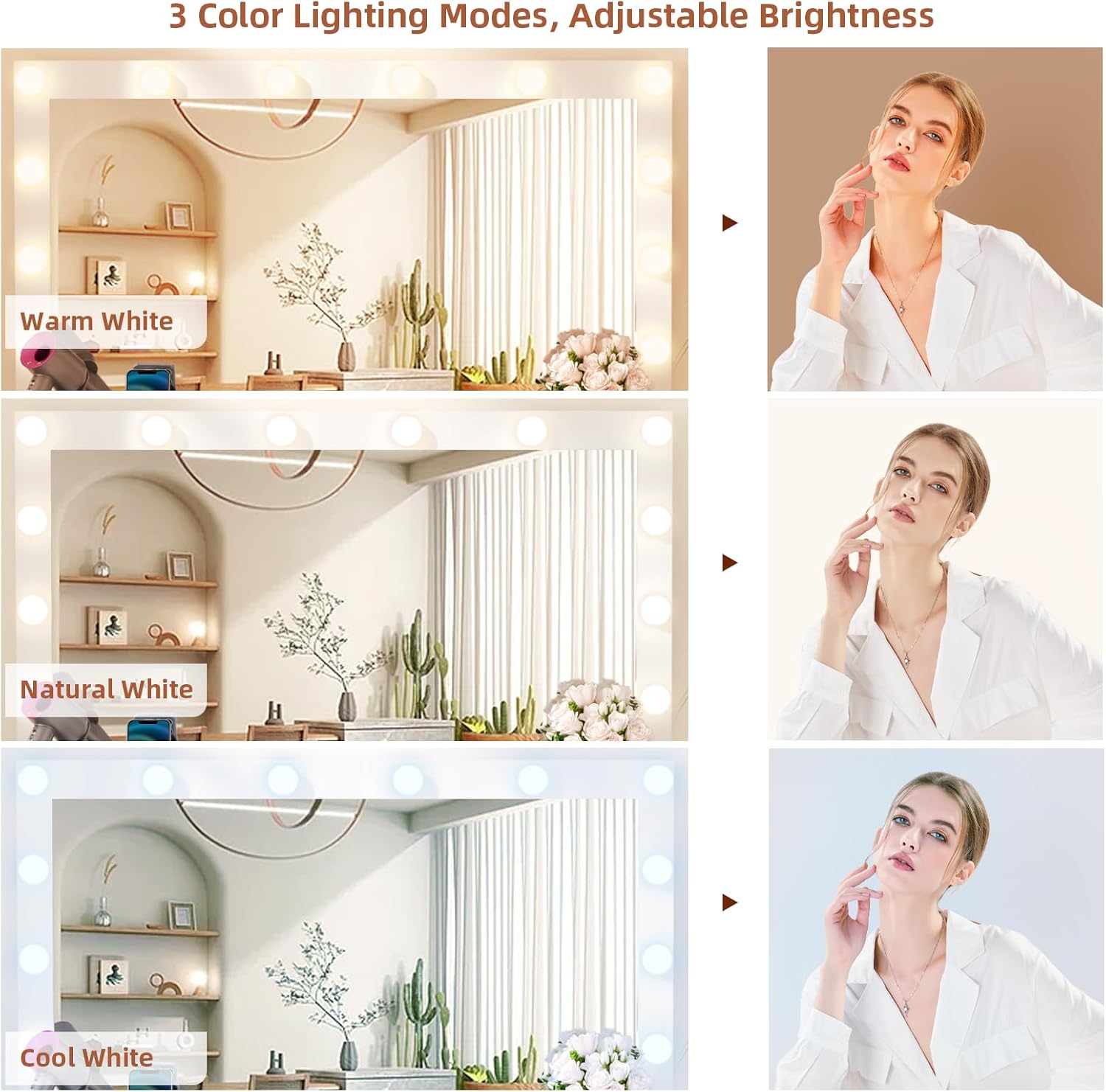
Image: Depicts the three available lighting modes: Warm White, Natural White, and Cool White, with adjustable brightness.
- Power On/Off: Locate the touch sensor on the mirror surface. Tap once to turn the lights on or off.
- Change Lighting Mode: With the lights on, tap the touch sensor repeatedly to cycle through the 3 color lighting modes: Warm Yellow, Warm White, and Cool White.
- Adjust Brightness: With the lights on, press and hold the touch sensor to adjust the brightness level. Release when the desired brightness is achieved.
Power Outlet and USB Ports:

Image: The SMOOL Vanity featuring a built-in power outlet with two standard sockets and two USB ports on the left side of the tabletop.
The vanity is equipped with 2 standard plug sockets and 2 USB ports for convenient charging of your devices and powering beauty tools.
- Plug in hair dryers, curling irons, beauty devices, or charge your phone directly from the vanity's built-in power strip.
- Ensure devices are compatible with the power output to prevent damage.
Maintenance
- Cleaning the Surface: Wipe the vanity surfaces with a soft, dry cloth. For stubborn marks, a slightly damp cloth with mild soap can be used, followed immediately by drying. Avoid harsh chemicals or abrasive cleaners.
- Mirror Care: Clean the mirror with a glass cleaner and a lint-free cloth. Do not spray cleaner directly onto the mirror; apply it to the cloth first.
- Drawer Maintenance: Periodically check drawer slides for smooth operation. If drawers become stiff, apply a small amount of silicone lubricant to the slides.
- Hardware: Regularly check all screws and fasteners to ensure they remain tight. Tighten if necessary to maintain stability.
- Electrical Components: Keep the power outlet and LED bulbs free from dust and debris. Do not attempt to repair or modify the electrical components yourself. Contact a qualified technician if issues arise.
Troubleshooting
| Problem | Possible Cause | Solution |
|---|---|---|
| Lights not turning on. | Not plugged in; power outage; faulty connection; touch sensor issue. | Ensure power cord is securely plugged into a working outlet. Check household circuit breaker. Verify all internal electrical connections are secure. Contact customer support if problem persists. |
| Lights flickering or dim. | Loose connection; power fluctuation; bulb issue. | Check power cord and internal connections. Ensure stable power supply. If individual bulbs are replaceable, check them. |
| Drawers are stiff or not sliding smoothly. | Misalignment; debris in slides; lack of lubrication. | Ensure drawers are correctly aligned on the slides. Clean any debris from the slides. Apply silicone lubricant to the drawer slides. |
| Vanity is wobbly. | Loose fasteners; uneven floor. | Tighten all assembly screws and bolts. Ensure the vanity is placed on a level surface. Use shims if necessary. |
Specifications
- Model: SMOOL-223
- Brand: SMOOL
- Color: Marble
- Frame Material: Engineered Wood
- Product Dimensions: 16"D x 44"W x 58"H (44" W x 16" D x 58" H)
- Item Weight: 122.4 pounds
- Lighting: 14 Premium Built-in LED Bulbs
- Lighting Modes: 3 Color (Warm Yellow, Warm White, Cool White), Adjustable Brightness
- Power Outlet: 2 Standard Plug Sockets, 2 USB Ports
- Drawers: 7 (1 large central, 6 deep side drawers)
- Assembly Required: Yes
- Product Care: Wipe with Dry Cloth
Warranty and Support
SMOOL products are manufactured with quality and customer satisfaction in mind. For specific warranty details, product support, or to report missing/damaged parts, please refer to the warranty card included with your purchase or visit the official SMOOL website.
You can also contact the seller directly through the platform where you purchased the product for assistance.


