
Wilprep SS-P1200WA-B
Wilprep Commercial Refrigerator User Manual
Model: SS-P1200WA-B (37 cu. ft., 2 Sliding Doors)

1. Introduction
Thank you for choosing the Wilprep Commercial Refrigerator. This manual provides essential information for the safe and efficient installation, operation, and maintenance of your new appliance. Please read this manual thoroughly before use and retain it for future reference.
This commercial display refrigerator is designed for storing and showcasing various beverages and packaged foods in commercial environments such as convenience stores, cafes, and restaurants. It features a 37 cu. ft. capacity with two sliding glass doors and LED lighting.
2. Safety Instructions
WARNING: To reduce the risk of fire, electric shock, or injury, follow these basic precautions:
- Read all instructions before using the appliance.
- This appliance must be properly installed and located in accordance with the Installation Instructions before it is used.
- Do not allow children to climb, stand, or hang on the shelves of the refrigerator. They could damage the refrigerator and seriously injure themselves.
- Do not store or use gasoline or other flammable vapors and liquids in the vicinity of this or any other appliance.
- Keep ventilation openings, in the appliance enclosure or in the built-in structure, clear of obstruction.
- Do not use mechanical devices or other means to accelerate the defrosting process, other than those recommended by the manufacturer.
- Do not damage the refrigerant circuit.
- Do not use electrical appliances inside the food storage compartments of the appliance, unless they are of the type recommended by the manufacturer.
Electrical Safety
- This appliance must be plugged into a grounded 110V, 60Hz electrical outlet.
- Do not use an extension cord.
- Do not operate the refrigerator with a damaged power cord or plug.
- Ensure the power cord is not pinched or damaged during installation.
- Always unplug the appliance before cleaning or performing any maintenance.
3. Setup
3.1 Unpacking
Carefully remove all packaging materials. Inspect the refrigerator for any shipping damage. Report any damage immediately to the carrier and your dealer. Do not discard packaging materials until the unit has been inspected.
3.2 Placement
- Place the refrigerator on a strong, level surface capable of supporting its weight when fully loaded.
- Ensure adequate ventilation around the unit. Maintain a minimum of 4 inches (10 cm) clearance from walls or other objects on all sides to allow for proper airflow and heat dissipation.
- Avoid placing the refrigerator in direct sunlight or near heat sources such as ovens, radiators, or heating vents.
- The ambient temperature should be between 60°F (16°C) and 90°F (32°C) for optimal performance.
3.3 Leveling
The refrigerator is equipped with casters for mobility. Ensure the unit is level to prevent door misalignment and ensure proper operation. Use the adjustable feet on the casters to level the unit if necessary.
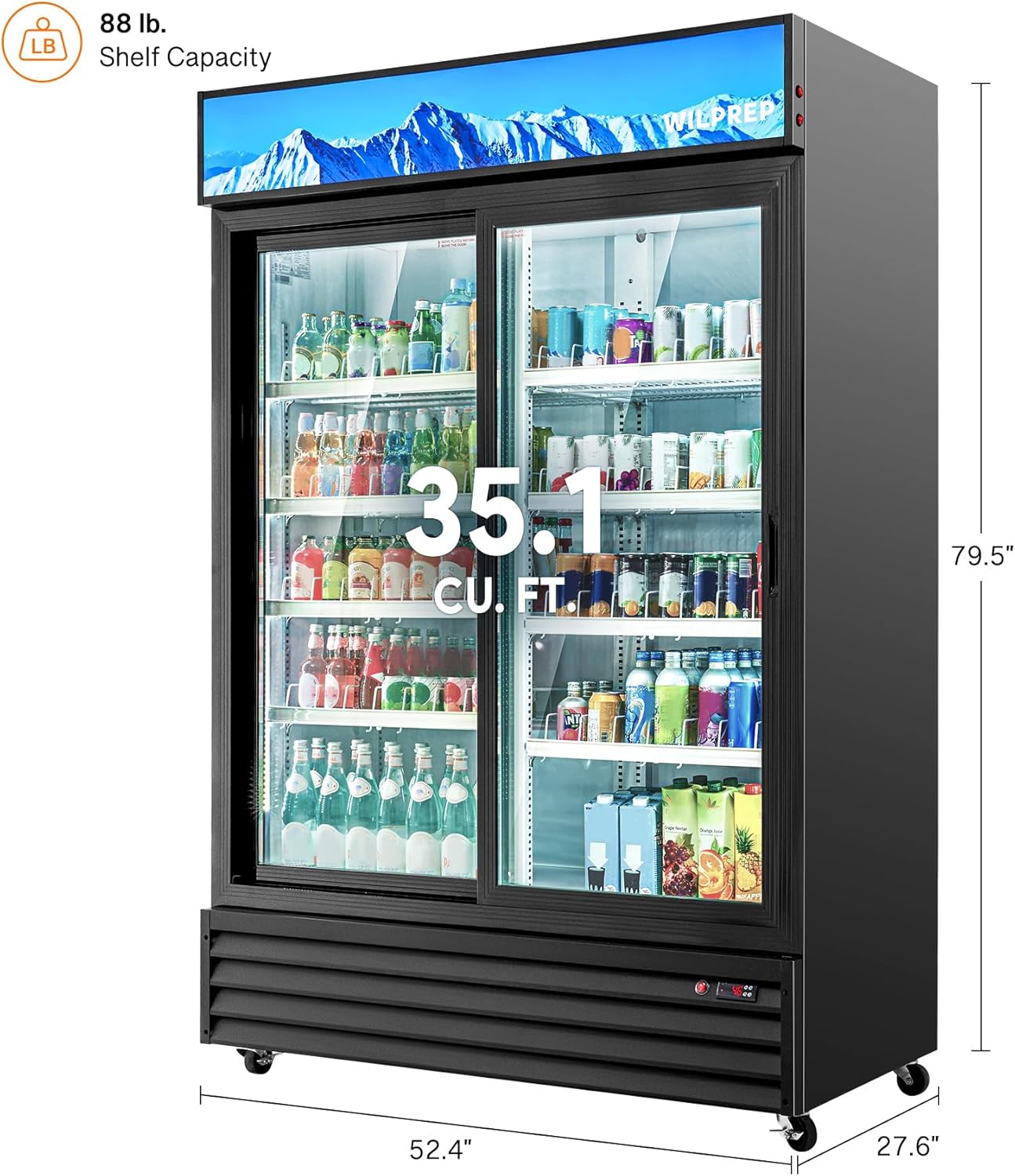
Image: Angled view of the Wilprep Commercial Refrigerator, highlighting its dimensions (52.4 inches width, 27.6 inches depth, 79.5 inches height) and 35.1 cubic feet capacity. The image also indicates an 88 lb. shelf capacity.
3.4 Electrical Connection
Plug the refrigerator into a dedicated 110V, 60Hz, grounded electrical outlet. Do not use a multi-outlet adapter or extension cord. Ensure the circuit is protected by a fuse or circuit breaker of appropriate amperage.
3.5 Initial Cleaning
Before first use, clean the interior and exterior of the refrigerator with a mild detergent and warm water. Rinse thoroughly and dry with a soft cloth. This removes any manufacturing residues.
3.6 Shelf Installation
The refrigerator comes with 8 adjustable and removable shelves. Install the shelves by inserting the shelf clips into the desired slots on the interior side walls, then placing the shelves onto the clips. Ensure shelves are level and securely in place before loading products.

Image: Front view of the empty Wilprep Commercial Refrigerator interior, showing the installed shelves and the ETL and ETL Sanitation Listed certifications on the right side.
3.7 Caster Installation
The refrigerator includes 4 casters for mobility. Attach the casters to the bottom of the unit using the provided hardware. Ensure all casters are securely fastened and locked once the unit is in its final position.
4. Operating Instructions
4.1 Initial Start-Up
After installation, allow the refrigerator to stand upright for at least 2 hours before plugging it in. Once plugged in, allow the unit to run empty for 2-4 hours to reach the desired temperature before loading products.
4.2 Control Panel and Temperature Settings
The refrigerator features a convenient digital temperature control panel. The adjustable temperature range is 32°F to 50°F (0°C to 10°C). Use the control buttons to set the desired temperature. Refer to the control panel diagram for specific button functions (usually up/down arrows for temperature adjustment, and a set button).

Image: A diagram illustrating user-friendly features including a convenient temperature control panel, flexible storage solutions with adjustable shelves, secure fridge locks, and lockable swivel casters.
4.3 Loading Products
- Arrange products to allow for proper air circulation. Do not block the air vents inside the refrigerator.
- Avoid overloading shelves. The maximum shelf capacity is 88 lbs.
- Ensure bottles and cans are stable to prevent tipping.

Image: The Wilprep Commercial Refrigerator in a commercial setting, showcasing its 35.1 cubic feet large capacity, capable of storing various items like bottled water, soft drinks, beers, energy drinks, fruit cups, and desserts.
4.4 LED Lighting
The refrigerator is equipped with built-in LED lights to illuminate the interior. These lights enhance product visibility. The lighting can typically be controlled via a switch on the control panel or near the top of the unit.

Image: A diagram highlighting the customizable lightbox, built-in LED lights for illumination, and fog-free glass doors for clear visibility, all contributing to an attractive beverage display.
5. Maintenance
Regular maintenance ensures optimal performance and extends the lifespan of your refrigerator.
5.1 Cleaning the Interior and Exterior
- Frequency: Monthly or as needed.
- Procedure: Unplug the unit. Remove all products and shelves. Wash interior surfaces with a solution of mild detergent and warm water. Rinse with clean water and dry thoroughly. Clean exterior surfaces with a soft cloth and mild detergent.
- Glass Doors: Use a glass cleaner for the sliding glass doors. Avoid abrasive cleaners that may scratch the surface.
5.2 Defrosting
This refrigerator features an automatic defrost system, eliminating the need for manual defrosting. Water from the defrost cycle is evaporated automatically.
5.3 Gasket Care
- Frequency: Quarterly or as needed.
- Procedure: Inspect door gaskets for cracks or tears. Clean gaskets with a mild detergent and warm water. Ensure they are flexible and seal properly to maintain cooling efficiency.
5.4 Condenser Coil Cleaning
- Frequency: Every 3-6 months, depending on the environment.
- Procedure: Unplug the unit. Locate the condenser coil (usually at the bottom rear or front behind a grille). Use a brush or vacuum cleaner to remove dust and debris from the coils. Clean coils improve cooling efficiency and reduce energy consumption.
6. Troubleshooting
Before contacting customer service, please review the following common issues and their solutions.
| Problem | Possible Cause | Solution |
|---|---|---|
| Refrigerator not cooling | Power supply issue Temperature setting too high Blocked condenser coils Door left open | Check power plug and outlet Adjust temperature to a lower setting Clean condenser coils Ensure doors are closed properly |
| Excessive noise | Unit not level Loose parts Fan obstruction | Level the unit using adjustable casters Check for and tighten any loose components Ensure nothing is obstructing the fan blades |
| LED lights not working | Light switch off Bulb failure Wiring issue | Check the light switch Contact customer service for bulb replacement Contact customer service for wiring inspection |
| Frost buildup on glass doors | High humidity Door gasket not sealing Frequent door opening | Ensure proper ventilation Inspect and clean door gaskets Minimize door opening frequency |
7. Specifications
| Feature | Specification |
|---|---|
| Brand | Wilprep |
| Model Number | SS-P1200WA-B |
| Capacity | 35.1 Cubic Feet (Effective Volume), 37 Cubic Feet (Fresh Food Capacity) |
| Dimensions (D x W x H) | 27.6 x 52.4 x 79.5 inches |
| Item Weight | 348.3 Pounds |
| Voltage | 110 Volts |
| Annual Energy Consumption | 1314 Kilowatt Hours Per Year |
| Temperature Range | 32-50°F (0-10°C) |
| Number of Doors | 2 (Sliding Glass Doors) |
| Defrost System | Automatic |
| Shelves | 8, Adjustable Metal |
| Special Features | Adjustable Shelves, LED Lighting, Customizable Lightbox, Lockable Swivel Casters |
| Certification | ETL, ETL Sanitation Listed |
| Included Components | 1 Merchandiser Refrigerator, 8 Shelves, 4 Casters, 1 Instruction Manual |
8. Warranty and Support
Wilprep products are manufactured to high-quality standards. For warranty information, technical support, or service inquiries, please contact Wilprep customer service. Keep your purchase receipt and model number handy when contacting support.
For further assistance, please visit the official Wilprep website or contact your authorized dealer.
Related documentsSS-P1200WA-B

Ask a question about this manual
Ask about setup, troubleshooting, compatibility, parts, safety, or missing instructions. Manuals+ will review the question and use this page’s manual context to help answer it.