
Introduction
Thank you for choosing Lekaby S2 Wireless Bluetooth Earbuds. This manual provides detailed instructions for setting up, operating, and maintaining your earbuds to ensure optimal performance and longevity. Please read this manual thoroughly before use.
Package Contents
Please check the package for the following items:
- Lekaby S2 Wireless Bluetooth Earbuds (Left and Right)
- Charging Case
- USB Type-C Charging Cable
- Silicone Ear Tips (S/M/L sizes)
- User Manual
Product Overview
The Lekaby S2 earbuds feature advanced Bluetooth 5.3 technology, HiFi stereo sound with 13mm drivers, and ENC noise reduction for clear calls. They are designed for comfort and durability with an IP7 waterproof rating.

Image: Lekaby S2 Wireless Bluetooth Earbuds and Charging Case. This image displays the earbuds within their charging case, highlighting key features such as Bluetooth 5.3, noise reduction, comfort, digital power display, voice assistant, and smart touch controls.
Key Features
- Bluetooth 5.3 Technology: Provides faster speed, more stable connection, and lower latency for an enhanced audio experience.
- HiFi Stereo Sound: Equipped with 13mm drivers and a triple-layer composite diaphragm for deep bass, solid mids, and clear highs. Supports AAC, SBC, and MSBC audio decoding.
- ENC Noise Reduction: Built-in ENC (Environmental Noise Cancellation) microphone reduces ambient noise by up to 40dB for clearer calls.
- Lightweight Design: Each earbud weighs approximately 4 grams, ensuring a comfortable and secure fit for extended wear.
- IP7 Waterproof: Resistant to daily splashes, sweat, and rain, making them suitable for sports and outdoor activities.
- LED Power Display: The charging case features an LED indicator that shows the battery status of both the case and the earbuds.

Image: Exploded view of Lekaby S2 earbud components. This diagram illustrates the internal structure of an earbud, highlighting the 13mm dynamic driver and ENC microphone for powerful bass and clear calls.
Charging
Before first use, fully charge the earbuds and the charging case.
Charging the Earbuds
- Place the earbuds into the charging case. Ensure they are correctly seated in their respective L/R slots.
- The LED indicators on the earbuds will show charging status.
Charging the Case
- Connect the USB Type-C charging cable to the charging port on the case.
- Connect the other end of the cable to a USB power adapter (not included) or a computer's USB port.
- The LED digital display on the case will show the charging progress (1-100%).
- A full charge for the case takes approximately 1 hour.
With a full charge, the earbuds provide 5-6 hours of playtime, and the charging case extends the total playtime to up to 48 hours.

Image: Lekaby S2 Charging Case with LED display and Type-C cable. This image illustrates the charging process, showing the digital power display on the case and the Type-C charging port. It also indicates battery life for earbuds and the case.
Setup & Pairing
First-Time Pairing
- Ensure the earbuds are charged.
- Open the charging case. The earbuds will automatically power on and enter pairing mode.
- On your device (smartphone, tablet, etc.), enable Bluetooth.
- Search for "S2" in the list of available Bluetooth devices and select it to connect.
- Once connected, you will hear a confirmation tone, and the earbuds will be ready for use.
Automatic Reconnection
After the initial pairing, the earbuds will automatically connect to the last paired device when you open the charging case, provided Bluetooth is enabled on your device and it is within range.
Touch Controls
The Lekaby S2 earbuds feature smart touch controls on each earbud for easy management of music, calls, and voice assistant.

Image: Lekaby S2 Smart Touch Control diagram. This diagram illustrates the various touch gestures for controlling music playback, calls, volume, and activating the voice assistant on both the left and right earbuds.
| Action | Gesture (L/R Earbud) |
|---|---|
| Play/Pause Music | Single tap (x1) |
| Next Track | Double tap (x2) on Right earbud |
| Previous Track | Double tap (x2) on Left earbud |
| Volume Up | Long press (Hold) on Right earbud |
| Volume Down | Long press (Hold) on Left earbud |
| Answer/End Call | Single tap (x1) |
| Reject Call | Double tap (x2) |
| Activate Voice Assistant (Siri/Google Assistant) | Triple tap (x3) |
Wearing the Earbuds
For optimal sound quality and comfort, choose the correct size of silicone ear tips and ensure a proper fit.
- Select the ear tips (S/M/L) that best fit your ear canals. A good seal improves bass response and noise isolation.
- Gently insert the earbud into your ear canal and rotate it slightly until it feels secure and comfortable.
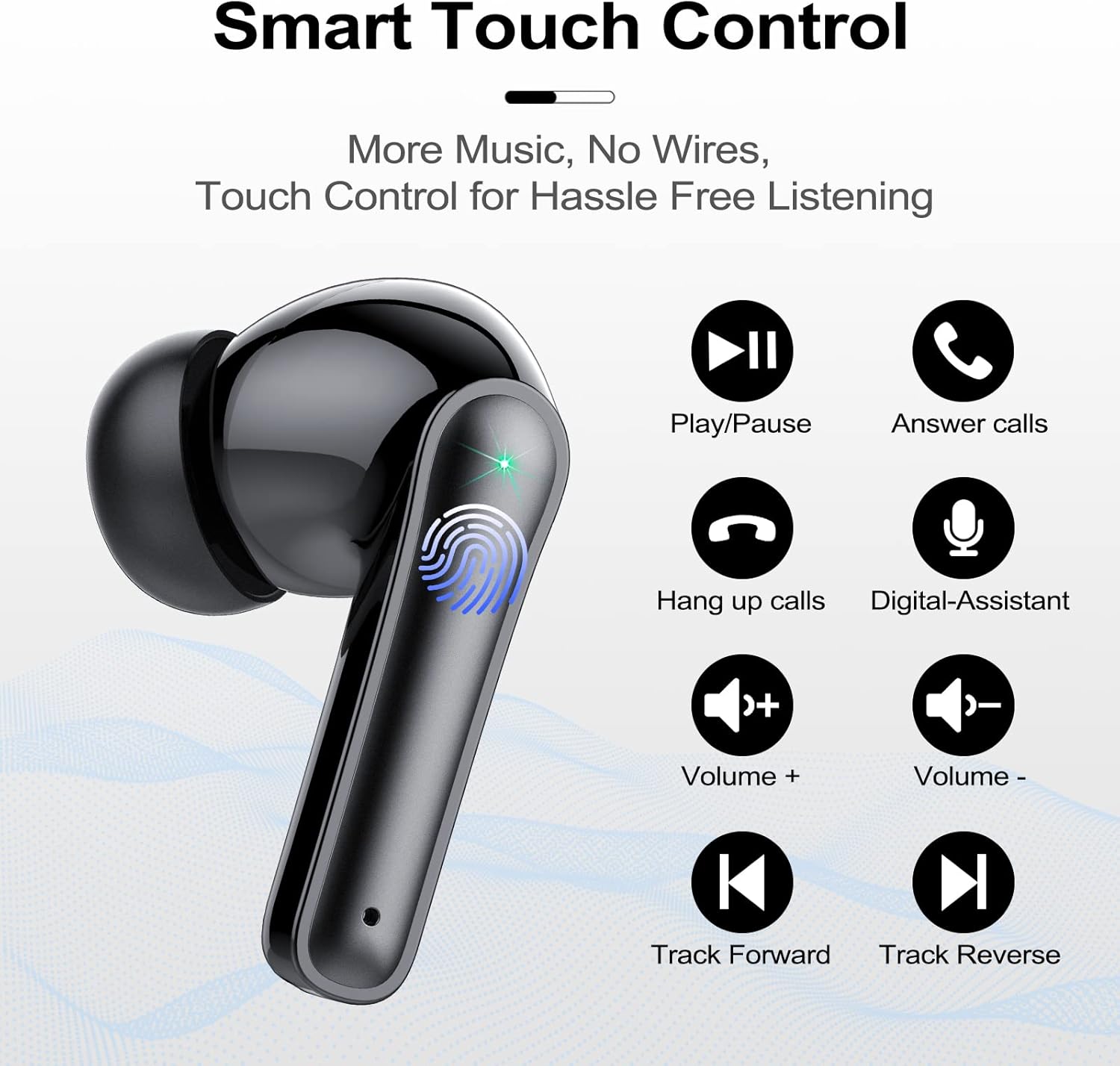
Image: Person wearing Lekaby S2 earbud. This image demonstrates how the lightweight earbud fits comfortably in the ear.
Maintenance
Proper maintenance ensures the longevity and performance of your earbuds.
- Cleaning: Regularly clean the earbuds, especially the ear tips and charging contacts, with a soft, dry, lint-free cloth. For stubborn dirt or earwax, use a cotton swab lightly dampened with rubbing alcohol.
- Storage: Always store the earbuds in their charging case when not in use to protect them from dust, damage, and to keep them charged.
- Water Exposure: While the earbuds are IP7 waterproof, avoid prolonged submersion in water. Dry them thoroughly before placing them back in the charging case.
- Avoid Extreme Temperatures: Do not expose the earbuds or charging case to extreme temperatures (hot or cold) or direct sunlight for extended periods.
Troubleshooting
If you encounter any issues, please refer to the following common problems and solutions:

Image: Troubleshooting guide for Lekaby S2 earbuds. This image provides visual solutions for common issues like earbuds not charging (clean contacts) and poor sound quality (choose correct ear tip size, clean earbud mesh).
| Problem | Solution |
|---|---|
| Earbuds not charging | Clean the charging contacts on both the earbuds and the charging case with a dry cotton swab or a small amount of rubbing alcohol. Ensure earbuds are properly seated in the case. |
| Poor sound quality (low bass, muffled sound) |
|
| Earbuds not pairing or connecting |
|
| Only one earbud working |
|
Specifications
| Feature | Detail |
|---|---|
| Model Name | S2 |
| Brand | Lekaby |
| Connectivity Technology | Wireless (Bluetooth 5.3) |
| Form Factor | In-Ear |
| Control Method | Touch |
| Water Resistance Level | IP7 (Waterproof) |
| Earbud Weight | Approx. 4 grams per earbud |
| Total Item Weight | Approx. 40 Grams (earbuds + case) |
| Battery Composition | Lithium-polymer |
| Earbud Playtime | 5-6 hours (single charge) |
| Total Playtime (with charging case) | Up to 48 hours |
| Charging Time (Case) | Approx. 1 hour (Type-C fast charge) |
| Special Features | Microphone included, ENC Noise Reduction, LED Digital Display |
| Compatible Devices | Various Bluetooth-enabled devices including smartphones (iPhone, Samsung, Huawei, Moto), tablets (iPad, Samsung Galaxy Tab), smartwatches, and computers (MacBook, iMac). |
Safety Information
Please read and follow these safety guidelines:
- Do not disassemble or modify the earbuds or charging case.
- Keep the device away from extreme temperatures, humidity, and corrosive materials.
- Avoid listening at high volume levels for extended periods to prevent hearing damage.
- Keep out of reach of children and pets.
- Dispose of batteries and electronic components responsibly according to local regulations.
Warranty and Support
Lekaby products are designed for reliability and performance. For warranty information or technical support, please refer to the warranty card included in your package or contact Lekaby customer service through the retailer where you purchased the product.