
Introduction
Thank you for choosing the LIGE Smartwatch BW1846A. This device is designed to enhance your daily life with smart features, health monitoring, and fitness tracking. Please read this manual carefully to ensure proper use and optimal performance of your smartwatch.
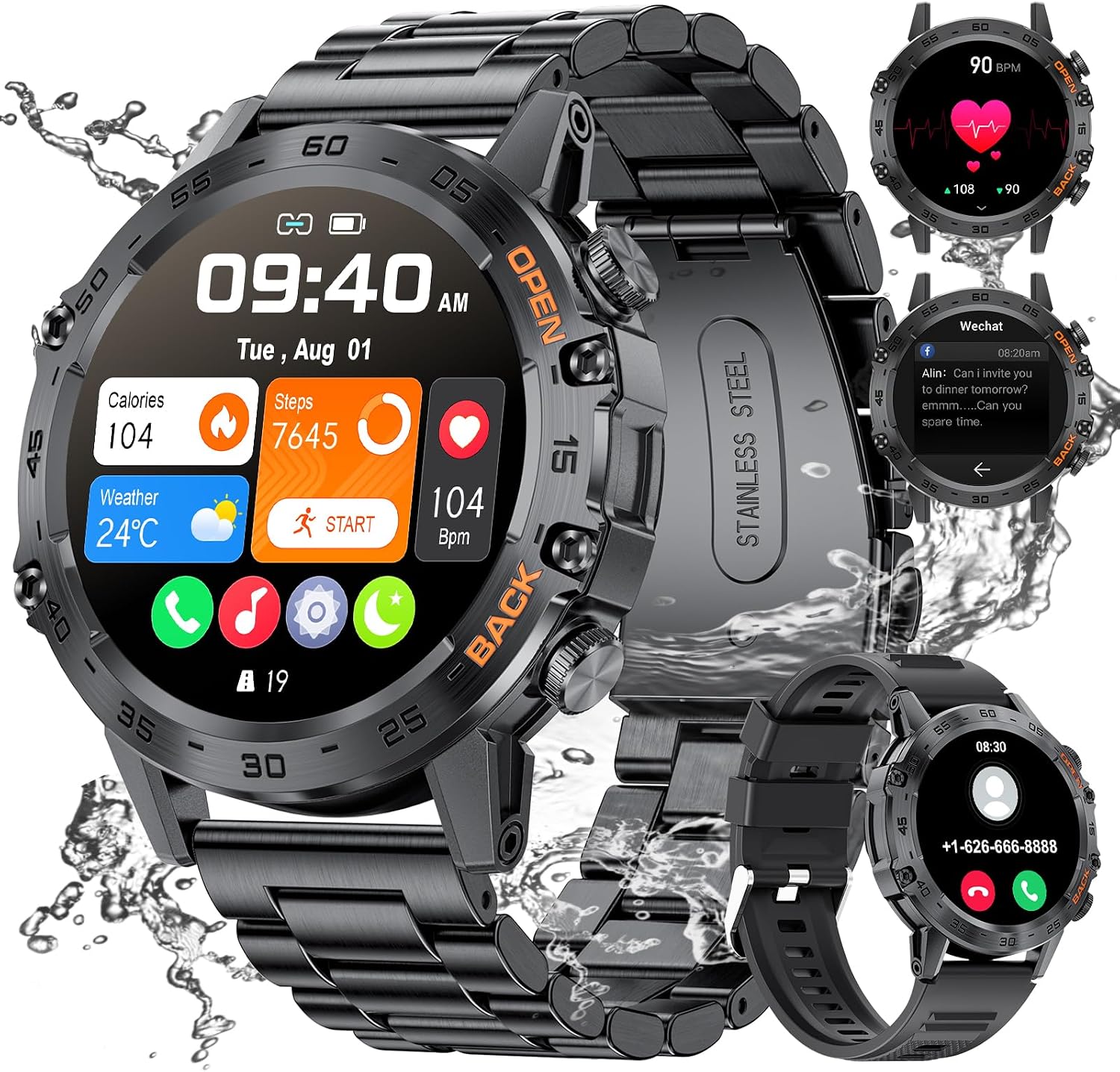
Image: LIGE Smartwatch BW1846A, showcasing its design and display.
Setup
1. Charging the Smartwatch
Before first use, fully charge your smartwatch. Connect the magnetic charging cable to the charging points on the back of the watch and plug the USB end into a power adapter (not included) or a computer USB port. A full charge typically takes 1-2 hours.

Image: Magnetic charging cable and battery life information. Charging time is 1-2 hours, standby time 15-20 days, and typical use life 5-10 days.
2. App Installation and Device Pairing
To unlock all features, download and install the FitCloudPro app on your smartphone.
- Turn on Bluetooth on your smartphone.
- Download the "FitCloudPro" app from Google Play Store (for Android) or Apple App Store (for iOS).
- Open the app, grant necessary permissions, and navigate to the 'Device' section.
- Search for your smartwatch (usually named K-52 or similar) and tap to pair.

Image: Step-by-step guide for initial smartwatch setup, including app download and pairing.
3. Connecting for Bluetooth Calls
After pairing the device with the FitCloudPro app, you need to connect the audio Bluetooth separately for call functionality.
- On your smartwatch, swipe down or access the menu to find the 'Call' icon and tap it to enable Bluetooth audio.
- On your smartphone, go to Bluetooth settings.
- Find and connect to the device named "K-52" (or similar, specifically for audio).
- Once connected, you can answer and make calls directly from your smartwatch.

Image: Instructions for enabling Bluetooth call functionality and receiving notifications from various social media apps.
Operating Instructions
1. Basic Navigation
- Power On/Off: Press and hold the side button.
- Wake Screen: Raise your wrist or press the side button.
- Swipe Up/Down: Access notifications or quick settings.
- Swipe Left/Right: Navigate through main functions and widgets.
- Tap: Select an item or confirm an action.
2. Bluetooth Calls and Notifications
Once connected, you can receive call notifications, answer, and make calls directly from your watch. You will also receive message notifications from various apps like WhatsApp, Facebook, Twitter, etc.
- Answering Calls: Tap the green icon on the watch screen when a call comes in.
- Making Calls: Use the dial pad on the watch or access your contacts (synced via the app).
- Viewing Notifications: Swipe down from the watch face to see recent messages.
3. Health Monitoring
The smartwatch continuously monitors your health data. Access these features from the main menu or dedicated widgets.
- Heart Rate Monitor: Provides real-time heart rate data.
- Blood Pressure Monitor: Measures your blood pressure.
- Blood Oxygen Monitor: Tracks your SpO2 levels.
- Sleep Monitor: Analyzes your sleep patterns (awake, light sleep, deep sleep).

Image: Health monitoring features, including sleep tracking and heart rate/blood pressure monitoring.
4. Sports Modes
The smartwatch supports 111 sports modes. Select your activity to track distance, calories burned, heart rate, and steps.
- Access the 'Sports' menu on your watch.
- Choose your desired sport (e.g., hiking, cycling, running, HIIT, skiing).
- The watch will record relevant data, which can be synced to the FitCloudPro app for detailed analysis.

Image: Multiple sports modes tracking exercise data such as steps, distance, calories, and heart rate.
5. Customization and Other Features
- Watch Faces: Personalize your watch face through the FitCloudPro app. Choose from various styles or create your own.
- Weather Forecast: Get real-time weather updates directly on your watch.
- Password Protection: Set a password for enhanced privacy.
- Music Control: Control music playback on your phone from your watch.
- AI Voice Assistant: Use voice commands for various tasks (e.g., checking weather, setting alarms).
- Reminders: Set alarms, sedentary reminders, and drink water reminders.

Image: Customizable watch faces, allowing users to personalize the display.

Image: Overview of additional features such as weather forecast, password lock, and various practical functions.

Image: The 1.39-inch Super HD display, offering clear visuals.

Image: The smartwatch's military-grade durability, tested for high/low temperatures and various environments.
Maintenance
- Cleaning: Wipe the watch and straps regularly with a soft, dry cloth. If necessary, use a slightly damp cloth and dry thoroughly.
- Water Resistance: The watch is water-resistant, suitable for daily use like hand washing or light rain. It is not recommended for swimming, showering, or submersion in water. Prolonged exposure to water or hot water may damage the device.
- Avoid Chemicals: Do not expose the watch to harsh chemicals, detergents, or solvents, as these can damage the materials.
- Storage: Store the watch in a cool, dry place when not in use.
- Strap Care: The TPU strap can be cleaned with mild soap and water. Ensure it is completely dry before wearing.
Troubleshooting
- Watch not turning on: Ensure the watch is fully charged. Connect it to the charger for at least 30 minutes.
- Cannot pair with phone:
- Make sure Bluetooth is enabled on your phone.
- Ensure the watch is within range of your phone.
- Restart both your phone and the smartwatch.
- Check if the FitCloudPro app has all necessary permissions.
- Notifications not received:
- Ensure the watch is paired correctly with the app.
- Check notification settings within the FitCloudPro app for specific applications.
- Verify that your phone's notification settings allow the FitCloudPro app to send alerts.
- Bluetooth calls not working: Ensure the audio Bluetooth (e.g., "K-52") is separately connected in your phone's Bluetooth settings after initial app pairing.
- Inaccurate health data: Ensure the watch is worn snugly on your wrist, not too tight or too loose. Avoid excessive movement during measurements. Note that this device is not a medical instrument.
- Short battery life: Reduce screen brightness, turn off unnecessary features, and limit frequent screen wake-ups.
Specifications
| Feature | Specification |
|---|---|
| Model Name | BW1846A |
| Screen Size | 1.39 Inches |
| Screen Resolution | 360*360 |
| Battery Capacity | 400 mAh |
| Connectivity Technology | Bluetooth |
| Compatible Devices | Android 4.4+ / iOS 8.0+ Smartphones |
| Water Resistance Level | Water Resistant (not for swimming/showering) |
| Health Monitoring | Heart Rate, Blood Oxygen, Sleep Duration |
| Sports Modes | 111 |
| Strap Material | Thermoplastic Polyurethane (TPU) |
| Product Weight | 90 Grams |
| Dimensions | 6 x 2 x 3 centimeters |
Warranty and Support
LIGE offers a 24-month warranty for this product, covering replacement, return, or repair services. Please retain your proof of purchase for warranty claims.
For technical support or warranty inquiries, please contact LIGE customer service through the retailer where you purchased the product or visit the official LIGE website for contact information.
Important Note: The warranty does not cover damage caused by improper use, accidents (such as dropping the device), or exposure to conditions beyond its specified water resistance limits (e.g., submersion in water).


