1. Introduction
The Moman H2Pro is a wireless helmet communication headset designed to provide seamless communication and entertainment for motorcycle riders and outdoor enthusiasts. It features advanced noise cancellation, long-range intercom capabilities, and robust weather resistance, ensuring a clear and reliable experience in various conditions.
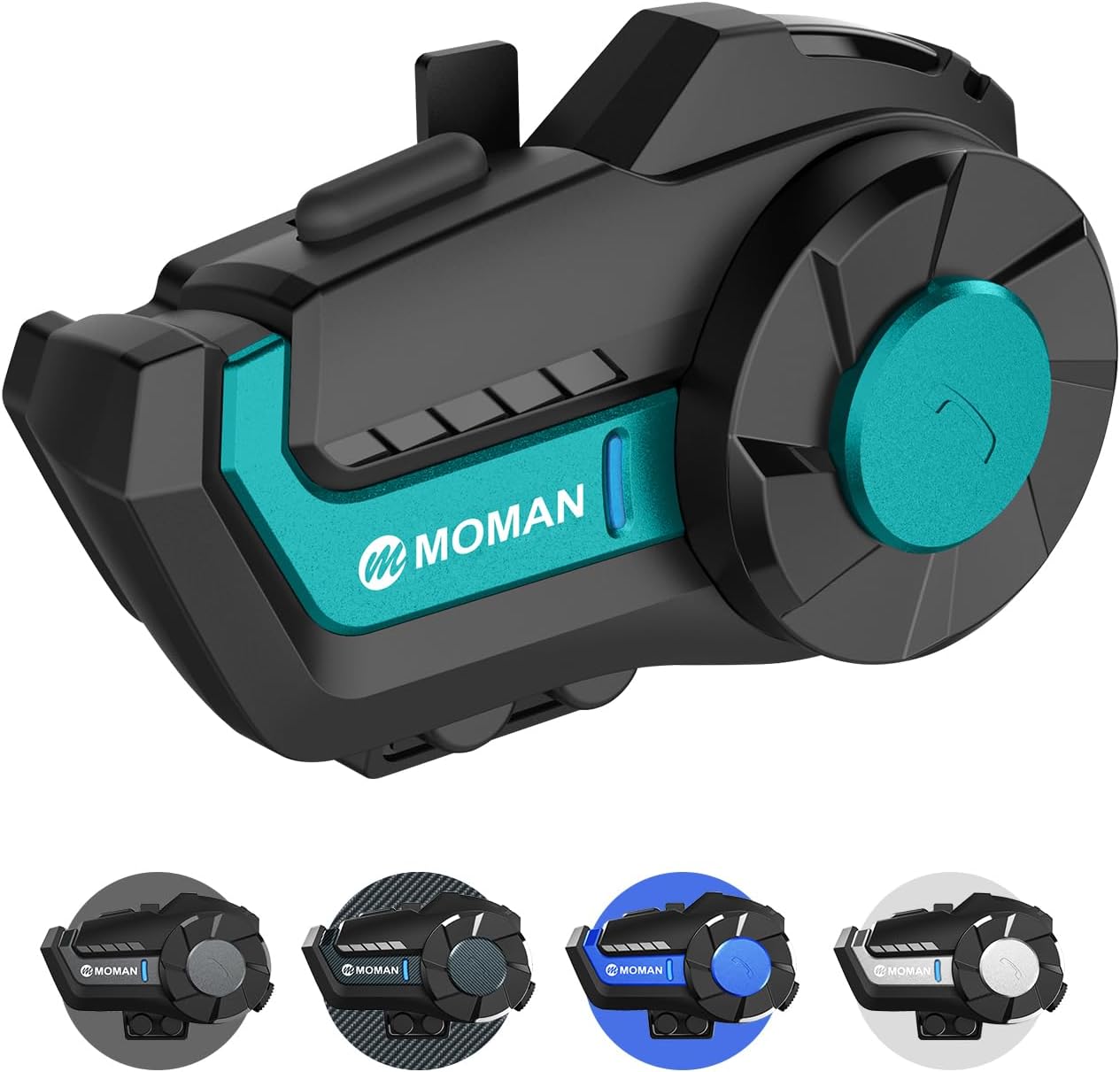
Image: The Moman H2Pro headset, showcasing its sleek design and integrated controls.
2. What's in the Box
Upon unboxing your Moman H2Pro, please verify that all the following components are included:
- Moman H2 Pro Intercom x 1
- Velcro Clip x 1
- Back Clip x 1
- Hook and Loop Fasteners x 1
- Pair of Speakers with Microphone x 1
- Headphone Velcro x 4
- USB Cable x 1
- Screw Driver x 1
- Manual x 1
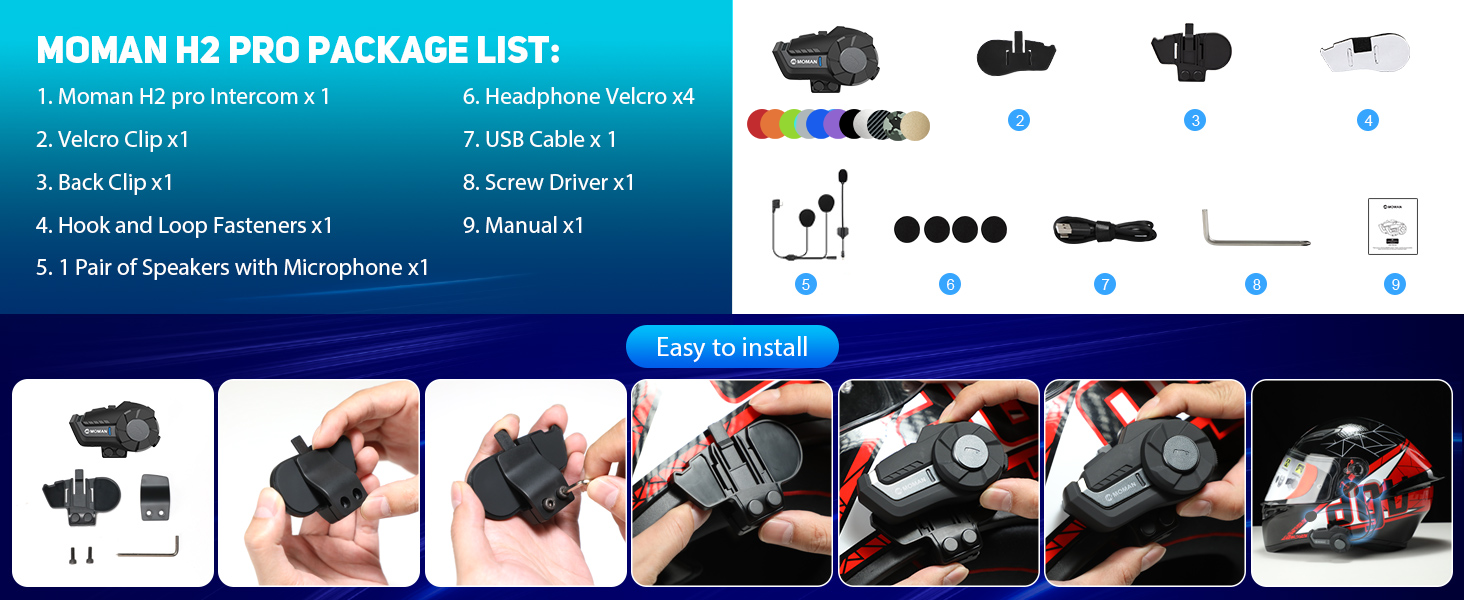
Image: Visual representation of the Moman H2 Pro package contents, including the main unit, mounting accessories, speakers, microphone, and charging cable.
3. Product Features
The Moman H2Pro is equipped with several features designed to enhance your riding experience:
- 1000m Intercom Range: Supports communication between two riders up to 1000 meters apart, ideal for group rides.
- High-Quality Audio: Features 40mm large speakers for clear music and call quality.
- Advanced Noise Cancellation: Incorporates DSP (Digital Signal Processing) and CVC (Clear Voice Capture) noise suppression technology to minimize wind and road noise, even at high speeds.
- Wireless 5.1 Connectivity: Ensures stable and efficient wireless connection for hands-free calls, music streaming, and voice assistant integration.
- IP65 Waterproof & Dustproof: Designed to withstand various weather conditions, including rain, snow, and dust, with a working temperature range of -20℃ to 50℃.
- Long Battery Life: A powerful 900mAh battery provides up to 20 hours of continuous use (talk/music time) and up to 300 hours of standby time on a single charge.
- Intuitive Control: Features a unique built-in knob and large buttons for easy operation, even while wearing gloves.

Image: An overview of the H2 Pro's functions, including Wireless 5.1, Full Duplex Intercom, AI Voice Assistant, Music Share, FM Radio, CVC&DSP Noise Cancellation, IP65 Waterproofing, and 900mAh Battery.

Image: Illustration highlighting the 40mm Hi-Fi speaker, DSP Noise Reduction, and CVC Noise Cancelling features for superior sound quality.
4. Setup and Installation
The Moman H2Pro can be easily installed onto most helmets using either the provided back clip or magic tape. Follow these steps for proper installation:
- Choose Mounting Method: Decide whether to use the back clip for a secure, semi-permanent attachment or the magic tape for a more flexible option.
- Attach Mount to Helmet: If using the back clip, secure it to the helmet's edge. If using magic tape, adhere it to a flat, clean surface on the helmet.
- Mount the Headset: Slide the H2Pro unit onto the installed back clip or firmly press it onto the magic tape until secure.
- Install Speakers and Microphone: Open the helmet's inner lining. Place the speakers inside the helmet's ear pockets, ensuring they are aligned with your ears. Route the microphone to a position near your mouth, typically along the cheek pad. Use the headphone Velcro to secure the speakers.
- Connect Cables: Plug the speaker and microphone cable into the corresponding port on the H2Pro unit.
Image: Step-by-step visual guide for installing the Moman H2Pro headset onto a helmet, showing attachment of the clip, mounting the unit, and speaker/microphone placement.
5. Operating Instructions
The Moman H2Pro features intuitive controls for various functions:
5.1 Power On/Off and Pairing
- Power On: Press and hold the On/Off Key until the indicator light illuminates.
- Power Off: Press and hold the On/Off Key until the indicator light turns off.
- Bluetooth Pairing: With the device off, press and hold the On/Off Key until the indicator light flashes rapidly (pairing mode). Search for "Moman H2Pro" on your mobile device's Bluetooth settings and connect.
- Intercom Pairing: To pair two H2Pro units for intercom communication, ensure both units are in pairing mode. Follow the specific pairing sequence detailed in the full manual (typically involves pressing a specific button on both units simultaneously).
5.2 Call Management
- Answer Call: Short press the Function Key.
- End/Reject Call: Press and hold the Function Key.
- Last Call Redial: Double-press the On/Off Key.
5.3 Music and FM Radio
- Play/Pause Music: Short press the Function Key.
- Next Song: Rotate the Knob clockwise.
- Previous Song: Rotate the Knob counter-clockwise.
- Volume Up: Rotate the Knob clockwise and hold.
- Volume Down: Rotate the Knob counter-clockwise and hold.
- FM Radio On/Off: Press the Function Key twice.
- Change FM Channels: Rotate the Knob while FM radio is active.
5.4 Voice Assistant
- Activate Voice Assistant: Press the Function Key three times.

Image: Diagram illustrating the precise functions of the On/Off Key, Function Key, and Knob, along with the indicator light and charging interface.
6. Maintenance
To ensure the longevity and optimal performance of your Moman H2Pro headset, follow these maintenance guidelines:
- Cleaning: Wipe the unit with a soft, damp cloth. Do not use harsh chemicals or abrasive cleaners. Ensure the charging port cover is securely closed to prevent water ingress.
- Storage: Store the headset in a cool, dry place away from direct sunlight and extreme temperatures when not in use.
- Battery Care: For optimal battery life, avoid fully discharging the battery frequently. Charge the unit regularly, even if not in use for extended periods (e.g., once every 3 months).
- Water Exposure: While IP65 rated, avoid submerging the device in water. If exposed to heavy rain, ensure it is dried thoroughly before charging.
7. Troubleshooting
If you encounter issues with your Moman H2Pro, refer to the following common problems and solutions:
- Device does not power on: Ensure the battery is charged. Connect the headset to a power source using the provided USB cable and try again after a few minutes.
- No sound from speakers: Check if the speaker cable is securely connected to the headset. Verify that the volume is not set to minimum. Ensure the headset is properly paired with your audio source.
- Cannot pair with phone/intercom: Ensure the headset is in pairing mode (rapidly flashing indicator light). Turn off and restart both the headset and the device you are trying to pair with. Clear previous Bluetooth connections on your phone if necessary.
- Intercom connection unstable or short range: Ensure both intercom units are within the specified range (up to 1000m in open terrain). Obstacles like buildings or dense foliage can reduce range. Re-pair the intercom units.
- Excessive background noise during calls/music: While the H2Pro features noise cancellation, extreme wind or environmental noise can still affect audio quality. Ensure the microphone is positioned correctly and not obstructed.
- FM Radio reception is poor: FM radio performance can vary based on location and signal strength. Try moving to an area with better reception.
If the problem persists after trying these solutions, please contact Moman customer support.
8. Specifications
| Feature | Specification |
|---|---|
| Model Name | Moman H2【1Pack Cyan】 |
| Connectivity Technology | Wireless |
| Wireless Communication Technology | Wireless 5.1 |
| Water Resistance Level | IP65 (Water Resistant) |
| Noise Control | Active Noise Cancellation (DSP & CVC) |
| Battery Life | 20 Hours (Continuous Use) |
| Standby Time | 300 Hours |
| Battery Capacity | 900mAh |
| Control Type | Touch Control, Built-In Knob |
| Audio Driver Type | Dynamic Driver (40mm) |
| Frequency Range | 2.4 GHz |
| Operating Temperature | -20℃ to 50℃ |
| Item Weight | 12 ounces |
| Package Dimensions | 6.73 x 4.37 x 2.32 inches |
| Compatible Devices | Mobile Devices, Laptops, Other Devices with Bluetooth Capabilities supporting A2DP and AVRCP Protocols |
9. Warranty and Support
For information regarding product warranty, returns, or technical support, please refer to the documentation included with your product packaging or visit the official Moman website. Contact details for customer service are typically provided on the manufacturer's support page.


