
Introduction
This user manual provides essential information for the safe and effective use of your TMEZON Wireless Video Intercom Battery. Please read this manual thoroughly before using the battery to ensure proper operation, maximize battery life, and prevent damage or injury. Keep this manual for future reference.
Safety Information
Your safety and the safety of others are very important. Please observe the following safety precautions:
- Do not disassemble, open, or shred the battery pack. This can lead to short-circuiting, overheating, fire, or explosion.
- Do not expose the battery to heat or fire. Avoid storage in direct sunlight.
- Do not short-circuit a battery. Do not store batteries haphazardly in a box or drawer where they may short-circuit each other or be short-circuited by other metal objects.
- Do not remove a battery from its original packaging until required for use.
- Do not subject batteries to mechanical shock.
- In the event of a battery leaking, do not allow the liquid to come into contact with the skin or eyes. If contact has been made, wash the affected area with copious amounts of water and seek medical advice.
- Do not use any charger other than that specifically provided for use with the equipment.
- Observe the plus (+) and minus (-) marks on the battery and equipment and ensure correct use.
- Keep batteries out of the reach of children.
- Seek medical advice immediately if a battery has been swallowed.
- Consult the equipment manufacturer's manual for specific battery installation and removal instructions.
Product Overview
The TMEZON TL-AH708 (TL708-01) is a high-capacity Lithium-ion battery designed specifically for TMEZON wireless video intercom systems. It provides reliable power to ensure continuous operation of your intercom device.

Image 1: Front view of the TMEZON TL-AH708 battery, displaying its label with capacity (5000mAh) and voltage specifications.

Image 2: Bottom view of the TMEZON TL-AH708 battery, highlighting the USB-C charging port and ventilation holes.
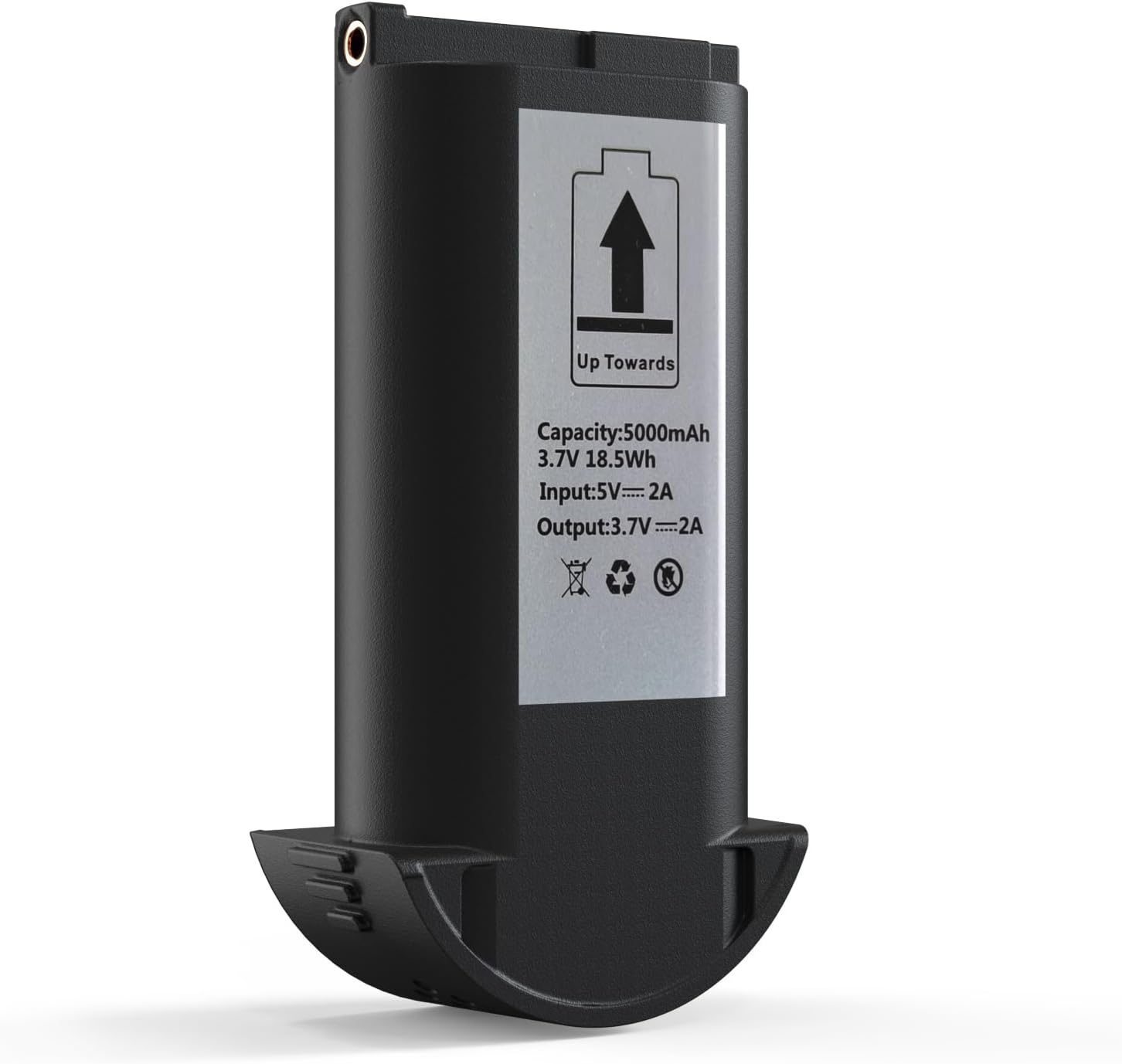
Image 3: Upright view of the TMEZON TL-AH708 battery, showing the electrical contacts at the top and the product label.
The battery features a robust design with clear markings for proper orientation and connection. It includes a USB-C port for convenient charging.
Setup
Before first use, ensure the battery is fully charged. Refer to the "Operating Instructions" section for charging procedures.
Battery Installation:
- Power Off: Ensure your TMEZON wireless video intercom device is completely powered off before attempting to install or remove the battery.
- Locate Battery Compartment: Identify the battery compartment on your intercom device. This is typically located on the back or bottom of the unit. Consult your intercom's specific user manual for exact location and opening instructions.
- Insert Battery: Carefully insert the TMEZON TL-AH708 battery into the compartment, ensuring the electrical contacts on the battery align correctly with the contacts in the device. The "Up Towards" arrow on the battery label (as shown in Image 1 and 3) indicates the correct orientation for insertion into most compatible devices.
- Secure Compartment: Close the battery compartment cover securely.
- Power On: You may now power on your TMEZON wireless video intercom device.
Note: Always refer to your specific TMEZON video intercom manual for detailed instructions on battery compartment access and installation, as designs may vary.
Operating Instructions
Charging the Battery:
The TMEZON TL-AH708 battery can be charged directly via its integrated USB-C port. It is recommended to use a compatible 5V/2A USB power adapter for optimal charging.
- Connect Cable: Insert a USB-C charging cable into the USB-C port on the battery (refer to Image 2).
- Connect to Power: Connect the other end of the USB-C cable to a compatible USB power adapter (e.g., a smartphone charger) or a powered USB port on a computer.
- Charging Indicator: The battery or your intercom device may feature an LED indicator to show charging status. Consult your intercom's manual for specific indicator behavior (e.g., solid red for charging, solid green for fully charged).
- Full Charge: Allow the battery to charge until the charging indicator (if present) signals a full charge, or for approximately 4-6 hours for a complete charge from empty.
- Disconnect: Once fully charged, disconnect the charging cable.
Important: Do not overcharge the battery. Disconnect the charger once the battery is fully charged.
Maintenance
Proper maintenance will extend the life of your TMEZON battery.
- Cleaning: Use a dry, soft cloth to clean the battery and its contacts. Do not use liquid cleaners or solvents.
- Storage: If storing the battery for an extended period, charge it to approximately 50-70% capacity. Store in a cool, dry place away from direct sunlight and extreme temperatures. Avoid storing fully charged or fully depleted batteries for long periods.
- Temperature: Operate and store the battery within recommended temperature ranges (typically 0°C to 45°C for charging, -20°C to 60°C for discharge). Extreme temperatures can degrade battery performance and life.
- Disposal: Do not dispose of the battery in household waste. Lithium-ion batteries contain materials that require special handling. Recycle the battery at an authorized recycling facility or return it to the point of purchase according to local regulations. Look for recycling symbols on the battery (as shown in Image 1).
Troubleshooting
If you encounter issues with your TMEZON battery, refer to the following common problems and solutions:
| Problem | Possible Cause | Solution |
|---|---|---|
| Battery not charging. |
|
|
| Intercom not powering on with battery. |
|
|
| Battery life is shorter than expected. |
|
|
If the problem persists after trying these solutions, please contact TMEZON customer support or your retailer for further assistance.
Specifications
The following table outlines the technical specifications for the TMEZON TL-AH708 (TL708-01) battery:
| Feature | Specification |
|---|---|
| Model Number | TL-AH708 (TL708-01) |
| Battery Type | Lithium-ion |
| Capacity | 5000mAh (18.5Wh) |
| Input | 5V – 2A |
| Output | 3.7V – 2A |
| Dimensions (Package) | 13.3 x 8 x 5.4 cm |
| Weight (Package) | 140 grams |
| Manufacturer | TMEZON |
| ASIN | B0CDKJM2QN |
| Date First Available | August 3, 2023 |
Warranty and Support
For warranty information and customer support regarding your TMEZON Wireless Video Intercom Battery, please refer to the warranty card included with your original product purchase or visit the official TMEZON website. You may also contact the retailer from whom you purchased the battery for assistance.
When contacting support, please have your product model number (TL-AH708 or TL708-01) and purchase details readily available.


