
SPANN CS-JBL510SL
SPANN Replacement Battery for JBL Tune 510BT Headphones
Model: CS-JBL510SL
Brand: SPANN | Part Number: 02-553-3494
Introduction
This manual provides essential information for the safe and effective use of your SPANN CS-JBL510SL replacement battery, designed for JBL Tune 510BT headphones. Please read these instructions carefully before installation and use to ensure optimal performance and safety.

Image: Top-down view of the SPANN CS-JBL510SL replacement battery, clearly displaying its label with model number, part number, and electrical ratings.
Important Safety Warnings
Failure to follow these safety instructions may result in fire, electric shock, injury, or damage to the battery or headphones. Keep this manual for future reference.
- Do Not Disassemble: Do not attempt to disassemble, open, or service the battery pack. Unauthorized tampering can lead to severe damage and injury.
- Proper Replacement: Replace only with the battery pack specifically designated for this product (JBL Tune 510BT headphones). Using an incompatible battery may cause hazards.
- Avoid Physical Damage: Do not crush, puncture, or apply excessive force to the battery. Avoid short-circuiting external contacts.
- Temperature Control: Do not dispose of the battery in fire or water. Do not store above 60°C (140°F). High temperatures can cause the battery to explode or leak.
- Charging Voltage: The limited charge voltage is 4.2V ± 0.05V. Use only chargers compatible with this specification.
- Manufacturer Information: For more information, you may visit www.cameronsino.com.

Image: SPANN CS-JBL510SL replacement battery showing its label with safety warnings and specifications. This view highlights the battery's compact size and wired connector.
Setup and Installation
Replacing the internal battery of electronic devices like headphones requires careful handling and technical knowledge. It is recommended that battery replacement be performed by a qualified technician or by following the specific instructions provided in the original JBL Tune 510BT headphone service manual.
- Preparation: Ensure the JBL Tune 510BT headphones are powered off and disconnected from any charging source.
- Access: Carefully open the headphone casing to access the existing battery compartment. Refer to the headphone's original service manual for precise disassembly instructions.
- Disconnect Old Battery: Gently disconnect the old battery from the headphone's circuit board. Note the orientation of the connector.
- Install New Battery: Connect the SPANN CS-JBL510SL replacement battery, ensuring the connector is properly aligned and securely seated.
- Secure Battery: Place the new battery in the compartment. Ensure it is properly secured and does not move freely.
- Reassemble: Carefully reassemble the headphone casing, ensuring all components are correctly aligned and secured.
- Initial Charge: After installation, fully charge the headphones before first use.

Image: Detailed view of the battery's connector, showing the three-pin configuration and wire colors (red, white, black) for proper connection during installation.
Operating Instructions
Once the SPANN replacement battery is installed, the JBL Tune 510BT headphones will operate as usual. Follow the original operating instructions for your headphones for pairing, playback, and volume control.
- Charging: Use the original charging cable and adapter provided with your JBL Tune 510BT headphones. Ensure the charging voltage does not exceed the specified limit (4.2V ± 0.05V).
- First Use: For optimal battery life, it is recommended to fully charge the battery before its first use and to allow it to discharge completely a few times initially.
- Regular Use: Charge the battery when the headphone's low battery indicator appears. Avoid letting the battery drain completely for extended periods.
Maintenance
Proper maintenance can extend the life of your battery.
- Storage: If the headphones will not be used for an extended period, store them in a cool, dry place with the battery charged to approximately 50-70%. Avoid extreme temperatures.
- Cleaning: Keep the battery and headphone contacts clean and free from dust or debris. Use a dry, soft cloth for cleaning.
- Avoid Moisture: Do not expose the battery or headphones to moisture or liquids.
Troubleshooting
| Problem | Possible Cause | Solution |
|---|---|---|
| Headphones do not power on after battery replacement. | Battery not properly connected, battery not charged, or incorrect battery type. | Verify battery connection. Ensure the battery is charged. Confirm the battery is the correct model (CS-JBL510SL). |
| Battery life is shorter than expected. | Battery not fully charged, aging battery, or high power consumption from headphones. | Ensure a full charge cycle. If the issue persists, contact support. |
| Battery not charging. | Faulty charging cable/adapter, improper connection, or battery issue. | Check charging cable and adapter. Reconnect the battery. If problem persists, seek professional assistance. |
Product Specifications
- Brand: SPANN
- Model Number: CS-JBL510SL
- Part Number: 02-553-3494
- Compatible with: JBL Tune 510BT Headphones
- Battery Type: Lithium Polymer
- Voltage: 3.7 V
- Capacity: 450 mAh / 1.67 Wh
- Dimensions: Approximately 30.00 x 30.00 x 6.20 mm (1.18 x 1.18 x 0.24 inches)
- Weight: Approximately 36 g (1.27 oz)
- Limited Charge Voltage: 4.2V ± 0.05V
- Color: Black (battery casing)
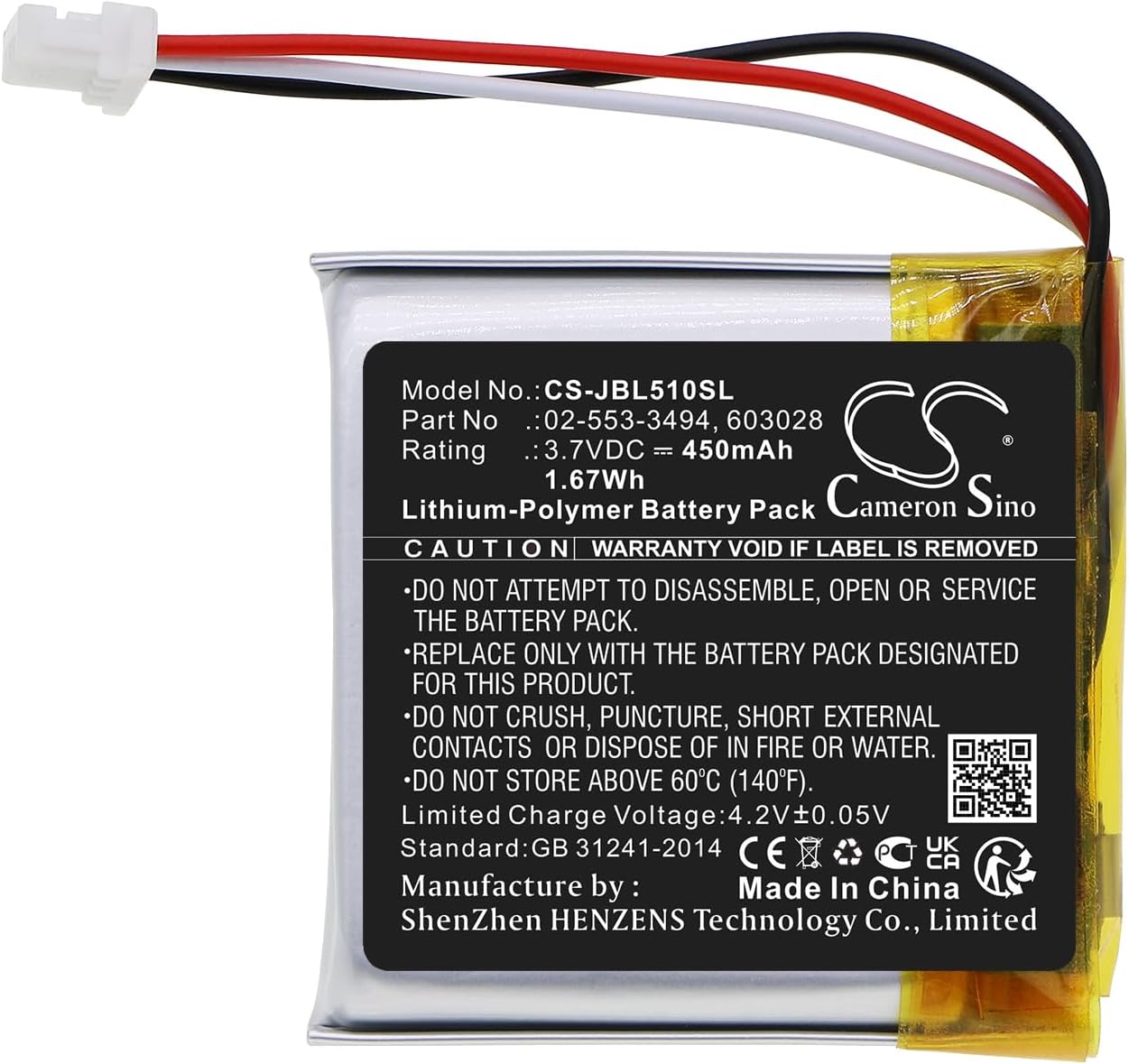
Image: The SPANN replacement battery, displaying its full label with detailed specifications and warnings. This image provides a clear view of the product's identifying information.
Warranty and Support
This SPANN replacement battery comes with a 365-day warranty from the date of purchase, covering manufacturing defects.
Our products undergo rigorous quality inspection. If you have any questions, concerns, or require technical assistance, please do not hesitate to contact our customer support team. Please have your purchase details and product model number ready when contacting us.
Ask a question about this manual
Ask about setup, troubleshooting, compatibility, parts, safety, or missing instructions. Manuals+ will review the question and use this page’s manual context to help answer it.