
1. Introduction
This manual provides essential information for the safe and effective operation of your Banshee TE4-0298 20-Amp Smart Automatic Battery Charger. This charger is designed for 12V and 24V lead-acid (Wet, MF, AGM, Gel), LiFePO4, and lithium-ion batteries, offering a fully automatic 6-step charging cycle with various modes for optimal battery care. Please read this manual thoroughly before use and retain it for future reference.
2. Safety Information
Always prioritize safety when working with electrical equipment and batteries. Failure to follow these instructions may result in electric shock, fire, or serious injury.
- Read All Instructions: Before using the charger, read all instructions and cautionary markings on the charger, the battery, and the product using the battery.
- Ventilation: Ensure the charging area is well-ventilated. Batteries can produce explosive gases during charging.
- Eye Protection: Always wear eye protection and protective clothing when working with batteries.
- Avoid Sparks: Do not smoke or allow a spark or flame in the vicinity of the battery or engine.
- Disconnect Power: Always disconnect the AC power supply before making or breaking connections to the battery.
- Correct Voltage: Ensure the charger is set to the correct voltage (12V or 24V) and battery type before connecting.
- Damaged Equipment: Do not operate the charger if it has received a sharp blow, been dropped, or otherwise damaged.
- Children: Keep the charger and batteries out of reach of children.
- Indoor Use: This charger is rated IP20, meaning it is protected against solid objects over 12.5mm but has no protection against liquids. Use in dry conditions only.
3. Product Overview
The Banshee TE4-0298 is a versatile and intelligent battery charger designed for a wide range of applications. It features an LCD display for clear status indication and multiple protection mechanisms to ensure safe and efficient charging.

Image 3.1: Front view of the Banshee TE4-0298 charger, showing the LCD display, power button, mode button, 12V/24V selection button, and battery type selection button.

Image 3.2: Detailed view of the charger's LCD screen, illustrating various indicators such as battery capacity bar, voltage, selected battery type (Lead/Li-Ion), and charging modes (Normal, Small, Low Temp).
Key Features:
- LCD Display: Provides real-time charging status and settings.
- Multi-Voltage Support: Compatible with 12V and 24V batteries.
- Multi-Battery Type Support: Charges Wet, MF, AGM, Gel Lead Acids, 12V LiFePO4, and 29.4V Li-Ion batteries.
- 6-Step Fully Automatic Charging Cycle: Optimizes charging for battery longevity.
- Advanced Protection: Includes overcharge, overheat, short circuit, excess current, and reverse polarity protection.
- Multiple Charging Modes: Features Normal, Low Temperature, Small Battery, and Silent modes.
- Durable Construction: Equipped with strong, durable alligator clips.

Image 3.3: An icon symbolizing the internal protection features of the charger, such as overcharge and short circuit protection.

Image 3.4: An icon indicating the availability of four distinct charging modes for various battery conditions and types.
4. Setup
Follow these steps to safely set up your Banshee TE4-0298 battery charger.
- Prepare the Battery: Ensure the battery terminals are clean and free of corrosion. If charging a wet lead-acid battery, check the fluid levels and add distilled water if necessary (do not overfill).
- Connect Alligator Clips:
- Connect the RED (+) positive clamp to the positive battery terminal.
- Connect the BLACK (-) negative clamp to the negative battery terminal.
Important: Ensure a secure connection. If charging a battery installed in a vehicle, connect the negative clamp to the vehicle chassis away from the battery and fuel line if the negative terminal is grounded. If the positive terminal is grounded, connect the positive clamp to the chassis away from the battery and fuel line.
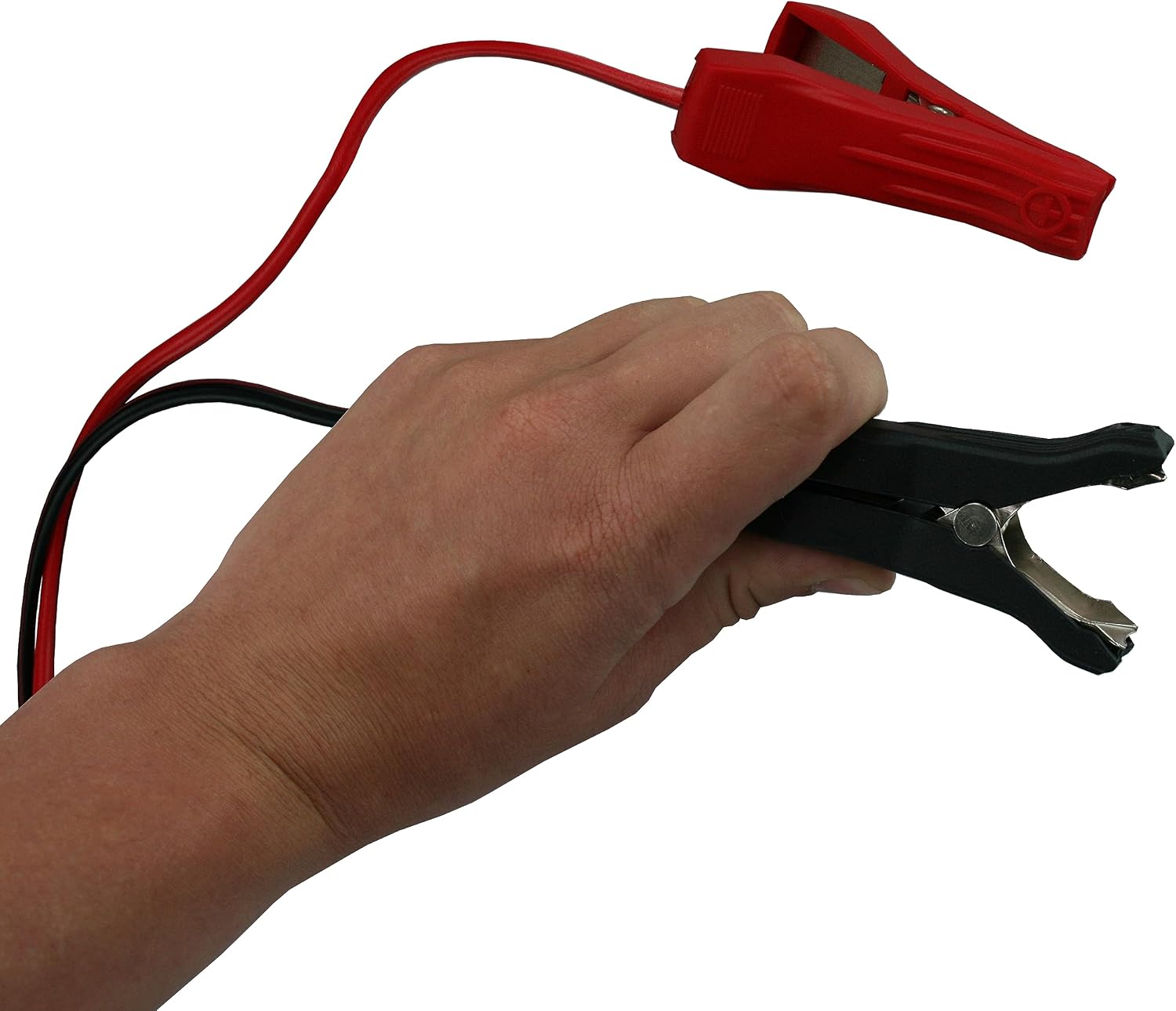
Image 4.1: A hand demonstrating the proper grip and connection of the red and black alligator clips to battery terminals.
- Connect to Power: Plug the charger's AC power cord into a standard 105-125V AC, 60Hz electrical outlet. The charger will power on and display its current status.
5. Operating Instructions
Once connected, the charger will automatically detect the battery voltage and type. However, manual selection may be required or preferred.
- Power On/Off: Press the ON/OFF button to turn the charger on or off.
- Select Voltage (12V/24V): Press the 12V/24V button to toggle between 12-volt and 24-volt charging. The selected voltage will be displayed on the LCD screen.
- Select Battery Type: Press the Battery button to cycle through the available battery types: Lead-Acid (Wet, MF, AGM, Gel), LiFePO4, and Lithium-Ion. The selected type will be shown on the LCD.
- Select Charging Mode: Press the MODE button to cycle through the available charging modes. Refer to Section 6 for details on each mode.
- Monitor Charging: The LCD display will show the charging progress, current voltage, and selected mode. The 6-step automatic charging cycle will proceed until the battery is fully charged.
- Disconnecting: Once charging is complete, first unplug the AC power cord from the outlet, then disconnect the negative (-) clamp, followed by the positive (+) clamp from the battery.
6. Charging Modes
The Banshee TE4-0298 offers specialized charging modes to optimize performance and battery life under different conditions.
- Normal Temperature Mode: Standard charging mode for most lead-acid and lithium batteries under typical ambient temperatures (above 0°C / 32°F).
- Low Temperature Mode: Designed for charging lead-acid batteries in cold environments (below 0°C / 32°F). This mode adjusts charging parameters to safely and effectively charge in colder conditions. Do not use this mode for Lithium-Ion or LiFePO4 batteries.
- Small Battery Mode (Silent): Suitable for charging smaller capacity batteries. This mode operates with reduced current and often in a quieter manner.
- Small Battery & Low Temperature Mode (Silent): Combines the features of Small Battery Mode with Low Temperature Mode, ideal for small lead-acid batteries in cold conditions. Do not use this mode for Lithium-Ion or LiFePO4 batteries.

Image 6.1: The Banshee charger is shown operating effectively across a wide range of temperatures, from as cold as -4°F (-20°C) to as hot as 122°F (50°C), highlighting its robust design for various climates.
7. Maintenance
Proper maintenance ensures the longevity and reliable operation of your battery charger.
- Cleaning: Disconnect the charger from all power sources and batteries before cleaning. Wipe the casing with a soft, dry cloth. Do not use solvents or abrasive cleaners.
- Cable Inspection: Regularly inspect the input and output cables for any signs of damage, cuts, or fraying. Do not use the charger if cables are damaged.
- Storage: Store the charger in a cool, dry place when not in use. Avoid areas with high humidity or extreme temperatures.
- Ventilation: Ensure the cooling fan (if present) and ventilation openings are free from dust and debris to prevent overheating.

Image 7.1: Side view of the Banshee TE4-0298 charger, highlighting the integrated cooling fan for thermal management during operation.
8. Troubleshooting
If you encounter issues with your Banshee TE4-0298 charger, refer to the following common problems and solutions.
| Problem | Possible Cause | Solution |
|---|---|---|
| Charger does not power on. | No AC power; faulty outlet; damaged power cord. | Check AC power connection and outlet. Inspect power cord for damage. Try a different outlet. |
| Battery not charging. | Incorrect battery connection; incorrect voltage/battery type selection; deeply discharged battery; faulty battery. | Verify correct polarity and secure connection of clamps. Ensure correct voltage (12V/24V) and battery type are selected. For deeply discharged batteries, the charger may take time to initiate. Test battery condition. |
| LCD displays an error message or warning. | Reverse polarity; short circuit; overheat; overcharge. | Disconnect charger immediately. Check battery connections for reverse polarity. Inspect cables for short circuits. Allow charger to cool down if overheating. Ensure battery is not already fully charged. |
| Charger gets hot during operation. | Normal operation; poor ventilation; excessive load. | Some heat is normal. Ensure adequate ventilation around the charger. Check if the battery is severely discharged, requiring higher current. If excessively hot, disconnect and allow to cool. |
9. Specifications
Detailed technical specifications for the Banshee TE4-0298 Smart Automatic Battery Charger.
| Feature | Specification |
|---|---|
| Model Number | TE4-0298 |
| Input Voltage | 105-125V AC, 60Hz |
| Output Voltage | 12V DC / 24V DC |
| Max Charging Current (12V) | 20A |
| Max Charging Current (24V) | 10A |
| Max Charging Voltage (Lead Acid 12V) | 14.3V / 14.7V |
| Max Charging Voltage (Lead Acid 24V) | 28.6V / 29.4V |
| Max Charging Voltage (LiFePO4 12V) | 14.6V |
| Max Charging Voltage (Lithium Ion 29.4V) | 29.4V |
| Battery Types Supported | Wet, MF, AGM, Gel Lead Acids, 12V LiFePO4, 29.4V Li-Ion |
| Charging Type | 6-Step Fully Automatic Charging Cycle |
| Surrounding Temperature Range | -20°C to +50°C (-4°F to 122°F) |
| Dimensions (L x W x H) | 245 x 159 x 99 mm (9.65 x 6.26 x 3.9 inches) |
| IP-Class | IP20 |
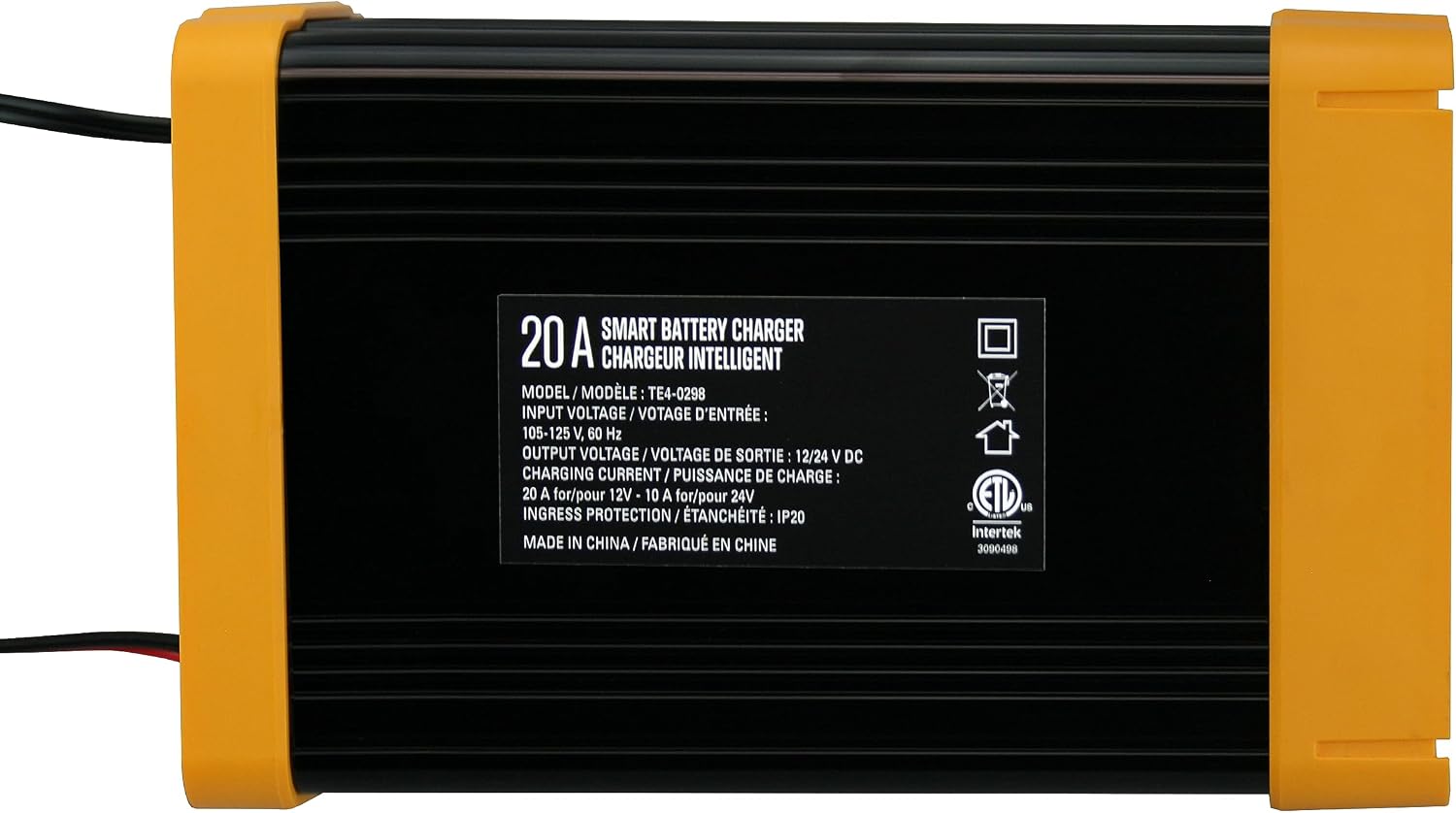
Image 9.1: The product label on the underside of the Banshee TE4-0298 charger, detailing its model number, input voltage, output voltage, charging current, and ingress protection rating.
10. Warranty and Support
Your Banshee TE4-0298 Smart Automatic Battery Charger comes with a 2-year warranty from the date of purchase, covering defects in materials and workmanship under normal use.
For warranty claims, technical support, or any questions regarding your product, please contact Banshee customer service through the retailer where the product was purchased or visit the official Banshee website for contact information.
Please have your model number (TE4-0298) and proof of purchase ready when contacting support.