
Introduction
This manual provides comprehensive instructions for the safe and effective use of your HiFuture Future Ring Smart Ring. Please read this manual thoroughly before using the device and retain it for future reference.
Product Overview
The HiFuture Future Ring is an advanced smart wearable designed for seamless integration into your daily life, offering health monitoring and smart control features. Crafted from durable nano-ceramic material, it combines elegance with robust functionality.

Image: The HiFuture Future Ring, showcasing its sleek design and internal sensors.
Key Features:
- Advanced Nano-Ceramic Material: Ensures a sleek, elegant, and durable design.
- Comprehensive Health Tracking: Monitors heart rate, calories burned, and sleep patterns.
- Smart Control Gestures: Effortlessly manage short videos, music, photos, and presentations with intuitive long-press and slide gestures.
- Water Resistance (5 ATM): Suitable for swimming and various water sports.
- Long Battery Life: Up to 7 days of battery life.
Setup Guide
1. Unboxing and Initial Charge
Upon unboxing your HiFuture Future Ring, it is recommended to fully charge the device before first use. Use the provided charging cable and connect it to a compatible USB power source.

Image: The HiFuture Future Ring packaging, showing the product box.
2. App Installation and Pairing
- Download the official HiFuture companion application from your smartphone's app store (iOS or Android).
- Open the application and follow the on-screen instructions to create an account or log in.
- Ensure your smartphone's Bluetooth is enabled.
- Within the app, select "Add Device" or similar option and choose your Future Ring from the list of discoverable devices.
- Confirm the pairing request on both your phone and, if prompted, on the ring (though typically the ring pairs automatically).

Image: Screenshot of the HiFuture Future Ring's companion app interface, showing smart control options.
3. Ring Sizing and Placement
For accurate health tracking and comfortable wear, ensure the ring fits snugly on your finger. The ring is available in various sizes (e.g., 57mm, 60mm, 65mm). Refer to the sizing guide if you are unsure of your correct size.

Image: Comparison of different HiFuture Future Ring sizes (57mm, 60mm, 65mm).
Operating Instructions
Smart Control Features
The Future Ring allows for intuitive control of various media and applications through simple gestures. These gestures are configured and managed within the companion app.
- Video Playback Control: Long press to play/pause short video clips. Slide up or down to navigate.
- Music Control: Double-click to play/pause music. Slide up/down to switch songs.
- Camera Remote: Long press to capture photos or record videos.
- Presentation Control: Slide up/down to switch slides in presentations.
Health Tracking
The ring continuously monitors key health metrics, providing insights into your well-being. All data is synchronized with the companion app for detailed analysis.
- Heart Rate Monitoring: Tracks your heart rate throughout the day and during activities.
- Calorie Tracking: Estimates calories burned based on your activity levels.
- Sleep Analysis: Monitors sleep patterns, including sleep stages, and provides insights for improved sleep quality. You can set smart alarms within the app to wake you up during optimal sleep cycles.
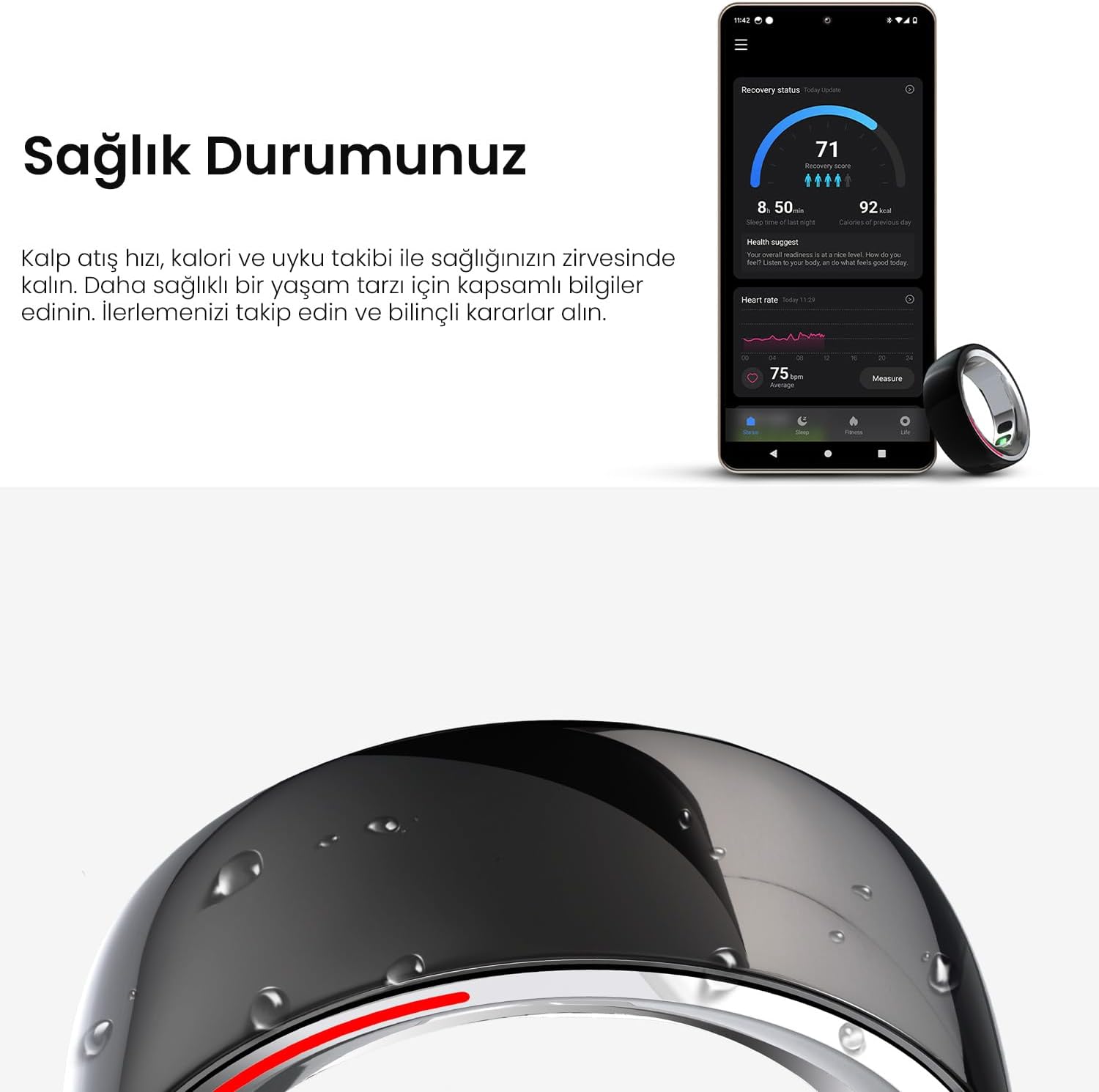
Image: The health status dashboard within the HiFuture Future Ring app, displaying heart rate, recovery, and calorie data.
Water Resistance
The HiFuture Future Ring is designed with 5 ATM water resistance, making it suitable for various water activities.
- Suitable for swimming in shallow water and showering.
- Not recommended for diving, high-pressure water activities, or prolonged submersion in hot water.
- Ensure the ring is dry before charging to prevent damage.

Image: Visual representation of the HiFuture Future Ring's 5 ATM water resistance and nano-ceramic material.
Maintenance
To ensure the longevity and optimal performance of your HiFuture Future Ring, follow these maintenance guidelines:
- Cleaning: Wipe the ring regularly with a soft, damp cloth. Avoid using harsh chemicals or abrasive materials.
- Storage: Store the ring in a cool, dry place when not in use.
- Charging: Always use the original charging cable. Avoid exposing the charging contacts to water or corrosive substances.
- Avoid Extreme Temperatures: Do not expose the ring to extremely high or low temperatures, as this can affect battery life and internal components.
Troubleshooting
| Problem | Possible Cause | Solution |
|---|---|---|
| Ring not pairing with phone | Bluetooth off, ring out of charge, app issue. | Ensure Bluetooth is on. Charge the ring. Restart the app and phone. |
| Inaccurate health data | Loose fit, sensor obstruction, incorrect profile settings. | Ensure ring fits snugly. Clean sensors. Verify personal data in app. |
| Gestures not responding | App not running, ring not connected, incorrect gesture. | Check app status and ring connection. Review gesture instructions in app. |
| Battery drains quickly | Frequent use of features, old battery, background app activity. | Reduce continuous tracking if not needed. Ensure app is updated. Contact support if issue persists. |
Specifications
| Feature | Detail |
|---|---|
| Model Name | Future Ring |
| Model Number | HF.HRFR1-60.BK |
| Brand | HiFuture |
| Color | Black |
| Material | Nano Ceramic |
| Water Resistance | 5 ATM |
| Connectivity | Bluetooth |
| Battery Type | Lithium Polymer (included) |
| Special Features | Heart Rate Monitor, Sleep Monitor |
| Target Audience | Unisex Adults, Women |
| Item Dimensions | 11 x 9 x 5.8 cm; 30 grams (Shipping) |
| Country of Origin | China |
Warranty and Support
The HiFuture Future Ring comes with a standard manufacturer's warranty. Please refer to the warranty card included in your product packaging for specific terms and conditions, including warranty duration and coverage.
For technical support, troubleshooting assistance, or warranty claims, please contact HiFuture customer service through their official website or the contact information provided in your product documentation.
For additional support and resources, visit the official HiFuture website: www.hifuture.com
