
1. Introduction
The SCANTECH ID DDG175-01 is a robust 2D barcode scanner designed for various applications including logistics, inventory management, and warehousing. This device is capable of reading a wide range of barcode types, including 1D, 2D, GS1 Databar, and OCR-B characters, even when displayed on LCD screens. Its durable construction ensures reliable performance in demanding environments.
2. Product Overview
The DDG175-01 scanner features an ergonomic design for comfortable handling and a high-rebound trigger button for efficient operation. Key features include:
- Versatile Scanning: Supports 1D, 2D, GS1 Databar, and OCR-B character reading.
- Screen Reading Capability: Can read barcodes displayed on labels and digital screens.
- Durable Construction: IP52 dust and splash protection, with 1.2m drop resistance.
- Vibration Feedback: Provides tactile confirmation for successful scans.
- Connectivity: USB interface for easy integration.
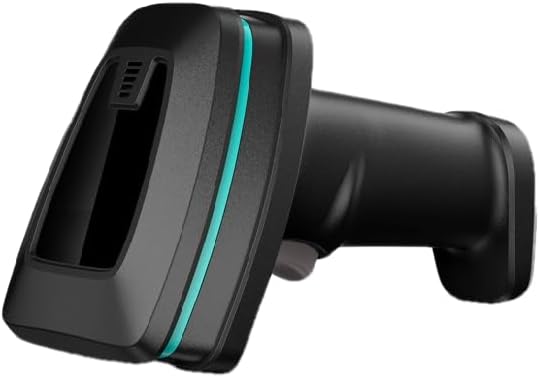
Image 1: Side view of the SCANTECH ID DDG175-01 Barcode Scanner, showcasing its ergonomic design and scanning window.

Image 2: Two DDG175-01 scanners, illustrating different orientations and the overall form factor.
3. Package Contents
Please verify that all items are present in the package:
- SCANTECH ID DDG175-01 Barcode Scanner Unit
- USB Cable
- Quick Guide (refer to this manual for detailed instructions)
4. Setup
Follow these steps to set up your barcode scanner:
- Connect the provided USB cable to the scanner's interface port.
- Plug the other end of the USB cable into an available USB port on your computer or host device.
- The scanner is typically plug-and-play and should be recognized by your operating system automatically without requiring additional driver installation.
- Once connected, the scanner will power on and be ready for use.
5. Operating Instructions
To operate the DDG175-01 barcode scanner:
- Hold the scanner comfortably in your hand, ensuring the scanning window is facing the barcode.
- Point the scanner's aimer at the center of the barcode you wish to read.
- Press and hold the trigger button. The scanner will emit a light beam to target the barcode.
- Upon a successful read, the scanner will typically provide an audible beep and/or vibrate (if the vibration function is enabled). The scanned data will be transmitted to your connected device as keyboard input.
- Release the trigger button after a successful scan.
Tips for Optimal Scanning:
- Ensure the barcode is clean and free from obstructions or damage.
- Adjust the distance between the scanner and the barcode. The optimal reading distance can vary depending on the barcode size and type.
- For barcodes on reflective surfaces or screens, try adjusting the scanning angle to minimize glare.
6. Maintenance
Proper maintenance ensures the longevity and optimal performance of your scanner:
- Cleaning the Casing: Use a soft, dry, lint-free cloth to wipe the exterior of the scanner. For stubborn dirt, a slightly damp cloth with a mild, non-abrasive cleaner can be used, ensuring no liquid enters the device.
- Cleaning the Scanning Window: Gently wipe the scanning window with a soft, lint-free cloth. Avoid using abrasive materials or harsh chemicals that could scratch the surface.
- Storage: Store the scanner in a clean, dry environment within the recommended storage temperature range of -20°C to 70°C.
- Handling: While the scanner is designed to be rugged with 1.2m drop resistance, avoid unnecessary drops or impacts to prevent potential damage.
7. Troubleshooting
If you encounter issues with your DDG175-01 scanner, refer to the following common problems and solutions:
- Scanner not reading barcodes:
- Ensure the barcode is clean, undamaged, and clearly printed.
- Verify that the scanner's aimer is centered on the barcode.
- Adjust the distance between the scanner and the barcode.
- Check if the barcode type is supported by the scanner (refer to Specifications).
- No data transmitted to the computer:
- Confirm the USB cable is securely connected to both the scanner and the computer.
- Try connecting the scanner to a different USB port on your computer.
- Ensure your computer's operating system has recognized the scanner.
- No beep or vibration after scanning:
- This may indicate an unsuccessful scan. Re-attempt scanning, ensuring proper aiming and distance.
- If the scanner has configurable settings for feedback, ensure the beep and vibration functions are enabled.
For further assistance, please contact your vendor or SCANTECH ID support.
8. Specifications
Detailed technical specifications for the SCANTECH ID DDG175-01 Barcode Scanner:
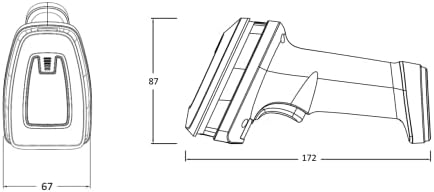
Image 3: Dimensions of the DDG175-01 scanner (Width: 67mm, Height: 87mm, Length: 172mm).

Image 4: Comprehensive table detailing electrical, performance, environmental, and reliability specifications.
| Feature | Specification |
|---|---|
| Brand Name | SCANTECH ID |
| Model | DDG175-01 |
| Connectivity | USB Cable |
| Weight | 220g |
| Material | ABS Resin |
| Cable Length | 1.8m |
| External Dimensions (W x H x L) | 67mm x 87mm x 172mm |
| Interface | USB |
| Power Supply | Typ. +5V |
| Standby Current | <130mA |
| Operating Current | <280mA |
| Light Source | White LED, Red (Aimer) |
| Sensor | 1280(H) x 800(V) pixels |
| Field of View (FOV) | Horizontal 45°, Vertical 36° |
| Scan Rate | 60fps |
| Reading Distance (20mil/0.5mm PCS 90% QR) | 450mm |
| Print Contrast Ratio (PCS) | 20% |
| Resolution (1D Barcode) | 3mil/0.076mm |
| Resolution (2D Barcode) | 6.67mil/0.2mm |
| Reading Angle (Pitch) | 5° ~ 60° (±5°) |
| Reading Angle (Skew) | 5° ~ 60° (±5°) |
| Ambient Light | 100,000 Lux (Max) |
| Dust/Splash Protection | IP52 |
| Operating Temperature | 0°C ~ 50°C |
| Storage Temperature | -20°C ~ 70°C |
| Humidity | 20% ~ 95% (non-condensing) |
| Trigger Switch Life | 1,000,000 operations |
| MTBF (Mean Time Between Failures) | 50,000 hours |
| Drop Resistance | 1.2m onto concrete |
| Electrostatic Discharge (ESD) | 8KV (contact), 16KV (air) |
| Supported 1D Barcodes | UPC-A, UPC-E, EAN-8/JAN-8, EAN-13/JAN-13, ISSN, UCC/EAN-128, Code 39, Code 32, Code 128, Interleaved 25, Industrial 25, Matrix 25, Codabar/NW7, Code 93, Code 11, China Post, MSI, Telepen, GS1 Databar Omnidirectional, GS1 Databar Limited, GS1 Databar Expended |
| Supported 2D Barcodes | Aztec, Data Matrix, Maxicode, QRCode, PDF417, Micro PDF417, HANXIN, MicroQR Code, Dotcode, Grid Matrix |
| Supported Characters | OCR-B Characters |
9. Warranty and Support
For warranty information, please refer to the documentation included with your purchase or visit the official SCANTECH ID website. Keep your purchase receipt as proof of purchase for any warranty claims.
For technical support, troubleshooting assistance beyond this manual, or service inquiries, please contact your authorized SCANTECH ID dealer or the manufacturer's customer support directly.


