
1. Product Overview
This document provides instructions for the SIBRILLE FLH-036-F1 remote control, specifically designed for use with compatible 36W LED tree floor lamps. This remote allows for convenient adjustment of light settings, including brightness, color temperature, and various preset modes.

Image 1.1: SIBRILLE 36W LED Tree Floor Lamp with its dedicated remote control.
2. Compatibility
The FLH-036-F1 remote control is ONLY compatible with SIBRILLE 36W LED Tree Floor Lamps. Compatible lamp models include B0BS14V9DX, B0DBKKR3GY, B0DBKT8PKT, B0DBL38XY4, B0F5GGFGN9, B0F59W2C14, B0F59TB7HT, and B0F59RT7WZ. This remote control is NOT compatible with RGB floor lamps.
3. Package Contents
- 1 x SIBRILLE Remote Control (Model: FLH-036-F1)
- Note: 2 x AAA batteries are required for the remote control (not included).
4. Setup and Pairing Instructions
Upon receiving your new remote control, it is recommended to re-pair it with your SIBRILLE 36W LED Tree Floor Lamp to ensure proper functionality.
- Step 1: Clear the Code
Turn off the power switch of your floor lamp. Unplug the power cord, then plug it back in 5 times in a row. The floor lamp will flash quickly, indicating that the previous pairing code has been successfully cleared. - Step 2: Match the Code
Long press the On/Off button on the remote control for approximately 3 seconds. The lights on the floor lamp will flash quickly to confirm successful re-pairing.
Video 4.1: This video demonstrates the assembly and features of a compatible SIBRILLE floor lamp, including the remote control functions.
5. Operating the Remote Control
The remote control provides comprehensive control over your SIBRILLE 36W LED Tree Floor Lamp. Insert 2 AAA batteries into the remote before use.
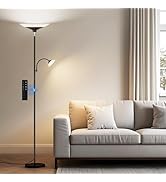
Image 5.1: Detailed layout of the SIBRILLE remote control buttons.
Remote Control Functions:
- On/Off Button (Power Symbol): Turns the lamp on or off.
- Brightness Adjustment (Sun +/-): Increases or decreases the light brightness.
- Color Temperature Adjustment (K +/-): Adjusts the light's color temperature from warm to cool tones.
- 1H Timer: Sets the lamp to automatically switch off after 1 hour.
- Preset Modes: Quickly switch between optimized lighting settings for various activities:
- Leisure Mode (Bell Icon): Ideal for relaxation.
- Reading Mode (Book Icon): Provides optimal light for reading.
- Working Mode (Laptop Icon): Suitable for tasks requiring focused light.
- Night Light Mode (Moon Icon): A soft, low-intensity light for nighttime.
- Sleep Mode (ZzZ Icon): A very dim setting for winding down.
Video 5.2: This video illustrates the various functions of the SIBRILLE remote control, including brightness and color temperature adjustments, and preset modes.
6. Specifications
| Product Dimensions | 5.9 x 1.49 x 0.51 inches |
| Item Weight | 1.12 ounces |
| Item Model Number | FLH-036-F1 |
| Brand | SIBRILLE |
| Special Feature | Cordless |
| Color | Black |
| Max Number of Supported Devices | 1 |
| Compatible Devices | Floor Lamp |
7. Maintenance
- Battery Replacement: If the remote control becomes unresponsive or its range decreases, replace the two AAA batteries. Ensure correct polarity when inserting new batteries.
- Cleaning: Wipe the remote control with a soft, dry cloth. Avoid using liquid cleaners or abrasive materials.
8. Troubleshooting
- Remote not responding to lamp:
- Ensure the remote control has fresh AAA batteries installed correctly.
- Verify that the lamp is powered on and receiving electricity.
- Perform the re-pairing procedure as described in Section 4.
- Ensure there are no obstructions between the remote and the lamp.
- Lamp flashes quickly but does not pair: This indicates the code clearing step was successful. Proceed immediately to the code matching step (Step 2 in Section 4).
9. Warranty and Support
For warranty information, technical support, or any inquiries regarding your SIBRILLE remote control or compatible floor lamp, please contact SIBRILLE customer service through the retailer where the product was purchased or visit the official SIBRILLE website for contact details.


