
TCL W8W9E2-B3
TCL 8,000 BTU Smart Window Air Conditioner User Manual
Model: W8W9E2-B3
1. Introduction
Thank you for choosing the TCL 8,000 BTU Smart Window Air Conditioner, Model W8W9E2-B3. This unit is designed to provide powerful and efficient cooling for rooms up to 350 sq. ft. With smart features, energy-saving modes, and convenient controls, your TCL air conditioner will help you maintain a comfortable indoor environment.
This manual provides essential information for the safe and effective operation and maintenance of your air conditioner. Please read it thoroughly before installation and use, and keep it for future reference.
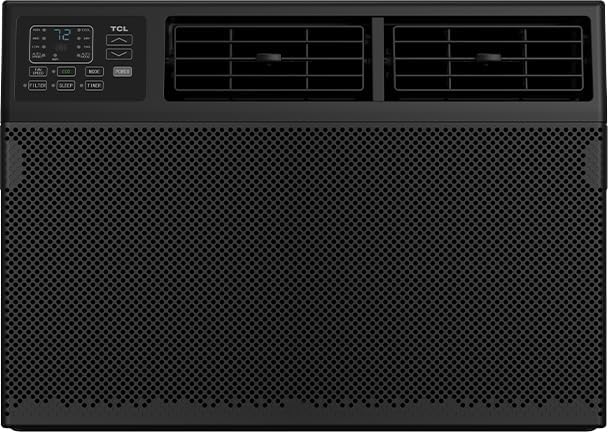
Figure 1: Front view of the TCL 8,000 BTU Smart Window Air Conditioner, showcasing its black design and digital display.
2. Setup and Installation
The TCL 8,000 BTU Smart Window Air Conditioner comes with an easy-to-use installation kit for convenient setup. Proper installation is crucial for optimal performance and safety.
2.1 Window Size Requirements
- Width: 26-36 inches
- Height: 14.5 inches
2.2 Installation Steps (Summary)
While a detailed guide is included with your unit, here is a summary of the general installation process:
- Prepare the window opening, ensuring it meets the specified dimensions.
- Attach the top mounting rail and side panels to the air conditioner unit.
- Carefully place the unit into the window opening, ensuring it is level or slightly tilted outwards for proper drainage.
- Extend the side panels to fill the window opening and secure them.
- Install the window sash seal and any additional sealing materials to prevent air leakage.
- Plug the unit into a grounded electrical outlet.
Always refer to the detailed installation instructions provided in the box for complete and accurate steps.
3. Operating Instructions
Your TCL air conditioner offers various modes and features for personalized comfort. You can control the unit using the intuitive LED display on the unit or the included remote control.
3.1 Control Panel and Remote Control
The unit features an LED display and control buttons. All functions available on the unit's control panel are also accessible via the remote control, providing convenient operation from anywhere in the room.
- Power Button: Turns the unit On or Off.
- Cool Mode: Activates cooling function.
- Fan Speed: Adjusts fan speed (e.g., Low, Medium, High).
- Sleep Mode: Gradually increases temperature during sleep for energy saving and comfort.
- Timer: Sets a specific time for the unit to turn On or Off automatically.
- Eco Mode: Optimizes energy consumption by cycling the compressor On and Off to maintain the set temperature.
- Auto Mode: Automatically selects the operating mode (Cool, Fan) and fan speed based on the room temperature.
- Display Button: Controls the illumination of the LED display.
- Fan Only: Operates the fan without cooling, for air circulation.
The unit also features two 4-way vents, allowing you to direct airflow precisely where it's needed most.
3.2 Smart Features (App & Voice Control)
Control your air conditioner remotely using the dedicated smartphone app or simple voice commands with Alexa and Google Assistant. This allows you to:
- Change temperature settings.
- Set daily or weekly schedules.
- Switch between different operating modes and fan speeds.
- Monitor the unit's status.
4. Maintenance
Regular maintenance ensures your TCL air conditioner operates efficiently and prolongs its lifespan.
4.1 Cleaning the Air Filter
The unit is equipped with a washable and reusable filter that helps protect the AC and reduces airborne particles like dust and pet hair. It is recommended to clean the filter regularly, typically every two weeks, or more often depending on usage and air quality.
- Turn off and unplug the air conditioner.
- Locate and remove the air filter (usually behind the front grille).
- Wash the filter with warm, soapy water. For heavily soiled filters, a vacuum cleaner can be used first to remove loose dirt.
- Rinse thoroughly and allow the filter to air dry completely before reinserting it into the unit.
Do not operate the air conditioner without the filter in place.
4.2 General Cleaning
Wipe the exterior of the unit with a soft, damp cloth. Do not use harsh chemicals, abrasives, or solvents, as these can damage the surface.
5. Troubleshooting
If you encounter issues with your air conditioner, refer to the following common troubleshooting tips before contacting customer support.
- Unit does not turn on:
- Check if the power cord is securely plugged into a grounded outlet.
- Verify that the circuit breaker has not tripped.
- Ensure the unit is not in Timer mode set to turn off.
- Unit is not cooling effectively:
- Check if the air filter is clean and not obstructed.
- Ensure windows and doors are closed to prevent warm air from entering the room.
- Verify that the temperature setting is lower than the room temperature.
- Check for any obstructions blocking the air intake or exhaust vents.
- Ensure the unit size is appropriate for the room area (up to 350 sq. ft.).
- Water dripping from the unit:
- Ensure the unit is installed with a slight downward tilt towards the outside for proper drainage.
- Check if the drain pan is full or clogged.
- Unusual noises:
- A slight rattling or gurgling sound is normal due to refrigerant flow.
- Check for loose parts or obstructions in the fan area.
If the problem persists after trying these solutions, please contact TCL customer support.
6. Specifications
| Feature | Detail |
|---|---|
| Brand | TCL |
| Model Number | W8W9E2-B3 |
| Cooling Power | 8,000 BTU |
| Coverage Area | Up to 350 sq. ft. |
| Installation Type | Window |
| Control Method | App, Remote, Voice |
| Item Weight | 45.3 lbs |
| Product Dimensions (WxDxH) | 18.58" x 15.59" x 13.31" |
| Energy Star Certified | Yes |
| Refrigerant | R 410A |
7. Warranty and Support
7.1 Warranty Information
This TCL 8,000 BTU Smart Window Air Conditioner comes with a 1 year limited warranty. Please retain your proof of purchase for warranty claims.
7.2 Customer Support
For further assistance, technical support, or warranty inquiries, please visit the official TCL Store or contact their customer service directly.
Related Documents - W8W9E2-B3
 |
TCL 5K-14K Window Air Conditioner User Manual User manual and installation guide for TCL 5K-14K Window Air Conditioners. Includes safety instructions, installation steps, WiFi app setup, and troubleshooting. |
 |
TCL Window Air Conditioner 5K-14K BTU User Manual Comprehensive user manual for TCL 5K-14K BTU window air conditioners, covering installation, operation, troubleshooting, and warranty information in English, Spanish, and French. |
 |
TCL 15K-24K Window Air Conditioner User Manual Get started with your TCL 15K-24K Window Air Conditioner. This comprehensive user manual covers installation, operation, troubleshooting, and WiFi setup for your cooling unit. |
 |
TCL 5K-14K BTU Window Air Conditioner User Manual User manual and installation guide for TCL 5K-14K BTU window air conditioners. Includes setup, operation, troubleshooting, and warranty information. |
 |
TCL 5K-14K Window Air Conditioner User Manual Comprehensive user manual and installation guide for TCL 5K-14K BTU window air conditioners, featuring safety instructions, installation steps, operation modes, and troubleshooting. |
 |
TCL 5K-14K UN Window AC User Manual and Installation Guide Comprehensive guide for the TCL 5K-14K UN Window Air Conditioner, covering installation, operation, troubleshooting, and warranty information. Includes support resources. |
Ask a question about this manual
Ask about setup, troubleshooting, compatibility, parts, safety, or missing instructions. Manuals+ will review the question and use this page’s manual context to help answer it.