1. Product Overview
The Zeppelin Mediterranee 9670-5 is a sophisticated men's chronograph watch featuring a quartz movement, a beige analog dial with date display, and a tachymeter scale. This manual provides essential information for the proper use and care of your watch.
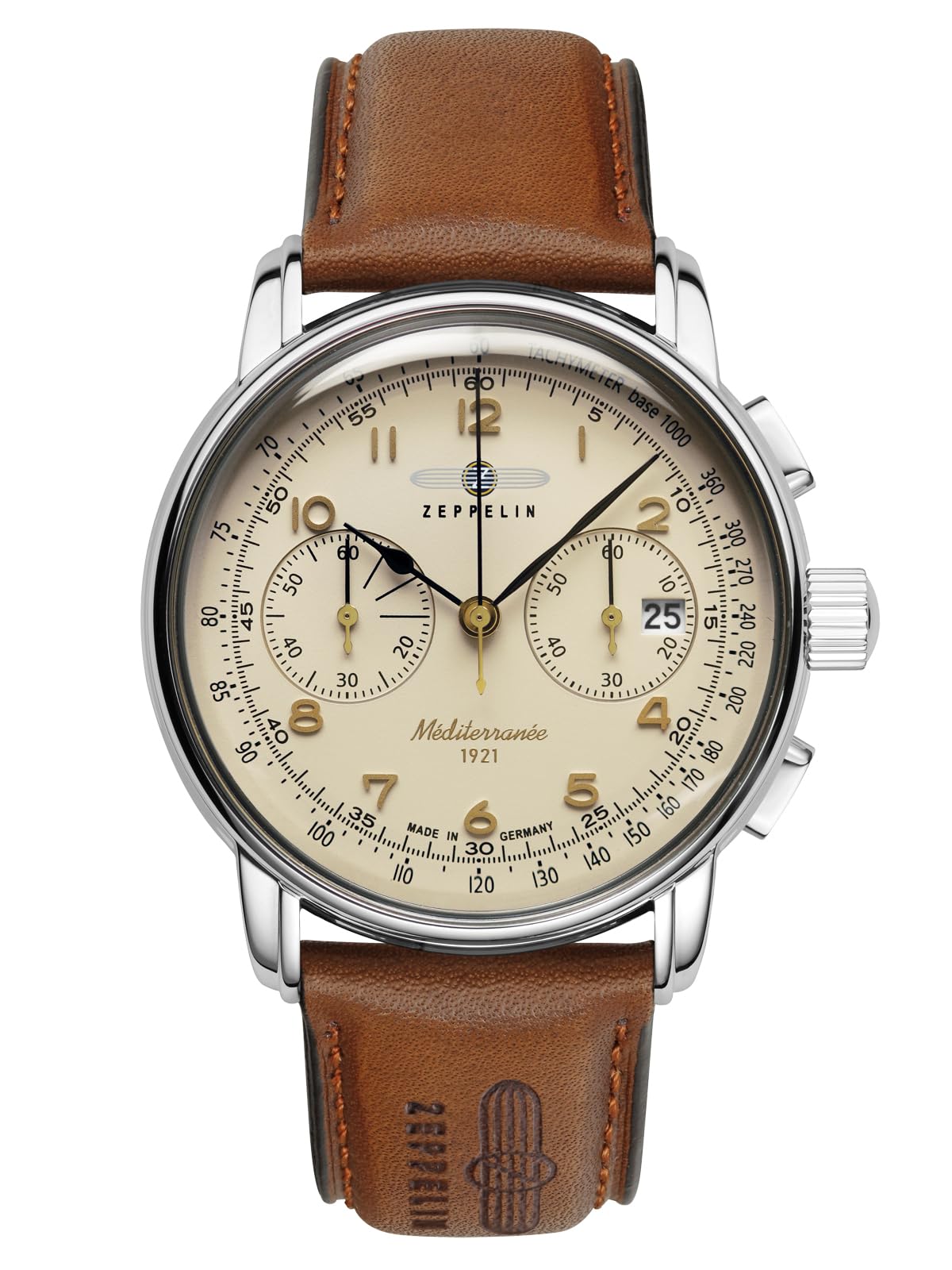
Figure 1: Front view of the Zeppelin Mediterranee 9670-5 watch.
Key Components:
- Crown (A): Used for setting time and date.
- Pusher A (B): Used to start and stop the chronograph.
- Pusher B (C): Used to reset the chronograph.
- Main Dial: Displays hours, minutes, and seconds.
- Sub-dials: Chronograph minute counter, chronograph hour counter, and small seconds.
- Date Window: Displays the current date.
- Tachymeter Scale: Located on the outer rim of the dial, used for measuring speed.

Figure 2: Side view illustrating the crown and pushers.
2. Setup and Initial Operation
2.1 Setting the Time:
- Pull the crown (A) out to position 2.
- Rotate the crown (A) to move the hour and minute hands to the correct time. Ensure AM/PM is correctly set if the watch has a 24-hour indicator or by observing the date change.
- Push the crown (A) back into position 0 to start the watch.
2.2 Setting the Date:
- Pull the crown (A) out to position 1.
- Rotate the crown (A) clockwise or counter-clockwise to set the desired date.
- Once the date is set, push the crown (A) back into position 0.
Note: Avoid setting the date between 9:00 PM and 3:00 AM, as this may interfere with the automatic date change mechanism. If the date needs to be set during this period, first set the time outside this window, adjust the date, then reset the time.
3. Operating the Chronograph Function
The chronograph function allows for precise measurement of elapsed time.
3.1 Basic Chronograph Operation:
- Start: Press Pusher A (B) to start the chronograph. The chronograph second hand will begin to move.
- Stop: Press Pusher A (B) again to stop the chronograph. The elapsed time can be read from the chronograph second hand and the sub-dials.
- Reset: After stopping, press Pusher B (C) to reset all chronograph hands to their zero positions.
3.2 Using the Tachymeter Scale:
The tachymeter scale, located on the outer bezel, can be used to measure speed over a known distance (e.g., 1 kilometer or 1 mile).
- Start the chronograph (Pusher A) at the beginning of the measured distance.
- Stop the chronograph (Pusher A) when the distance is completed.
- The number on the tachymeter scale indicated by the chronograph second hand represents the average speed in units per hour (e.g., km/h or mph).
4. Maintenance and Care
4.1 Water Resistance:
Your watch has a water resistance rating of 50 meters (5 ATM). This means it is suitable for short periods of recreational swimming, but not for diving or prolonged water exposure. Ensure the crown is fully pushed in before any contact with water.
4.2 Cleaning:
Wipe the watch case and crystal with a soft, dry cloth. For the leather strap, avoid excessive moisture and harsh chemicals. Clean with a damp cloth and mild soap if necessary, then allow to air dry completely.
4.3 Battery Replacement:
The watch is powered by a quartz movement requiring a product-specific battery. When the battery needs replacement, it is recommended to take the watch to an authorized service center or a professional watchmaker to ensure proper sealing and function.
4.4 Storage:
When not in use, store your watch in a cool, dry place, away from direct sunlight and extreme temperatures. Avoid placing it near magnetic fields, which can affect the accuracy of quartz movements.
5. Troubleshooting
5.1 Watch Not Running:
- Check if the crown is fully pushed in (position 0).
- The battery may need replacement. Consult a professional watchmaker.
5.2 Date Not Changing:
- Ensure the time is set correctly, especially the AM/PM cycle. The date typically changes around midnight.
- Avoid setting the date between 9:00 PM and 3:00 AM.
5.3 Chronograph Hands Not Resetting to Zero:
- Press Pusher B (C) firmly. If they still do not reset, a calibration may be needed by a professional.
For issues not covered here, please contact an authorized service center.
6. Specifications
| Feature | Detail |
|---|---|
| Model Number | 9670-5 |
| Movement Type | Quartz |
| Dial Color | Beige |
| Dial Style | Analog with Chronograph and Date |
| Case Material | Steel |
| Case Size | 42 mm (Diameter), 12 mm (Thickness) |
| Glass Type | Mineral Crystal |
| Strap Material | Leather (Brown) |
| Water Resistance | 50 meters (5 ATM) |
| Item Weight | 79 g |
| Country of Origin | China |
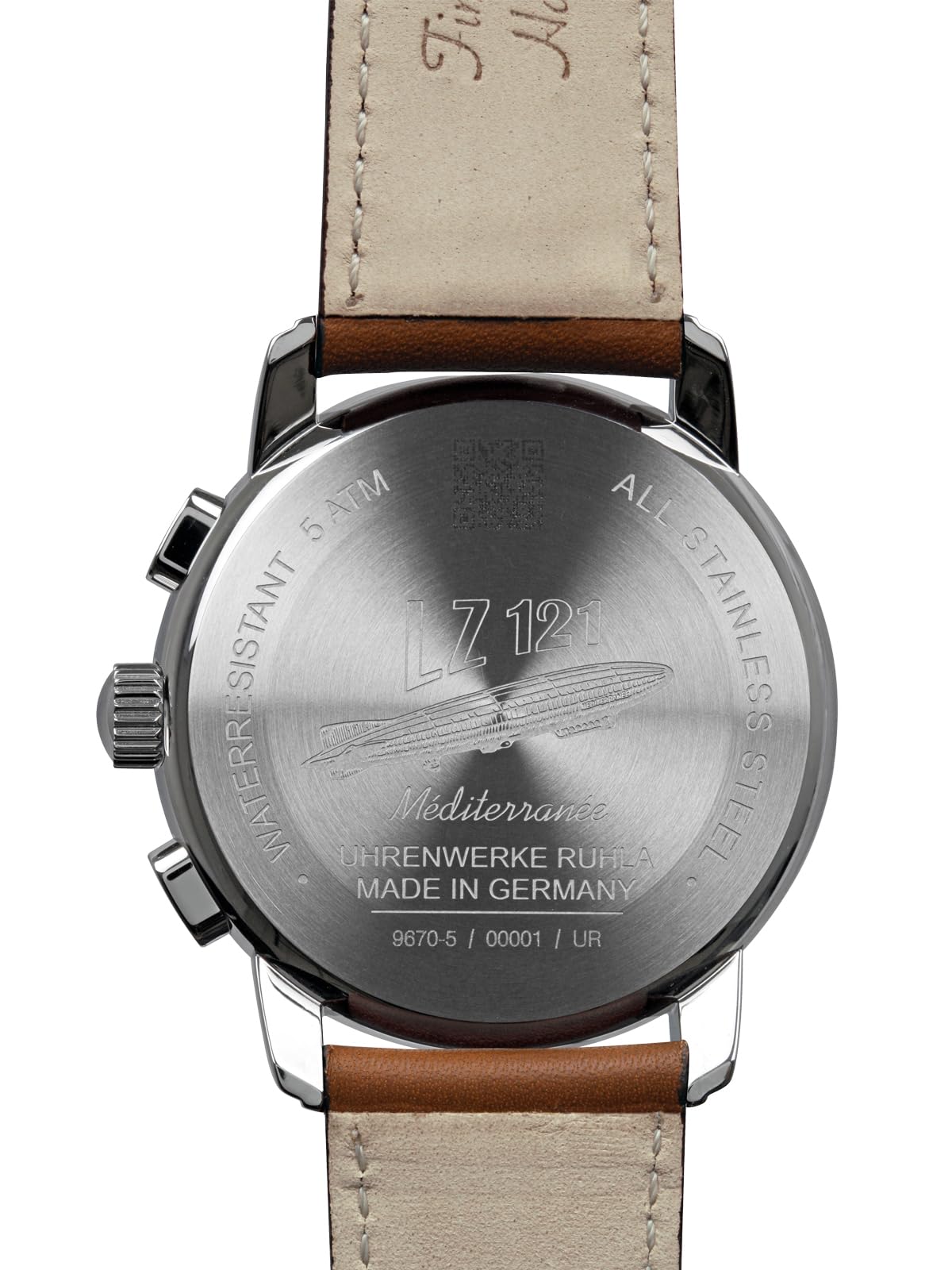
Figure 3: Case back of the Zeppelin Mediterranee 9670-5 watch.
7. Warranty and Support
This Zeppelin watch comes with a Manufacturer's Warranty. Please refer to the warranty card included with your purchase for specific terms and conditions, including coverage duration and claim procedures.
For technical support, service, or warranty claims, please contact your authorized Zeppelin dealer or the official service center. Contact details can typically be found on the manufacturer's website or in the documentation provided with your watch.


