
1. Introduction
This manual provides essential information for the installation, operation, and maintenance of your Philips Hue Lightguide Ellipse Smart LED Bulb. Please read these instructions carefully before use to ensure proper functionality and safety.

Image 1.1: The Philips Hue Lightguide Ellipse Smart LED Bulb and its retail packaging. This image displays the unique handblown glass design of the bulb and highlights its smart features on the box.
The Philips Hue Lightguide Ellipse Smart LED Bulb is designed to offer both aesthetic appeal and advanced smart lighting capabilities. Featuring handblown glass and a distinctive inner tube, this bulb provides a unique glowing effect. It supports 16 million colors and warm-to-cool white light, allowing for personalized ambiance. The bulb is compatible with Amazon Alexa, Apple HomeKit, and Google Assistant, and can be controlled via Bluetooth or a Philips Hue Bridge for extended functionality.
2. Setup and Installation
2.1 What's in the Box
- One Philips Hue Lightguide Ellipse Smart LED Bulb.
2.2 Installation Steps
- Install your lighting: Screw the Philips Hue Lightguide Ellipse bulb into a standard E26 light fixture. Ensure the fixture is powered off before installation.
- Connect the Philips Hue Bridge (Optional, for full features): If you are using a Philips Hue Bridge, connect it to your Wi-Fi router using an Ethernet cable and plug it into a power outlet. The Bridge is sold separately.
- Download the Philips Hue app: Download the official Philips Hue app from the App Store (iOS) or Google Play Store (Android) on your smartphone or tablet.
Image 2.1: Illustration of Step 1, showing options to start with Philips Hue Starterkits or a Philips Hue Bridge with lights.
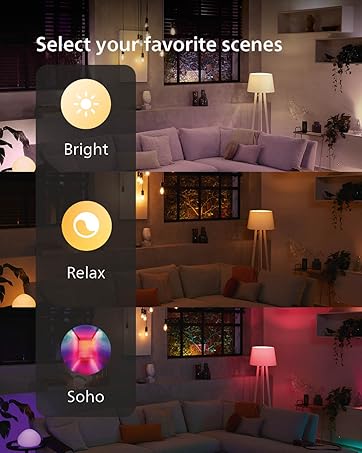
Image 2.2: Illustration of Step 2, demonstrating how to connect the Philips Hue Bridge to a router and power for full home control.

Image 2.3: Illustration of Step 3, showing the Philips Hue app interface on a smartphone, prompting users to download it.
2.3 Initial Connection
Once the bulb is installed and the app is downloaded, open the Philips Hue app. The app will guide you through the process of discovering and connecting your new Lightguide Ellipse bulb. You can connect via Bluetooth for single-room control or via a Philips Hue Bridge for multi-room and advanced features.

Image 2.4: A visual comparison detailing the features available when controlling Philips Hue lights via Bluetooth versus using a Hue Bridge. It highlights that Bluetooth offers one-room control and basic ambiance, while the Bridge enables full home control, smart switches, motion sensors, routines, and remote access.
3. Operating Instructions
3.1 Control Methods
- Philips Hue App: Use the app to control brightness, color, and create custom scenes.
- Voice Control: Integrate with Amazon Alexa, Apple HomeKit, or Google Assistant for hands-free control.
- Smart Accessories: Connect with Philips Hue smart switches or motion sensors (requires Hue Bridge).

Image 3.1: An image demonstrating voice control functionality, showing a family in a dining area with smart bulbs, and text indicating compatibility with Alexa and Hey Google.
3.2 Lighting Features
- Color Changing: Access 16 million colors to set the perfect mood.
- Warm-to-Cool White Light: Adjust white light from warm (2000K) to cool (6500K) for various activities.
- Dimmable: Smooth dimming capabilities without flickering.
- Scenes and Automations: Create and save custom light scenes, set schedules, and automate lighting behavior (requires Hue Bridge).
- Media Sync: Sync your lights with movies, games, and music for immersive experiences (requires Hue Bridge).

Image 3.2: A composite image illustrating the Philips Hue app interface with different lighting scenes like 'Bright', 'Relax', and 'Soho', demonstrating how users can select moods for various rooms.

Image 3.3: An image depicting Philips Hue smart lights syncing with various media, including movies, games, and music, to create immersive lighting experiences.
4. Maintenance
The Philips Hue Lightguide Ellipse Smart LED Bulb requires minimal maintenance. To clean the bulb, ensure the power is off and the bulb is cool. Gently wipe the glass surface with a soft, dry cloth. Avoid using liquid cleaners or abrasive materials, as these may damage the finish or internal components.
5. Troubleshooting
5.1 Common Issues and Solutions
- Bulb not responding:
- Ensure the light fixture is powered on.
- Check if the bulb is securely screwed into the socket.
- If using Bluetooth, ensure your device is within range.
- If using a Hue Bridge, verify the Bridge is powered on and connected to your network.
- Cannot connect to Philips Hue app:
- Restart the Philips Hue app.
- Restart your smartphone/tablet.
- Ensure Bluetooth is enabled on your device.
- For Bridge connection, ensure the Bridge has an internet connection and is visible in the app.
- Inconsistent color or brightness:
- Perform a factory reset on the bulb (refer to Philips Hue support for specific instructions).
- Update the Philips Hue app and Bridge firmware to the latest versions.
For further assistance, please visit the official Philips Hue support website or contact customer service.
6. Specifications
| Feature | Detail |
|---|---|
| Brand | Philips Hue |
| Model Number | 577460 |
| Light Type | LED |
| Special Feature | Dimmable |
| Wattage | 6.5 watts |
| Incandescent Equivalent | 45 Watts |
| Bulb Shape Size | T (Tubular) |
| Bulb Base | E26 |
| Light Color | White, Color (16 million colors) |
| Voltage | 100-120 Volts |
| Color Temperature | 2000 Kelvin (Warm) to 6500 Kelvin (Cool) |
| Brightness | 500 Lumen |
| Material | Copper, Handblown Glass |
| Indoor/Outdoor Usage | Indoor |
| Connectivity | Bluetooth, Zigbee |
| Dimensions | 7.48"W x 9.65"H (185mm x 205mm) |
| Item Weight | 7.7 ounces (0.22 Kilograms) |

Image 6.1: Technical drawing illustrating the dimensions of the Philips Hue Lightguide Ellipse bulb, showing a diameter of 185mm and a height of 205mm.
7. Warranty and Support
7.1 Warranty Information
The Philips Hue Lightguide Ellipse Smart LED Bulb comes with a 2-year warranty. Please retain your proof of purchase for warranty claims.
7.2 Customer Support
For additional support, product information, or to explore other Philips Hue products, please visit the official Philips Hue Store:


