
Important Safety Information
Please read all instructions carefully before operating your new TCL Smart Window Air Conditioner. Keep this manual for future reference.
- Electrical Safety: Always plug the unit into a grounded 3-prong outlet. Do not use extension cords or adapter plugs. Ensure the power cord is not pinched or damaged.
- Installation: Install the unit securely in a window according to the provided instructions. Ensure the window size meets the requirements (26-36 inch width, 14.5 inch height).
- Handling: Use caution when lifting and moving the unit due to its weight (approximately 45.3 lbs). It is recommended to have two people for installation.
- Maintenance: Disconnect power before cleaning or performing any maintenance.
- Children and Pets: Keep children and pets away from the unit during operation.
- Flammable Materials: Do not place flammable materials near the air conditioner.
Product Overview
The TCL 8,000 BTU Smart Window Air Conditioner (Model: W8W9E2-B3C) is designed to provide efficient cooling for rooms up to 350 sq. ft. It features smart controls, energy-saving modes, and a user-friendly interface.
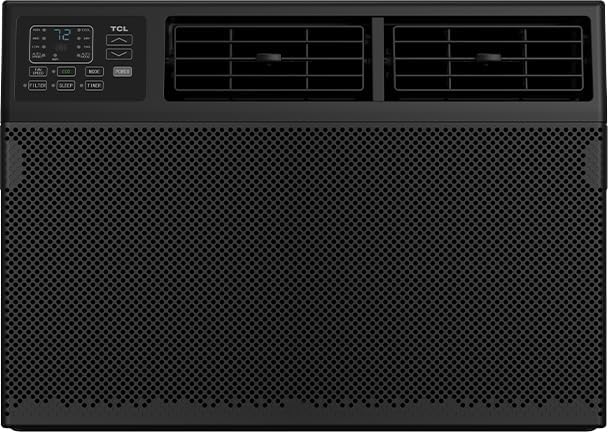
Figure 1: Front view of the TCL 8,000 BTU Smart Window Air Conditioner. The unit is black with a large mesh grille covering the lower front. The upper left features a digital control panel with an LED display showing "72" degrees, along with buttons for fan speed, eco mode, mode selection, and power. Below these are indicator lights for filter, sleep, and timer. To the right of the control panel are two horizontal air vents with adjustable louvers.
Key Components:
- Control Panel: Digital display and buttons for various functions.
- Air Vents: Two 4-way adjustable vents for directing airflow.
- Front Grille: Covers the air intake and filter.
- Remote Control: Included for convenient operation from a distance.
- Washable Filter: Reusable filter located behind the front grille.
Installation and Setup
The TCL Smart Window Air Conditioner comes with an easy-to-use installation kit. Follow these general steps for proper setup:
- Prepare the Window: Ensure your window meets the required dimensions: 26-36 inches in width and 14.5 inches in height. Clear the area around the window.
- Install Mounting Brackets (if applicable): Refer to the detailed installation guide included in the box for specific instructions on securing any necessary mounting brackets or support frames.
- Place the Unit: Carefully lift the air conditioner and place it into the window opening. Ensure it is level or slightly tilted outwards to allow for proper condensation drainage.
- Secure the Unit: Extend the side panels to fill the window gap and secure them using the provided screws and sealing materials to prevent air leakage.
- Seal Gaps: Use foam insulation or weather stripping to seal any remaining gaps around the unit to maximize cooling efficiency.
- Plug In: Once securely installed, plug the unit into a standard, grounded electrical outlet.
For detailed, step-by-step installation instructions, please refer to the separate installation guide provided with your product.
Operating Instructions
Your TCL Smart Window Air Conditioner offers multiple ways to control your comfort.
Using the Control Panel and Remote:
- Power On/Off: Press the POWER button to turn the unit on or off.
- Mode Selection: Press the MODE button to cycle through cooling, fan, and eco modes.
- Cool Mode: Provides maximum cooling.
- Fan Mode: Circulates air without cooling.
- Eco Mode: Saves energy by cycling the compressor on and off to maintain the set temperature.
- Temperature Adjustment: Use the UP/DOWN arrows on the control panel or remote to set your desired temperature.
- Fan Speed: Press the FAN SPEED button to adjust between low, medium, and high fan speeds.
- Sleep Mode: Activate SLEEP mode for quiet operation and gradual temperature adjustment during sleep.
- Timer: Use the TIMER function to set a specific time for the unit to turn on or off automatically (up to 24 hours).
- Airflow Direction: Manually adjust the two 4-way vents to direct the airflow where needed.
Smart Control (App & Voice):
Control your air conditioner from anywhere using the TCL Home app or voice commands with Alexa and Google Assistant.
- Download App: Download the TCL Home app from your smartphone's app store.
- Connect to Wi-Fi: Follow the in-app instructions to connect your air conditioner to your home Wi-Fi network.
- Voice Assistant Integration: Link your TCL Home account with Amazon Alexa or Google Assistant through their respective apps.
- Control: Use the app to change temperature, set schedules, switch modes, and adjust fan speeds. Use voice commands like "Alexa, set the AC to 72 degrees" or "Hey Google, turn on the air conditioner."
Maintenance
Regular maintenance ensures optimal performance and extends the life of your air conditioner.
- Filter Cleaning: The washable and reusable filter should be cleaned regularly (e.g., every two weeks or as needed, depending on usage).
- Disconnect the power supply to the unit.
- Remove the front grille to access the filter.
- Slide out the filter.
- Wash the filter with warm, soapy water. Rinse thoroughly.
- Allow the filter to air dry completely before reinserting.
- Replace the filter and reattach the front grille.
- Exterior Cleaning: Wipe the exterior of the unit with a soft, damp cloth. Do not use harsh chemicals or abrasive cleaners.
- Coil Cleaning: Periodically inspect the condenser coils at the back of the unit for dirt and debris. If necessary, gently clean them with a soft brush or vacuum cleaner.
- Winter Storage: If storing the unit for winter, ensure it is clean and dry. Store it in an upright position in a dry, protected area.
Troubleshooting
Before contacting customer service, try these common troubleshooting steps:
| Problem | Possible Cause | Solution |
|---|---|---|
| Unit does not turn on. | No power, tripped circuit breaker, power outage. | Check power cord connection. Reset circuit breaker. Unit designed to auto-restart after power outage. |
| Unit not cooling effectively. | Dirty air filter, blocked air vents, room too large, open doors/windows. | Clean air filter. Ensure vents are clear. Close doors/windows. Verify room size is within 350 sq. ft. capacity. |
| Unusual noise. | Loose parts, unit not level, foreign object. | Check for loose parts. Ensure unit is level. Inspect for foreign objects. |
| Water dripping inside. | Unit not tilted slightly outwards, clogged drain. | Ensure unit is slightly tilted outwards for drainage. Check for and clear any drain clogs. |
If the problem persists after trying these solutions, please contact TCL customer support.
Specifications
| Feature | Detail |
|---|---|
| Brand | TCL |
| Model Number | W8W9E2-B3C |
| Cooling Power | 8,000 BTU |
| Coverage Area | Up to 350 sq. ft. |
| Installation Type | Window |
| Window Size Requirements | Width: 26-36 inches, Height: 14.5 inches |
| Item Weight | 45.3 lbs |
| Color | Black |
| Control Method | App, Remote, Voice (Alexa, Google Assistant) |
| Energy Efficiency | Energy Star Certified |
| Special Features | Sleep Mode, Eco Mode, 24-hour Timer, Auto Restart, Washable Filter |
Warranty and Support
Your TCL 8,000 BTU Smart Window Air Conditioner is covered by a 1-year limited warranty from the date of purchase.
This warranty covers defects in materials and workmanship under normal use. It does not cover damage resulting from misuse, accident, modification, or unauthorized repair.
Customer Support:
For warranty claims, technical assistance, or any questions regarding your product, please contact TCL Customer Support. Have your model number (W8W9E2-B3C) and purchase date ready when you call.
Please refer to the warranty card included with your product for complete terms and conditions.


