
1. Introduction
Thank you for choosing the WARMTEC EWE 2500W Electric Convector Heater. This appliance is designed to provide efficient and comfortable heating for your home. Featuring a powerful 2500W output, it is suitable for rooms up to 35 square meters. The heater includes an intuitive LCD touch screen, WiFi control via the Tuya Smart app, and an electronic thermostat for precise temperature management between 15°C and 45°C. Its IP24 protection class makes it suitable for use in bathrooms. This manual provides essential information for safe installation, operation, and maintenance of your heater.
2. Safety Information
Please read all safety instructions carefully before using the appliance. Failure to follow these instructions may result in electric shock, fire, or injury.
- Placement: Ensure the heater is placed on a stable, level surface or securely mounted to a wall. Maintain adequate clearance from walls, furniture, and curtains.
- Power Supply: Connect the heater only to a grounded electrical outlet with the correct voltage (230V / 50Hz). Do not overload the circuit.
- Water Exposure: The IP24 rating means it is protected against splashing water, making it suitable for bathrooms. However, do not immerse the heater in water or expose it to direct water jets.
- Overheating Protection: The heater is equipped with an automatic overheating protection system. If the heater overheats, it will automatically shut off. Unplug the unit and allow it to cool before restarting.
- Tip-Over Protection: For safety, the heater will automatically switch off if it is accidentally tipped over. Ensure it is placed upright on a stable surface.
- Child Lock: Activate the child lock function to prevent unintended changes to settings by children.
- Airflow: Do not block the air inlets or outlets. Blockage can lead to overheating and damage.
- Maintenance: Always unplug the heater before cleaning or performing any maintenance.
3. Package Contents
Carefully unpack the box and ensure all items are present and undamaged. If any parts are missing or damaged, contact customer support.
- WARMTEC EWE Electric Convector Heater
- Wall mounting brackets
- Screws and wall plugs for mounting
- Feet with wheels for freestanding use
- User Manual (this document)

Figure 3.1: Included accessories for installation.
4. Setup
The WARMTEC EWE heater offers flexible installation options: freestanding with wheels or wall-mounted.
4.1 Freestanding Installation
- Carefully place the heater on its side on a soft, clean surface to avoid scratching.
- Attach the feet with wheels to the bottom of the heater using the provided screws. Ensure they are securely fastened.
- Carefully lift the heater and place it upright in your desired location. Ensure it is on a stable, level surface.
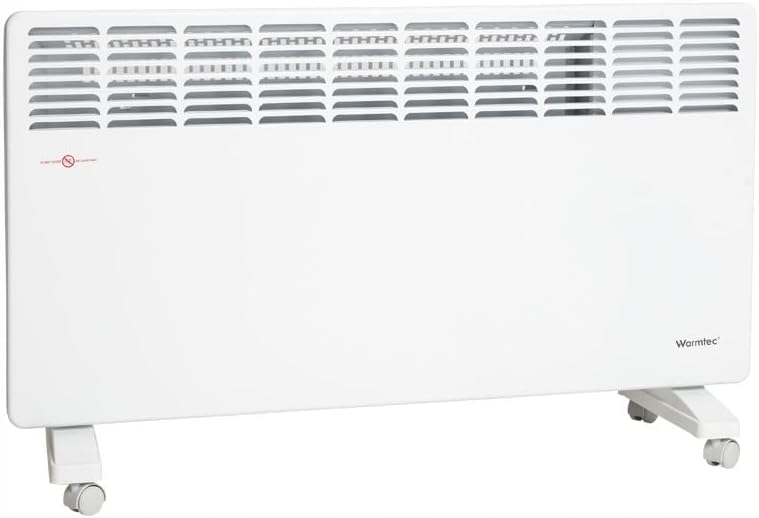
Figure 4.1: Heater with feet and wheels attached.
4.2 Wall-Mounted Installation
- Choose a suitable wall location, ensuring adequate clearance from flammable materials and a power outlet is nearby.
- Mark the drilling points for the wall mounting brackets using the provided template or by holding the brackets against the wall.
- Drill holes at the marked points and insert the wall plugs.
- Securely attach the wall mounting brackets to the wall using the provided screws.
- Carefully hang the heater onto the wall mounting brackets, ensuring it is securely seated and level.

Figure 4.2: Heater installed as a wall-mounted unit.
5. Operating Instructions
The WARMTEC EWE heater can be controlled via its integrated LCD touch screen or remotely using the Tuya Smart app.
5.1 Control Panel Overview

Figure 5.1: LCD Touch Control Panel.
The LCD display shows current temperature, time, WiFi status, and active mode. The touch buttons allow you to:
- Power Button (U): Turn the heater ON/OFF.
- Up/Down Arrows (^ / v): Adjust the target temperature (15°C to 45°C).
- Mode Button (⚙️): Cycle through heating modes (Comfort, Eco, Frost Protection).
- Settings Button (≡): Access advanced settings and child lock.
- Timer Button (⏱️): Set a timer for operation.
5.2 WiFi Control with Tuya Smart App
The heater can be controlled remotely via your smartphone using the Tuya Smart app. This allows you to adjust settings, set schedules, and monitor the heater from anywhere.
- Download the 'Tuya Smart' app from your smartphone's app store (iOS or Android).
- Register or log in to your Tuya Smart account.
- Ensure your heater is powered on and the WiFi indicator on the display is blinking (if not, refer to the app's instructions for pairing mode).
- In the app, tap '+' to add a new device. Follow the on-screen instructions to connect your heater to your home WiFi network.
- Once connected, you can control all functions of the heater through the app.

Figure 5.2: Heater with WiFi connectivity.
5.3 Heating Modes
- Comfort Mode: Maintains your set target temperature for optimal comfort.
- Eco Mode: Operates at a slightly lower temperature or reduced power to save energy while still providing warmth.
- Frost Protection Mode: Maintains a minimum temperature (e.g., 5-7°C) to prevent pipes from freezing in unoccupied rooms.
5.4 Special Features
- Open Window Function: The heater automatically detects a sudden drop in temperature (e.g., when a window is opened) and switches to frost protection mode to save energy. It will resume normal operation once the temperature stabilizes.
- Memory Function: In the event of a power outage, the heater will automatically restart with the previously selected settings once power is restored.
- Weekly Program: Set a customized heating schedule for each day of the week to optimize energy consumption and comfort.
6. Maintenance
Regular cleaning and maintenance will ensure the longevity and efficient operation of your WARMTEC EWE heater.
- Cleaning: Always unplug the heater and allow it to cool completely before cleaning. Use a soft, damp cloth to wipe the exterior surfaces. Do not use abrasive cleaners, solvents, or harsh chemicals.
- Dust Removal: Periodically use a vacuum cleaner with a brush attachment to remove dust from the air inlets and outlets.
- Storage: If storing the heater for an extended period, ensure it is clean and dry. Store it in its original packaging in a cool, dry place.
7. Troubleshooting
If you encounter issues with your WARMTEC EWE heater, please refer to the following common problems and solutions:
| Problem | Possible Cause | Solution |
|---|---|---|
| Heater does not turn on | No power supply; Power button not pressed; Tip-over switch activated. | Check power cord connection and wall outlet; Press the power button; Ensure heater is upright on a stable surface. |
| Heater stops unexpectedly | Overheating protection activated; Tip-over protection activated; Open window function activated. | Unplug and allow to cool, check for blocked air vents; Ensure heater is upright; Close windows/doors or disable function. |
| WiFi connection issues | Incorrect WiFi password; Router too far; App not configured correctly. | Verify WiFi password; Move heater closer to router; Re-follow Tuya Smart app pairing instructions. |
| Temperature not reaching set level | Room too large; Air vents blocked; Heater in Eco or Frost Protection mode. | Ensure room size is within recommended limits; Clear air vents; Switch to Comfort mode. |
If the problem persists after attempting these solutions, please contact WARMTEC customer support.
8. Technical Specifications
| Feature | Specification |
|---|---|
| Model | EWE 2500W |
| Power | 2500 W |
| Voltage | 230 V / 50 Hz |
| Temperature Range | 15 - 45 °C |
| Protection Type | IP24 |
| Control | LCD Touch Screen + WiFi (Tuya Smart App) |
| Cable Length | 1.60 m |
| Dimensions (W x H x D) | 100 cm x 43.5 cm x 8 cm |
| Weight | 9.5 kg |
| Special Features | Low consumption, Electronic thermostat, Overheating protection, Tip-over protection, Child lock, Memory function, Open window function, Weekly program |
| Mounting Type | Wall mount, Floor mount (Pedestal) |
| Recommended Room Types | Bathroom, Office, Bedroom, Children's room, Living room |
9. Warranty and Support
WARMTEC products are designed for reliability and performance. This product comes with a standard manufacturer's warranty. Please refer to the warranty card included in your packaging for specific terms and conditions, or visit the official WARMTEC website for detailed warranty information.
For technical support, troubleshooting assistance, or warranty claims, please contact WARMTEC customer service through their official website or the contact information provided in your product documentation.


