
INNOREL F20
INNOREL F20 Fluid Head User Manual
Model: F20 | Brand: INNOREL
Introduction
Thank you for choosing the INNOREL F20 Fluid Head. This compact and portable fluid video head is designed for smooth and precise camera movements, ideal for DSLR cameras, mirrorless cameras, and compact video cameras. Please read this manual thoroughly before using the product to ensure proper operation and longevity.

Image: The INNOREL F20 Fluid Head shown with its handle, two Arca Swiss quick release plates, a magic arm, and a phone clip.
Package Contents
Verify that all items listed below are included in your package. If any items are missing or damaged, please contact customer support.
- 1 x F20 Fluid Head Main Body
- 1 x Handle
- 1 x Magic Arm
- 1 x Phone Clip
- 1 x 3/8" to 1/4" Screw (located in the bottom hole of the head)
- 1 x Extra Quick Release Plate (total of 2 included)

Image: An open box displaying the F20 Fluid Head, handle, magic arm, phone clip, 3/8" to 1/4" screw, and an extra quick release plate.
Setup Guide
Component Identification
Familiarize yourself with the main components of the F20 Fluid Head:

Image: A detailed diagram highlighting key components such as the 1/4" screw, sponge sleeve, spirit level, handle locking lever, panoramic scale, main knob, vertical scale, and pan locking lever.
- 1/4" Screw: For attaching cameras and other devices to the quick release plate.
- Sponge Sleeve: Provides a comfortable grip on the handle.
- Spirit Level: Helps ensure the head is perfectly level for accurate shots.
- Handle Locking Lever: Secures the handle in position.
- Panoramic Scale: Graduated markings for precise 360° panoramic adjustments.
- Main Knob: Controls the tilt friction and locking mechanism.
- Vertical Scale: Markings for precise vertical tilt adjustments.
- Pan Locking Lever: Secures the horizontal pan movement.
- Quick Release Plate: Arca Swiss compatible plate for quick attachment and detachment of equipment.
Attaching to a Tripod
- Locate the 3/8" screw hole at the bottom of the F20 Fluid Head. If your tripod has a 1/4" screw, use the included 3/8" to 1/4" adapter screw.
- Screw the fluid head onto your tripod's mounting screw until it is securely fastened. Ensure it is tight to prevent wobbling during use.
Attaching the Handle
- Insert the handle into the designated slot on the side of the fluid head.
- Tighten the Handle Locking Lever to secure the handle firmly. The handle can be adjusted for left or right-hand use by re-orienting it.

Image: Illustrations demonstrating how to attach and re-orient the handle for both left-hand and right-hand operation.
Attaching Your Camera/Device
- Attach one of the Arca Swiss quick release plates to the bottom of your camera or device using the 1/4" screw. Ensure it is securely tightened. The plate includes safety screws to prevent accidental sliding.
- Open the quick release clamp on the fluid head by turning the appropriate knob.
- Slide the quick release plate with your camera into the clamp.
- Tighten the quick release clamp knob until your camera is firmly secured. Always double-check the security before use.
Operating Instructions
Pan Movement (Horizontal Rotation)
The F20 Fluid Head allows for a full 360° horizontal rotation, ideal for panoramic shots.
- To enable panning, loosen the Pan Locking Lever located at the base of the fluid head.
- Gently rotate the head horizontally to achieve your desired angle. The panoramic scale provides precise degree markings.
- Once the desired position is reached, tighten the Pan Locking Lever to secure the head.
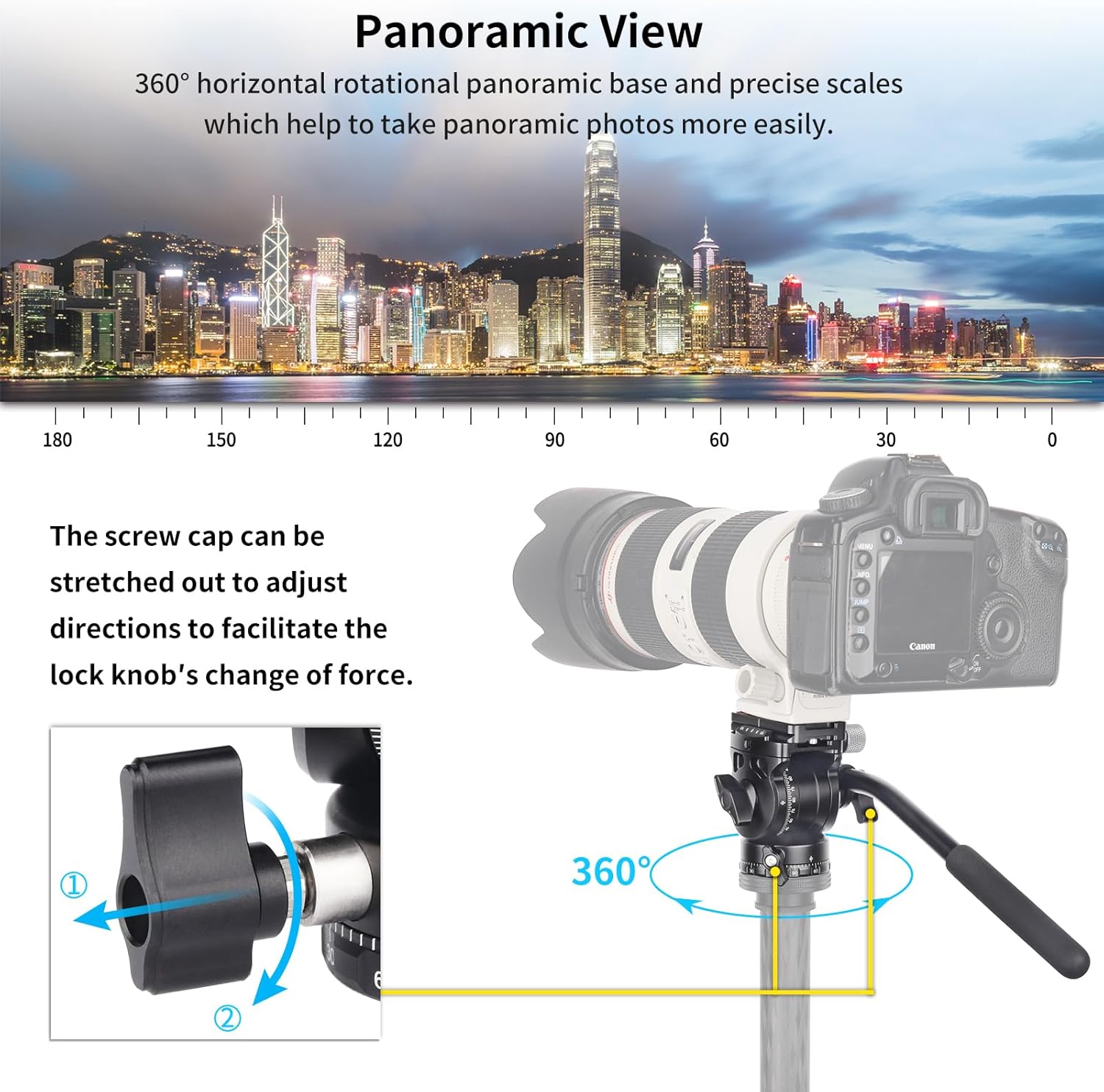
Image: A camera mounted on the F20 Fluid Head, illustrating its 360° horizontal rotation capability for panoramic photography, with a city skyline in the background.
Tilt Movement (Vertical Adjustment)
The fluid head supports a tilt range from -90° to +90°, allowing for versatile vertical framing.
- To adjust the vertical tilt, loosen the Main Knob.
- Carefully tilt your camera up or down to the desired angle. The vertical scale provides reference points.
- Once positioned, tighten the Main Knob to lock the tilt in place.

Image: A visual representation of the F20 Fluid Head's tilt range, demonstrating its ability to tilt from -90° to +90° for various shooting angles.
Using the Magic Arm and Phone Clip
The included magic arm and phone clip allow you to attach additional accessories, such as a smartphone, to the fluid head for multi-device setups.
- Attach the magic arm to the 1/4" screw hole located on the side of the quick release clamp.
- Secure the phone clip to the other end of the magic arm.
- Insert your smartphone into the phone clip. Ensure the phone clip is securely holding your device (compatible with phones 2.32" to 3.70" wide).

Image: A collage of four images demonstrating different applications of the F20 Fluid Head, including use with a large lens, on a slider, and with a phone attached via the magic arm.
Maintenance
Proper maintenance will extend the lifespan of your INNOREL F20 Fluid Head.
- Cleaning: Use a soft, dry cloth to wipe down the fluid head after each use. For stubborn dirt, a slightly damp cloth can be used, followed by immediate drying. Avoid abrasive cleaners or solvents.
- Storage: Store the fluid head in a clean, dry environment, away from extreme temperatures and humidity.
- Lubrication: The fluid damping system is sealed and does not require user lubrication. Do not attempt to disassemble the fluid head for lubrication.
- Inspection: Periodically check all screws and levers to ensure they are tight. Do not overtighten, as this can cause damage.
Troubleshooting
If you encounter issues with your INNOREL F20 Fluid Head, refer to the following common problems and solutions:
| Problem | Possible Cause | Solution |
|---|---|---|
| Head feels stiff or movements are not smooth. | Pan or tilt locking levers are too tight. | Ensure the Pan Locking Lever and Main Knob are sufficiently loosened for movement. |
| Camera wobbles on the head. | Quick release plate not securely attached to camera or head. | Ensure the 1/4" screw on the quick release plate is tight on the camera, and the quick release clamp on the head is fully tightened. |
| Handle is loose. | Handle Locking Lever is not tightened. | Tighten the Handle Locking Lever until the handle is secure. |
| Spirit level does not show level. | Tripod legs are not level. | Adjust the length of your tripod legs until the spirit level indicates a level surface. |
Specifications
Detailed specifications for the INNOREL F20 Fluid Head:
- Model: F20
- Material: Aluminum alloy
- Net Weight: 0.91lb / 411g
- Maximum Load Capacity: 11lb / 5kg
- Height: 3.31in / 84mm
- Bottom Diameter: 1.97in / 50mm
- Bottom Screw Thread: 3/8" (with included 1/4" adapter)
- Quick Release Plate Size: 2.36 x 1.50in / 60 x 38mm
- Tilt Range: -90° to +90°
- Pan Range: 360°
- Compatible Devices: Digital SLR cameras, mirrorless cameras, compact video cameras
- Phone Clip Compatibility: Width between 2.32" / 5.9cm to 3.70" / 9.4cm
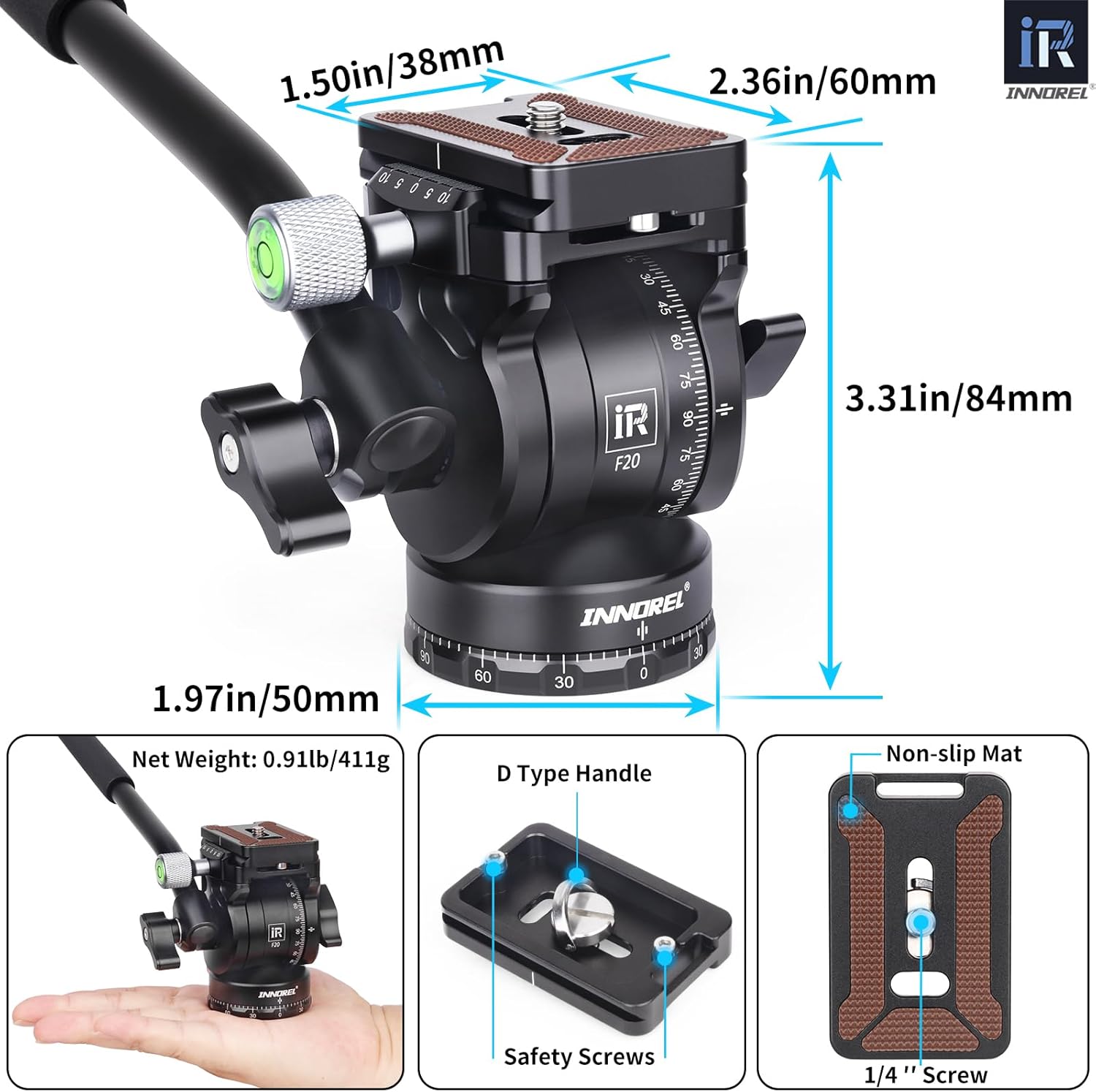
Image: A visual representation of the F20 Fluid Head's key dimensions (height, bottom diameter, quick release plate size) and net weight.
Warranty Information
INNOREL products are manufactured to high quality standards. For specific warranty terms and conditions, please refer to the warranty card included with your product or visit the official INNOREL website. Extended protection plans may also be available for purchase separately.
Customer Support
For further assistance, technical support, or inquiries regarding your INNOREL F20 Fluid Head, please contact INNOREL customer service through their official channels. You can often find contact information on the brand's official website or through the retailer where you purchased the product.
Visit the INNOREL Store on Amazon for more product information and support resources.
Ask a question about this manual
Ask about setup, troubleshooting, compatibility, parts, safety, or missing instructions. Manuals+ will review the question and use this page’s manual context to help answer it.