
1. Introduction
This manual provides essential information for the safe and efficient use of your iWALK USB-C Portable Charger, Model DBL5000PNC. Please read these instructions carefully before using the product.
2. Product Overview
The iWALK USB-C Portable Charger is a compact power bank designed for on-the-go charging. It features an integrated USB-C connector for direct device charging and a digital display to monitor battery status.

Image: iWALK USB-C Portable Charger connected to a smartphone, showing its compact design.
Components:
- Integrated USB-C Connector: For direct connection to compatible devices.
- Digital Display: Shows the remaining battery capacity of the power bank.
- Power Button: Activates the digital display and initiates charging.
- USB-C Input Port: For recharging the portable charger itself.

Image: Close-up of the iWALK USB-C Portable Charger's digital display, indicating battery percentage.
3. Setup
Initial Charging of the Power Bank:
- Connect the provided USB-C charging cable to the USB-C input port on the side of the iWALK portable charger.
- Plug the other end of the USB-C cable into a compatible USB power adapter (not included).
- The digital display will show the charging progress. Charge until the display shows 100%.
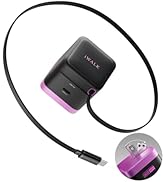
Image: The iWALK portable charger connected to a USB-C cable for recharging.
4. Operating Instructions
Charging Your Device:
- Remove the protective cap from the integrated USB-C connector.
- Align the integrated USB-C connector with your device's USB-C charging port.
- Gently push the portable charger onto your device until it is securely connected.
- Press the power button on the portable charger to begin charging. The digital display will show the power bank's remaining charge.
- To stop charging, simply disconnect the portable charger from your device.

Image: A smartphone connected to the iWALK USB-C Portable Charger, illustrating direct charging.
5. Features
- Wide Compatibility: Designed for iPhone 15/16 series, Samsung S25, S24, S23 Ultra series, Galaxy, Pixel, LG, Huawei, OnePlus, and other USB-C Android phones.
- 20W Fast Charging: Capable of charging an iPhone 15 from 0% to 50% in approximately 30 minutes.
- Smart Power Management: A digital display tracks the 4,800mAh capacity and charging progress in real-time.
- Mini & Lightweight: Compact design allows for easy portability in pockets or small bags.
- 4,800mAh Capacity: Provides sufficient power for a complete charge of an iPhone 15.

Image: A visual representation of the iWALK portable charger's compatibility with iPhone 15 series and various Android devices.

Image: A graphic demonstrating the 20W fast charging capability, showing an iPhone 15 charging from 0% to 50% in 30 minutes.
6. Specifications
| Attribute | Value |
|---|---|
| Product Dimensions | 3 x 1 x 2 inches |
| Item Weight | 6.4 ounces |
| Item Model Number | DBL5000PNC |
| Battery Capacity | 4800 Milliamp Hours |
| Batteries Required | 1 C battery (included) |
| Connector Type | USB Type C |
| Special Features | Auto Shut-Off, Fast Charging, LED Indicator Lights, Pocket Size, Slim |
| Manufacturer | U2O GLOBAL CO., LTD. |
7. Troubleshooting
- Device not charging: Ensure the portable charger is adequately charged. Verify the connection between the charger and your device is secure.
- Portable charger not recharging: Check that the USB-C charging cable is properly connected to both the power bank and the power adapter. Ensure the power adapter is functioning correctly.
- Digital display not working: Press the power button to activate the display. If it remains unresponsive, the battery may be fully depleted or require service.
8. Maintenance
- Keep the portable charger dry and away from moisture.
- Avoid exposing the device to extreme temperatures (hot or cold).
- Clean the device with a soft, dry cloth. Do not use harsh chemicals or abrasive materials.
- Store the portable charger in a cool, dry place when not in use.
9. Warranty and Support
For warranty information or technical support, please refer to the documentation included with your product or visit the official iWALK website. Keep your purchase receipt as proof of purchase.


