
Introduction
This manual provides comprehensive instructions for the assembly, operation, and maintenance of your AODK 66-Inch L-Shaped Reversible Computer Desk. Designed for versatility, this desk can be configured as a 66"x66" corner desk or a 113" long two-person desk, adapting to various home office or gaming setups. It features integrated storage solutions, LED lighting, and a power outlet for enhanced functionality. Please read this manual thoroughly before assembly and use to ensure proper setup and safe operation.
Important Safety Information
Always assemble the desk on a stable, level surface. Do not overload the desk, as it may tip over. Keep the power outlet and cords away from water and heat sources. Always unplug the power outlet when not in use or when leaving the desk unattended. Always follow the assembly instructions carefully to ensure the desk's stability and safety.
Product Features
- Reversible Design: Configurable as a 66"x66" L-shaped corner desk or a 113" long two-person desk to fit various room layouts.
- Integrated Storage: Includes a file cabinet with two drawers for letter, legal, and A4 size files, and four-tier fabric storage drawers to keep your workspace tidy.
- Power Outlet & LED Lighting: Features a built-in power outlet with 3 AC outlets and 2 USB ports for convenient device charging. An upgraded LED light strip with an odorless milky fluorescent shell offers 13 lighting modes and 7 color variations for ambient lighting.
- Ergonomic Monitor Shelf: A 47.2" long monitor stand accommodates two monitors, promoting a comfortable viewing height.
- CPU Stand & Storage Shelves: Two under-desk storage shelves (18.1"x11") are suitable for organizing a CPU tower and other office supplies.
- Sturdy Construction: Made with a durable metal frame and waterproof desk board, ensuring stability and longevity. Adjustable foot pads maintain stability on uneven floors.
Setup and Assembly
The AODK L-shaped computer desk is designed for straightforward assembly. All necessary tools and clearly labeled parts are included in the package. Please follow the step-by-step instructions provided in the included assembly manual.
Assembly Overview
The desk offers a reversible design, allowing you to set it up as an L-shaped desk with the longer side to the left or right, or as a straight long desk for two users.

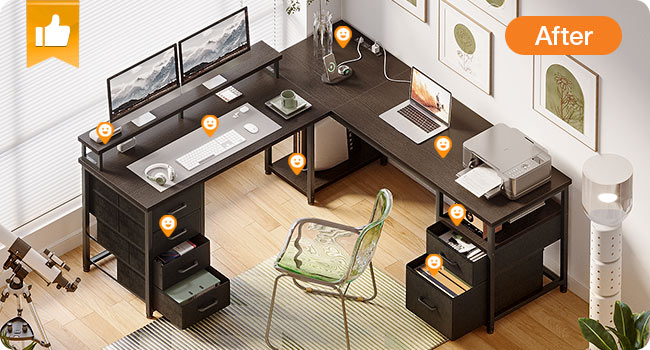
This image displays the fully assembled AODK 66-inch L-shaped computer desk, showcasing its black finish, monitor stand, integrated drawers, and overall design suitable for a home office or gaming setup.

This diagram illustrates how the desk can be assembled in different L-shaped orientations (left or right) to best suit your room's layout and personal preference.

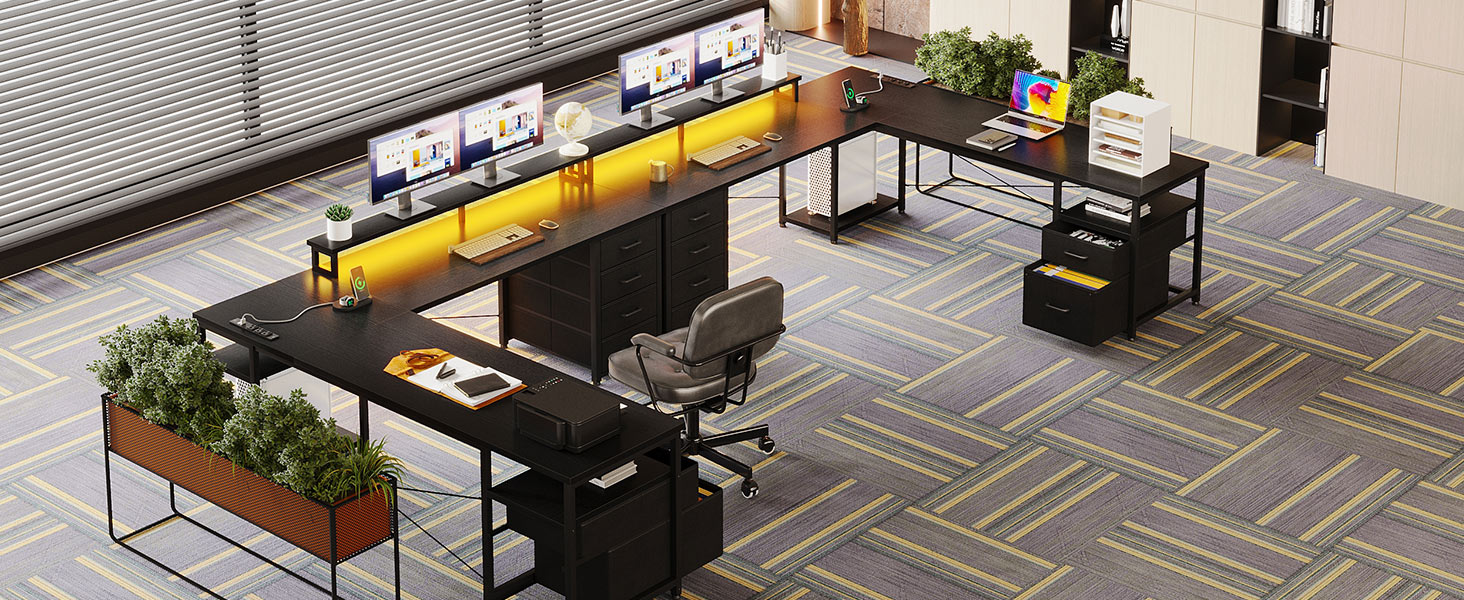
This image demonstrates the desk configured as a straight, long desk, providing ample space for two individuals or an extended workspace.
Visual Assembly Guides
For a detailed visual guide on the assembly process, please refer to the official product videos below. These videos provide step-by-step instructions for various configurations.
Video 1: AODK L Shaped Desk with 2-Tier File Cabinet and 4 Drawers Assembly Guide. This video from the seller provides a comprehensive overview of assembling the L-shaped desk, highlighting the integration of the file cabinet and drawers.
Video 2: AODK L Shaped Computer Desk with 6 File Drawers Assembly Guide. This seller-provided video details the assembly process for the L-shaped computer desk, focusing on the setup of the file drawers.
Operating Instructions
Power Outlet
The desk includes a built-in power outlet for convenient access to power. It features 3 standard AC outlets and 2 USB ports. To use, simply plug the desk's main power cord into a wall outlet. Ensure the power cord is not pinched or damaged.

This image shows the integrated recessed power outlet on the desk surface, featuring multiple AC and USB ports for charging devices.
LED Light Strip
The desk is equipped with an LED light strip located under the monitor stand. This strip offers 13 lighting modes and 7 color variations to customize your workspace ambiance. Use the inline controller to cycle through modes and colors.

This image highlights the RGB LED light strips installed under the monitor shelf, providing customizable illumination to the workspace.
Storage Features
File Cabinet and Fabric Drawers
The desk includes a 2-tier file cabinet designed to accommodate letter, legal, and A4 size files. Additionally, four fabric drawers provide versatile storage for various office supplies and personal items.

This image provides an overview of the desk's extensive storage capabilities, including the file cabinet, fabric drawers, and open shelves.

A detailed view of the four-tier fabric drawers, illustrating their capacity for organizing various items.
Monitor Stand and CPU Shelf
An elevated monitor stand helps maintain an ergonomic viewing position for your screens. The desk also features dedicated shelves for your CPU tower and other equipment, keeping them off the floor and easily accessible.
This image shows the extended monitor stand, designed to elevate screens for improved ergonomics and to free up desk space.
This image illustrates the two-tier storage shelves, ideal for housing a CPU tower or other office essentials, keeping them organized and accessible.
Maintenance
To ensure the longevity and appearance of your AODK desk, follow these simple maintenance guidelines:
- Cleaning: Wipe the desk surfaces with a soft, damp cloth. Avoid harsh chemicals or abrasive cleaners that may damage the finish.
- Spills: Immediately wipe up any spills to prevent staining or damage to the waterproof desk board.
- Hardware: Periodically check all screws and fasteners to ensure they are tight. Re-tighten if necessary to maintain stability.
- Fabric Drawers: The fabric drawers can be spot cleaned with a mild detergent and damp cloth. Allow to air dry completely.
- Heat & Moisture: Avoid placing hot items directly on the desk surface. Use coasters for drinks to prevent water rings.
Troubleshooting
If you encounter any issues with your AODK desk, please refer to the following common troubleshooting tips:
- Wobbling Desk: Ensure all screws are securely tightened. Adjust the foot pads on the bottom of the desk legs to stabilize it on uneven surfaces.
- LED Lights Not Working: Check if the power cord for the LED strip is securely plugged into the power outlet and that the power outlet itself is connected to a functioning wall socket. Verify the inline controller is not damaged.
- Power Outlet Not Functioning: Confirm the desk's main power cord is fully inserted into a live wall outlet. Test the wall outlet with another device to ensure it is working.
- Drawers Sticking: Ensure the fabric drawers are correctly inserted into their slots and are not overloaded. Check for any obstructions.
- Missing Parts: If any parts are missing or damaged upon arrival, please contact customer support immediately with your purchase details.
Specifications
| Feature | Detail |
|---|---|
| Brand | AODK |
| Product Dimensions | 18.9"D x 66"W x 35"H |
| Color | Black |
| Style | Modern |
| Base Material | Metal |
| Finish Type | Unfinished (Matte Black Laminate) |
| Number of Shelves | 2 |
| Number of Drawers | 4 |
| Is Electric | Yes (Power Outlet, LED Lights) |
| Required Assembly | Yes |
| Maximum Weight Recommendation | 100 Kilograms |
| Recommended Number of People for Assembly | 2 |
| Includes All Assembly Tools | Yes |
Warranty
This AODK desk comes with a Limited Warranty. For specific terms and conditions, please refer to the warranty information included in your product packaging or contact customer support.
Customer Support
Should you have any questions, concerns, or require assistance with your AODK 66-Inch L-Shaped Computer Desk, please contact our customer support team:
- Email: support@aodk-service.com
- Phone: 8888005000 (Monday - Friday from 9:00 AM - 5:00 PM PT)
You can also visit the AODK Store on Amazon for more product information and support: AODK Store
