
1. Introduction
Thank you for purchasing the radius SOUND BUMP SP-S15BTW Portable Bluetooth Speaker. This manual provides essential information for setting up, operating, and maintaining your speaker. Please read it thoroughly before use to ensure optimal performance and safety.
The SOUND BUMP SP-S15BTW is a compact, versatile portable speaker designed for various audio needs. It features Bluetooth connectivity, microSD card playback, Wide FM radio, and IPX5 water resistance, making it suitable for both indoor and outdoor use.
2. Product Overview
2.1 Package Contents
- radius SOUND BUMP SP-S15BTW Speaker
- USB Charging Cable
- Strap
- User Manual
2.2 Speaker Components and Controls
Familiarize yourself with the speaker's layout:

Image: Side panel with ports (microSD, AUX-IN, USB-C)
- Power Button: Press and hold to turn the speaker on or off.
- Mode Button (M): Press to switch between Bluetooth, microSD, FM Radio, and AUX modes.
- Play/Pause Button (►▮▮): Press to play or pause audio. In call mode, press to answer/end a call.
- Volume Up / Next Track Button (+): Short press to increase volume. Long press to skip to the next track.
- Volume Down / Previous Track Button (-): Short press to decrease volume. Long press to go to the previous track.
- microSD Card Slot: Insert a microSD card for local music playback.
- AUX-IN Port: Connect external audio devices via a 3.5mm audio cable.
- USB-C Charging Port: Connect the USB cable for charging.
- LED Indicator: Displays power status, charging status, and Bluetooth pairing status.
- LED Illumination: Located on the side, provides visual effects.
3. Setup
3.1 Initial Charging
Before first use, fully charge the speaker. Connect the provided USB charging cable to the speaker's USB-C port and the other end to a USB power adapter (not included) or a computer's USB port. The LED indicator will show charging status (e.g., red while charging, off when fully charged).
3.2 Powering On/Off
- To Power On: Press and hold the Power button for approximately 3 seconds until the LED indicator lights up and you hear a power-on tone.
- To Power Off: Press and hold the Power button for approximately 3 seconds until the LED indicator turns off and you hear a power-off tone.
4. Operating Instructions
4.1 Bluetooth Pairing
- Turn on the speaker. It will automatically enter Bluetooth pairing mode, indicated by a flashing blue LED.
- On your device (smartphone, tablet, etc.), enable Bluetooth and search for available devices.
- Select "SOUND BUMP SP-S15BTW" from the list.
- Once paired, the LED indicator will turn solid blue, and you will hear a confirmation tone.
- If pairing fails, turn off the speaker and your device's Bluetooth, then repeat the steps.
4.2 microSD Card Playback
- Insert a microSD card (up to 128GB, formatted with MP3/WAV files) into the microSD card slot.
- Press the Mode (M) button until the speaker enters microSD mode.
- Music playback will start automatically. Use the Play/Pause, Volume Up/Next Track, and Volume Down/Previous Track buttons to control playback.
4.3 Wide FM Radio

Image: Speaker in an indoor setting, suitable for FM radio
- Press the Mode (M) button until the speaker enters FM Radio mode.
- Automatic Station Scan: Long press the Play/Pause button to automatically scan and save available FM stations. The speaker will then play the first saved station.
- Manual Tuning: Short press the Volume Up (+) or Volume Down (-) buttons to switch between saved stations.
Note: As the speaker does not have an external antenna, FM reception may vary depending on location and environment.
4.4 AUX-IN Mode
- Connect one end of a 3.5mm audio cable (not included) to the speaker's AUX-IN port and the other end to the audio output of your external device.
- Press the Mode (M) button until the speaker enters AUX mode.
- Control playback and volume directly from your connected external device.
4.5 LED Illumination
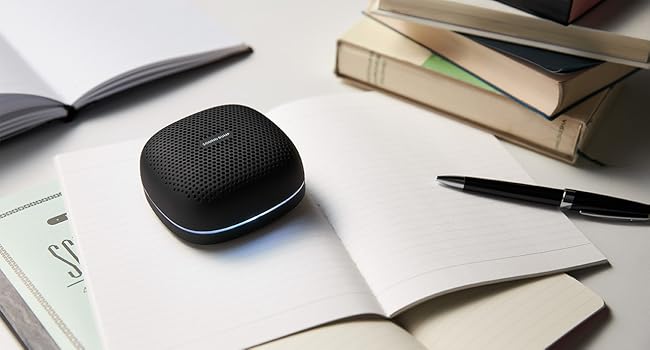
Image: Speakers displaying LED illumination
The speaker features LED illumination with 7 colors and various modes. To change the illumination mode or color, refer to the specific instructions in the full product manual (if available). Typically, a dedicated button or a combination of existing buttons controls this feature.
5. Charging
When the battery is low, the speaker will indicate this (e.g., flashing red LED, audible prompt). Connect the USB charging cable to the speaker's USB-C port and a power source. The LED indicator will show red during charging and turn off when fully charged. A full charge provides up to 20 hours of continuous playback.

Image: Speaker used outdoors, highlighting long battery life
6. Maintenance
- Cleaning: Wipe the speaker with a soft, dry cloth. Do not use abrasive cleaners or solvents.
- Water Resistance (IPX5): The speaker is IPX5 splash-proof, meaning it can withstand water splashes from any direction. However, it is not designed for submersion. Do not use it in the bath or submerge it in water. Ensure the port cover is securely closed to maintain water resistance.
- Storage: Store the speaker in a cool, dry place away from direct sunlight and extreme temperatures.
- Battery Care: To prolong battery life, charge the speaker periodically even if not in use for extended periods.

Image: Speaker with water droplets, illustrating IPX5 water resistance
7. Troubleshooting
| Problem | Possible Cause | Solution |
|---|---|---|
| Speaker does not turn on. | Battery is depleted. | Charge the speaker fully. |
| No sound. | Volume is too low; device not connected; incorrect mode. | Increase volume on speaker and connected device. Ensure proper Bluetooth pairing or AUX cable connection. Switch to correct mode (Bluetooth, microSD, AUX, FM). |
| Bluetooth pairing fails. | Speaker is not in pairing mode; device Bluetooth is off; too far from device. | Ensure speaker is in pairing mode (flashing blue LED). Turn on Bluetooth on your device. Move speaker closer to your device (within 10 meters). |
| Poor FM radio reception. | Environmental interference; weak signal. | Move the speaker to a different location. Perform an automatic station scan again. |
| Audio/video synchronization issues (Bluetooth). | Bluetooth latency. | Bluetooth audio can have latency. For critical synchronization, use the AUX-IN connection if your device supports it. Some apps may offer audio delay compensation. |
8. Specifications
- Model: SP-S15BTW
- Brand: radius
- Connectivity: Bluetooth, USB (for charging), AUX-IN (3.5mm), microSD
- Wireless Technology: Bluetooth
- Speaker Type: Outdoor / Portable
- Woofer Diameter: 66 mm
- Water Resistance: IPX5 (Splash-proof)
- Continuous Playback Time: Up to 20 hours
- microSD Card Support: Up to 128GB (MP3/WAV files)
- Dimensions (L x W x H): Approximately 9 x 9 x 4 cm
- Power Source: Battery (rechargeable)
- Recommended Use: Music Player
9. Safety Information
- Do not expose the speaker to extreme temperatures, direct sunlight, or high humidity.
- Avoid dropping or subjecting the speaker to strong impacts.
- Do not attempt to disassemble, repair, or modify the speaker yourself. Contact qualified service personnel for assistance.
- Keep the speaker away from medical devices, as it contains magnets.
- Dispose of the battery according to local regulations. Do not dispose of it in fire.
- Warning: Despite IPX5 rating, this product is not designed for use while submerged or in environments like a bath where it could be fully immersed.
10. Warranty and Support
This radius product is covered by a warranty. For warranty service, please ensure your purchase was made from an authorized radius retailer. Products purchased from unauthorized sellers may not be eligible for warranty support.
For detailed warranty terms, product registration, and technical support, please visit the official radius website or contact their customer service department. Keep your proof of purchase for warranty claims.