
1. Introduction
Congratulations on your purchase of the Bulova Men's Joseph Chronograph Watch, Model 96C146. This timepiece embodies Bulova's heritage of innovation, inspired by vintage chronographs from the 1940s. Featuring a Swiss automatic movement, a twelve-hour chronograph, and a telemeter, this watch is designed for precision and style. This manual provides essential information for the proper use and maintenance of your watch.
2. Product Overview
The Bulova Joseph Chronograph Watch 96C146 features a 42mm round stainless steel case, a black dial with rose-gold tone accents, and a black leather strap with a deployant clasp. Its exhibition case back allows a view of the fine Swiss automatic movement.

Figure 2.1: Front view of the Bulova Joseph Chronograph Watch 96C146, showcasing the black chronograph dial with rose-gold tone accents and the black leather strap.

Figure 2.2: Side profile of the watch, illustrating the stainless steel case and the deployant clasp mechanism on the black leather strap.

Figure 2.3: Rear view of the watch, highlighting the exhibition case back which reveals the intricate Swiss automatic movement.
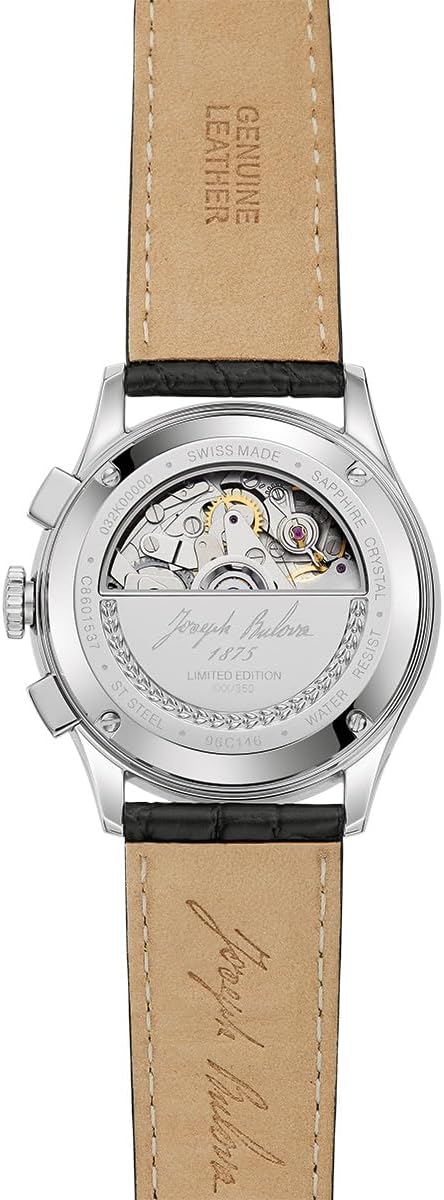
Figure 2.4: Detailed close-up of the exhibition case back, showing the engraved details and the visible components of the automatic movement.
3. Setup
3.1 Winding the Watch
Your Bulova Joseph Chronograph Watch is equipped with an automatic movement. It winds itself through the motion of your wrist. If the watch has stopped or its power reserve is low, you can manually wind it by rotating the crown clockwise in its normal position (position 0) for approximately 20-30 turns. This will provide sufficient power to start the watch.
3.2 Setting the Time
- Pull the crown out to position 2.
- Rotate the crown to move the hour and minute hands clockwise until the desired time is set.
- Push the crown back into position 0 to restart the watch.
3.3 Setting the Date
- Pull the crown out to position 1.
- Rotate the crown clockwise or counter-clockwise to adjust the date. Avoid setting the date between 9 PM and 3 AM, as this can interfere with the automatic date change mechanism.
- Once the correct date is displayed, push the crown back into position 0.
4. Operating the Chronograph and Telemeter
The chronograph function allows for precise measurement of elapsed time, while the telemeter scale can be used to estimate distances.
4.1 Using the Chronograph
The watch features a twelve-hour chronograph with push buttons located on the side of the case.
- Start: Press the upper pusher (A) to start the chronograph. The central chronograph second hand will begin to move.
- Stop: Press the upper pusher (A) again to stop the chronograph. The elapsed time will be indicated by the chronograph hands (seconds, minutes, and hours on the sub-dials).
- Reset: After stopping the chronograph, press the lower pusher (B) to reset all chronograph hands to their zero positions.
- Intermediate Time (Split Time): Some chronographs allow for split times. Consult the specific movement's detailed instructions if this feature is desired.
4.2 Telemeter Function
The telemeter scale on the dial is used to measure the distance to an event that can be both seen and heard (e.g., lightning and thunder, artillery fire). The scale is calibrated for the speed of sound.
- Start the chronograph (press pusher A) when you see the event (e.g., lightning flash).
- Stop the chronograph (press pusher A) when you hear the event (e.g., thunder).
- The chronograph second hand will point to a number on the telemeter scale, indicating the approximate distance in kilometers or miles (depending on calibration).
5. Maintenance
5.1 Cleaning Your Watch
To maintain the appearance of your watch, wipe the case and crystal with a soft, dry cloth. For the leather strap, avoid excessive moisture and harsh chemicals.
5.2 Water Resistance
Your Bulova 96C146 watch has a water resistance rating of up to 30 meters (3 ATM). This means it is suitable for everyday use and can withstand splashes or brief immersion in water. It is not suitable for swimming, showering, or diving. Always ensure the crown is fully pushed in to maintain water resistance.
5.3 Leather Strap Care
Leather straps are susceptible to wear and tear from moisture, sweat, and direct sunlight. To prolong the life of your strap:
- Avoid prolonged exposure to water.
- Clean with a soft, damp cloth and allow to air dry.
- Avoid contact with cosmetics, oils, and chemical products.
5.4 Servicing
For optimal performance, it is recommended to have your automatic watch serviced by an authorized Bulova service center every 3-5 years.
6. Troubleshooting
- Watch not running: If the watch has stopped, it may need to be wound. Manually wind the watch by rotating the crown clockwise for 20-30 turns, then gently shake it to initiate movement. Ensure it is worn regularly to maintain its power reserve.
- Date not changing: Check if the date was set during the prohibited hours (9 PM - 3 AM). If so, reset the time and date outside of these hours. Ensure the crown is fully pushed in after setting.
- Chronograph hands not resetting to zero: This may indicate a need for adjustment or service. Consult an authorized Bulova service center.
7. Specifications
| Feature | Detail |
|---|---|
| Model Number | 96C146 |
| Case Diameter | 42mm |
| Case Material | Stainless Steel |
| Crystal | Domed Sapphire Crystal |
| Movement | Swiss Automatic 6-hand movement |
| Dial Color | Black with Rose-Gold Tone Accents |
| Strap Material | Black Leather |
| Clasp Type | Deployant Clasp with Push Buttons |
| Water Resistance | 30 meters (3 ATM) |
| Functions | Twelve-hour Chronograph, Date Window, Telemeter |
8. Warranty and Support
Your Bulova watch is covered by a manufacturer's warranty against defects in materials and workmanship. For specific warranty terms, registration, and to locate an authorized service center, please refer to the official Bulova website or the warranty card included with your purchase. For further assistance, contact Bulova customer support.
Bulova Official Website: www.bulova.com
