
1. Introduction
This manual provides essential instructions for the safe and efficient operation, setup, and maintenance of your GRECELL 2400W Portable Power Station (Acc2400) and the included 2x200W Solar Panels. Please read this manual thoroughly before using the product to ensure optimal performance and longevity.

Image: The GRECELL 2400W Portable Power Station with solar panels deployed, illustrating its use in various environments.
2. Safety Instructions
Always adhere to the following safety guidelines to prevent injury or damage to the product:
- Do not disassemble, repair, or modify the unit.
- Avoid exposure to rain, moisture, or direct sunlight for extended periods.
- Keep away from heat sources, open flames, and flammable materials.
- Ensure proper ventilation during use and charging.
- Use only original or certified charging cables and accessories.
- Keep out of reach of children and pets.
- Dispose of the product according to local regulations.

Image: Internal diagram highlighting the Super Safe BMS Protect System, showing protections against over-charge, over-discharge, short-circuit, over-voltage, over-heated, and over-current.
3. Package Contents
Verify that all items are present upon unpacking:
- 1 x GRECELL 2400W Portable Power Station (Acc2400)
- 2 x 200W Foldable Solar Panels
- 1 x AC Charger
- 1 x Car Charger Cable
- 1 x Anderson Cable
- 2 x 4-in-1 Charge Cable (XT60/30A Anderson/ DC 79*09mm/M16 Aviation Connector)
- 1 x Cable Storage Bag
- 1 x User Manual

Image: Visual representation of the power station, user manual, cable storage bag, AC charger, car charger, and Anderson to MC4 cable included in the package.
4. Product Overview
The GRECELL Acc2400 is a high-capacity portable power station designed for various power needs, from home backup to outdoor adventures. It features multiple output ports and supports diverse charging methods.
4.1 Power Station Layout
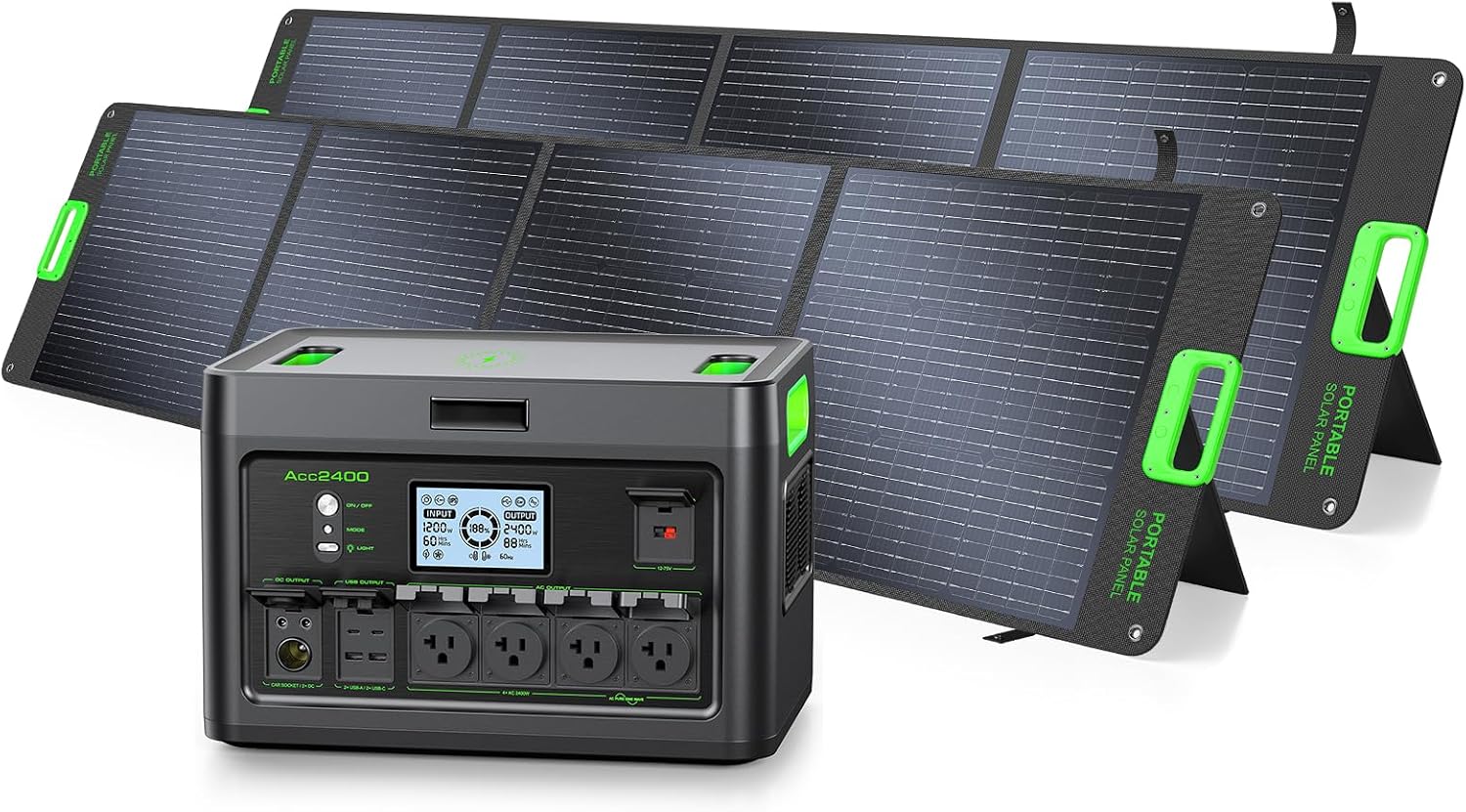
Image: Front view of the GRECELL 2400W Portable Power Station, showing the display, AC outlets, USB ports, and other controls.
4.2 Dimensions
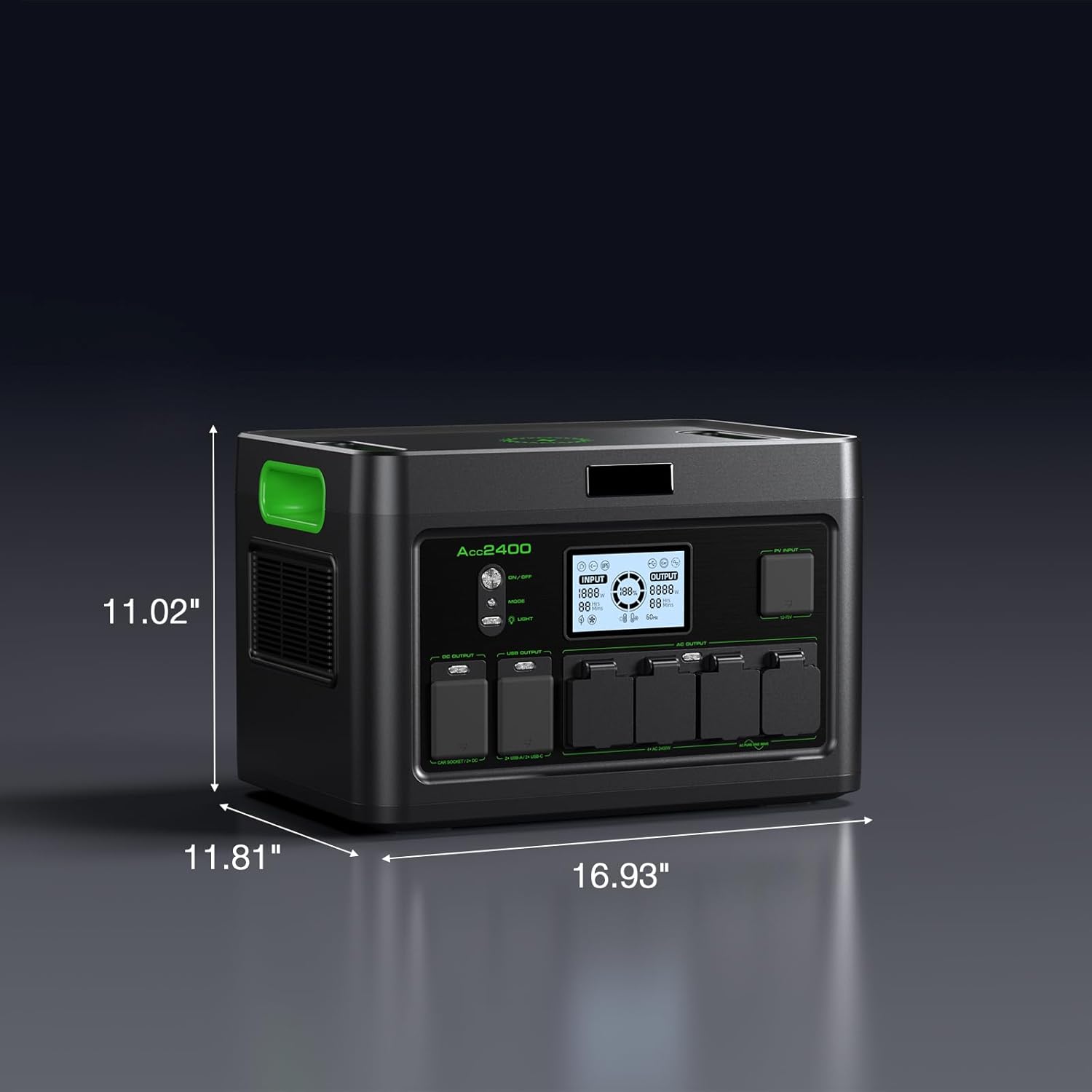
Image: Diagram illustrating the physical dimensions of the GRECELL Acc2400 power station: 16.93"L x 11.81"W x 11.02"H.
5. Setup and Charging
5.1 Initial Charging
Before first use, fully charge the power station. It supports AC, solar, and car charging.
- AC Charging: Connect the AC charger to the power station's AC input port and then to a wall outlet. A full charge takes approximately 1.6-2 hours.
- Car Charging: Use the car charger cable to connect the power station to your vehicle's 12V cigarette lighter port.
- Solar Charging: Connect the solar panels to the power station using the provided cables.

Image: The GRECELL Acc2400 power station charging from a standard wall outlet, illustrating its fast AC charging capability to reach 100% in under 2 hours.
5.2 Solar Panel Connection
The 200W foldable solar panels can be connected in series or parallel for flexible power expansion. Ensure the panels are positioned to receive maximum sunlight.
- Use the provided 4-in-1 charge cables for wide compatibility with various connectors (7.9*0.9mm, Anderson, XT60, Aviation).
- For optimal solar charging, aim for a maximum 800W solar input, which can fully charge the unit in about 3 hours on a sunny day.

Image: Diagram showing the wide compatibility of the solar panel with various connectors including Anderson, 7.9*0.9mm, XT60, and Aviation connectors, enabling connection to different power stations.
5.3 Dual Charging (AC + Solar)
For the fastest recharge, combine AC and solar charging simultaneously. With a max input of 1200W, the power station can be fully recharged in approximately 1.8 hours.

Image: The GRECELL power station being recharged simultaneously by both AC power and solar panels, demonstrating its super fast recharge capability in 1.8 hours.
6. Operation
6.1 Powering On/Off
Press and hold the main power button to turn the unit on or off. The LCD display will illuminate, showing battery status and output information.
6.2 Using Output Ports
The power station features 12 output ports for simultaneous charging of multiple devices:
- 4 x 2400W AC Outlets: For household appliances, tools, and electronics.
- 2 x 18W QC USB-A Ports: For quick charging compatible USB devices.
- 2 x 100W PD USB-C Ports: For fast charging laptops, tablets, and smartphones.
- 1 x Wireless Charging Pad: For Qi-compatible devices.
- 1 x Car Port: For 12V car appliances.
- 2 x DC Ports: For various DC-powered devices.

Image: The GRECELL power station connected to and powering multiple devices simultaneously, including a coffee maker, toaster, blender, and laptop, demonstrating its versatility.
6.3 Uninterruptible Power Supply (UPS) Function
When connected to an AC power source, the power station can act as an Uninterruptible Power Supply (UPS). In case of a power outage, it will seamlessly switch to battery power in less than 10ms, ensuring zero disruption for connected devices.

Image: A person using a laptop connected to the GRECELL power station, which is also connected to a wall outlet, illustrating the seamless UPS power switch function during a simulated power outage.
6.4 LED Light and SOS Mode
The power station includes an integrated LED light with multiple modes: Half Bright, Full Bright, Strobe, and SOS. Press the light button to cycle through modes or activate SOS for emergencies.

Image: A person reading by the light of the GRECELL power station's LED lamp, demonstrating its utility in low-light conditions and highlighting its various light modes including SOS.
7. Solar Panel Usage
The included 200W foldable solar panels feature high-performance monocrystalline silicon cells, achieving up to 23.5% photoelectric conversion efficiency.
7.1 Deployment
Unfold the solar panels and use the adjustable kickstands to position them directly towards the sun. Ensure no shadows are cast on the panels for maximum efficiency.

Image: A GRECELL solar panel deployed in a grassy field under clear skies, highlighting its 23% high solar conversion efficiency with monocrystalline solar cells.
7.2 Features
- Adjustable Kickstand: Allows for optimal angle adjustment towards the sun.
- Stainless Grommets: For secure mounting options.
- Built-in Cable Bag: Convenient storage for cables and connectors.
- Strong Handle: For easy portability.

Image: Detailed view of the GRECELL solar panel's features, including the adjustable kickstand, stainless grommets, built-in cable bag, and strong handle for portability.
8. Maintenance and Storage
8.1 General Care
- Clean the power station and solar panels with a dry, soft cloth. Avoid harsh chemicals or abrasive materials.
- Regularly check all ports and cables for damage.
8.2 Battery Maintenance (LiFePO4)
The LiFePO4 battery is designed for long life (3500+ lifecycle, 10+ years lifespan). To maximize its lifespan:
- Avoid fully discharging the battery frequently.
- Charge the unit to 80% every 3-6 months if not in regular use.
- Store in a cool, dry place away from direct sunlight and extreme temperatures.
8.3 Storage
When storing the power station for extended periods, ensure it is charged to approximately 50-80% and stored in a temperature-controlled environment (0-40°C / 32-104°F).
9. Troubleshooting
If you encounter issues, refer to the following common troubleshooting steps:
| Problem | Possible Cause | Solution |
|---|---|---|
| Power Station not turning on | Battery fully discharged; Power button not pressed long enough | Charge the unit; Press and hold the power button for 3-5 seconds |
| No output from ports | Output port not activated; Device incompatible; Overload protection triggered | Ensure AC/DC/USB output is enabled; Check device power requirements; Reduce load |
| Slow solar charging | Insufficient sunlight; Incorrect panel angle; Dirty panels; Low input wattage | Reposition panels for direct sun; Clean panels; Verify connections; Consider additional panels for higher input |
| Unit overheating | Poor ventilation; Excessive load | Ensure clear airflow around vents; Reduce connected load; Allow unit to cool |
If the problem persists, please contact customer support.
10. Specifications
| Feature | Detail |
|---|---|
| Model Name | Acc2400 |
| Battery Type | LiFePO4 |
| Capacity | 1843.2Wh |
| Continuous AC Output | 2400W |
| Peak AC Output | 4800W |
| AC Input (Max) | 1200W |
| Solar Input (Max) | 800W |
| Total Power Outlets | 12 |
| USB-A Output | 2 x 18W QC |
| USB-C Output | 2 x 100W PD |
| Wireless Charging | Yes |
| UPS Function | Switchover <10ms |
| Solar Panel Efficiency | Up to 23.5% (Monocrystalline Silicon) |
| Dimensions (L x W x H) | 16.95" x 11.83" x 11" |
| Weight | 55 pounds |
| Operating Temperature | 0-40°C (32-104°F) |
| Frequency | 60 Hz |
11. Warranty Information
The GRECELL 2400W Portable Power Station (Acc2400) and accompanying solar panels come with a 2-year warranty from the date of purchase. This warranty covers manufacturing defects and workmanship under normal use. Please retain your proof of purchase for warranty claims.
The warranty does not cover damage caused by misuse, unauthorized modifications, accidents, or natural disasters.
12. Customer Support
For any questions, technical assistance, or warranty claims, please contact GRECELL customer support through the retailer where you purchased the product or visit the official GRECELL website for contact information.
When contacting support, please have your product model (Acc2400) and proof of purchase readily available.


