
1. Introduction
Thank you for choosing the Mardin KM01356 Cordless Grass Trimmer / Brush Cutter. This manual provides essential information for the safe and efficient operation, assembly, maintenance, and troubleshooting of your new tool. Please read this manual thoroughly before first use and keep it for future reference.
The Mardin KM01356 is a versatile tool designed for various gardening and landscaping tasks, including trimming grass, clearing weeds, and cutting light brush. It features a powerful 21V motor, an ergonomic design, adjustable length, and comes with two interchangeable batteries for extended use.
2. Safety Information
WARNING: Read all safety warnings, instructions, illustrations, and specifications provided with this power tool. Failure to follow all instructions listed below may result in electric shock, fire, and/or serious injury.
General Safety Precautions:
- Always wear appropriate personal protective equipment (PPE) including safety glasses, gloves, long pants, and sturdy footwear. Ear protection is recommended.
- Keep bystanders, children, and pets at a safe distance (at least 15 meters) from the operating area.
- Inspect the work area for objects that could be thrown by the cutting line or blade, such as rocks, broken glass, or metal pieces. Remove them before starting.
- Do not operate the trimmer in wet conditions or rain.
- Ensure the protective guard is always securely attached before operation.
- Never operate the tool with damaged or missing guards.
- Disconnect the battery pack before making any adjustments, changing accessories, or storing the tool.
- Use only original Mardin replacement parts and accessories.
- Maintain a firm grip on both handles during operation.
- Avoid contact with the cutting line/blade while it is rotating.
- Be aware of flying debris.
The manufacturer cannot foresee every circumstance that might involve a hazard. Do not use this product for any purpose other than that for which it is intended.
3. Package Contents
Carefully unpack all items and ensure you have received all components. If any parts are missing or damaged, contact your retailer.

This image presents all components included in the Mardin grass trimmer package, including the main trimmer unit, various cutting blades, the battery charger, and two 21V batteries.
Your package should include:
- Mardin KM01356 Grass Trimmer / Brush Cutter main unit
- 2x 21V Lithium-Ion Batteries
- 1x Battery Charger
- 1x Circular Saw Blade
- 2x Metal Blades
- Multiple Plastic Blades
- 1x Protective Guard
- 1x Auxiliary Handle
- User Manual
4. Setup and Assembly
The Mardin KM01356 is designed for easy assembly. Follow these steps to prepare your trimmer for use:
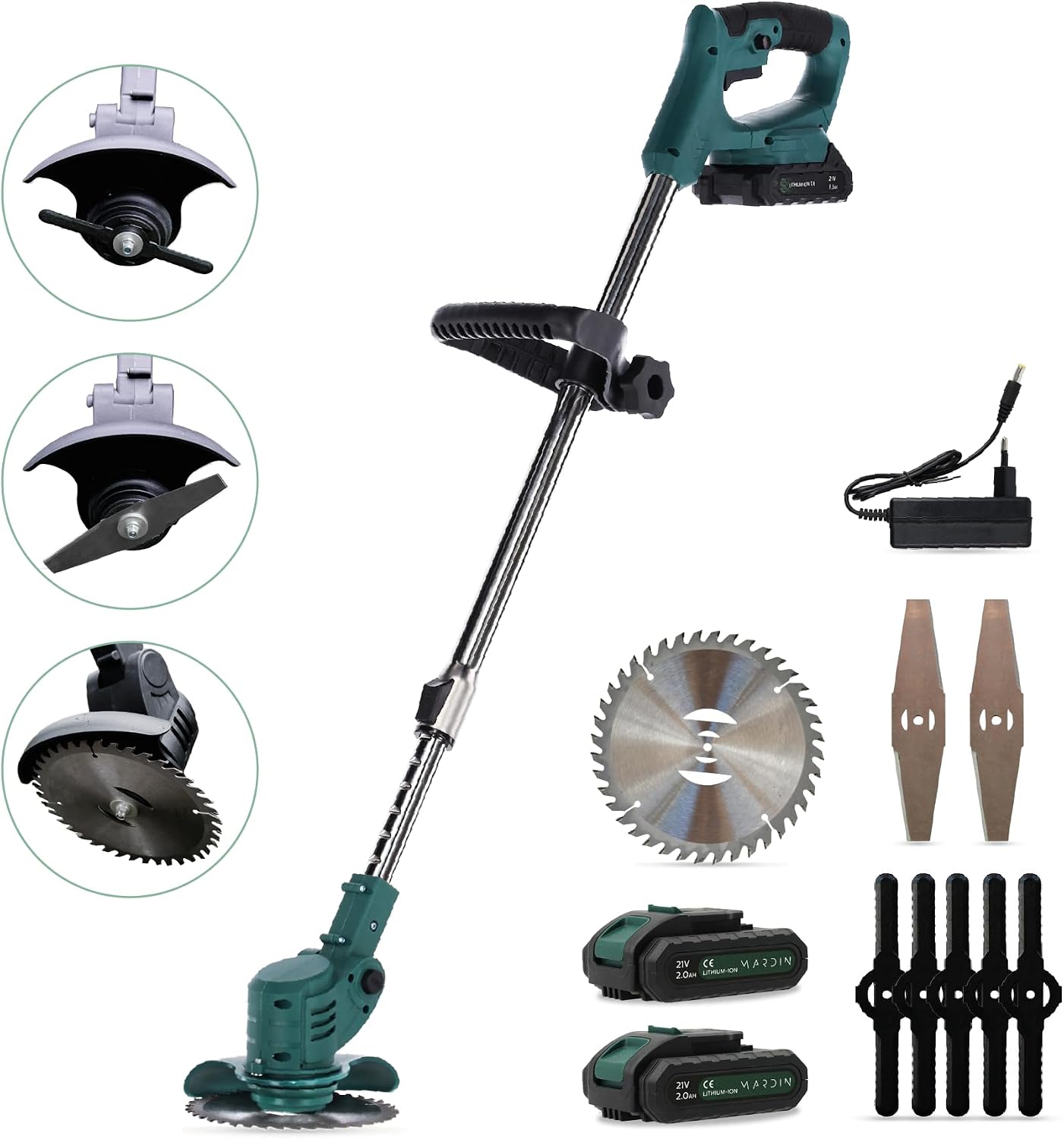
This image displays the complete Mardin KM01356 Cordless Grass Trimmer, including the main unit, two 21V batteries, a charger, a circular saw blade, two metal blades, and several plastic blades. It provides an overview of all components included with the product.
- Attach the Protective Guard: Slide the protective guard onto the trimmer head until it clicks securely into place. Ensure it is firmly attached to prevent debris from being thrown towards the user.
- Install the Auxiliary Handle: Attach the auxiliary handle to the main shaft. Adjust its position for comfortable operation, ensuring a balanced grip. (Refer to image PT07 for visual guidance on handle adjustment).
- Select and Install the Cutting Blade: Choose the appropriate blade for your task (plastic for light grass, metal for tougher weeds, saw blade for brush). Align the blade with the spindle and secure it using the provided fasteners. Ensure the blade is tightly fastened before use.
5. Operating Instructions
5.1. Charging and Installing the Battery
- Charge the Battery: Before first use, fully charge both 21V Lithium-Ion batteries using the provided charger. Connect the charger to a power outlet and insert the battery. The indicator light on the charger will show the charging status.
- Install the Battery: Once charged, slide the battery pack into the battery compartment on the trimmer handle until it clicks into place. Ensure it is securely seated. (Refer to image PT02).

This image shows a hand inserting one of the 21V Lithium-Ion batteries into the battery compartment of the Mardin grass trimmer, highlighting the easy battery exchange mechanism.
5.2. Adjusting Length and Handle
The trimmer's length and auxiliary handle can be adjusted to suit your height and working posture for optimal comfort and control.
- Adjusting Length: Press the black button on the main shaft and extend or retract the shaft to your desired length. Release the button to lock the length.
- Adjusting Auxiliary Handle: Loosen the knob on the auxiliary handle, slide it along the shaft to a comfortable position, and then tighten the knob securely.

This image demonstrates how to adjust the extra supportive handle for user comfort and how to extend or retract the trimmer's length by pressing a black button, allowing customization for different users and tasks.
5.3. Changing Cutting Angle
The trimmer head can be adjusted to two different cutting angles (45 and 90 degrees) for versatile trimming and edging.
- Locate the angle adjustment mechanism near the trimmer head.
- Press the release button or lever and pivot the trimmer head to either the 45-degree or 90-degree position.
- Ensure the head locks securely into the chosen angle before operation.

This composite image illustrates the two adjustable cutting angles of the trimmer head: 90 degrees for standard trimming and 45 degrees for edging or reaching difficult areas.
5.4. Starting and Stopping
- Starting: Ensure the battery is installed. Press and hold the safety lock button (if present) and then squeeze the trigger switch to start the motor.
- Stopping: Release the trigger switch to stop the motor. The blade will continue to spin for a few seconds before coming to a complete stop.
5.5. Operating Tips
- Always hold the trimmer with both hands for maximum control.
- Use a sweeping motion to cut grass and weeds.
- Avoid hitting hard objects like fences, walls, or trees, as this can damage the blade and motor.
- For thicker vegetation, use the metal blades or the circular saw blade.

The image depicts the Mardin grass trimmer's versatility, showing it being used for general gardening tasks and also for clearing denser brush, highlighting its suitability for various jobs.
6. Maintenance
Regular maintenance ensures the longevity and safe operation of your Mardin KM01356 trimmer.
- Cleaning: After each use, disconnect the battery and clean the trimmer head, guard, and housing with a damp cloth. Remove any grass, dirt, or debris. Do not use harsh chemicals or abrasive cleaners.
- Blade Inspection and Replacement: Regularly inspect the cutting blades for wear, damage, or dullness. Replace worn or damaged blades immediately. Always use genuine Mardin replacement blades.
- Battery Care: Store batteries in a cool, dry place away from direct sunlight and extreme temperatures. Do not store fully discharged batteries for extended periods. Charge them periodically if not in use.
- Storage: Store the trimmer in a dry, secure location out of reach of children.
7. Troubleshooting
If you encounter issues with your Mardin KM01356, refer to the following common problems and solutions:
| Problem | Possible Cause | Solution |
|---|---|---|
| Trimmer does not start | Battery not charged or improperly installed. Safety lock not engaged. | Ensure battery is fully charged and correctly inserted. Press safety lock before squeezing trigger. |
| Poor cutting performance | Dull or damaged blade. Incorrect blade for material. | Replace blade. Select appropriate blade for the task. |
| Excessive vibration | Damaged or unbalanced blade. Loose components. | Inspect and replace blade if necessary. Check all fasteners for tightness. |
| Short battery life | Battery not fully charged. Old or worn battery. | Ensure battery is fully charged. Consider replacing old batteries. |
If the problem persists after attempting these solutions, please contact Mardin customer support.
8. Specifications
| Feature | Specification |
|---|---|
| Brand | Mardin |
| Model Number | KM01356 |
| Power Source | Battery (21V) |
| Weight | 1.3 Kilograms |
| Product Dimensions (L x W) | 115L x 15B Centimeters |
| Color | Green |
| Assembly Required | Yes |
| Number of Items | 1 (Trimmer unit) |
9. Warranty and Support
The Mardin KM01356 Cordless Grass Trimmer / Brush Cutter comes with a 2-year warranty from the date of purchase. This warranty covers manufacturing defects and material faults under normal use.
For warranty claims, technical support, or inquiries about spare parts, please contact your retailer or Mardin customer service. Please have your proof of purchase and model number (KM01356) ready when contacting support.