
Introduction
Thank you for choosing the MOTPK 47-Inch Gaming Desk. This desk is designed to enhance your gaming and work experience with its robust construction, integrated LED lighting, and convenient power outlets. This manual provides essential information for safe assembly, operation, and maintenance of your new desk. Please read it thoroughly before beginning assembly or use.

Figure 1: Fully assembled MOTPK 47-inch Gaming Desk setup.
Safety Information
To ensure safe use and prevent damage, please observe the following safety guidelines:
- Assembly: This desk requires assembly by two people. Do not attempt to assemble alone.
- Weight Capacity: Do not exceed a maximum weight of 150 pounds (68 kg) on the desk surface.
- Stability: Ensure all screws and fasteners are securely tightened before use. Periodically check for loose connections.
- Electrical Safety: Only use the integrated power outlets and USB ports as intended. Do not overload the outlets. Keep liquids away from electrical components.
- Placement: Place the desk on a level surface to prevent wobbling. Avoid placing in direct sunlight or near heat sources.
- Children: Keep small parts away from children during assembly. This product is suitable for adults, teens, and kids, but adult supervision is recommended during initial setup and for younger users.
Package Contents
Before beginning assembly, please verify that all components are present and undamaged. Refer to the detailed installation manual included in your package for a complete list of parts and hardware. If any parts are missing or damaged, please contact customer support.
Assembly Instructions
The MOTPK 47-Inch Gaming Desk is designed for straightforward assembly. A detailed installation manual with step-by-step instructions and labeled parts is included in your package. All necessary assembly tools, including Allen keys and a magnetic screwdriver, are provided.
Estimated Assembly Time: Approximately 30-50 minutes with two people.
For visual guidance, please refer to the official assembly video below:
Video 1: Official MOTPK T-Shaped Gaming Desk Assembly Guide. This video demonstrates the assembly process and key features of the desk.
Key Assembly Tips:
- Follow the numbered steps in the manual carefully.
- Do not overtighten screws, especially when attaching to the desktop board, to prevent damage.
- Ensure the T-shaped legs are correctly oriented for maximum stability.
- The monitor shelf can be installed to optimize viewing angles and desk space.

Figure 2: Desk dimensions for planning your setup.

Figure 3: Detail of the sturdy T-shaped legs.
Operating Instructions
LED Lights
The MOTPK Gaming Desk features customizable LED lights with 20 dynamic lighting modes to enhance your environment. The LED lights are controlled via a reversible controller.
- Power On/Off: Use the ON/OFF button on the controller to turn the lights on or off.
- Static Color: Press the 'C' (Static Color) button to cycle through various solid colors.
- Dynamic Modes: Press the 'M' (Dynamic Mode) button to switch between different dynamic lighting effects.
- Speed & Brightness: Adjust the speed of dynamic modes or the brightness of static colors using the dedicated buttons on the controller.
- Memory Function: The LED lights include a power-off memory function, retaining your last setting when powered on again.

Figure 4: Reversible LED Lights Controller.
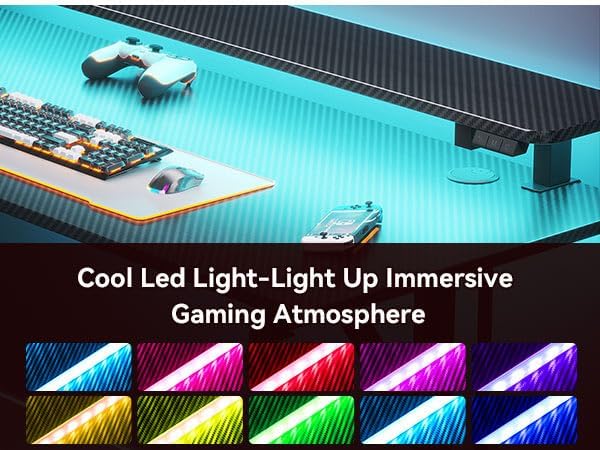
Figure 5: Examples of LED light colors.
Power Outlets & USB Ports
The desk is equipped with integrated power outlets and USB ports for convenient charging and powering your devices.
- AC Outlets: Use the standard AC outlets to power monitors, laptops, or other electronic devices.
- USB Ports: Two USB ports are available for charging smartphones, tablets, or other USB-powered accessories.
- Cable Management: Utilize the built-in cable management features to keep your workspace tidy and organized.

Figure 6: Integrated power outlets and USB ports.
Accessories
The desk includes a cup holder and a headphone hook for added convenience.
- Cup Holder: Attach the cup holder to either side of the desk for easy access to beverages, preventing spills on your workspace.
- Headphone Hook: Use the headphone hook to store your gaming headset or headphones, keeping them within reach and off the desk surface.

Figure 7: Detachable cup holder.

Figure 8: Detachable headphone hook.
Monitor Shelf
The full-sized monitor shelf provides an ergonomic viewing height and maximizes desk space. It can accommodate up to two 24-inch monitors or a monitor arm.
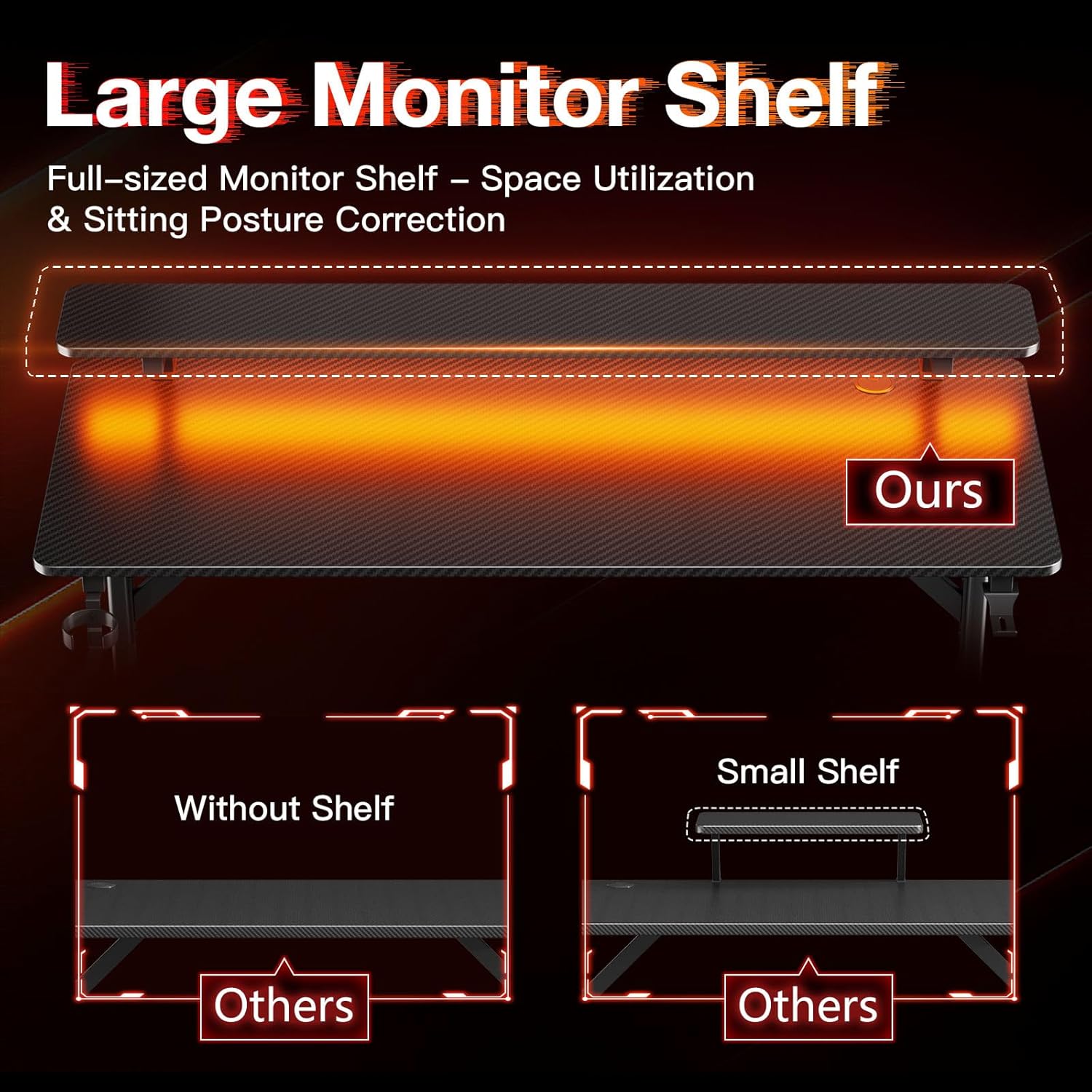
Figure 9: Large monitor shelf for optimal viewing and space.
Maintenance
To keep your MOTPK Gaming Desk in optimal condition, follow these maintenance tips:
- Cleaning: Wipe the desk surface with a soft, damp cloth. Avoid harsh chemicals or abrasive cleaners that could damage the carbon fiber texture.
- Dusting: Regularly dust the desk and LED light strip to maintain optimal performance and appearance.
- Fasteners: Periodically check all screws and bolts to ensure they remain tight. Retighten if necessary.
- Cable Management: Ensure cables are neatly organized and not pinched or strained, which could lead to damage.
Troubleshooting
If you encounter any issues with your MOTPK Gaming Desk, please refer to the following common solutions:
- Desk Wobbles: Check that all leg connections and frame screws are securely tightened. Ensure the desk is on a level surface.
- LED Lights Not Working: Verify that the power cable for the LED lights is properly connected to a working power source and the controller. Check if the ON/OFF button has been pressed.
- Power Outlets Not Functioning: Ensure the main power cable for the integrated outlets is securely plugged into a wall socket. Check if the wall socket is active. Avoid overloading the outlets.
- Missing Parts During Assembly: Double-check the packaging. If parts are genuinely missing, contact MOTPK customer support with your purchase details.
If these steps do not resolve your issue, please contact MOTPK customer support for further assistance.
Specifications
| Feature | Detail |
|---|---|
| Brand | MOTPK |
| Model Number | MKB04010401003 |
| Product Dimensions (D x W x H) | 19.68"D x 47.24"W x 34.69"H (50cm D x 120cm W x 88cm H) |
| Size | 47 Inch |
| Color | Black |
| Style | Gaming |
| Top Material Type | Engineered Wood with Carbon Fiber Texture |
| Base Material | Metal (Iron) |
| Leg Style | T-shaped |
| Special Features | LED Lights, Built-in Power Outlets (AC & USB), Monitor Shelf, Carbon Fiber Texture |
| Maximum Weight Recommendation | 150 Pounds (68 kg) |
| Required Assembly | Yes (Recommended 2 people) |
| Included Components | Built-in Outlet, LED Lights, Headphone Hook, Cup Holder |
Warranty and Support
The MOTPK 47-Inch Gaming Desk comes with a Limited Warranty. For specific details regarding warranty coverage and duration, please refer to the warranty information provided in your product packaging or contact MOTPK customer service.
MOTPK is committed to providing high-quality products and excellent pre-sales & after-sales service. If you have any questions, concerns, or require assistance with your product, please do not hesitate to contact our support team. You can find contact information on the official MOTPK website or through your purchase platform.


