
1. Introduction
The Espelho Automatic Elevated Pet Feeder (Model DU7L-KH-02) is designed to provide a convenient and healthy feeding solution for your cats and small dogs. This 7-liter capacity feeder features flexible meal scheduling, adjustable bowl height, a 10-second voice recording function, and a dual-bowl design for feeding two pets simultaneously. Its advanced sealing and desiccant system ensures food freshness.
Key features include:
- Freshness in Every Bite: Equipped with a desiccant bag compartment and a triple-seal lock to keep food fresh, delicious, and crunchy.
- Adjustable Height: Comes with short (1 inch) and long (2 inch) risers to adjust the food bowl height, promoting healthy eating posture and aiding digestion for pets of all life stages.
- Flexible Meal Scheduling: Program up to 4 meals per day with up to 9 portions per meal (1/8 cup/2 tablespoons per portion). Features a manual feed button for immediate dispensing.
- 10-Second Voice Recording: Record a personalized message to call your pets to eat, enhancing their sense of security and connection.
- Large 7L Capacity: Stores 3-4 kg (approximately 28 cups) of dry pet food, sufficient for 20-35 days for cats and small dogs.
2. Safety Information
- Use only dry pet food with this feeder. Do not use wet food, canned food, or treats.
- Keep the feeder away from direct sunlight and high temperatures.
- Ensure the power adapter cable is not chewed by pets. Use batteries as a backup power source.
- This appliance is not intended for use by persons (including children) with reduced physical, sensory or mental capabilities, or lack of experience and knowledge, unless they have been given supervision or instruction concerning use of the appliance by a person responsible for their safety.
- Clean the feeder regularly to maintain hygiene and prevent food spoilage.
- Do not immerse the main unit in water.
3. Package Contents
Please check the package contents to ensure all items are present:
- Espelho Automatic Pet Feeder Main Unit
- Food Storage Container with Lid
- Stainless Steel Food Bowls (x2)
- Bowl Holder with Adjustable Risers (short and long)
- Desiccant Bag
- Power Adapter
- User Manual
4. Product Diagram
Familiarize yourself with the components of your Espelho Automatic Pet Feeder.
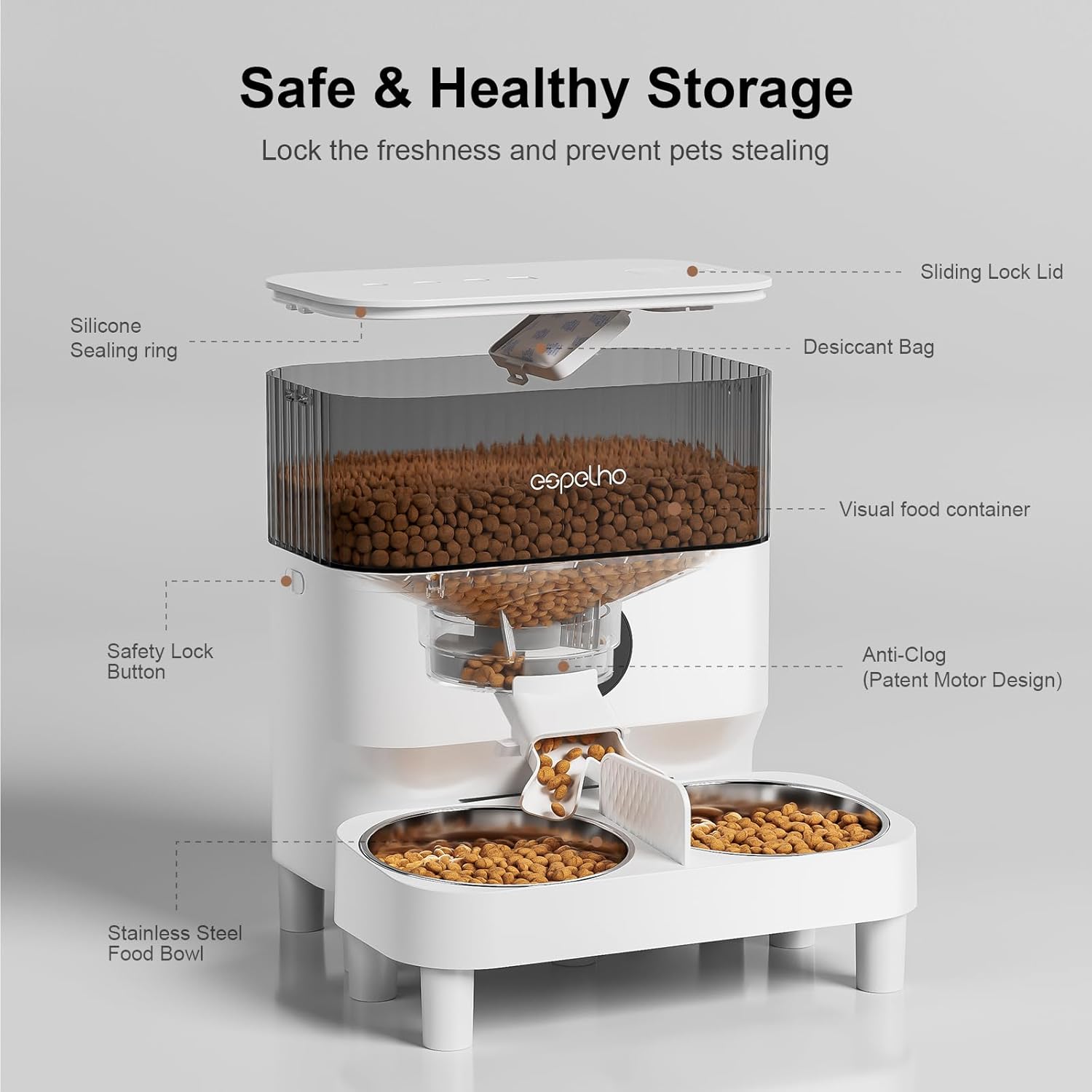
Image: Exploded view of the feeder highlighting its components like the sliding lock lid, silicone sealing ring, desiccant bag, visual food container, safety lock button, anti-clog mechanism, and stainless steel food bowls.
5. Setup
- Unpack and Assemble: Remove all components from the packaging. Attach the bowl holder to the main unit. Insert the stainless steel bowls into the holder. If desired, use the short or long risers to elevate the bowls to a comfortable height for your pet.
- Install Desiccant Bag: Open the lid of the food container. Locate the desiccant bag compartment on the underside of the lid. Insert the desiccant bag to maintain food freshness. Close the lid securely.
- Fill Food Container: Open the lid and pour dry pet food into the container. Ensure the food level does not exceed the MAX fill line. Close the lid securely, ensuring the triple-seal mechanism is engaged.
- Power Supply: The feeder supports dual power supply. Connect the power adapter to the feeder and a wall outlet. For backup, install 3 D-cell batteries (not included) in the battery compartment at the bottom of the unit. This ensures continuous operation during power outages.

Image: Illustration of the feeder's dual power supply, showing both battery installation and AC adapter connection.
- Initial Power On: Once powered, the LCD screen will light up.
6. Operating Instructions
6.1. Setting Current Time
- Press and hold the 'SET' button until the hour digit flashes.
- Use the 'UP' and 'DOWN' buttons to adjust the hour.
- Press 'SET' again to move to the minute digit and adjust.
- Press 'SET' to confirm and exit time setting.
6.2. Programming Meals
The feeder allows you to program up to 4 meals per day.
- Press the 'SET' button once to enter Meal 1 programming. The meal number will flash.
- Use 'UP'/'DOWN' to set the feeding time (hour and minute), pressing 'SET' to move between them.
- After setting the time, press 'SET' to set the number of portions (1-9). Use 'UP'/'DOWN' to adjust.
- Press 'SET' to save Meal 1 settings and move to Meal 2. Repeat for up to 4 meals.
- To disable a meal, set its portion size to '0'.
6.3. Voice Recording
Record a 10-second message that will play before each scheduled meal.
- Press and hold the 'REC' button. The recording indicator will light up.
- Speak clearly into the microphone for up to 10 seconds.
- Release the 'REC' button to save the recording.
- To play back the recording, press the 'PLAY' button.
6.4. Manual Feeding
Press the 'FEED' button once to dispense one portion of food immediately. You can press it multiple times for additional portions.

Image: A visual representation of the feeder's programmable meal schedule and recommended kibble size, emphasizing a healthy diet for pets.

Image: Two cats eating simultaneously from the dual bowls of the feeder, illustrating its large capacity and ability to feed multiple pets.
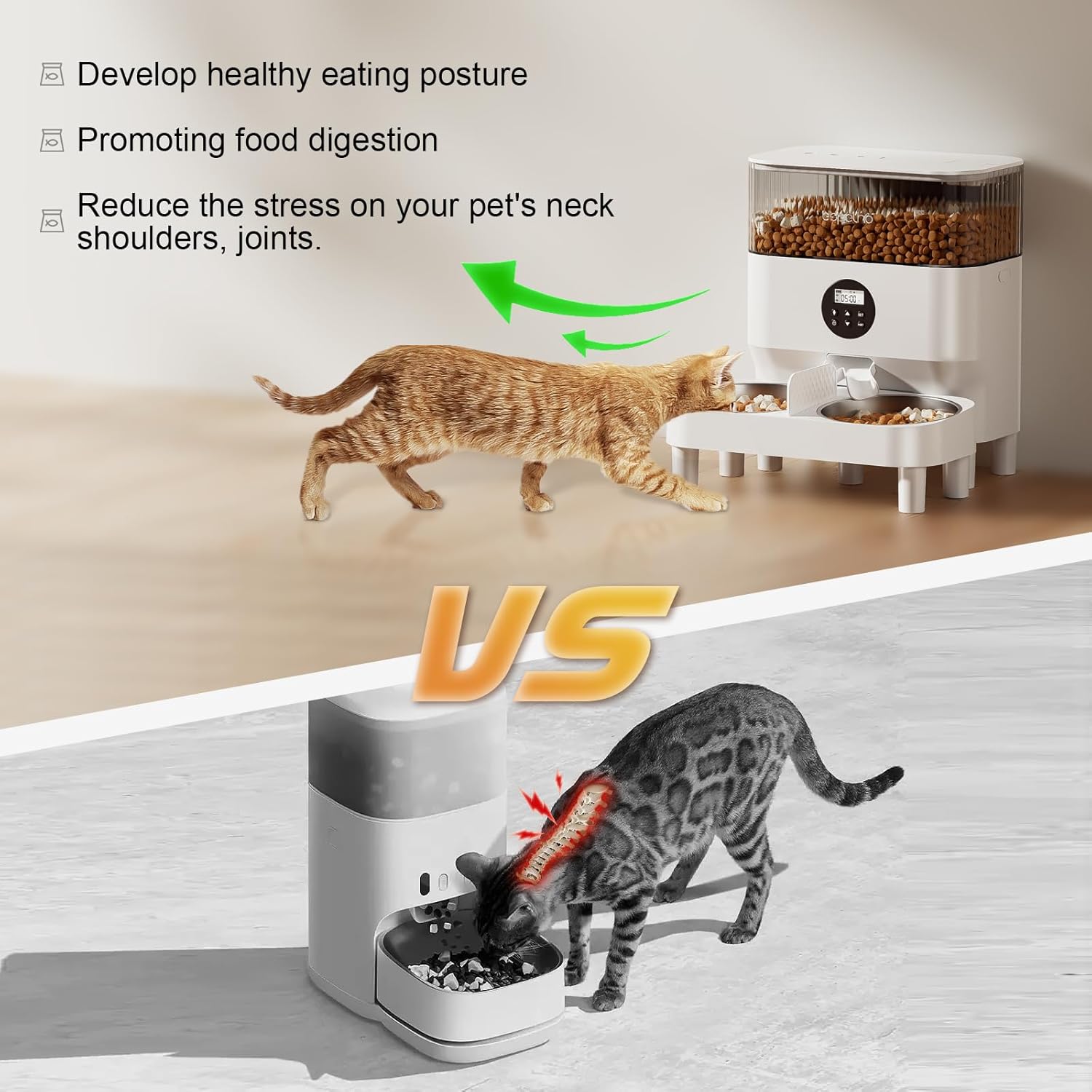
Image: A comparison demonstrating the ergonomic benefits of the elevated feeder for pet posture and digestion, contrasting it with a standard floor-level bowl.
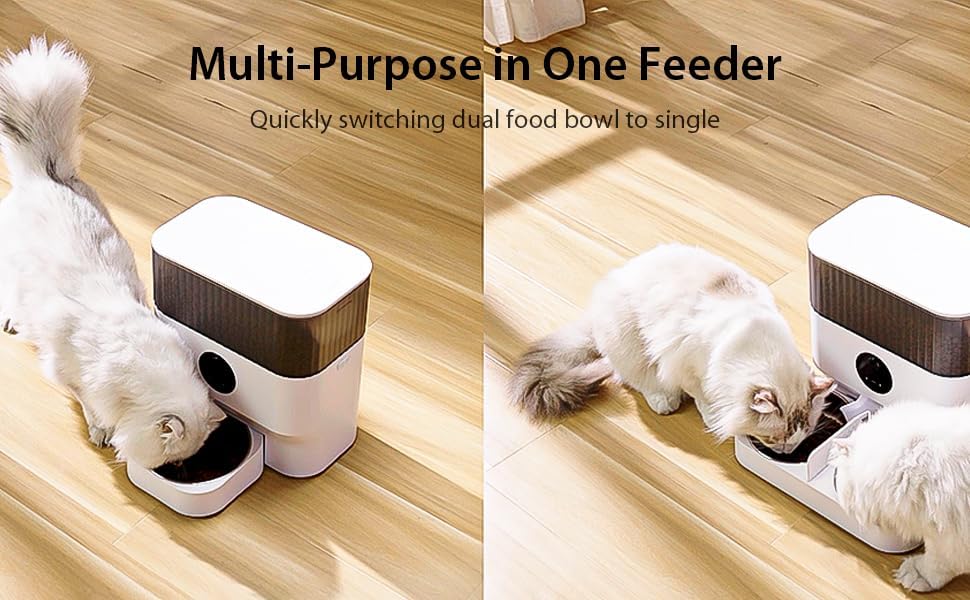
Image: The feeder demonstrating its versatility, showing configurations for both dual and single pet feeding.
7. Maintenance
7.1. Cleaning
The feeder features a detachable design for easy and thorough cleaning.
- Unplug the feeder and remove any remaining food.
- Detach the food container, lid, and stainless steel bowls.
- Hand wash all detachable parts with mild soap and water. Rinse thoroughly.
- Wipe the main unit with a damp cloth. Do not immerse the main unit in water.
- Ensure all parts are completely dry before reassembling and refilling with food.

Image: The feeder's detachable components being cleaned, illustrating the ease of maintenance.
7.2. Desiccant Bag Replacement
Replace the desiccant bag every 1-2 months, or as needed, to ensure optimal food freshness. Replacement desiccant bags can be found by searching for "B0BG3Z6XX6".
8. Troubleshooting
| Problem | Possible Cause | Solution |
|---|---|---|
| Feeder not powering on | No power from adapter; batteries depleted or incorrectly installed. | Check adapter connection. Replace batteries or ensure correct polarity. |
| Food not dispensing | Food chute clogged; low food level; incorrect programming. | Check for food blockages in the chute and clear. Refill food container. Verify meal schedule and portion settings. Ensure kibble size is between 3-13mm. |
| Voice recording not playing | No recording saved; volume too low. | Re-record your message. Ensure the volume is set appropriately (if adjustable, otherwise check for clear recording). |
| One bowl receives more food than the other | Uneven food distribution due to kibble shape/size or slight manufacturing variance. | This can sometimes occur with dual-bowl feeders. If it's a significant issue, consider manually adjusting food between bowls or contacting support. |
9. Specifications
- Model Number: DU7L-KH-02
- Dimensions: 5.08 x 5.08 x 5.08 cm (Product dimensions are likely incorrect, using weight for scale: 3.45 kg)
- Weight: 3.45 Kilograms
- Capacity: 7 Liters
- Material: Stainless Steel (bowls), Plastic (main unit)
- Color: White
- Operation Mode: Automatic
- Special Features: Voice Recording, Feeding Schedule, Adjustable Height
- Target Species: Cat, Dog (Small to Medium breeds)
- Care Instructions: Hand Wash Only (detachable parts)
- Batteries Required: No (for primary operation, but 3 D-cell batteries for backup)
- Batteries Included: No
10. Warranty and Support
Espelho products are manufactured with quality and performance in mind. For any questions, concerns, or technical support regarding your Automatic Pet Feeder, please refer to the contact information provided with your purchase or visit the official Espelho website.
Please retain your proof of purchase for warranty claims. Specific warranty terms and conditions may vary by region and retailer.


