
1. Introduction and Overview
The Tone King Imperial All-Tube Preamp pedal is designed to deliver the legendary tones of Tone King's MKII amplifier, encompassing '50s tweed, '60s blackface, and vintage British rock sounds. This compact pedalboard-friendly unit integrates the exact preamp section and phase inverter circuitry of the Imperial MKII amp. It also includes onboard Reverb, Tremolo, and Attenuation, providing a rich harmonic sound and responsive touch. Powered by three 12AX7 preamp tubes operating at high voltage, the pedal ensures authentic amplifier sound and interaction with your pickups and effects. Advanced features include a low-latency impulse response (IR) loader per channel, headphone output, and MIDI capabilities for seamless integration into modern guitar setups.
Key Features:
- Independent power amp simulation with HF Comp and Low-Pass filters.
- Access to 15 included OwnHammer IRs.
- Ability to load custom IRs and manage your IR library.
- Six assignable IR slots (three per channel).
- Comprehensive control over reverb, reverb tails, tremolo, and effects loop bypass settings.
2. Setup and Connections
Proper setup ensures optimal performance and sound quality. Follow these steps to connect your Imperial Preamp Pedal:
Power Connection:
- Connect the provided 12V DC power adapter to the '9-12VDC 9W' input jack on the rear panel. Ensure the correct voltage and polarity to prevent damage.
Audio Connections:
- Input: Connect your guitar to the 'INPUT' jack on the rear panel.
- To Amp In: For connecting to the input of a guitar amplifier.
- From Amp Send: For connecting from an amplifier's effects send.
- To Amp Return: For connecting to an amplifier's effects return.
- Send (Line Out) / Return: These jacks form an effects loop, allowing you to integrate external effects pedals. The 'Send' jack can also function as a line out.
- Cab Sim (Headphones): Connect headphones to this 3.5mm jack for silent practice with cabinet simulation.
- Speaker Output (8Ω / 16Ω): Connect to a speaker cabinet. Ensure the impedance matches your cabinet (8 or 16 ohms).
- Balanced Out (Left/Right XLR): For connecting to a mixing console, audio interface, or PA system.
- GND Lift: Use this switch to eliminate ground loop hum when using the balanced outputs.
MIDI and USB:
- MIDI In: Connect MIDI devices for external control.
- USB: Connect to a computer for IR management, firmware updates, and deeper editing.

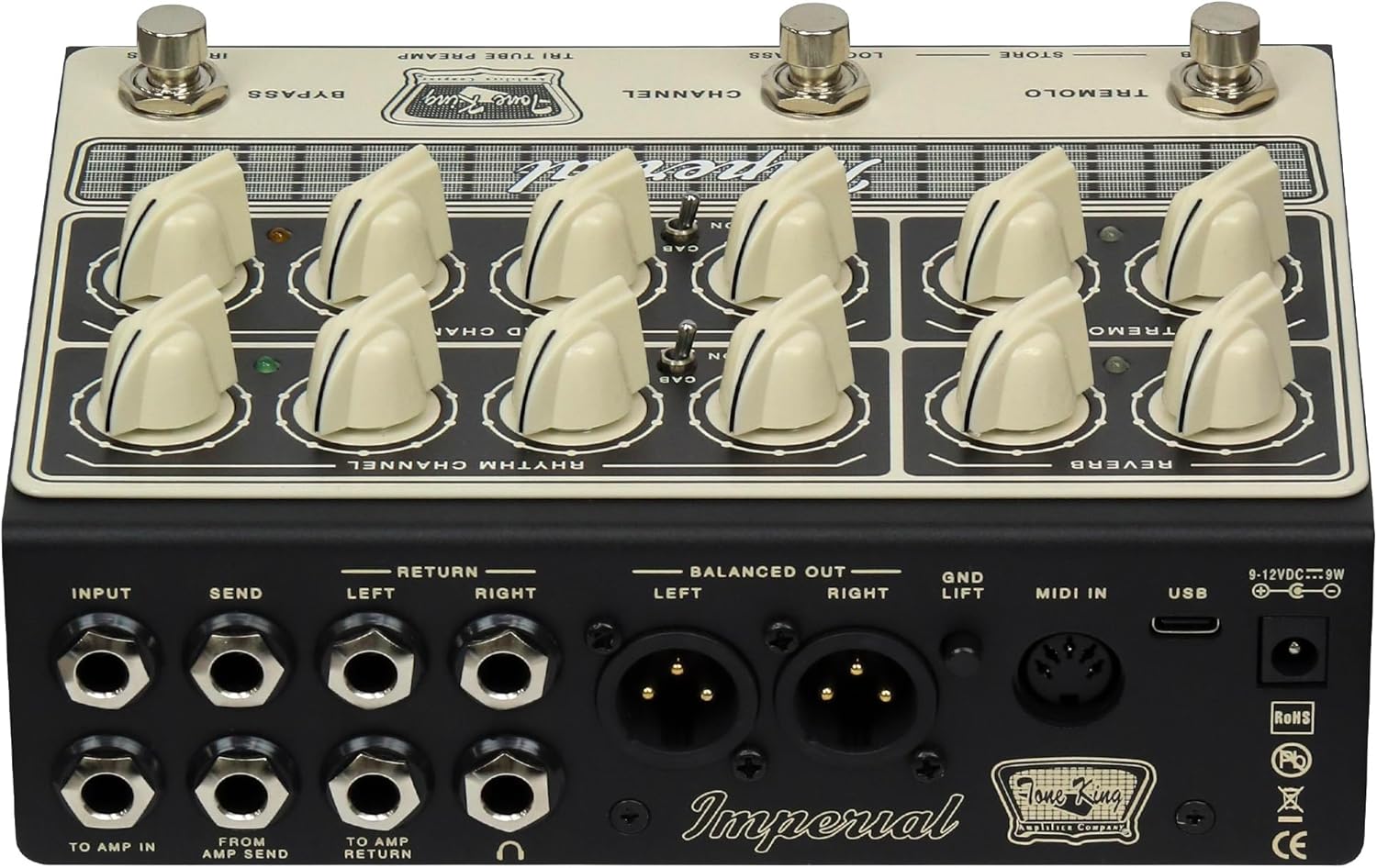
3. Operating the Pedal
The Imperial Preamp Pedal offers intuitive controls for shaping your tone. The front panel is divided into sections for Reverb, Tremolo, Rhythm Channel, and Lead Channel, along with footswitches for various functions.
Front Panel Controls:
- Reverb: Adjusts the overall reverb level.
- Dwell: Controls the decay time of the reverb.
- Tremolo Depth: Sets the intensity of the tremolo effect.
- Tremolo Speed: Adjusts the rate of the tremolo effect.
- Attenuation (Rhythm/Lead): Controls the output level of each channel, simulating power amp attenuation.
- Bass (Rhythm): Adjusts the low-frequency response of the Rhythm channel.
- Treble (Rhythm): Adjusts the high-frequency response of the Rhythm channel.
- Volume (Rhythm/Lead): Sets the overall output volume for each channel.
- Mid-Bite (Lead): Shapes the mid-range character of the Lead channel.
- Tone (Lead): Adjusts the overall brightness of the Lead channel.
Footswitches:
- Reverb: Toggles the reverb effect on/off.
- Store: Used to save custom presets and IR assignments.
- Channel: Switches between the Rhythm and Lead channels.
- Loop Bypass: Engages or bypasses the effects loop.
- IR Bypass: Toggles the Impulse Response loader on/off.

4. Advanced Features
Impulse Response (IR) Loader:
The Imperial Preamp Pedal features a powerful, low-latency IR loader. It comes pre-loaded with 15 premium OwnHammer IRs, offering a variety of cabinet emulations. You can also load your own custom IRs via the USB connection and assign them to the pedal's six available slots (three per channel) for quick recall.
Reverb and Tremolo:
The onboard Reverb and Tremolo effects are designed to emulate classic amplifier effects. Adjust the 'Reverb' and 'Dwell' controls to fine-tune your reverb sound, and use 'Depth' and 'Speed' to customize the tremolo effect. The 'Store' footswitch allows you to save your preferred settings.
Effects Loop:
The dedicated 'Send' and 'Return' jacks provide a transparent effects loop, allowing you to insert your favorite modulation, delay, or other time-based effects into the signal chain after the preamp section but before the IR loader. The 'Loop Bypass' footswitch offers convenient control.
MIDI Capabilities:
The 'MIDI In' port enables advanced control over the pedal's functions. You can integrate the Imperial Preamp Pedal into a larger MIDI-controlled setup, allowing for remote switching of channels, effects, and other parameters.
Headphone Output:
The 'Cab Sim' output provides a convenient way to practice silently using headphones, delivering a fully processed and cabinet-emulated tone directly to your ears.
Power Amp Simulation:
The independent power amp simulation features 'HF Comp' and 'Low-Pass' filters, allowing you to fine-tune the high-frequency compression and overall tonal balance, mimicking the characteristics of different power amp sections.
5. Maintenance
To ensure the longevity and optimal performance of your Tone King Imperial Tube Preamp Pedal, follow these maintenance guidelines:
- Cleaning: Use a soft, dry cloth to clean the pedal's exterior. Avoid abrasive cleaners or solvents.
- Storage: Store the pedal in a cool, dry place away from direct sunlight, extreme temperatures, and humidity.
- Handling: Handle the pedal with care. Avoid dropping it or subjecting it to strong impacts.
- Tube Care: The pedal uses three 12AX7 preamp tubes. While designed for durability, tubes are delicate. If you experience a significant change in tone or excessive noise, a tube replacement may be necessary. Consult a qualified technician for tube replacement.
- Power Supply: Always use the specified 12V DC power supply. Using an incorrect power supply can damage the unit and void the warranty.
6. Troubleshooting
If you encounter issues with your Imperial Preamp Pedal, try the following troubleshooting steps:
- No Power: Ensure the 12V DC power adapter is securely connected to both the pedal and a working power outlet. Check the power outlet with another device.
- No Sound: Verify all audio cables are correctly connected. Check your guitar, amplifier, and other pedals in the signal chain. Ensure the 'Volume' knobs on both channels are not set to zero. If using headphones, ensure they are plugged into the 'Cab Sim' jack and the volume is adequate.
- Hum or Noise: Check all cable connections for proper seating. If using balanced outputs, try engaging the 'GND Lift' switch. Ensure your power supply is not faulty and is providing clean power.
- Unexpected Tone: Check the settings of all knobs and footswitches. Ensure the correct IR is selected and loaded. If using the effects loop, bypass it to determine if an external pedal is causing the issue.
- Footswitch Malfunction: Ensure the footswitch is clean and free from debris. If a footswitch is unresponsive, try restarting the pedal.
- IR Loading Issues: Refer to the detailed instructions in the full user manual for loading custom IRs via USB. Ensure the correct file format and size are used.
If problems persist, contact Tone King customer support or an authorized service center.
7. Specifications
| Feature | Detail |
|---|---|
| Item Weight | 2.87 pounds (1.3 kg) |
| Product Dimensions | 11.35 x 7.5 x 4 inches (28.8 x 19.05 x 10.16 cm) |
| Item Model Number | IMPERIAL PREAMP PEDL |
| Hardware Interface | 1/4-inch Audio, 3.5mm Audio |
| Signal Format | Analog |
| Voltage | 12 Volts |
| Audio Output Effects | Reverb, Tremolo, Effects Loop |
8. Warranty and Support
For warranty claims and technical support, it is crucial to purchase your Tone King Imperial Tube Preamp Pedal from an authorized dealer. Warranties may be invalidated if the product is not purchased through official channels.
Tone King does not offer direct repair services. In the event of a malfunction, especially concerning internal components like the circuit board, you will need to rely on your warranty through an authorized dealer or seek independent repair services if the warranty is not applicable.
Always retain your proof of purchase from an authorized dealer to ensure warranty eligibility.
